1
SLRC Wireless Remote Control
®
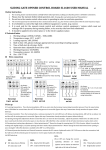
1.3 Standard Functions
1
2
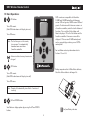
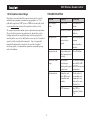
(1 to 48) Indicates zone number. Use UP and
DOWN buttons to select zone. Press ON to start
zone. Zones will run for the user defined maximum
run time set in the remote (range 1-90 min, default
2 min). Refer to section 1.4 for instructions on
setting maximum run times. Press OFF to stop zone
before the maximum run time has expired.
2
(PA, PB, PC, PD) Operates all zones assigned to the
selected program for the time set in the Smartline
controller. Use the UP and DOWN buttons to
select desired program. Press ON to start. Once a
program is activated, it will complete its cycle and
turn off automatically. Press OFF to stop program.
3
(LC) Valve Locator function will “chatter” valve
solenoids for quick field locating (Note: Water
supply must be turned off for Valve Locator
operation). Press UP and DOWN buttons to select
Valve Locator (LC). Press ON button to begin
pinging zone 1. Use UP and Down buttons to index
to desired zone. Press OFF button to stop.
Note: The hourglass ICON is displayed on the
display while setting the maximum run
time.
3
4
1.4 Hidden Functions
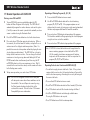
(J) Joins SLRC-HH remote control to a single
SmartLine controller with SLHUB-RF communication
hub. Refer to section 1.6 in this manual.
Note: In SLRC-KIT-ADP and SLRC-KIT-HUB kits,
remote is pre-joined to receiver.
Press UP and DOWN buttons simultaneously to
access hidden functions.
Note: After 5 seconds of no activity, Hidden
Functions will close, the changes will
be saved and the remote will return to
Standard Functions.
(Cd) Contractor Code allows for remote access to
SmartLine controller. Valid codes are 01–99. After
accessing hidden functions, press ON button to
display code (Cd). Use UP or DOWN buttons and
scroll to select desired code. Once selected, wait 5
seconds for your contractor code to be stored.
Select identical code on SmartLine controller:
Rotate the dial to Advanced Functions. Press Adjust
Value button until WIRELESS is displayed. Press
Next button to display INSTALL and press Adjust
Value button to display SET CODE. Press Next
button and use the Adjust Value buttons to set
desired code.
Note: The Valve Locator function will override
rain and freeze sensor shutdown.
1
(1 to 90) Sets maximum run time when remotely
operating zones. Default setting is 2 minutes. Once
selected, wait 5 seconds for your maximum run
time to be stored.