1
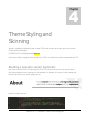
In the above code segment, if you want to activate parallax effect on all (supported) mobile devices please
activate (uncomment) the line 880.
If you want to deactivate total parallax effect on all browsers then deactivate (comment) line 886.
If you want to deactivate total parallax effect on all mobile devices as well as desktop browsers please
deactivate line 879 and activate line 886.
So, the default setup (what is shown on the above code preview) is that the parallax effect activated on nonmobile devices.
Stylesheet Hook:
The parallax engine when disable on mobile devices, can access a particular stylesheet which contains style
rules needed only for such mobile devices. This CSS file can be found here:
[THEME’S ROOT FOLDER]/stylesheets/mobile-hook.css
Mobile Device Support:
Please note that the rendering of advanced scripts and heavey parallax layers may cause it have any lag on
some mobile devices – Smoothscrolling effects may not be experienced. But reloading will make it cache the
assets and make it improved.
Technically speaking, this Skrollr Parallax Scrolling is properly working on iOS mobile devices with the help of
iScroll jQuery hook which is integrated within this parallax library. This will over-ride the native scrolling
limitations of iOS mobile hence the layout will work properly on such devices.
For more info please find this: https://github.com/Prinzhorn/skrollr#mobile-support
AMAZE v2.1 – Premium Theme from Designova