1
EXCELL PRECISION CO., LTD.
2-4 Weight Calibration
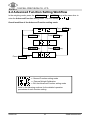
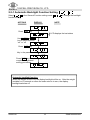
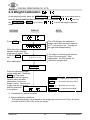
In the weighing mode, press the NET/GROSS and ON/ZERO keys at the same time to
enter the Advanced Function setting mode. The LCD shows
the NET/GROSS or UNITS key to select
and use
to enter the weight calibration
mode.
ACTIONS
NOTE
DISPLAY
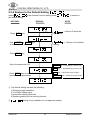
Press TARE key
kg
.
When the digit on the right
flashes, ensure that the
weigh pan is empty. Then
Press the TARE
key.
kg
After stabilization
The LCD displays the calibration
weight value (the maximum capacity
of 1st unit) and the unit. The digit on
the right side keeps flashing.
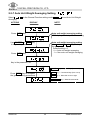
The scale is calculating the internal
value of the zero point. After
stabilization, the LCD shows the
calibration weight value.
kg
.
Place the displayed weight
on the weigh pan. Press the
TARE key. The scale
calculates the full capacity
internal value and after
stabilization, the buzzer
beeps 3 times. Remove the
weight from the weigh pan
and the procedure
is completed.
ON/ZERO key ⇒ Upward key (from 0 to 9)
UNITS key ⇒ Downward key (from 9 to 0)
TARE key ⇒ Move the cursor to right
NET/GROSS key ⇒ Move the cursor to left.
Unavailable for approval models
Weight calibration conditions:
The calibration weight value placed on the weight pan must be over 100e, and must
be within the 90% and 110% of the full weight
02005316
19
ZSME3000000306