1
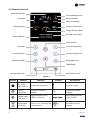
Symbol
Button
Function
Display
Description
Mode
Adjustment
Changes the mode as such,
press once for COOL, twice
for DRY and thrice for FAN.
Trane Mode
Activates TRANE mode
Refer Figure - 5
Activates TRANE mode
Power
ON/OFF
NA*
ON/OFF
Night
latch mode
activation/
deactivation
Activates/deactivates
night latch mode on TRANE
lock.
Shows night latch mode
selection
Multi room
(Room
Configuration)
Selects the split air
conditioner to control.
Shows room selection as
for each room AC settings
-
NA*
-
Indicates error
-
NA*
-
-
NA*
-
Shows current outdoor
ambient temperature.
-
NA*
-
Shows current room
temperature.
/
e
Shows mode selection
(COOL/DRY/FAN)
/
Shows different efficiency zone (Refer section
2.4.2.2)
* NA: Not Applicable
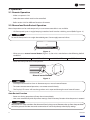
2.4.1. Range of Operation
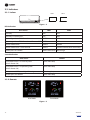
2.4.1.1. Lock and Indoor Unit range
Range (Indoor)
Range (Outdoor - without any obstacles)
15 meter
1000 meter
2.4.1.2. Remote and Indoor Unit range
Range (Indoor)
Range (Outdoor - without any obstacles)
14 meter
160 to 175 meter
2.4.2. Functions
2.4.2.1. Trane Mode
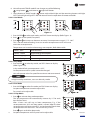
1. Press
to start or stop trane mode (Refer Figure - 7).
. The unit when powered ON by remote control starts with TRANE mode by default.
. The TRANE mode will set room temperature and fan speed automatically to provide
an energy efficient and comfortable environment hence the energy efficiency
meter always shows dark green (Refer Figure - 5)
Figure - 7
4. It will set room temperature automatically based on outdoor temperature.
5. Unit shall exit ‘trane mode’ if user changes any of the following: set point, fan speed, mode, and also
if
button is pressed.
14
48626782
Contents