1
Why does my VFR Real Scenery look blurry?
Please ensure anti-aliasing and anisotropic filtering are enabled in the FSX Graphics settings menu as that
sharpens up the textures. Your graphics card control panel should also have settings to improve this.
Please note that VFR is best viewed at 3,000ft minimum; this is when you will see the full 3D experience.
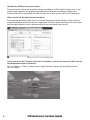
Where should I set the Global Texture Resolution?
We recommend the highest setting your PC can handle. Experiment with the settings to achieve the best
compromise between performance and visual appearance. Raising or lowering this setting will mainly affect
how the scenery displays in the far distance and not in the area nearest to your aircraft.
I don’t want to use the FSX water effects that are included – how do I turn them off so that I just see
the photographic images of the water?
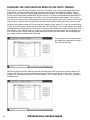
Go to the Settings > Display > Scenery menu in Flight Simulator X and turn the Water Effects slider to
Low 1.X or None.
6
VFR Real Scenery: Northern England