1
User manual for Data Logger and cooperating software
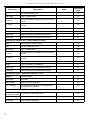
3. USING THE PROGRAM............................................................................................................................62
3.1. „CURRENT MEASURE” MENU.......................................................................................................63
3.2. „REPORTS” MENU...........................................................................................................................63
3.2.1.„Table” tab................................................................................................................................64
3.2.2.„Graph” tab...............................................................................................................................66
3.3. „CONFIGURATION” MENU..............................................................................................................71
3.3.1.„Devices” tab............................................................................................................................71
3.3.2.„Groups” tab - group operations...............................................................................................73
3.3.3.„Settings” tab............................................................................................................................75
3.4. LIST OF ERRORS AND FAULT DIAGNOSTICS ...........................................................................76
III. USER MANUAL FOR “S-TOOLKIT”....................................................................77
1. GENERAL CHARACTERISTICS..............................................................................................................77
2. INSTALLATION AND STARTUP..............................................................................................................77
3. USING PROGRAM....................................................................................................................................78
3.1. “INPUTS SETTINGS” TAB...............................................................................................................79
3.2. “LOGGING SETUP” TAB..................................................................................................................80
3.3. “INTERFACE OPTIONS” TAB.........................................................................................................81
3.4. “DEVICE INFORMATION” TAB........................................................................................................82
3.5. CONFIGURATION MODES.............................................................................................................83
3.5.1.Individual configuration of channels.........................................................................................83
3.5.2.Configuring selected channels.................................................................................................83
3.5.3.Configuring all channels...........................................................................................................83
3.6. UPDATING SOFTWARE OF PMS-90R DEVICE............................................................................84
Explanation of symbols used in the manual:
!
- This symbol denotes especially important guidelines concerning the installation and
operation of the device. Not complying with the guidelines denoted by this symbol
may cause an accident, damage or equipment destruction.
IF THE DEVICE IS NOT USED ACCORDING TO THE MANUAL THE USER IS
RESPONSIBLE FOR POSSIBLE DAMAGES.
i
- This symbol denotes especially important characteristics of the unit.
Read any information regarding this symbol carefully
3