1
The Header Space
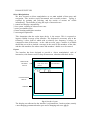
In this layout, the header space, as an unchanging space providing a sense of
continuity from one page to the ne xt.
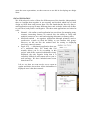
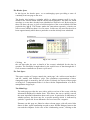
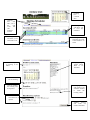
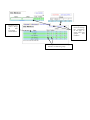
The header also includes a calendar which, to reduce memory recall is set by
default to the current month with the current date highlighted. The dates for which
meetings or events have already been scheduled are shown in red. By hovering on
these red dates, the user is given a brief description of the event scheduled for that
particular day (fig.2). This feature makes the interaction responsive, whereby an
effect occurs within less than 0.1s of its cause. In this case, the need for the user to
know approximately which dates a particular event has already been scheduled.
Fig 2. The calendar
Clicking on
the red date takes the user to details of the event(s) scheduled for the date in
question. The flexibility brought about by the rapid access of data through this 2level structure contributes to dynamic exploration.
The Task Space
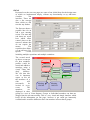
This space consists of 3 pages, namely the ‘main page’, the ‘add an event interface’
and the ‘modify club members’ page. The continuous representation of these
changeable pages is ensured by the use of tabs. Evidently, the layout of these pages
as being in a 3-compartment folder is in line with the implementation of a directmanipulation design style.
The Main Page
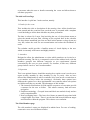
The main page provides the user with a quick overview of the events, with the
information displayed in tabular form. This allows the user to quickly scan all
the most important information about each event. In particular an indication of
whether quoracy has been met for a specific meeting, which is indicated by
symbols: a green tick for an affirmative and a red cross for a negative.
Elements on this page are linked to other relevant pages, with all active links
shown in blue, again contributing towards a more flexible dialogue between the
user and the computer. In the case of the ‘forthcoming events’, clicking on the