1
PixController, Inc.
Raptor™ Wireless Camera System
User’s Manual
Cellular and WiFi Radio Version
Internal Motion Sensor or Wireless Motion Sensor Version
Revision: 3.00c
WARRANTY REGISTRATION
PixController, Inc. warrants products (Raptor Wireless Camera System) sold by it and guarantees
to correct, by repair or replacement at our option, any defects of material and workmanship which
develop under normal and proper use within twelve (12) months from the date of the original
purchase when inspection proves the fault to be of manufacturing. All such Products must be
returned to our service center. This warranty does not apply to any of our Products which have
been repaired or altered by unauthorized persons or service centers in any way so as, in our
judgment, to injure their stability or reliability, or which have been subject to misuse, negligence,
or accident or which have had their serial number altered, effaced or removed.
We will not assume any expense or liability for repairs made by other parties without our written
consent. PixController, Inc is not responsible for damage to any associated equipment or
apparatus, nor shall we be held liable for loss of profit or other special damages. There is no
other guarantee or warranty except as herein stated.
Returns for any unaffected products are permitted within 14 days from the date of receipt of
merchandise. After such time, items will incur a 15% restocking fee. Returns of wrong ordered
items are allowed. Returned merchandise will be accepted only if all conditions are met.
In no event shall PixController, Inc. be liable for any incidental, special, indirect or consequential
damages, whether resulting from the use, misuse, or inability to use this product or from defects
in this product. The Buyer is not permitted to tamper or remove any of the Raptor System
electronics without voiding this warranty.
The Buyer, his employees, or others assumes all risks and liabilities for the operation, the use
and the misuse of the product described herein and agree to defend and to save the seller
harmless from any and all claims arising from any cause whatsoever, including seller’s
negligence for personal injury incurred in connection with the use of the said product.
PixController, Inc reserves the right to discontinue models at any time or change specifications,
price or design without notice and without incurring any obligation.
The express warranties are in lieu of all other warranties, guarantees, promises, affirmations, or
representations, express or implied which would be deemed applicable to the goods sold
hereunder. No express warranties and no implied warranties, whether of merchantability, fitness
for any particular use or purpose, against infringement, or otherwise (except as to title) other than
those expressly set forth herein, shall apply.
FOR REPAIR CONTACT:
PixController, Inc.
1056 Corporate Lane
Export, PA 15632
Phone: 724-733-0970
Fax: 724-733-0860
Email: [email protected]
Web : http://www.pixcontroller.com
Table of Contents
1. Warranty Information
2. What’s Included & System Updates
3. Raptor System Overview
3.1 Introduction
4. Raptor System Specifications
5. Raptor System Setup
5.1 Getting Started
5.2 Raptor Electronics Overview
5.3 Installing the PC Software
6. Raptor PC Software Setup
6.1 Running the RaptorConfig.exe Program
6.2 Raptor Configuration Setup – General Tab
6.3 Raptor Configuration Setup – E-Mail Tab
6.4 Raptor Configuration Setup – Camera Tab
6.5 Raptor Configuration Setup – Schedule Tab
6.6 Raptor Configuration Setup – SMPT/FTP Tab
6.7 Raptor Configuration Setup – Cellular Tab
6.8 Raptor Configuration Setup – Wi-Fi Tab
6.9 Raptor Configuration Setup - (COTA) Configuration update Over-The-Air
6.9.1 COTA Quick Start Setup
6.9.2 COTA Cellular Phone Text Commands
6.9.3 Setting up FTP Space for COTA
6.10
Read/Save Raptor Configuration Files
7. Choosing a Cellular Provider
7.1 Cellular Provider Overview
7.2 Activating your Raptor system with Verizon or AT&T cellular networks
7.3 Using a World GSM/GPRS SIM Card and other Cellular Networks
8. Powering the system on
9. Diagnostics Mode
10. Raptor System Emails
10.1 Email Example with Photo and GPS
10.1 Status Message Example
10.1 Sending photos to your cellular phone
11. Wireless RF Sensors
11.1
Wireless Sensor Introduction
11.2
Using the Wireless PIR Motion Sensor
12. GPS Option
12.1 Sending a SMS text message to retrieve Raptor GPS location
13. Updating the Raptor Firmware
14. Long Range WiFi
14.1 WiFi Repeaters
14.2 Using WiFi option without Internet Connectivity
15. Raptor Camera
16. Charging the 12V Battery
2. What’s Included & System Updates
PixController Raptor Systems contain the following
•
•
•
•
•
•
•
Raptor Unit in waterproof/weather proof enclosure
Appropriate removable antennas for installed wireless radios
12V SLA 3.4AH rechargeable battery
12V SLA AC wall charger
2GB USB Flash Drive
External Trigger Raptor systems will include (1) Wireless PIR sensor
CD with system manual and PC setup software
Raptor Wireless System Updates
Firmware updates and upgrades will be available free of charge from PixController, Inc. for the
life of your product. Certain versions encompassing new product features will be available for
sale.
Radio updates, new radio installations, and internal/external sensor updates will be available from
PixController, Inc, for purchase at anytime. Customers choosing these updates will need to
contact PixController, Inc. before sending the product back for these enhancements. Please
contact us at:
PixController, Inc.
1056 Corporate Lane
Export, PA 15632
Phone: 724-733-0970
Fax: 724-733-0860
Email: [email protected]
Web : http://www.pixcontroller.com
3. Raptor System Overview
Raptor Wireless System with built in motion sensor – Exterior
Raptor Wireless System with external wireless motion sensor – Exterior
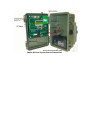
Raptor Wireless System Internal Components
3.1 Introduction
The Raptor Wireless System will capture a photo and email it to you via a cellular network
(cellular radio option) or Wi-Fi access point (Wi-Fi radio option) upon motion-activation. Cellular
system includes an unlocked Quad Band GSM/GPRS cellular radio or CDMA cellular radio that
will work on cellular networks worldwide. To activate the unit you will need to purchase a SIM
card from any of these providers. You can either purchase a cellular data contract or use pay-asyou-go cards.
Photos are attached to an email using the popular POP3/SMTP protocol. Emails include the time,
date, battery level, radio signal strength, and internal unit temperature.
The built-in camera will capture color photos at day and IR stealth photos at night that can be
stored on the systems UBS Flash Drive. This battery operated system can last several months in
a remote location making it the perfect security device.
PC software to setup the system is included. Features include day, night, 24 hr. operation, motion
or time-lapse activation, delays between photos, option to send a daily status text email giving
unit battery life, and a scheduler to disable to system during different times of the day - example:
disable the system MON-FRI 8AM - 5PM for jobsite applications.
The system includes a rechargeable 12V battery and charger. Battery life depends on the number
of photos taken but typically lasts several months on a single charge. There is an external
charging port for solar panels or external batteries to extend field battery life.
The wireless motion sensor option allows the system to be located 50-80 feet away from the
motion sensors. There is no limit to the number of wireless motion sensors that can be used.
4. Raptor System Specifications
•
•
•
•
•
•
•
•
•
•
•
•
•
Size: 9-1/4"L x 7-3/4"W x 4-1/2"D
Weight: 8 Pounds
Waterproof Case
Cast Steel Eye Bolts - Use MasterLock Python
cable (sold separately) for unit locking
1/4"-20 Tri-Pod Camera Mount
LCD Setup Screen
Menu Setup Buttons
On-board USB Host Port - Allows USB Flash Drive
Devices for storage and program updates
PC Setup Software Included
Scheduler Included
12V 3.4AH SLA Battery & Charger
PIR Trigger Time ~1 second
Wireless Sensor Option for Covert Setup
•
•
•
•
•
•
•
•
•
•
•
•
CDMA 850MHz/1900MHz or GSM/GPRS Quad Band
850/900/1800/1900 MHz Cellular Radio
SMA Cellular Antenna Connector
VGA Color Day/Night IR Camera (640 X 480)
Cellular Transmission time ~30 second per photo
PIR Motion Detection to 80 Feet
PIR & Day/Night Sensitivity Adjusting POTS
Email Protocol: SMTP/POP3
FTP (File Transfer Protocol)
Emails include photo, time/date, battery level
Time-Lapse Mode
Daily text status email of battery life (optional)
Set delays between photos
5. Raptor System Setup
5.1 Getting Started
Before you power on your Raptor Wireless System we suggest you become familiar with the
systems interior and exterior components as we will refer to them throughout this document. The
Raptor cellular customers have the option to purchase cellular data plans through PixController,
Inc. for Verizon Wireless or AT&T cellular networks. PixController managed cellular data plans
include free set up including programmed email addresses and no activation fee. Raptor
customers have the option to purchase a system with an unlocked GSM/GPRS quad band
cellular radio. This option requires customers to purchase a SIM card from a GSM cellular
provider and activate a cellular data plan.
Be sure that your 12V battery is fully charged. There is a 12V wall charger which was included
with your Raptor system. We suggest you remove the battery and charge the system before
starting.
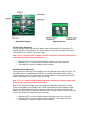
5.2 Raptor Electronics Overview
Raptor System Board
Raptor Menu Keypad
Adjusting Sensors
PIR Sensitivity Adjustment
You can adjust the sensitivity of the PIR motion sensor by adjusting the PIR Sensitivity POT.
Typically you will not need to adjust this setting. However, if you need to make the PIR motion
sensor more or less sensitive use a small Philips.
Note: This is a single turn POT and does not rotate continuously. Extreme caution must be
made when turning the POT not to damage it.
•
•
•
Rotate the POT ¼ turn to the Right to make the motion sensor “Less Sensitive”
Rotate the POT ¼ turn to the Left to make the motion sensor “More Sensitive”
The middle POT setting is the default sensitive setting
Day/Night Sensor Adjustment
You can adjust the sensitivity of the Day/Night sensor by adjusting the Day Sensitivity POT. The
Day/Night sensor is located behind the PIR lens on the front of the Raptor Wireless Camera
system. Typically you will not need to adjust this setting. However, if you need to make the PIR
motion sensor more or less sensitive use a small Philips.
Note 1: This is a single turn POT and does not rotate continuously. Extreme caution must
be made when turning the POT not to damage it.
Note 2: You must put the Raptor system into Diagnostic mode before adjusting this setting.
Power on the Raptor system and press the “Center” menu button to go into Diagnostic mode.
Move to configure mode by pressing the right or left menu keys until the first line of the LCD
display says “[cfg] Cam Pwr”. Watch the “MCU Stat LED”. The MCU Stat LED will be lit when the
sensor sees day and not lit when the sensor sees dark.
•
•
•
Rotate the POT ¼ turn to the Right to make the day/night sensor “Less Sensitive”
Rotate the POT ¼ turn to the Left to make the day/night sensor “More Sensitive”
The middle POT setting is the default sensitive setting
Firmware Update Port
The port is for updating the firmware on your Raptor Wireless System. Using a RS-232 to USB
cable we can update the firmware on your Raptor Wireless System. See section 13 of this
manual for information on updating the Raptor Firmware
Raptor Status LED
The Status LED will blink for errors, system power up, and PIR walk test mode detection.
SIM Card Holder
This is where you will place the SIM card from your cellular provider. The card slides in/out from
the right.
Cellular Radio Status LED
The LED will light up upon power up of the Raptor System letting you know if you have cellular
connection.
Menu Keys
These 5 push button keys are used for changing or displaying Raptor System Settings shown on
the LCD display.
Fuse
There is a 12V 3A fuse that will protect your Raptor System from any over power battery damage.
If the fuse is blown please contact PixController, Inc. for a replacement.
Unit Power Switch
This is the main power switch of the Raptor Wireless System. Simply turn the power switch on
when activating the Raptor System.
Reverse Battery LED
If the user connects the 12V SLA battery backwards by mistake, this LED will light up. Your
Raptor System will not be damaged. Simply switch the battery connectors to fix the problem.
USB Flash Drive
Your Raptor System includes a 2Gb USB Flash Drive. This Flash Drive should be removed from
the system and inserted into your PC when setting the system up for email and cellular provider
settings and replaced into the Raptor System before use. Photos taken by your Raptor system
will also be stored on the USB Flash Drive.
LCD Display
The LCD display will show you the status and settings of the Raptor System.
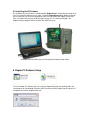
5.3 Installing the PC Software
On the Raptor System CD there is a folder labeled “RaptorConfig”. Simply drag this folder on to
your PC or open the folder on the CD. Next, run the file RaptorConfig.exe by double clicking on
the file name. Be sure you have removed the USB Flash Drive from your Raptor System and
have it inserted into one of your USB drive ports on your PC. The settings changed in the
RaptorConfig.exe program will be stored on the USB Flash Drive.
Insert the USB Flash Drive into your PC during the Software Setup Phase
6. Raptor PC Software Setup
To run the Raptor PC Software you must install the RaptorConfig.exe and Grahicgrid.dll in the
same folder or on your desktop. Place the USB Flash drive from the Raptor System into your PC
and double click on the “RaptorConfig” icon.
6.1 Running the RaptorConfig.exe Program
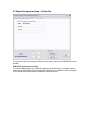
When you run the RaptorConfig.exe program the following screen will appear
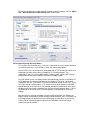
6.2 Raptor Configuration Setup – General Tab
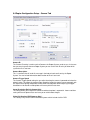
Trigger Mode
The Raptor System can be configured to be triggered by the internal PIR motion sensor, or
external wireless motion sensor depending on which system you have purchased, or the Raptor
system can be setup in a Time Lapse Mode
When setting the Raptor System in PIR motion trigger mode select the “Sensor Events” option.
Here you can setup the “Minimum Time Delay Between Triggers” in hours/minutes. This
option is for limiting the number of photos that will be sent by the Raptor System. For setting in
high traffic areas you may want to adjust the setting to 5 or 10 minutes. In low traffic areas you
can keep the setting at the default setting of 1 minute.
Keep in mind that your battery life will be impacted greatly by the number of photos you send a
day. If you are setting the Raptor System up in a high traffic area where you may be sending as
many as 100 photos a day we highly recommend using a solar panel or external battery for
keeping the system charged.
When setting the system up in “Time Lapse” mode you can specify the time between photos in
the “Time Lapse First Trigger” box.
Low Battery Shutdown Slider
Slider control for setting the voltage below which normal camera operation will be suspended.
Range is 10.0 – 11.9 volts in steps of 0.1 volt. On systems equipped with solar panels, the battery
will be re-tested every 24 hours and the camera operation will be resumed when the voltage rises
0.25 volts above this setting.
Low Battery Shutdown
User-defined threshold voltage from the config program is used to shut down the Raptor to
prevent battery damage. The battery voltage is compared to this threshold whenever a normal
event occurs (sensor trigger, time-lapse trigger, or status e-mail). If the voltage is below this
threshold, then the e-mail will be sent normally, but will include a “low-battery shutdown”
message. The Raptor will then go into a low-power shut-down mode and stop responding to
events. Every 24 hours, the battery will be re-tested, and if the voltage has recovered to at least
0.25 volts above the threshold, such as if a solar charger is installed, the Raptor will return to
normal operation, and will send an e-mail notification of this fact.
Low Battery Start-up Warning
During self-test, if the battery voltage is below the user-defined threshold, startup will pause and a
warning message will be displayed. Press the center button to continue start-up. Be advised, if
the start-up is completed in this condition, the system will most likely go into shutdown mode after
the first event (as described previously). In other words, only start up in this mode if you don’t
mind missing (at least) the first 24 hours and are confident the solar charger will bring the battery
up to normal charge.
Low Battery Start-up Error
During self-test, if the battery voltage is below an absolute minimum value (set to 9 volts at this
time), an error message will be displayed and the system will not start up. As with all failed selftests, in Diagnostic Startup you can press the center button to continue into Diagnostic Mode.
LED Trigger Indicator
When this mode is set a LED will blink every time motion is detected from the PIR sensor. This
will be lit up through the PIR lens on the Raptor System. The default mode is off.
Bridge Timeout (General Tab):
For systems that utilize a Wifi/Cellular bridge, this is the maximum amount of time to wait to
establish communication with the cellular network on power-up. Leave this setting at zero (0) for
normal Raptor camera systems. When this is non-zero, there will be a phase during start-up
during which the Raptor will try to connect to the network, and the time remaining before timeout
will be shown on the LCD display.
Send Startup Notification (General Tab):
If this is checked, the Raptor will send a status e-mail when the system switches to Auto Mode
during a normal start-up.
Disable Trigger And Camera (General Tab):
This new control carries over from previous versions, but is related to the above two functions so
it is repeated here. Checking this box will cause the Raptor firmware (V1.15a or later) to ignore
the sensor/trigger module and camera module. This is intended for non-Raptor applications,
where sensor and camera functionality is not needed. Note that, when checked, the label for this
check-box turns red as a warning to the user to make sure this is what they really want.
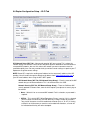
6.3 Raptor Configuration Setup – E-Mail Tab
Trigger E-Mail Format
The Trigger E-Mail Format box lets you adjust how you are notified by the Raptor System.
Selecting the “Attach Image” option will send a photo and text message with every trigger.
Selecting the “Text Only” option will only send a text message when a trigger event happens,
but the photo will be saved on the USB Flash Drive. The Text Only option can be used in
situations where you are limited by cellular bandwidth or do not wish to charge your cellular
account with data fees. Lastly, there is a “None” option. In this mode the Raptor System will not
attempt to send any data via the cellular radio. This setting is used in areas where there is no
cellular coverage but you wish to still collect photos with your Raptor System. In this mode photos
will be stored to the USB Flash Drive only.
Status E-Mails
The Status E-Emails box lets you setup the Raptor System to send you a system status email
based on the settings. If activated the Raptor System will email you once a day, or once a week,
depending on how you set it up and give you a battery status, cellular signal status, and internal
temperature status. This setting is very useful to make sure your Raptor System is working fine in
the field.
E-Mail Composition
The E-Mail Composition window will let you enter the email addresses the Raptor System will
send the emails too. Up to 10 email addresses can be entered. Note: you must change the
default email address on initial setup by changing or removing the [email protected] email address.
This is just a place holder.
In this box you can also change the “Subject Line” and “Senders Address”
6.4 Raptor Configuration Setup – Camera Tab
Camera ID
The Camera ID setting is used to set the filenames the Raptor Systems sends to you, In the case
that you are using more than one Raptor System you can set the Unit ID to let you know which
system the file is sent from
Camera Description
This is a text box that will send this message in the body of each email sent by the Raptor
System. You can include information about location of the unit and such.
Camera Trigger Speed
The Camera Trigger Speed setting lets you adjust how long the camera is powered on before the
photo is taken. The longer the camera trigger speed the longer the camera sensor automatic gain
can adjust to the lighting and produce a more color accurate photo. When adjusting the trigger
time down to 1.0 second or under photos will have a pinkish tint to them.
Image Resolution (Built-In Camera Only)
This setting allows you to adjust the camera resolution the photo is captured in. Lower resolution
setting will transmit photos faster and save you on cellular data charges.
Video Clip Duration (DVR Cameras Only)
This setting is only for our Law Enforcement Systems which include a built-in DVR.
6.5 Raptor Configuration Setup – Schedule Tab
Active Schedule
The Active Schedule box lets you setup the Raptor System for 24-hour activity, Day only activity,
or Night only Activity. There is also a “Use Schedule Grid” setting which is explained below.
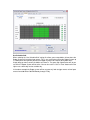
Use Schedule Grid
When selecting the “Use Schedule Grid” setting this allows you to setup blocks of time where the
Raptor System will not take trigger events. This is very useful when setting the Raptor System up
in a work place setting where you want the Raptor System to be inactive during work hours.
Simply drag you mouse across the blocks to fill them in. The green high lighted colors will let you
set times the Raptor System will be active. You can also set the “Set” or “Clear” buttons off to the
right to set a whole day or clear a whole day.
In the above example the Raptor system will be set up to only look at trigger events or time-lapse
events from 8:00 AM to 5:00 PM Monday through Friday.
6.6 Raptor Configuration Setup – SMTP/FTP Tab
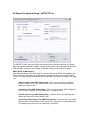
The SMTP/FTP tab is where you will be setting up the cellular provider information for sending
data over the cellular provider’s network. You will need to contact your cellular provider to get the
APN and SMTP settings for their network. The default settings are for the AT&T network.
SMTP SETUP (E-Mail Servers)
New control group for E-mail server setup. The text-entry box for the SMTP Server Address has
been moved here, along with new settings to permit full control of access to a variety of SMTP
servers. The settings should be confirmed with your provider. The settings contained in this group
are:
Address (Camera Tab, SMTP Setup Group) – This is the entry that was available in
previous versions, which is the address of the SMTP server that is to be used by the
Raptor for sending e-mails.
Port (Camera Tab, SMTP Setup Group) – This is the server port for SMTP (outgoing email). This port is typically 25 or 587. With SSL it is sometimes 465.
Use SSL (Camera Tab, SMTP Setup Group) – Check this box if your SMTP provider
requires the use of SSL (Secure Socket Layer).
Use Authentication (Camera Tab, SMTP Setup Group) – Check this box if your SMTP
provider requires authentication. If you check this box, you must fill in the Username and
Password text-entry fields with your correct log-in information
Username (Camera Tab, SMTP Setup Group) – This is the Username associated with
the SMTP account. This is usually the username or e-mail address you use to log in to
your e-mail.
Password (Camera Tab, SMTP Setup Group) – This is the Password associated with
the SMTP account.
Send Images Via FTP (Servers Tab, FTP Setup group)
Check this checkbox to have images transmitted to an FTP server on triggers. This can be in
addition to, or instead of, e-mail. When this checkbox is checked, the Address, Username and
Password fields will be enabled. Note that, for “Trail Camera” mode, this box must be unchecked
as well as selecting “None” in the Trigger E-Mail Format group on the E-Mail tab.
In normal operation, images captured during sensor triggers or time-lapse triggers can be
transmitted to an FTP server in addition to, or instead of, transmission by e-mail, depending on
the configuration setup done with the RaptorConfig program. It is also possible to send a text-only
e-mail while also transmitting an image to an FTP server. Note that the FTP image will carry the
same filename as the e-mail attachment, and the image will always be deposited in the initial
directory on the FTP server.
Address (Servers Tab, FTP Setup group) – Address of the FTP server.
Username (Servers Tab, FTP Setup group) – Username for logging in to the FTP server.
Password (Servers Tab, FTP Setup group) – Password for logging in to the FTP server.
6.7 Raptor Configuration Setup – Cellular Tab
The Cellular tab will let you setup your APN or Internet Access Point for your GSM/GPRS Cellular
provider.
APN SETUP (Internet Access Point)
The various GSM providers all use APNs but implement them differently. For example, some by
default will not allow mobile terminated connections while others use RADIUS servers and require
user name/password authentication in addition to SIM authentication.
6.8 Raptor Configuration Setup – Wi-Fi Tab
Wifi Network Setup (Wifi Tab) – New control group for Wifi server setup. This is where the
network settings are entered. Future versions will permit dynamic detection of and connection to
unsecured Wifi networks, but as of this release the network you want to connect to must be
specified explicitly here. You may need to check your wireless router settings or speak to your IT
department to get the correct settings.
NOTE: Some ISP’s require the sending email address be the same emails address of the ISP
provider. You will need to change the default email address from [email protected] to
your ISP email address when using the WiFi SMTP option.
Wifi Network Name (Wifi Tab, Wifi Network Setup Group) – Enter the name of the Wifi
network that you will be connected to. This is also referred to as the SSID.
Network Security (Wifi Tab, Wifi Network Setup Group) – There are 5 different Wifi
security protocols to choose from, some of which require a passphrase or security key to
be entered:
• None – Select this for an unsecured Wifi network. For this selection, no password is
required.
• WEP64 – This is 64-bit WEP (Wired Equivalency Privacy) security. If this is selected,
you must enter the correct key. A 64-bit WEP key is always exactly 10 characters
long, and all characters must be hexadecimal character (0-9, a-f, or A-F). If the key
entered is not 10 characters or contains non-hexadecimal characters, an error will
be indicated and the key will not be accepted.
• WEP128 – This is 128-bit WEP (Wired Equivalency Privacy) security. If this is
selected, you must enter the correct key. A 128-bit WEP key is always exactly 26
characters long, and all characters must be hexadecimal character (0-9, a-f, or A-F).
If the key entered is not 26 characters or contains non-hexadecimal characters, an
error will be indicated and the key will not be accepted. NOTE: This release of
Raptor does not support 128-bit WEP security.
• WPA – This is Wifi Protected Access security, which is much more secure than WEP.
If WPA is selected, you must enter the correct passphrase. WPA requires a
password of at least 8 characters, and an error will be raised if the passphrase
entered is less than 8 characters. Note that, unlike WEP, WPA permits most
characters in a passphrase.
• WPA2 – This is an improved version of WPA, and all passphrase rules are the same
for WPA and WPA2.
Time Synchronization (Wifi Tab) – New control group for Wifi time-synchronization setup.
Unlike a cellular system, Wifi networks do not automatically provide local time updates.
Therefore, you will need to specify the address of one or two special-purpose time servers that
the Raptor can access to synchronize time. Since the time server may be in a different time zone,
you will also need to enter your time-zone and daylight-savings information.
Primary Time Server (Wifi Tab, Time Synchronization Group) – Enter the name of the
Internet time server you wish to use for time synchronization. The U.S. government
agency National Institute of Standards and Technology (NIST) provides a number of such
servers for public use. One recommended server to use is nist1-la.ustiming.org. A full
listing can be found at http://tf.nist.gov/tf-cgi/servers.cgi
Secondary Time Server (Wifi Tab, Time Synchronization Group) – Enter the name of
the Internet time server you wish to use as a backup for time synchronization. One
recommended server to use is nist1-ny.ustiming.org.
Time Zone (Wifi Tab, Time Synchronization Group) – Set this to the standard-time
time-zone specification of the Raptor’s location, relative to GMT/UTC. For example, the
U.S. Eastern Time zone is -5, Central Time is -6, Mountain Time is -7, and Pacific Time is
-8.
Use Daylight Savings Time (Wifi Tab, Time Synchronization Group) – Check this box
if the Raptor’s location observes daylight savings time.
6.9 (COTA) Configuration update Over-The-Air
Overview
This option allows a user to remotely configure all Raptor settings by transmitting
configuration files to Raptor camera units in the field from your PC. Other functions
include photos and GPS location on demand, and retrieving error logs. This powerful
function is known as Configuration update Other-The-Air (COTA).
This requires a camera equipped with firmware version 2.00a or later, as well as this
version 2.00 or later of the PC PixController Raptor Config software on a PC with Internet
access. The other requirement is an FTP server account. The FTP server acts as a
communication medium between the configuration program and the remote camera units,
as well as a repository in which a synchronized copy of each camera’s configuration
settings can be kept. In this way, remote configuration update can be done from any
computer without having to worry about whether the settings are up-to-date.
Remote cameras do COTA updates on a user-selectable cycle of every 10 minutes,
hourly, or daily. This is how often the Raptor will “wake up” and check the FTP server for
update requests. Four actions can be requested remotely – Configuration Update, Error
Log Retrieval, GPS Fix Retrieval, and Remotely Triggered Image
Acquisition/Transmission.
The COTA server can be any FTP server to which the user has access. The IT
department of most agencies should be able to provide an FTP account that can be used
for this purpose. Also, many Internet providers include a certain amount of web space
that is accessed by an FTP server. FTP accounts are also be available through
Transferum.com – see section 6.9.2 for more information.
For a quick reference to the steps required to update a camera remotely, see the “COTA
Tab – General Sequence To Be Used by user” section below.
Initial Camera Sync-up, Directory Names
This section is for information only – no action is required of the user to create directories,
synchronize config files, or link directory names with camera descriptions.
On the COTA server, the root directory associated with the FTP account will contain one
subdirectory for each camera that is available for COTA communication. The
subdirectory name is the unique IMEI number (cellular) or MAC address (WiFi) factoryprogrammed into the wireless module installed in the Raptor system.
On initial normal start-up, the Raptor camera will automatically register its availability for
COTA operations by creating the directory on the remote COTA server. On this and
subsequent start-ups, it will transfer its current configuration settings to the COTA server.
This step is called “synchronization.” This ensures that any local changes made to the
configuration file on the flash drive – for example, through the configuration menu, or by
plugging the flash drive into a computer and running the Config program locally – will be
synchronized on the COTA server so remote updates will be working on the current
settings.
Note that the user need not remember the various IMEI and/or MAC IDs; besides the
Raptor’s ability to automatically create correctly-named directories, the COTA function of
the Config program will display the Camera Description (as entered by the user on the
Camera Tab of the Config program) along with the IMEI/MAC in order to facilitate
selecting the correct camera.
Camera Update Cycle
The Raptor “wakes up” periodically to check for and, if necessary, execute COTA
requests. The user can select among 4 cycle settings: Daily, Hourly, 10 Minutes, and
Disabled.
The use of Disabled is not recommended, as this will prevent the camera from accepting
any COTA requests at all. Once set to Disabled at the Raptor camera, it cannot be
changed remotely; in order to re-enable COTA the user would have to visit the camera
and make the change on-site.
The other three settings are self-explanatory. There are several considerations to keep in
mind when making this selection:
The COTA cycle takes a finite amount of time, typically 30-60 seconds, during which the
Raptor will be consuming full operating current. This has implications on battery life. The
effect of a Daily COTA cycle on battery life will be negligible, but an Hourly COTA cycle
will reduce the stand-by time of the Raptor to as little as 30 days on the standard SLA
battery. A 10-Minute COTA cycle will reduce battery life to as little as five days.
Therefore, the tradeoff between responsiveness and battery life must be made for each
individual situation. A 10-Minute cycle is recommended only for those situations where:
• The application requires frequent response to remote photo-trigger requests,
and/or
• On-site battery exchange is convenient, and/or
• A robust solar recharging capability is installed.
Note also that the COTA cycle function cannot occur at the same time as motion-trigger
events. Therefore, a motion-trigger event can be missed during a COTA update;
conversely, if a motion-trigger event is in progress at the same time as a COTA cycle, the
COTA cycle will be missed for that period.
Update Frequency versus Battery Usage: Note that the frequency of the COTA update
polling cycle can affect battery life. For example, a Raptor set up for a COTA cycle every
ten minutes will be fairly responsive to remote requests for image capture and the like,
but system stamina (without solar recharging) could drop to as little as 5-10 days with a
3400 maH battery. We recommend using a solar panel for 10 minute update cycle.
Using an hourly or daily update cycle will have a much smaller effect on battery life, but
the camera will be less responsive to remote requests. This is a tradeoff that will have to
be evaluated for each user and each application.
Warning: The COTA update cycle can be set to DISABLED. This is not recommended, as
it will prevent the camera from responding to any remote requests until the user
physically accesses the camera unit and changes the COTA cycle setting either through
the config menu on the camera, or by storing a config file directly the flash drive using the
PC Config program.
FTP Server: An account on an FTP server is required for COTA operation. The IT
department of most agencies should be able to provide an FTP account that can be used
for this purpose. Also, many Internet providers include a certain amount of web space
that is accessed by an FTP server.
FTP accounts may also be available through PixController for Raptor customers; the
details and cost for this have not been established at the time of this writing.
Initial Startup: Once the FTP account has been established, a directory structure must
be created for each remote camera, and a working copy of the configuration settings
stored there. The Raptor units will do this automatically the first time they are powered up
and switch to Auto Mode in normal operational, with correct COTA server information.
Once this has occurred, the PC Config Program will be able to identify each camera and
allow remote modification of parameters and other remote interactions.
The Raptor camera will repeat the process of storing its configuration on the COTA
server each time it is powered up and switches to Auto Mode. This ensures that any local
changes made to the configuration file on the flash drive – for example, through the
configuration menu, or by plugging the flash drive into a computer and running the config
program locally – will be synchronized on the COTA server so remote updates will be
working on the current settings.
COTA Tab
Message Window
The COTA tab includes a Message Window. Keep an eye on this window to see
the status COTA communication and results of various COTA operations.
General Sequence to be used by user
When using the Config program to perform a COTA operation, the following
sequence of steps should be followed (details of each in following sections):
1) Enter COTA Server information
2) Connect to COTA server
3) Select camera from drop-down menu
4) Change camera settings as desired, using all the tabs in the Config program
5) Select COTA commands to be transmitted to camera (check-boxes)
6) Transmit commands
7) View status and results
COTA Server Setup
The COTA server is simply an FTP server with a valid user account. Enter the
FTP address, username, and password in the fields provided. Once this
information is entered, click the CONNECT button. The progress of connection
can be followed in the Message Window.
Once logged in to the FTP server, the program will search for valid subdirectories
for remote Raptor cameras. The drop-down menu at the upper right of the tab
(Remote Camera Units) will be populated with all available remote cameras. The
user can then select the desired camera.
Remote Camera Units
Each camera unit that has been registered (i.e., that has a subdirectory on the
COTA FTP server) will be listed in this drop-down menu after connecting to the
server. Each item in the drop-down will contain the IMEI or MAC ID for the
camera, as well as the Camera Description (as originally entered in the Camera
tab) Select the desired camera from the drop-down.
When you select the camera, the program will read that camera’s current
configuration settings and populate the tabs of the Config program with these
settings. Now you can modify the settings as desired before transmitting them
back to the camera.
Camera Update Cycle
The four radio-buttons at the top-left of the COTA tab are used to select the
“wake-up” interval that the camera will use for checking for COTA requests. See
the notes (above) about the implications of various settings.
When Status E-mail or Time Lapse is selected, the COTA cycle will be set up to
coincide with these events. In other words, if a daily COTA cycle is selected, and
daily time-lapse at 10:30AM is selected, the COTA cycle will be performed at
10:30 also. Otherwise, a daily COTA cycle will occur at midnight, an hourly cycle
at the top of each hour.
Note: We do not recommend using a COTA update cycle under 10 minutes due
to the battery power needed. Please do not use the 1 Minute COTA update cycle
with Raptor systems configured with the built-in PIR motion sensor. The 1 Minute
COTA update cycle will cause the PIR motion sensor to false trigger.
COTA Commands For Currently Selected Camera
The right-center area of the COTA tab contains controls for performing COTA
requests and seeing the results of those requests.
Commands
The COTA commands you wish to perform are selected using the four
check-boxes. You may select any combination of check-boxes. The
commands will not be sent to the remote COTA server until you click the
TRANSMIT COMMANDS TO CAMERA button. The available commands
are:
Send Config Settings
This will update the remote camera with the current settings on
all of the tabs of the Config program. The new settings will also
be saved on the remote camera’s flash drive.
Retrieve Error Log
This will cause the camera to transmit a copy of its error log back
to the COTA server. Once the log has been sent to the COTA
server, you may view it by hitting the VIEW ERROR LOG button.
This is useful for troubleshooting apparent camera issues.
Retrieve Latest GPS Fix
Request a GPS fix from suitably equipped cameras. Upon
receipt of this request, the camera will attempt to get a current
GPS fix; it will then transmit these coordinates back to the COTA
server. If a current fix cannot be acquired, then the most recent
GPS fix (with time-stamp) will be sent back instead. Once the fix
has been received by the COTA server, you can view this
information by clicking the VIEW GPS button. Camera units that
are not equipped with GPS hardware will simply ignore this
request.
Trigger Photo
Request a manually-triggered photo. When the camera receives
this command, it will trigger a photo, save it to the flash drive,
and transmit it via e-mail to the normal e-mail distribution list
(and to an FTP server if so configured). In other words, it
behaves exactly as if a motion-trigger had occurred, except that
the subject line and text of the e-mail will note the fact that this
was a remote manual trigger.
Retrieve Camera Status
Request a the camera status of the Raptor system to report
battery level and optional GPS receiver location.
Peripheral Re-Boot
This command requires that your Raptor system has the Raptor
“External Device Port” installed. This function will power off the
12V Peripheral Port for 3 seconds then power it back on in order
to reboot the attached peripheral device.
Peripheral On
This command requires that your Raptor system has the Raptor
“External Device Port” installed. This function will power on the
12V Peripheral Port.
Peripheral Off
This command requires that your Raptor system has the Raptor
“External Device Port” installed. This function will power off the
12V Peripheral Port.
Trigger Device
This command requires that your Raptor system has the Raptor
“External Device Port” installed. Send a momentary 12V pulse to
the Device Trigger Port. This is typically used to energize
solenoid devices.
Transmit Commands To Camera
Once the desired check-boxes have been selected, click this button to
transmit the commands to the COTA FTP server. The commands will
then be executed on the next camera COTA cycle.
If you transmitted some commands and wish to change them, simply
check the commands you want and un-check those you don’t want, and
click this button again to update the list of commands requested.
If you transmitted some commands and wish to revoke those commands
entirely, simply click this button with none of the command check-boxes
checked.
One consideration to keep in mind is that, in Time Lapse mode with first
trigger set to Top Of Next Hour, a COTA configuration update will reset
this to the top of the next hour, potentially disturbing the time-lapse
sequence.
View COTA Status
This allows you to follow the progress of a COTA request. If commands
have been transmitted to the COTA server, but not yet received by the
camera, then this will be indicated in the message window, with the time
the commands were sent and a list of the commands sent. For example:
> COTA Commands sent [24Apr2011 15:51:42], not yet received
and processed by camera
Config Update Requested
Error Log Requested
GPS Fix Requested
Remote Photo Trigger Requested
Once the camera has processed the request, clicking the View COTA
Status button will indicate this fact in the Message Window, along with
the status of each requested command. For example:
> Camera received and processed COTA Commands
[24Apr2011 16:05:33]
Results:
Config Update ......... Completed
Error Log Retrieval ... Completed
GPS Fix Retrieval ..... Fail
Remote Trigger ........ Completed
View Error Log
Once the error log has been uploaded from the camera to the COTA
server, you may view the log by clicking this button. The log will be
displayed in the program that your computer uses to display text files
(typically NOTEPAD).
View GPS
This will, in the Message Window, display the most recent GPS
information uploaded from the camera. For example:
GPS fix info downloaded:
> Lat/Long: 31.72010, -110.07031
Timestamp: 14 Apr 2011 06:01:15 -0700
6.9.1 COTA Quick Start Setup
Initial Setup of Raptor Camera for COTA
First, configure your Raptor system with the FTP server information. You must have your Raptor
USB Flash drive in the PC when you configure this. Setup the FTP Address, Username, and
Password as well as the “Camera Update Cycle”. If you do not have FTP space from your current
Internet Service Provider please see section “6.9.2 Setting up FTP Space for COTA”.
Next, save the configuration to your Flash drive under the “SAVE” button in the “Flash Drive” box
at the bottom of the COTA tab. It’s also a good idea to save a copy of the configuration file to
your local hard drive on your PC using the “SAVE COPY” button under the “Other Drives” box.
This will be needed to configure your Raptor system remotely.
The Raptor system is now ready to be placed in the field for remote access. We suggest testing
the remote access function before placing the Raptor camera in the field.
How to Remotely Access Raptor Cameras via COTA
Load the Configuration file you stored locally on your PC’s hard drive by pressing the “READ
COPY” button under the “Other Drives” box at the bottom of the COTA tab.
Under the “COTA SERVER SETUP” box press the “CONNECT” button to connect to the FTP
server.
The text box below will display the FTP access to make sure you have a successful FTP login to
your server.
After the login is complete select the remote camera from the “Remote Camera Units” drop down
menu at the top of the COTA tab. The name will be a combination of the IMEI number for Raptor
Cellular units or MAC number for Raptor WiFi units, and the Raptor Camera Description tag. If
you have multiple Raptor cameras in the field this will let you select the cameras configured for
COTA.
Once you have successfully logged into your Raptor COTA account you can request photos,
GPS location, error log files by using the commands in the “COTA Commands For Currently
Selected Cameras” box.
To send a command press the desired check box and press the “TRANSMIT COMMANDS TO
CAMERA” button. Note, the response time will be related to the “Camera Update Cycle” setting.
The three buttons at the bottom are used to view the COTA command status, retrieve the Raptor
Error log file, and GPS location.
6.9.2 COTA Cellular Phone Text Commands
Using your cellular phone you can send COTA commands to your Raptor system by text
messages. The Raptor will respond to text messages based on the COTA update cycle. Your
Raptor cellular data plan must include a text plan in order to receive COTA text
commands.
Text Command
00
10
20
30
31
32
33
COTA Function
Camera Status
Trigger Photo
GPS Status
Peripheral Re-Boot
Peripheral Power Up
Peripheral Power Down
External Trigger
Note: COTA Commands Peripheral Re-Boot, Peripheral Power Up, Peripheral Power Down, and
External Trigger require the PixController Raptor “External Device Port”.
6.9.3 Setting up FTP Space for COTA
Some Internet Service Providers (ISP) give your web hosting space or FTP space as part of your
subscription. If you do not have any FTP hosting space we suggest using an on-line FTP hosting
service called “Transferum”. They will charge you a one time fee of $15 which will let you run an
unlimited number of Raptor cameras from one account.
Note: We have received some recent reports of issues with the Transferum FTP server not
working properly. PixController, Inc. is not responsible for communication issues with the
Transferum FTP servers. Please contact Transferum for any issues or chose a different FTP
server for COTA use.
Please see: http://www.transferum.com/Main/component/content/article/69
Select they “Buy Now button to pay for the one-time $15 fee. Once you purchase this item you
will need to send an e-mail to [email protected] specifying an user name(of your
choice) and an e-mail id for correspondence with Transferum. The e-mail address is mandatory
information because otherwise we can not contact you back and no further communication will be
possible. If you don't specify a desired user name, we will create your user name based on your
email address
After you send the email requesting your username and account information you must wait for
Transferum to respond. This may take up to ½ day. Once you receive the email use the
username and password they send you and enter them into the “COTA SERVER SETUP” box.
The Address will be ftp.transferum.com.
Press the “CONNECT” button and verify the login is correct in the text window.
Note: There are many “free” FTP hosting sites on the Internet that offer disk space for remote file
storage and transfer but most of these FTP hosting sites do not offer “Client FTP” access in which
they will supply you with a Host Address, Username, and Password. This is what’s needed for
COTA setup. Most of these free FTP hosing sites supply users with an PC application for FTP file
transfer which will not work for COTA access.6.10 Read/Save Raptor Configuration
Files
Flash Drive group
Read – This will allow you to read a config file from a flash drive. You will be
prompted, via a drop-down menu, to select which drive you would like to use. If
there is no removable drive present on your system, this button will be disabled.
Save – This will save a config file from a flash drive. If a config file has previously
been read from a flash drive, the file will be saved back to that location.
Otherwise, you will be prompted, via a drop-down menu, to select which drive
you would like to use.
Other Drives group
Read Copy – This will allow you to read a config file from any location that is
navigable via the standard Windows file-open dialog. While this can be used to
read a file from a flash drive, this is generally intended to allow you to read an
archived copy from your hard drive or a networked location.
Save Copy – This will save a config file to any location that is navigable via the
Windows save-as dialog.
Note that, if one or more flash drives are present when the program is started, the program will
initially behave as if you had clicked the Read button in the Flash Drive group.
Error Log:
A file is stored (ERRORLOG.TXT) on the flash drive containing error information. Each error
appends a new line onto the log file, consisting of a time stamp and text describing the error. Note
that this file is only appended during normal operation. Errors encountered during diagnostic
operation are displayed on the LCD and are not stored in the error log.
Image Subdirectories
Images are now stored on the flash drive in subdirectories off PIX\IMAGES. The directories will
be PIX\IMAGES\00000, PIX\IMAGES\00001, etc. The directories are created automatically and
each will hold up to about 500 images. The file-naming convention remains the same.
E-mail body
The flash drive filename shown in the body of the e-mail now shows the full path rather than just
the file name. Example:
Filename on flash drive: \PIX\IMAGES\00003\02060132.jpg
7. Choosing a Cellular Provider
7.1 Cellular Provider Overview
PixController Raptor cellular customers have the option to purchase cellular data plans through
PixController, Inc. for Verizon Wireless or AT&T cellular networks. PixController managed cellular
data services include free set up including programmed of email addresses/cell phone numbers
with no activation fees.
PixController Raptor customers have the option to purchase cellular data plans with other GSM
providers with the unlocked GSM/GPRS quad band cellular radio option. This option requires
customers to purchase a SIM card from a GSM cellular provider and activate a cellular data plan.
Other carriers with built-in support include, but are not limited to, SunCom, Rogers, T-Mobile,
Petrocom, as well as a custom selection. Connectivity options vary amongst these providers, so
please check with your provider for details.
7.2 Activating your Raptor system with Verizon or AT&T cellular networks
PixController Raptor Cellular customers have the option to purchase managed cellular data
services from PixController, Inc. Customers can take advantage of either Verizon Wireless or
AT&T wireless networks. This option gives the customer the choice of which provider has better
coverage in their area. Data plans include a Basic Plan for 1,000 photo transmitted at
$27.95/month, or an Unlimited Plan at $39.95/month. For more information about PixController,
Inc. managed cellular data plans contact PixController Sales Department at
[email protected] or call 724-733-0970.
7.3 Using a world GSM/GPRS SIM cards and other cellular networks
World GSM Cellular Network
World GSM SIM is a prepaid SIM card mobile service that allows you to use your Raptor Wireless
Camera why where in the world. Typically a World SIM card will charge more for data charges
than a SIM card locked to a single cellular provider, but the World SIM gives you the freedom to
place your Raptor Wireless Camera anywhere in the world there is cellular service. We
recommend a World SIM for Raptor Cellular customers outside of the USA.
Mobal World SIM card is a provider we recommend. See: http://www.mobal.com/
Mobal SIM cards work on the AT&T (850/1900 MHz) and T-Mobile (850/1900 MHz) in the USA.
The SIM card cost is $19 and the data charge is $0.14 per 10K, which cost about $0.50 to $0.75
per photo.
When you use the Mobal World SIM there is no contract and the SIM card never expires. The
Mobal SIM card will work in over 190 countries.
Mobal World SIM Server Settings
Will need to setup the APN and SMTP server information in the PC Setup software before using
the Mobal World SIM card. See section 6 for more information.
Use the following settings:
APN Server: mobile.o2.co.uk
APN Username: mobileweb
APN Password: password
SMTP Server: smtp.o2.co.uk
(No SMTP Username/Password needed)
Note: To save money on data transfer costs we suggest using a FTP server to send Raptor
photos since the data size is 1/3 less than sending photos using SMPT due to Base64 encoding.
Rogers GSM Cellular Network (Canada)
User the following setting for the Rogers Cellular network in Canada:
APN Server: internet.com
SMTP: smtp.rogerswirelessdata.com
Username and password not needed but if necessary it is: wapuser1 and wap
Using Pay as you Go, there are two plans but the cheapest is the "Socialite Voice and
Data 45" which is $45 per month and gives 500 Mb of data with additional data costing
five cents per Kb.
8. Powering the system on
Before powering on your UndercoverEye Raptor system in the field be sure you have the external
video cable and bullet camera connected to the UndercoverEye Raptor system. Next, setup the
wireless PIR motion sensors within range of your UndercoverEye system.
When turning power on to your Raptor System LCD screen will display the current firmware
version number then begin a self test of all of the modules present in your Raptor System. These
modules will be shown on the LDC screen they are tested.
Next, if the Raptor System is configured with a cellular radio the Raptor will connect to the cellular
network and display the cellular signal strength. Note, if you need do increase your cellular signal
level you can attach a Yagi Direction antenna in place of the small monopole cellular antenna
included with your Raptor system.
Next, the system will show you the battery level and system time & date pulled from the cellular
tower. After this period the Raptor System will enter a 1-minute walk test mode. The red LED will
blink 5 times letting you know it’s entering this mode.
At this point you can move around the camera setup and check out the PIR area. The green
LED’s will light when motion is detected. After the 1 minute automatic walk-test phase expires the
red LED will blink 5 times letting you know the camera system will now become active.
The Raptor system will now enter a sleep mode to save battery power. Once a wireless sensor is
triggered the Raptor system will wake up, capture a photo from the camera and start the DVR into
recording mode. The photo will then be emailed to the email addresses setup on the USB flash
drive. After complete the Raptor system will be put back into sleep mode.
NOTE: Be sure not to power on/off and back on the system too quickly. This will cause the
internal motion sensor to lock up and disable the Raptor system. Let the system off for a
minimum of 30 seconds before powering it on again.
9. Diagnostics Mode
To enter diagnostic mode power the System on and hold down the center menu key button. In
this mode you can check the status of the cellular or WiFi signal, battery voltage, and see all of
the system parameters. This is a powerful option to test the Raptor Wireless System. Photos can
be manually taken and sent via SMTP (Cellular or WiFi) or FTP (Cellular or WiFi). Diagnostic
mode will also allow you to edit most of the Raptor settings in the field without using a PC.
Usage:
Press the “Right” and “Left” menu keys to go to each Diagnostic Menu item. Press the “Up” and
“Down” menu button to see all options available for each displayed option.
1. Power on the Raptor main power switch. You will see the following screen on the LCD display
showing the current version number of the Raptor Firmware installed on the system:
2. Just after you turn the main power switch on press the “center” menu key to enter Diagnostic
Mode.
3. Press the “Right” or “Left” menu buttons to access each function of Diagnostic mode. Below we
will cover each Diagnostic mode by selecting the “Right” menu button.
A. SIGNAL
The SIGNAL mode will continually show the signal strength of the radio, either Cellular or WiFi. In
this mode you can adjust your external antenna or move the Raptor system to gain the best
signal level.
B. BATTERY LEVEL
Displays the current battery level in volts. Note, if you have a solar panel attached to the system
we suggest you remove it to view the current battery level under no charge.
C. DATE/TIME
Displays the current date and time from the network. If the cellular modem is installed this will pull
the date/time from the cell tower where the WiFi modem will pull the date/time from the router
network.
D. WALK TEST
Walk-Test mode will let you test the sensor detection from either the built in sensor or external
wireless sensor. When the Raptor system is triggered in this mode it will display the trigger event
and from which type of sensor triggered the system.
This is a very useful mode when setting up the Raptor system in the field.
E. MANUAL PHOTO ACQUIRE
This mode will let you manually take a photo with the Raptor camera. Press the “Center” menu
button to acquire the photo. Photos will be stored on the USB Flash Drive.
F. MANUAL PHOTO SEND PLUS ATTACHMENT
This mode will send the photo taken in manual acquire mode over your modem device to test out
the wireless network. Photos will be sent email addresses setup in the configuration settings .This
is a very useful mode to test all aspects of the wireless network, either cellular or WiFi, in the field
or office before deployment.
G. MANUAL TEXT EMAIL
Manual test email mode will send a text email sending all of the Raptor information such as
time/date, battery level, modem signal level to the email addresses setup in the configuration
settings. This will let you test your wireless network before deployment of the Raptor unit.
H. MODEM STATUS
Displays all modem settings such as the IMEI number, phone number in the cellular modem, or
SSID if the WiFi modem is installed.
I. CONFIGURE RAPTOR SETTINGS
The Configuration [Cfg] option will let you see and adjust most of the Raptor settings. Typically,
the Up/Down buttons are used to select the previous and next config parameter, and the Center
button is used to go into Edit Mode for a particular parameter. The Right/Left buttons move out of
the Config Menu and to the next/previous diagnostic screen.
In Edit Mode, the Up/Down buttons are used to adjust the parameter setting, while the Center
button is used to finish editing and accept the modified parameter. For parameters with a fixed
number of choices, each Up or Down button press/release will advance to the next value. For
those with a numerical range of values, pressing the Up or Down button will cause the value to
change one step; continuing to hold the button will change the value to rapidly until released.
Configuration values for Wifi network name, Wifi security protocol, Wifi password/key, Wifi time
servers, and Wifi time specs. Note that these values will only be visible when the Raptor
hardware is configured for Wifi operation. The APN specs for Cellular internet connection is now
only visible when the Raptor hardware is configured for Cellular operation. The new Config menu
lineup is shown below:
Label
Cam Pwr
FileStamp
Editable?
Yes
No
Sched
Yes
Mode
Next Trig
Email Fmt
Stat Mail
Low Batt
LED
Bridge T/O
Strt Mail
Cam/Trig
Yes
Yes
Yes
No
Yes
Yes
Yes
Yes
Yes
Cam AGC
DVR Mode
DVR Time
Yes
Yes
Yes
DVR Rate
DVR Format
Yes
Yes
Cam ID #
Cam Descrp
APN Addr
APN User
APN Pass
Wifi SSID
Wifi Cxn
Yes
No
No
No
No
No
No
Wifi Key
Time Srv1
Time Srv2
Wifi Time
No
No
No
No
COTA Cyc
COTA Addr
COTA User
COTA Pass
FTP Addr
FTP User
FTP Pass
SMTP Addr
SMTP Misc
Yes
No
No
No
No
No
No
No
No
Values
Off, On (not saved in config file)
Date/time that file was saved, preceded by
source: P=PC; L=Local; C=Config-over-theair
24-hour, Daylight only, Nighttime only,
Schedule Grid
Sensor, Time Lapse
0 – 1439 minutes
None, Text Only, Attach Image
Status e-mail frequency and time
10.0 – 11.9 volts in 0.1 volt increments
Off, On
0-600 seconds
DISABLED or ENABLED
DISABLED (camera and trigger modules
disabled) or
ENABLED (normal operation)
0.100 – 5.000 sec in 0.1 sec increments
Continuous, Fixed, None
30 – 600 minutes (this item is only visible
when DVR Mode is set to Fixed)
5-30 frames per second
QVGA (320x240)
D1 (720x480)
1 – 99
Camera description text
3
APN server address
3
APN username
1,3
APN password
4
Name of the Wifi network selected
Security Protocol: Unsecured, Secure
(WEP64), Secure (WEP128), Secure
4
(WPA), Secure (WPA2)
1,4,5
Wifi Passphrase (WPA) or key (WEP)
4
Primary time server address
4
Secondary (backup) time server address
Time zone specifier (hour offset from
UTC/GMT) and daylight-savings setting.4
Disabled, Every 10 Minutes, Hourly, Daily
COTA server address
COTA username
COTA password1
2
FTP server address
2
FTP username
1,2
FTP password
SMTP server address
SMPT port number, Authentication (Y or N)
SMTP User
SMTP Pass
Subject
Mail From
Rcpt n
No
No
No
No
No
and SSL (Y or N)
Username for SMTP authentication
1
Password for SMTP authentication
E-mail subject line
E-mail sender address
One or more e-mail recipient addresses
Note 1: Passwords are hidden with **** format
Note 2: FTP items are only displayed when FTP is selected in the RaptorConfig program.
Note 3: APN items are only displayed when the Raptor is configured with cellular hardware.
Note 4: Wifi items are only displayed when the Raptor is configured with Wifi hardware.
Note 5: Wifi Key is only displayed when the Raptor is configured for a secure connection.
For the un-editable text fields, if they are too long to display on the 2nd and 3rd line of the LCD
display, they will be truncated with an ellipsis (…) at the end. If more than one e-mail recipient is
configured, each will be displayed as a separate parameter.
Self-Test: During self-test, a new step will be seen if Wifi is installed. This is noted as “Flashing
NVRAM” where the configuration settings are checked and the Wifi NVRAM is updated if
necessary. Note that if certain items are changed in the configuration program, this step can take
up to 30 seconds for the changes to register. The “Flashing NVRAM” message will be displayed
during this process.
Signal Meter: In Wifi mode, the signal meter will display the name of the Wifi network at the
bottom of the LCD display. In diagnostic mode, the signal level is reported as 0-100% (rather than
the dB display used for Cellular).
Modem Information Menu: The modem information menu in Diagnostic mode contains
information relevant to the Wifi modem and the current Wifi connection, including modem
software revision, and connection security protocol. The modem information menu is unchanged
when a Cellular modem is installed.
Cellular Modem Information Menu: Cellular-equipped Raptor systems will include a new item in
the modem information menu (Diagnostic Mode):
• Phone #: This is the cellular telephone number associated with the wireless SIM card
currently installed in the Raptor.
Wifi Modem Information Menu: Wifi-equipped Raptor systems will include two new items in the
modem information menu (Diagnostic Mode):
• MAC: This is the Media Access Control address, which is unique to each Wifi modem.
• IP Addr: This is the current IP address assigned to the Raptor by the Wifi access point.
Modem Menu (Diagnostic Mode): On Raptor units equipped with cellular capability, a new item
will appear in the Modem menu. This item is denoted in the menu as SMS. When this item is
displayed, the LCD will show how many received SMS text messages are currently in memory. If
there are no messages, this is all that will be displayed. If there are messages, then instructions
will show that you can hit the center button to read the SMS messages.
SMS Menu (Diagnostic Mode): Once the SMS menu is displayed, a preliminary screen will be
displayed instructing that the East/West buttons can be used to select the next/previous text
message; the North/South buttons can be used to scroll through a currently displayed text
message; and the center button can be used to bring up a sub-menu.
The Sub-Menu gives 3 or 4 selections:
Selection
QUIT MESSAGE READER
DELETE MESSAGE
DELETE ALL
BACK TO MESSAGE
Action(s)
Return to the Modem menu
Delete the current message (if
applicable)
Delete all text messages
Return to displaying the current
message without performing any other
actions.
When a text message is displayed, the LCD will contain header information and the contents of
the text message, all of which can be scrolled using the North/South buttons:
Display Position
Line 1
Line 2
Subsequent lines
Content
Message number, where #1 is the most
recently received, and sender ID
(typically the cell phone number from
which the message was sent.
Date and time stamp of the message
The contents of the text message
Remember that, while displaying a text message, besides scrolling the message with the
North/South buttons, you can select the next/previous message with East/West buttons, or bring
up the action sub-menu by pressing the center button.
10. Raptor System Emails
When the Raptor Wireless System is setup to send emails in SMTP format this will include a
photo attached in JEPG format and the email text body. The email will include a descriptive text
body which includes important information about the Raptor Wireless system including battery
level, radio signal strength, internal temperature, and GPS position if the GPS receiver option is
installed in your unit.
Note: If the GPS unit is installed a link to Google Aerial Map photo and Bing Aerial Map photo are
embedded in the email text body. By clicking on these links will bring up a browser window
showing you the current location of your Raptor Wireless System.
10.1 Email Example with Photo and GPS
Raptor System Email with Photo Attached Example
Subject: Raptor Cellular Camera
Date: 30 Jul 2010 10:09:46 -0700
Camera Description: PixController, Inc. Raptor Cellular Camera - Cellular Demo Camera #6
Trigger Date: Fri, 30 Jul 2010
Trigger Time: 10:08:26 -0400
Trigger Source: Built-in PIR
Signal Strength: Excellent (5/5)
Cellular Operator: AT&T
Battery Level: 100% (12.7 volts)
Internal Temperature: 88F (31C)
MOST RECENT GOOD GPS POSITION:
Lat/Long: 40.40324°, -79.60368° (40° 24.1946' N, 79° 36.2206' W)
Elev: 1149' (350 m)
Quality: Good
Timestamp: 30 Jul 2010 10:08:00 -0400
<html><body><a href="http://maps.google.com/?q=40.40324,79.60368+(Raptor%20Camera)&z=18&t=h">Click for Google Map</a><br><a
href="http://www.bing.com/maps/default.aspx?v=2&cp=40.40324~79.60368&style=h&lvl=18&sp=Point.40.40324_-79.60368_Raptor%20Camera">Click for Bing
Map</a><br></body></html>
Filename on flash drive: \PIX\IMAGES\00009\03314433.jpg
Attachment Filename: Cam00_20100730_100826.jpg
<<<This e-mail auto-generated by the PixController Raptor V1.13d>>>
10.2 Status Message Example
Raptor System Status Text Message Example
Subject: Camera 1 Status
Date: 29 Jul 2010 08:01:18 -0700
Camera Description: Raptor Cellular Camera
Trigger Date: Thu, 29 Jul 2010
Trigger Time: 08:00:00 -0400
Trigger Source: No trigger - this is a status e-mail
Signal Strength: Fair (2/5)
Cellular Operator: AT&T
Battery Level: 100% (12.8 volts)
Internal Temperature: 75F (24C)
CURRENT GPS POSITION:
Lat/Long: 40.41424°, -79.65140° (40° 24.8543' N, 79° 39.0839' W)
Elev: 1084' (330 m)
Quality: Good
<html>
<body>
<a href="http://maps.google.com/?q=40.41424,-79.65140+(Raptor%20Camera)&z=18&t=h">Click for
Google Map</a><br><a href="http://www.bing.com/maps/default.aspx?v=2&cp=40.41424~79.65140&style=h&lvl=18&sp=Point.40.41424_-79.65140_Raptor%20Camera">Click for Bing
Map</a><br></body>
</html>
<<<This e-mail auto-generated by the PixController Raptor V1.13b>>>
10.3 Sending photos to your cellular phone
You can send photos to your cellular phone as well as your PC. Sending photos to your cellular
phone is a very powerful feature of the Raptor Wireless System. If you cellular contract is setup to
receive photos you will need to put the address of your cellular phone into the Raptor Wireless
Camera using the following format show below. These examples show the most common USA
cellular providers. Please contact your cellular provider
AT&T
[10-digit phone number]@mms.att.net
example: [email protected]
Sprint
[10-digit phone number]@pm.sprint.com
example: [email protected]
Verizon
[10-digit phone number]@vzwpix.com
example: [email protected]
T-Mobile
[10-digit phone number]@tmomail.net
example: [email protected]
US Cellular
[10-digit phone number]@mms.uscc.net
example: [email protected]
Rogers (Canada)
10-digit phone number]@pcs.rogers.com
example: [email protected]
For a list of other cellular network SMTP email addresses please see:
http://www.notepage.net/smtp.htm
11. Wireless RF Sensors
11.1 Wireless Sensor Introduction
PixController, Inc. produces several different wireless sensors compatible with the Raptor
wireless sensor version. Sensor types range from but not limited to PIR motion detection,
magnetic switch contact, vibration sensor, and pressure mat sensor. The most common sensor is
the PIR motion detection sensor which is briefly covered in this manual. For detailed information
on the sensor used please refer to the sensor manual. Any combination of these sensors will
work with the Raptor Wireless Sensor Version.
PixController Digital PIR Wireless Motion Sensor
11.2 Using the Wireless PIR Motion Sensor
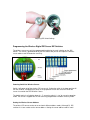
Powering on the Wireless Digital PIR Sensor
To power the wireless senor on you must first remove the battery cover and battery holder from
the sensor tube as shown above. Using a small screw driver such as a jewelers screw driver
press on switch 1 on the DIP switches as shown the photo below. The switches are rocker type
switches and you will need to press switch 1 at the top of the switch.
When the sensor is powered on you will notice the LED turn on and blink 5 times. This will let you
know that the wireless sensor is going into a 1-minute walk-test mode. If you place your hand in
front of the senor the LED will blink giving you feedback that the PIR sensor is functioning. After 1
minute has expired the LED will blink 5 more times and exit walk-test mode. From this point on
there will be no LED activity, but the sensor is armed and active.
Adjusting DIP Switch Settings
Programming the Wireless Digital PIR Sensor DIP Switches
The wireless sensor can easily be programmed by adjusting the small switches on the “DIP
Switch”. The sensor is powered on/off by the DIP Switch, and you can also adjust the wireless
sensor address and PIR detection sensitivity.
Powering On/Off the Wireless Sensor
Switch 1 will power on/off the wireless PIR sensor unit. Putting the switch in the down position will
turn the senor off, and putting the sensor in the up position will turn the sensor on. When the
sensor is turned on the LED will blink 5 times.
The default setting is all switches down (2 – 7), assuming switch 1 is “on” for sensor in operation
mode. The sensor is shipped with the PIR sensitivity programmed in medium sensitivity mode.
Setting the Wireless Sensor Address
The wireless PIR sensor can be set to send out 4 different address codes (A through D). DIP
switches 2 & 3 are used to set the sensor address. Setting the sensor address code is useful
when using multiple sensors with multiple camera units. Camera units can be set to respond to
certain sensor addresses.
Sensor Address
Switch 2
Switch 3
---------------------------------------------------------Address A
Down
Down
Address B
Down
Up
Address C
Up
Down
Address D
Up
Up
Note: When changing the sensor address you will need to power the sensor off and back on to
take effect.
Setting Range-Test Mode
Range-Test mode puts the sensor into a mode where it will send out trigger commands on 2second intervals. In this mode the PIR sensor is inactive. This mode is used to set the range
between the wireless PIR sensor and the receiving unit.
To set Range-Test mode start with the wireless sensor in the power down state. Turn DIP
switches 2 and 3 into the down “off” position. Next, power the sensor on by turning switch 1 into
up “on” position. Wait for the LED to blink 5 times. Next, move switches 2 and 3 into the up “on”
position. The wireless sensor is now in Range-Test mode.
To take the wireless sensor out of Range-Test mode power the sensor down by turning switch 1
into the “off” position then turning switch 2 and 3 into the “off” position.
Adjusting the Digital PIR Sensitivity
DIP switches 4 – 7 are used to adjust the PIR sensitivity. The DIP switch functions are as follows:
Switch 4 – Setting Low PIR Detection Sensitivity
Switch 5 – Setting Medium PIR Detection Sensitivity
Switch 6 – Setting High PIR Detection Sensitivity
Switch 7 – Programming PIR Detection Sensitivity
To adjust the PIR detection sensitivity be sure that the sensor is powered on. Next, select the
desired sensitivity setting, low, medium, or high from switch settings 4 – 6. Turn that switch to the
“on” position, then turn switch 7 to the “on” position for at least 1 second. Lastly, turn both
switches “off”. The programming is now complete. Note, programming the sensitivity can be done
at time the unit is powered on.
Sensitivity adjustments may be necessary when using the wireless PIR sensor in hot climates.
Typically you want to use a lower PIR sensitivity setting under very hot conditions. Under cooler
conditions the PIR sensitivity can be increased for longer detection ranges.
Note: It is always a good idea to place the wireless sensor under a covered area to keep the
sensor cool. Avoid placing the sensor on small trees which can blow around in the wind and
cause false triggers. Also, trim away any brush directly in front of the PIR lens which can cause
false triggers if they are heated by the sun and start moving.
12. GPS Option
The Raptor Wireless System can be equipped with a 50 Channel GPS receiver at time of
purchase or be updated after purchase. The GPS will send the latitude, longitude, and elevation
position of your Raptor System upon trigger event or status message. If you need to update a
Raptor Wireless System with the GPS receiver contact PixController, Inc. at
[email protected].
Be sure to place your Raptor Wireless System with GPS receiver in an area that has good view of
the sky. Obstructions such as inside buildings, metal enclosures, and heavy tree canopy can
degrade or block the GPS signal.
The Raptor Wireless System will acquire a new GPS fix upon system power up, trigger event,
and status message. When the Raptor Wireless System sends a trigger email or status email
links to Google and Bing Aerial maps will be embedded in the text body. Example of aerial maps
are shown below.
Google Aerial Map
Bing Aerial Map
Bing “Birds Eye View” Aerial Map
12.1 Sending a SMS text message to retrieve Raptor GPS location
To request a GPS location, simply text “20” to the Raptor’s phone number. There should be
nothing in the text message other than the two digits “20” (i.e. without quotes).
The next time the Raptor wakes up, it will immediately reply with a text message containing the
most recent GPS fix saved by the Raptor, with a time/date-stamp indicating when that fix was
acquired. This may be out-of-date and may not reflect the current position. Therefore, the Raptor
will next attempt to get a new fix at the current location. Once the new fix is acquired, the Raptor
will send a second text message with the newly acquired coordinates. If the unit is in motion, the
speed and direction will also be included in the text message. If a new fix cannot be acquired
within approximately 10 minutes (e.g. the Raptor is inside a building, in a location where it cannot
acquire a GPS fix), then the second message will not be sent.
Note that, in V1.13c, there will be only one good-fix text response. In other words, you must text
“20” to the Raptor again each time you want to receive further text messages.
In this version, the Raptor will only respond to a location-request text message at the following
time:
1) The next time the unit is powered up, OR.
2) The next time unit is triggered by motion, OR
3) The next time the unit wakes up to send a status message.
(whichever occurs first).
13. Updating the Raptor Firmware
To update the Firmware version on your Raptor Wireless System you will need to purchase a
Serial to USB cable. We suggest the Gigware Model: 26-949 Serial to USB cable or similar. The
Gigware cable can be purchased on-line or at your local RadioShack store.
Firmware updates are available from http://www.pixcontroller.com/downloads.htm
To update the firmware on your Raptor Wireless Camera follow these steps.
1. Install the ds30 Loader from the Raptor CD on your computer.
2. Connect the Serial to USB cable to your PC. Note, the DB9 Serial cable is connected to the
Firmware update port on the Raptor system and USB cable to your computer as shown below.
3. Power up the Raptor system and pressing the “Up” and “Down” menu key buttons at the same
time. You should see the following message on the Raptor LCD display:
PIX BOOTLOADER
Firmware update
mode
4. Run the ds30 Loader software and load the .HEX file as shown below. Press the “Download”
button to install the Firmware on the Raptor system. The MCU Stat LED will start blinking when
the download starts. Do not power down the Raptor system or unplug the cable until the firmware
update is complete.
Connect the Serial to USB Cable to your PC
Run the ds30 Loader to install the Firmware update on your Raptor System
ds30 Loader Settings:
Be sure the follow setting are set correctly before uploading the Raptor Firmware update
Hex File: (folder the XXXXXX.HEX file is located, example C:\Raptor200c.hex)
COM port: Com port where the serial cable or serial to USB cable is installed on your computer
Baudrate: 38400
Family: PIC24FJ
Device: PIC24FJ256GB110
Check the “Write program” box
Once you have setup the ds30 Loader settings load the firmware update (.HEX) file by pressing the “…” button
by the “Hex File” box. After the .HEX file is loaded press the “Download” button and this will start to program
your Raptor system.
14. Long-Range WiFi
Your Raptor Wireless Camera system can be equipped with either a GSM Cellular Radio or WiFi
Radio. This option can be changed at any time during the life of this product. Contact
PixController, Inc., [email protected] for radio update options.
The WiFi option is a 2.4GHz 802.11 protocol radio device. There are many ways to configure the
Raptor Wireless Camera with the WiFi radio option. There are many products available on the
market today to enhance the signal strength of this popular wireless protocol.
Specially shaped antennas, such as the Yagi antenna, can be used to increase the range of a WiFi transmission without a drastic increase in transmission power. High gain antenna may be of
many designs, but all allow transmitting a narrow signal beam over distances of several
kilometers, often nulling out nearby interference sources. Obstacles are among the biggest
problems when setting up a long-range Wi-Fi. Trees and forests degrade the microwave signal,
and rolling hills make it difficult to establish line-of-sight (LOS) propagation.
To prevent transmission signal loss due to obstacles such as trees and vegetation it will be
necessary to mount the Raptor Wi-Fi antenna as high as possible. The Raptor Wi-Fi unit was
design with a removable antenna with a standard SMA antenna mount for connecting other
antennas.
Using a High Gain Yagi such as the 16dBi ANT001 Raptor Wi-Fi antenna you will need point the
antenna in the direction of the Wi-Fi Access Point. It's best to place the Wi-Fi Access Point as
high as you can, and also upgrade the Access Point to higher gain antennas such as antenna
ANT003, 9dBi OMNI antenna. For the best range possible use ANT002, 15dBi outdoor OMNI
antenna for our Wi-Fi Access Point.
The high gain OMNI antennas for your Wi-Fi Access Point are 360° in direction which allows
many Raptor Wi-Fi Systems to access a single Access Point. There is not limit to the number of
Raptor Wi-Fi systems that can be used with an Access Point. Below are some common antenna
setups and expected ranges.
Standard Wi-Fi Antenna - 300 foot range LOS
Using the standard OMNI Raptor Wi-Fi antenna transmitting to the Linksys WAP54G Access
Point with the standard Linksys antennas will yield a maximum transmission distance of about
300 feet. This range can be slightly increased by replacing the Linksys Access Point antennas
with the 9dBi OMNI antennas under our Accessories page, part number ANT003. To obtain the
maximum transmission distance you must have clear line of sight (LOS) between the Raptor WiFi system and the Linksys Wi-Fi Access Point. Be sure your Wi-Fi access point is placed high
inside with little obstructions to the outside including metal walls.
High Gain Yagi Antenna - 800 foot range LOS
Adding the optional high gain Yagi antenna to your Raptor Wi-Fi system can increase
transmission distances up to 800 feet line of sight (LOS). The 16dBi Yagi antenna, part number
ANT001 from our accessories page is a direction antenna meaning is must point towards the WiFi Access Point. This range can be slightly increased by replacing the Linksys Access Point
antennas with the 9dBi OMNI antennas under our Accessories page, part number ANT003. To
obtain the maximum transmission distance you must have clear line of sight (LOS) between the
Raptor Wi-Fi system and the Linksys Wi-Fi Access Point. Placing the Yagi antenna from the
Raptor System as high as you can will increase transmission distances. Be sure your Wi-Fi
access point is placed high inside with little obstructions to the outside including metal walls.
High Gain Yagi Antenna with High Gain OMNI Access Point Antenna - 1/2 to 1 Mile LOS
Transmission distances from 1/2 mile to 1 mile can be obtained by adding the optional 16dBi high
gain Yagi antenna to your Raptor Wi-Fi system, and the 15dBi OMNI Mast Antenna, part number
ANT002, to your Wi-Fi Access Point. Both antennas can be purchased from our accessories
page. The OMNI mast antenna must be placed outside as high as possible. The OMNI mast
antenna includes a 23 foot cable and lighting protector, which is cabled back to your Wi-Fi access
point. To obtain the maximum transmission distance you must have clear line of sight (LOS)
between the Raptor Wi-Fi system and the Wi-Fi Access Point. Placing the Yagi antenna from the
Raptor System as high as you can will increase transmission distances.
Parabolic Wi-Fi High Gain Antennas - Several Miles LOS
Using a parabolic antenna will net the longest Wi-Fi
transmission distances, but these antennas are often expensive,
large, and difficult to setup due to their very narrow transmission
beam. There are many long range Wi-Fi antennas on the market
today due the the popularity of Wi-Fi networks.
One very interesting long range Wi-Fi antenna was built using a
DirectTV dish by Eliot Phillips,
http://www.engadget.com/2005/11/15/how-to-build-a-wifibiquad-dish-antenna/
. Eliot was able to detect an access point over 8 miles away with
his DYI antenna design.
WiFi biquad dish antenna by Eliot Phillips
14.1 WiFi Repeaters
The Linksys WRT54G router is capable of working in repeater mode with third party firmware like
DD-WRT. A WiFi repeater is a device that will connect to another wireless access point and
redistribute the signal. Repeaters are typically used to extend the coverage of a network.
It is possible to place a WRT54G router in a waterproof enclosure using a high gain Omni mast
antenna for input and high gain direction output antenna to extend WiFi networks over hilly
terrain.
14.2 Using WiFi option without Internet Connectivity
It is possible to setup a WiFi network without Internet connectivity. For remote applications such
as building security, border security, or wildlife research which may not have an Internet
connection you send photos to a FTP server configured on a standalone computer as shown
below. Free FTP server software such as FileZilla Server, http://filezilla-project.org/, are an open
source, simple to use, and free to download.
“PC Base Station” running FileZilla FTP software receiving Raptor WiFi Photos
15. Raptor Camera
The Raptor camera is a still IR (Infrared) VGA Camera which will capture photos at a maximum
resolution of 640 x 480 with data size around 48K. The smaller resolution is needed to keep
image file size down in order to send photos quickly over low bandwidth cellular networks thus
saving battery life of the Raptor system.
Day-time photo example. Photos will be color during day
light hours.
Night-time photo example. Photos will be captured in grayscale IR mode during dark hours.
16. Charging the 12V Battery
Included with your Raptor unit is a rechargeable 12V
SLA (Sealed Lead Acid) battery and 12V charger.
The 12V battery is completely removable from the
Raptor unit for replacing or recharging. To recharge
the 12V battery simply connect the red alligator clip
from the 12V wall charger to the positive terminal on
the 12V SLA battery, and the black alligator clip to
the negative terminal on the 12V SLA battery.
When charging the red LED on the wall charger will
be lit and will change to green when the 12V SLA
battery is fully charged.
Replacement 12V SLA batteries can be purchased
from www.pixcontroller.com, or you can use the
UB1234, 12V 3.4AH or similar battery.