1
Customizing the output of Mercurial
expansion of whatever is inside. To print a literal curly brace, you must escape it, as described in Section 11.5, “Escape
sequences”.
11.4. Common template keywords
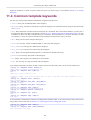
You can start writing simple templates immediately using the keywords below.
• author: String. The unmodified author of the changeset.
• branches: String. The name of the branch on which the changeset was committed. Will be empty if the branch name
was default.
• date: Date information. The date when the changeset was committed. This is not human-readable; you must pass it
through a filter that will render it appropriately. See Section 11.6, “Filtering keywords to change their results” for more
information on filters. The date is expressed as a pair of numbers. The first number is a Unix UTC timestamp (seconds
since January 1, 1970); the second is the offset of the committer's timezone from UTC, in seconds.
• desc: String. The text of the changeset description.
• files: List of strings. All files modified, added, or removed by this changeset.
• file_adds: List of strings. Files added by this changeset.
• file_dels: List of strings. Files removed by this changeset.
• node: String. The changeset identification hash, as a 40-character hexadecimal string.
• parents: List of strings. The parents of the changeset.
• rev: Integer. The repository-local changeset revision number.
• tags: List of strings. Any tags associated with the changeset.
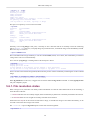
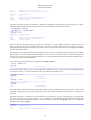
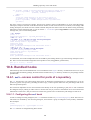
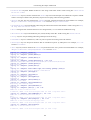
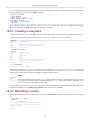
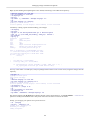
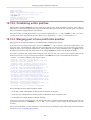
A few simple experiments will show us what to expect when we use these keywords; you can see the results below.
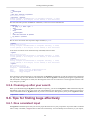
$ hg log -r1 --template 'author: {author}\n'
author: Bryan O'Sullivan <[email protected]>
$ hg log -r1 --template 'desc:\n{desc}\n'
desc:
added line to end of <<hello>> file.
in addition, added a file with the helpful name (at least i hope that some might consider it so) of
goodbye.
$ hg log -r1 --template 'files: {files}\n'
files: goodbye hello
$ hg log -r1 --template 'file_adds: {file_adds}\n'
file_adds: goodbye
$ hg log -r1 --template 'file_dels: {file_dels}\n'
file_dels:
$ hg log -r1 --template 'node: {node}\n'
node: b719ca118db589dc577aec3fde36399bebc4c3b1
$ hg log -r1 --template 'parents: {parents}\n'
parents:
$ hg log -r1 --template 'rev: {rev}\n'
rev: 1
$ hg log -r1 --template 'tags: {tags}\n'
tags: mytag
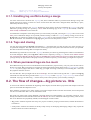
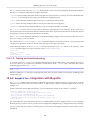
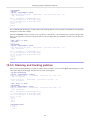
As we noted above, the date keyword does not produce human-readable output, so we must treat it specially. This involves
using a filter, about which more in Section 11.6, “Filtering keywords to change their results”.
$ hg log -r1 --template 'date: {date}\n'
date: 1274874205.00
$ hg log -r1 --template 'date: {date|isodate}\n'
date: 2010-05-26 11:43 +0000
122