1
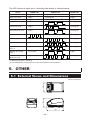
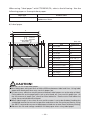
When using “label paper” with CT-S281XL/OL, refer to the following. Use the
following paper or the equivalent paper.
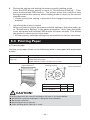
Paper type
Recommended thermal label paper
Product name
HD75 from Nippon Paper
150HBW from Ricoh
b) Label paper
A
E
C
B
L
D
Full cut
position
Paper feeding
direction
M
Unit: mm
H I
Mark
J
F
Item
G
58 -10
A
Liner width
B
Label width
54 +
_ 0.5
C
Left edge of label
2+
_ 0.5
D
Print width
48
E
Top margin
_1
2+
F
Print length
21 to 156 +
_1
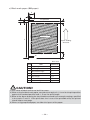
K
Printable area
Dimensions
G
Bottom margin
2+
_1
H
Cut position between labels
2 or more
5+
_1
I
Gap between labels
J
Label length
25 to 160
K
Label pitch
I+J
L
Left margin
3+
_1
M
Right margin
3+
_1
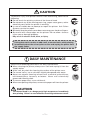
CAUTION!
■ Do not use full sheet label paper.
■ Use label paper with peel force of 200 mN/50mm between label and liner. Using label
paper with weak peel force may result in paper jam.
■ In some case, adhesive may be present between label papers or at the edge of label.
Fixing adhesive on the paper path such as print head, etc. may result in paper jam. At
the occurrence of paper jam, check for fixed adhesive. Remove the fixed adhesive
using close moistened with ethanol.
■ When label length is less than 30 mm and the cutter is set to be disabled, feeding the
unlabelled area to the manual cut position and then to the first print position by using
the GS FF command may cause label paper to feed one or two sheets without printing.
■ Observe the life and storage condition of label paper when using label paper.
— 33 —