1
The Subwoofer feed combines the LFE channel audio (boosted by 10dB) with
the SUB signal. While the LFE channel is created in production and printed to
the master, the Subwoofer feed is created by the Bass Management portion of
the playback system and isn’t printed to the master.
Using M-360°
Basic Operation
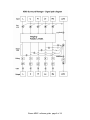
To enjoy the full capacity of the M-360°, use the Manager as an insert on the
Master Surround output channel. It is recommended to go through the studio
calibration routine provided with this product before you begin to pan sources
using the S360° components. If your studio is not set up according to ITU
recommendations, adjust your speaker angles in the Manager so that the panpots will perform optimally in this setup. Even if you are sure that your studio is
well-calibrated, it is still recommended to insert the manager for further fine
tuning. We recommend that you create a custom work setup for your studio and
use it as your convenient default.
Manager Usage:
When you insert an M360° Manager on your master output you can use it for the
following applications:
• Adjust the speaker angles to the ones in your studio to work with the S360°
Panner – This will provide optimal translation of the mix you make to the
standard ITU recommendation.
• Use per-channel gain and delay to align the level and phase of all speakers –
This will assure that the directionality of the image is solid and not pulling in a
certain direction because of speaker level or phase differences.
• Use more target adjustment options to account for –3dB surrounds, +10dB
LFE playback or other options that relate to encoders and settings available in
consumer playback systems.
• Use Bass management to set up proper monitoring using a Sub/Sat
monitoring system.
Calibrating the studio monitoring system is the first step which should be
performed before you begin to mix. Essentially the calibration settings will allow
you to trim the gap between your listening environment and the standard ITU
spec. The Manager behaves like a correcting lens. Remember to bypass
Manager for Mixdown
Waves M360˚ software guide page 5 of 18