1
Controls, Indicators and Connections
Introduction
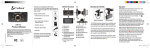
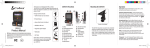
Controls, Indicators and Connections
•
GPS Receiver
Mini USB Connector
For charging and
connection to PC
Speaker
Mini HDMI Connector
For connection to
Television or Monitor.
(Cable not included.)
Camera
Lens
Introduction
Product Features
NOTES
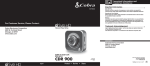
Congratulations! You’ve made a smart choice by purchasing a Drive
HD Dash Cam from Cobra. This booklet describes the simple steps
for mounting, setting up, and using your dash camera.
Camera Features
Records everything you see and hear in 1080P Full HD with high dynamic range that optimises
video during day or night.
•
Continuous Loop Recording overwrites old footage unless you want to save it. A time/date stamp
is embedded on all recordings so you’ll never miss an event while driving.
Ready to use out-of-the-box. Includes a heavy-duty suction cup to mount the camera to your
windshield and an 8GB Micro SD card to record your drive.
Wide angle view gives you a full view of the road without any edge distortion.
3-axis G-Sensor senses sudden accelerations and collisions and automatically protects footage
surrounding the incident.
LED Status
Indicator
Record /
OK Button
Microphone
Hole
On / Off Button
(Hold to turn off)
12V DC
Power
Jack
Menu
Button
Reset
Button
LCD
Display
Up / Down Menu
Navigation Buttons
Mode Button
File Lock
Button
Additional Features
Emergency Record Button
•
Motion Sensor
Built-in Microphone & Speaker
Auto-Record and Auto-Power Off
Adjustable Movie Clip Time
Micro SD Card Slot
Accepts Memory Card
to Store Video and
Photos, up to 32 GB
Suction Cup
Locking Lever
Suction Cup
Locking Knob
Angle Locking Knob
Mounting
Screw
A2
English
A3
21