1
Chapter 1: Getting Started
Step 6: Verify Hardware Configuration
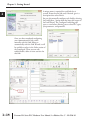
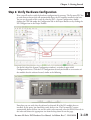
Next, you will need to verify the hardware configuration for accuracy. The Do-more PLC has
an auto discover feature that will automatically detect the I/O modules installed in the base.
You can see the results of this search by selecting PLC > System Configuration, double
clicking the CPU link under the Configuration tab in the Project Browser, or by clicking the
XY Configure icon in the Project Toolbar.
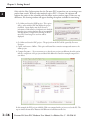
On the left side of the System Configuration window is an index of topics titled
Configuration Entries. Click the I/O Configuration tab and you should see an overview of
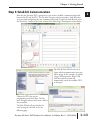
the modules that the software located, similar to the following.
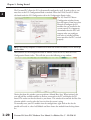
From here you can verify that the software has detected all of the I/O modules that are
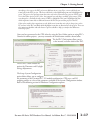
installed. At this point, you should also verify the base size. The Do-more PLC cannot
automatically detect the base size and if it needs to be corrected, select the DL205 Base tab in
the index and choose the appropriate size from the drop down list on that page.
Do-more H2 Series PLC Hardware User Manual, 1st Edition, Rev. C - H2-DM-M
1
2
3
4
5
6
7
8
9
10
11
12
13
14
A
B
C
D
1–19