1
ESP Server: Installing and Updating
•
Activate New Analyses—Any existing analyses that you have activated in CPM
version 1.0 will remain. However, to support new features in version 1.6, you should
activate the following Analyses after upgrading and configuring the new features:
• Core Protection Module – Spyware/Grayware Restore Information
• Web Reputation – Client Information
• Web Reputation – Site Statistics
• Common Firewall – Endpoint Firewall Settings
• Common Firewall – Inbound Port Violations
• Common Firewall – Outbound Port Violations
•
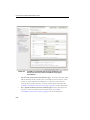
CPM Client Console—The new console on the endpoint machines allows manual
scanning of files and folders for virus/malware and spyware/grayware, the ability to
review the results and see what actions were taken on the infected files, and a feature
that allows the client machine to update immediately to the latest version of
protection components. See Click the Create Firewall Policy Task... button at the
top of the screen. on page A-11 and Using the Client Console on page 9-1 for
details.
•
New platforms supported—Windows 7® and Windows 2008 R2® platform
support added. See System Requirements on page 3-14 for details.
Note:
•
Upgrade to ESP 7.2.5 agent which supports Windows 7 and Windows 2008 R2
operating systems before attempting to install CPM.
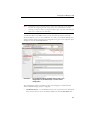
Enable/disable Web Reputation logging—The collection of visited sites can be
enabled and disabled using the Task pane. See About Analyses on page 6-17 for
details.
What Has Not Changed for Version 1.6
The following CPM settings are retained and do not need to be modified to remain
synchronized with the upgrade:
•
Global Settings, and any saved Tasks
•
On-Demand Settings, and any saved Tasks
•
Real-Time Settings, and any saved Tasks
•
Spyware White Lists, and any saved Tasks
•
ActiveUpdate Server Settings (proxy and AU server location)
2-7