1
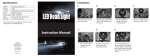
Instruction Duration Tap Turn Turn and Hold Press and Hold Press once briefly Turn knob once briefly Turn knob and hold it for 3 seconds Press the knob and keep it pressed in for 3 seconds Pairing ‐ Press and Hold the knob until you see red and blue LED lights blinking. This puts the device into pairing mode. ‐ Turn your phone Bluetooth® on and set it to search for the device (AR‐3129). ‐ On your phone, click on AR‐3129 and set to pair. Connection Diagram: Microphone ‐ Connect the supplied microphone (or another microphone of your choice with 3.5mm jack) to the auxiliary input at the back. ‐ Mount the microphone somewhere in the vehicle. Speakers ‐ Insert a 3.5mm auxiliary cable into the back of the device to connect it to your source speakers or amplifier. Installation Instructions ‐ Attach the red wire to 12V + ‐ Attach the black wire to 12V – Surface Mount Instructions ‐ Use 2x Phillips screws to mount