1
Chapter 2:GUI Reference
Chapter 2:
GUI Reference
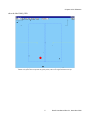
When the application starts the user is presented with a single window containing the most relevant
system status variables.
Figure 2.1: Main GUI. Use the File menu to open the skymap window.
2.1 MAIN > File Menu
Skymap Menu Option. Open and close the sky-map window. Read section 2.1.1 below.
Airmass Menu Option. Open the air-mass window. Read section 2.1.2 below.
Exit Menu Option. Terminates the application.
2.1.1 MAIN > File > Skymap Window
Set Button. Centers the field to the star just selected.
P1|P2 Button. Send the coordinates of the star just selected to the ICSOFT. The coordinates
will be displayed in the target P1|P2 indicator of the Guide Probes Tab in the ICSOFT GUI.
Tel Button. Use this button to retrieve the current telescope mount coordinates. Guide probes
coordinates get updated as well.
PA Button. Use this button to retrieve the current SAM position angle. Guide probe coordinates
get updated as well.
Zoom Arrows Button. Use the arrow buttons to zoom in and out the skymap.
Catalog Menu. Use this menu to select among the available catalogs. Right now the application
will crash if a catalog is selected having not installed the correspondent database.
Features Menu.
3
Rtsoft User Manual Rev 2.1, November 2010