1
Reworking
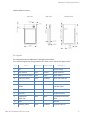
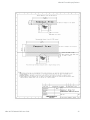
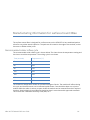
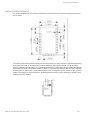
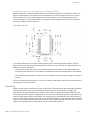
Common footprint for Through-hole and Surface Mount
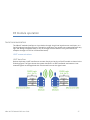
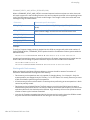
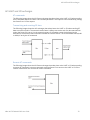
Digi has designed a common footprint which will allow either module to be attached to a PCB. The
layout is shown below. The round holes in the diagram are for the Through-hole version, and the
semi-oval pads are for the Surface Mount version. Note that pin 1 of the Through-hole version
connects with pin 2 of the Surface Mount. By using the shown diagonal traces to connect the pins,
the layout will work for both modules.
Flux and cleaning
It is recommended that a “no clean” solder paste be used in assembling these modules. This will
eliminate the clean step and ensure unwanted residual flux is not left under the module where it is
difficult to remove. In addition:
•
Cleaning with liquids can result in liquid remaining under the shield or in the gap between the
module and the OEM PCB. This can lead to unintended connections between pads on the module.
•
The residual moisture and flux residue under the module are not easily seen during an inspection
process.
Factory recommended best practice is to use a “no clean” solder paste to avoid the issues above and
ensure proper module operation.
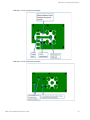
Reworking
Rework should never be performed on the module itself. The module has been optimized to give the
best possible performance, and reworking the module itself will void warranty coverage and
certifications. We recognize that some customers will choose to rework and void the warranty; the
following information is given as a guideline in such cases to increase the chances of success during
rework, though the warranty is still voided. The module may be removed from the OEM PCB by the
use of a hot air rework station, or hot plate. Care should be taken not to overheat the module. During
rework, the module temperature may rise above its internal solder melting point and care should be
taken not to dislodge internal components from their intended positions.
XBee Wi-Fi RF Module S6B User Guide
143