1
6 OPERATION
VG5
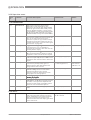
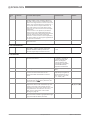
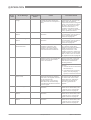
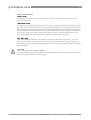
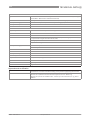
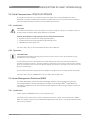
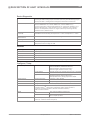
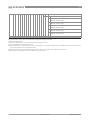
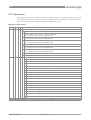
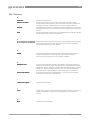
Error
code
Error Message
ERR 102
Temperature out of
range
1
The ambient temperature is
outside the given range. This
can cause loss or corruption of
data.
Measure the ambient
temperature. De-energize the
device until the ambient
temperature is back in the given
range. If the temperature does
not stay in the correct range,
make sure that there is
insulation around the signal
converter. If this error occurs 2
times, replace the device.
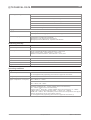
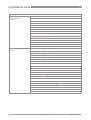
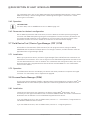
ERR 103
Converter memory
failure
1
The device's hardware is
defective.
Replace the signal converter.
For more data, refer to How to
Converter Voltage
failure
1
The device's hardware is
defective.
Replace the signal converter.
For more data, refer to How to
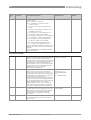
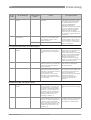
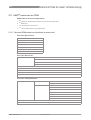
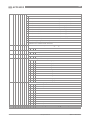
ERR 200
Internal
Communication
1
The device's hardware or
software is defective. The
converter cannot transmit
signals to or receive signals
from the antenna electronics.
De-energize the device. Make
sure that the signal cable
engages in the terminal and the
screw connection is tight.
Energize the device. If the
problem continues, replace the
signal converter. For more data,
refer to How to turn or remove
the signal converter on page 36.
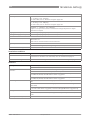
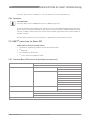
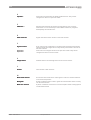
ERR 201
Overfill
2
The level is in the blocking
distance. There is a risk that the
product will overflow and/or
cover the antenna.
Use a different procedure to
measure the level in the tank.
Remove some of the product
until the level is below the
blocking distance.
ERR 104
Status marker
shown
Cause
Corrective action
turn or remove the signal
converter on page 36.
turn or remove the signal
converter on page 36.
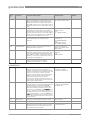
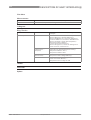
If a viscous product touched the
antenna:
• remove the device and clean
the antenna, or
• If the device has a purging
option, use the purging
system to clean the antenna.
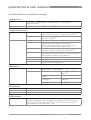
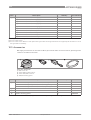
ERR 203
Peak Lost
(Level Lost)
2
The signal peak is not found
within the measuring window
that filters the signals received
by the antenna. The
measurement is not correct.
The device will automatically
increase this window to find the
correct signal.
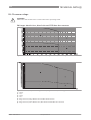
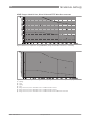
Do a check of the device, tank
and the process. Reconfigure
the device and record a new
empty spectrum. Follow the
instructions on page 81. If
necessary, speak to the
supplier.
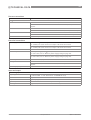
ERR 204
Sensor no Signal
3
The device's hardware is
defective.
Replace the signal
converter.For more data, refer
to How to turn or remove the
signal converter on page 36.
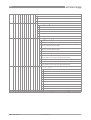
ERR 206
Sensor Microwave
failure
1
The device's hardware is
defective.
Replace the signal
converter.For more data, refer
to How to turn or remove the
signal converter on page 36.
ERR 207
Sensor Memory
failure
1
The device's hardware is
defective.
Replace the signal
converter.For more data, refer
to How to turn or remove the
signal converter on page 36.
86
www.hycontrol.com
08/2013 - VG5 manual v1