1
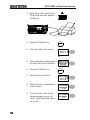
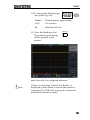
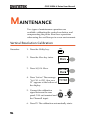
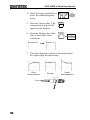
Digital Storage Oscilloscope
GDS-1000A-U Series
USER MANUAL
GW INSTEK PART NO. 82DS-112AUEA1
ISO-9001 CERTIFIED MANUFACTURER
April 2011 edition
This manual contains proprietary information, which is protected by
copyright. All rights are reserved. No part of this manual may be
photocopied, reproduced or translated to another language without
prior written consent of Good Will Corporation.
The information in this manual was correct at the time of printing.
However, Good Will continues to improve its products and therefore
reserves the right to change the specifications, equipment, and
maintenance procedures at any time without notice.
Good Will Instrument Co., Ltd.
No. 7-1, Jhongsing Rd., Tucheng Dist., New Taipei City 236, Taiwan.
TABLE OF CONTENTS
Table of Contents
SAFETY INSTRUCTIONS .................................. 8 Safety Symbols ....................................................................... 8 Safety Guidelines .................................................................... 9 Power cord for the United Kingdom .................................... 12 GETTING STARTED ........................................ 13 Main Features ................................................................... 13 Panel Overview .................................................................. 15 Front Panel ........................................................................... 15 Rear Panel ............................................................................. 19 Display .................................................................................. 20 Setting up the Oscilloscope ............................................... 21 QUICK REFERENCE ....................................... 24 Menu Tree and Shortcuts................................................... 24 CH1/CH2 key ....................................................................... 25 Cursor key 1/2 ...................................................................... 26 Cursor key 2/2 ...................................................................... 26 Display key ............................................................................ 27 Autoset key ........................................................................... 27 Hardcopy key ........................................................................ 27 Help key ................................................................................ 28 Horizontal menu key ............................................................ 28 Math key 1/2 (+/-/x)............................................................. 29 Math key 2/2 (FFT/FFT rms) ............................................... 30 Measure key.......................................................................... 31 Run/Stop key ........................................................................ 31 Save/Recall key 1/10 ............................................................ 32 Save/Recall key 2/10 ............................................................ 32 Save/Recall key 3/10 ............................................................ 33 Save/Recall key 4/10 ............................................................ 33 Save/Recall key 5/10 ............................................................ 34 Save/Recall key 6/10 ............................................................ 34 Save/Recall key 7/10 ............................................................ 35 Save/Recall key 8/10 ............................................................ 35 Save/Recall key 9/10 ............................................................ 36 Save/Recall key 10/10 .......................................................... 36 Trigger key 1/6 ...................................................................... 37 3
GDS-1000A-U Series User Manual
Trigger key 2/6 ..................................................................... 37 Trigger key 3/6 ..................................................................... 38 Trigger key 4/6 ..................................................................... 38 Trigger key 5/6 ..................................................................... 39 Trigger key 6/6 ..................................................................... 39 Utility key 1/11 (Utility #1) .................................................. 40 Utility 2/11 (Utility #2) ........................................................ 40 Utility key 3/11 (Utility #3) .................................................. 41 Utility key 4/11 (Hardcopy -Save All)................................... 41 Utility key 5/11 (Hardcopy -Printer) .................................... 42 Utility key 6/11 (Hardcopy -Save Image)............................. 42 Utility key 7/11 (Probe compensation) ............................... 43 Utility key 8/11 (Go-NoGo) ................................................. 43 Utility key 9/11 (Data Logging 1/2) ..................................... 44 Utility key 10/11 (Data Logging 2/2) ................................... 44 Utility key 11/11 (Self CAL Menu) ....................................... 44 Default Settings ................................................................. 45 Built-in Help ...................................................................... 46 MEASUREMENT ............................................ 47 Basic Measurements ......................................................... 47 Activating a channel ............................................................. 47 Using Autoset ...................................................................... 48 Running and stopping the trigger ....................................... 50 Changing the horizontal position and scale........................ 51 Changing the vertical position and scale ............................ 52 Using the probe compensation signal ................................ 53 Automatic Measurements .................................................. 55 Measurement items ............................................................. 55 Automatic measurement gating .......................................... 57 Automatically measuring the input signals ......................... 58 Cursor Measurements ....................................................... 61 Using the horizontal cursors ............................................... 61 Using the vertical cursors .................................................... 62 Math Operations ............................................................... 63 Overview............................................................................... 63 Adding, subtracting or multiplying signals ......................... 64 Using the FFT function ........................................................ 65 Go No-Go Testing .............................................................. 67 Overview............................................................................... 67 Edit: NoGo When ................................................................. 68 Edit: Source .......................................................................... 68 Edit: NoGo Violation Conditions ......................................... 69 4
TABLE OF CONTENTS
Edit: Template (boundary) ................................................... 69 Run Go-NoGo Tests ............................................................. 73 Data Logging ..................................................................... 74 Overview ............................................................................... 74 Edit: Source .......................................................................... 75 Edit: Setup Parameters ........................................................ 75 Run Data logging ................................................................. 77 CONFIGURATION .......................................... 78 Acquisition ........................................................................ 78 Selecting the acquisition mode............................................ 78 Selecting Delay mode ........................................................... 80 Real time vs Equivalent time sampling mode ..................... 82 Display .............................................................................. 83 Selecting vector or dot drawing ........................................... 83 Accumulating the waveform ................................................ 83 Adjusting the display contrast ............................................. 84 Selecting the display grid ..................................................... 84 Horizontal View ................................................................. 85 Moving the waveform position horizontally ........................ 85 Selecting the horizontal scale .............................................. 85 Selecting the waveform update mode ................................. 86 Zooming the waveform horizontally.................................... 87 Viewing waveforms in the X-Y mode ................................... 88 Horizontal Adjustment Menu .............................................. 89 Vertical View (Channel) ..................................................... 91 Moving the waveform position vertically ............................. 91 Selecting the vertical scale ................................................... 91 Selecting the coupling mode ............................................... 91 Expand Vertical Scale Center / Ground ............................... 92 Inverting the waveform vertically ......................................... 93 Limiting the waveform bandwidth ....................................... 94 Probe attenuation level and type ......................................... 94 Trigger ............................................................................... 96 Trigger type........................................................................... 96 Trigger parameter................................................................. 96 Configuring Holdoff ............................................................. 98 Configuring the edge trigger ................................................ 99 Configuring the video trigger ............................................. 100 Configuring the pulse width trigger ................................... 101 Manually triggering the signal ........................................... 103 Rear Panel USB Port Interface ......................................... 104 Remote Control Interface ................................................ 105 5
GDS-1000A-U Series User Manual
System Settings ............................................................... 107 Viewing the system information ........................................ 107 Selecting the language ....................................................... 107 SAVE/RECALL .............................................. 109 File Structures ................................................................. 109 Display image file format ................................................... 109 Waveform file format ......................................................... 109 Setup file format ................................................................ 112 Using the USB file utilities ................................................. 113 Quick Save (HardCopy) ................................................... 115 Save ................................................................................ 117 File type/source/destination.............................................. 117 Saving the panel settings ................................................... 118 Saving the waveform .......................................................... 119 Saving the display image ................................................... 121 Saving all (panel settings, display image, waveform) ....... 122 Recall .............................................................................. 124 File type/source/destination.............................................. 124 Recalling the default panel settings................................... 125 Recalling a reference waveform to the display .................. 126 Recalling panel settings ..................................................... 126 Recalling a waveform ......................................................... 127 Recall Image ....................................................................... 129 PRINT .......................................................... 131 Print (Hardcopy) ............................................................. 131 MAINTENANCE ........................................... 134 Vertical Resolution Calibration ........................................ 134 Probe Compensation ....................................................... 135 FAQ .............................................................. 137 The input signal does not appear in the display. .............. 137 I want to remove some contents from the display. .......... 137 The waveform does not update (frozen). .......................... 138 The probe waveform is distorted. ...................................... 138 Autoset does not catch the signal well. ............................. 138 I want to clean up the cluttered panel settings. ................ 138 The saved display image is too dark on the background. . 138 The accuracy does not match the specifications. ............. 139 6
TABLE OF CONTENTS
The oscilloscope will not allow a 2M waveform to be saved.
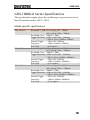
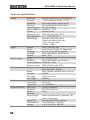
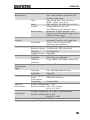
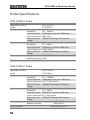
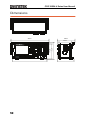
............................................................................................ 139 APPENDIX .................................................... 140 Fuse Replacement ........................................................... 140 GDS-1000A-U Series Specifications ................................. 141 Model-specific specifications ............................................. 141 Common specifications ..................................................... 142 Probe Specifications ........................................................ 144 GDS-1072A-U Probe........................................................... 144 GDS-1102A-U Probe........................................................... 144 GDS-1152A-U Probe........................................................... 145 Dimensions ..................................................................... 146 EC Declaration of Conformity .......................................... 147 INDEX .......................................................... 148 7
GDS-1000A-U Series User Manual
SAFETY INSTRUCTIONS
This chapter contains important safety instructions
that should be followed when operating and
storing the oscilloscope. Read the following before
any operation to ensure your safety and to keep
the oscilloscope in the best condition.
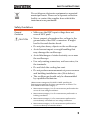
Safety Symbols
These safety symbols may appear in this manual or on the
oscilloscope.
WARNING
Warning: Identifies conditions or practices that
could result in injury or loss of life.
CAUTION
Caution: Identifies conditions or practices that
could result in damage to the oscilloscope or to
other objects or property.
DANGER High Voltage
Attention: Refer to the Manual
Protective Conductor Terminal
Earth (Ground) Terminal
8
SAFETY INSTRUCTIONS
Do not dispose electronic equipment as unsorted
municipal waste. Please use a separate collection
facility or contact the supplier from which this
instrument was purchased.
Safety Guidelines
General
Guideline
CAUTION
•
Make sure the BNC input voltage does not
exceed 300V peak.
•
Never connect a hazardous live voltage to the
ground side of the BNC connectors. It might
lead to fire and electric shock.
•
Do not place heavy objects on the oscilloscope.
•
Avoid severe impact or rough handling that
may damage the oscilloscope.
•
Avoid discharges of static electricity on or near
the oscilloscope.
•
Use only mating connectors, not bare wires, for
the terminals.
•
Do not block the cooling fan vent.
•
Do not perform measurements at power sources
and building installation sites (Note below).
•
The oscilloscope should only be disassembled
by a qualified technician.
(Measurement categories) EN 61010-1:2001 specifies the
measurement categories and their requirements as follows. The
GDS-1000A-U falls under category II.
• Measurement category IV is for measurement performed at the
source of a low-voltage installation.
• Measurement category III is for measurement performed in a
building installation.
• Measurement category II is for measurement performed on
circuits directly connected to a low voltage installation.
• Measurement category I is for measurements performed on
circuits not directly connected to Mains.
9
GDS-1000A-U Series User Manual
Power Supply
WARNING
Fuse
WARNING
Cleaning the
oscilloscope
Operation
Environment
•
AC Input voltage: 100 ~ 240V AC, 47 ~ 63Hz
•
The power supply voltage should not fluctuate
more than 10%.
•
Connect the protective grounding conductor of
the AC power cord to an earth ground.
•
Fuse type: T1A/250V
•
To ensure fire protection, replace the fuse only
with the specified type and rating.
•
Disconnect the power cord before replacing the
fuse.
•
Make sure the cause of fuse blowout is fixed
before replacing the fuse.
•
Disconnect the power cord before cleaning the
oscilloscope.
•
Use a soft cloth dampened in a solution of mild
detergent and water. Do not spray any liquid
into the oscilloscope.
•
Do not use chemicals containing harsh products
such as benzene, toluene, xylene, and acetone.
•
Location: Indoor, no direct sunlight, dust free,
almost non-conductive pollution (Note below)
•
Relative Humidity: ≤ 80%, 40°C or below
≤ 45%, 41°C~50°C
10
•
Altitude: < 2000m
•
Temperature: 0°C to 50°C
SAFETY INSTRUCTIONS
(Pollution Degree) EN 61010-1:2001 specifies pollution degrees and
their requirements as follows. The oscilloscope falls under degree 2.
Pollution refers to “addition of foreign matter, solid, liquid, or
gaseous (ionized gases), that may produce a reduction of dielectric
strength or surface resistivity”.
• Pollution degree 1: No pollution or only dry, non-conductive
pollution occurs. The pollution has no influence.
• Pollution degree 2: Normally only non-conductive pollution
occurs. Occasionally, however, a temporary conductivity caused
by condensation must be expected.
• Pollution degree 3: Conductive pollution occurs, or dry, nonconductive pollution occurs which becomes conductive due to
condensation which is expected. In such conditions, equipment
is normally protected against exposure to direct sunlight,
precipitation, and full wind pressure, but neither temperature
nor humidity is controlled.
Storage
environment
•
Location: Indoor
•
Storage Temperature: -10°C~60°C, no
condensation-
•
Relative Humidity: 93% @ 40°C
65% @ 41°C ~60°C
Disposal
Do not dispose this instrument as unsorted
municipal waste. Please use a separate collection
facility or contact the supplier from which this
instrument was purchased. Please make sure
discarded electrical waste is properly recycled to
reduce environmental impact.
11
GDS-1000A-U Series User Manual
Power cord for the United Kingdom
When using the oscilloscope in the United Kingdom, make sure the
power cord meets the following safety instructions.
NOTE: This lead/appliance must only be wired by competent persons
WARNING: THIS APPLIANCE MUST BE EARTHED
IMPORTANT: The wires in this lead are coloured in accordance with the
following code:
Green/ Yellow:
Earth
Blue:
Neutral
Brown:
Live (Phase)
As the colours of the wires in main leads may not correspond with the
coloured marking identified in your plug/appliance, proceed as follows:
The wire which is coloured Green & Yellow must be connected to the Earth
terminal marked with either the letter E, the earth symbol
or coloured
Green/Green & Yellow.
The wire which is coloured Blue must be connected to the terminal which is
marked with the letter N or coloured Blue or Black.
The wire which is coloured Brown must be connected to the terminal
marked with the letter L or P or coloured Brown or Red.
If in doubt, consult the instructions provided with the equipment or contact
the supplier.
This cable/appliance should be protected by a suitably rated and approved
HBC mains fuse: refer to the rating information on the equipment and/or
user instructions for details. As a guide, a cable of 0.75mm2 should be
protected by a 3A or 5A fuse. Larger conductors would normally require
13A types, depending on the connection method used.
Any exposed wiring from a cable, plug or connection that is engaged in a
live socket is extremely hazardous. If a cable or plug is deemed hazardous,
turn off the mains power and remove the cable, any fuses and fuse
assemblies. All hazardous wiring must be immediately destroyed and
replaced in accordance to the above standard.
12
GETTING STARTED
GETTING STARTED
The Getting started chapter introduces the
oscilloscope’s main features, appearance, and set
up procedure.
Main Features
Model name
Frequency bandwidth
Input channels
GDS-1072A-U
DC – 70MHz (–3dB)
2
GDS-1102A-U
DC – 100MHz (–3dB)
2
GDS-1152A-U
DC – 150MHz (–3dB)
2
Performance
•
1 GS/s real-time sampling rate
•
25GS/s equivalent-time sampling rate
•
2M points record length
•
Up to 10ns peak detection
•
2mV~10V vertical scale
•
1ns ~ 50s time scale
•
5.7 inch color TFT display
•
Saving and recalling setups and waveforms
•
27 automatic measurements
•
Multi-language menu (12 languages)
•
Math operation: Addition, Subtraction,
multiplication, FFT, FFT RMS
•
Data logging
•
Go-NoGo testing
•
Edge, video, pulse width trigger
Features
13
GDS-1000A-U Series User Manual
Interface
14
•
Compact size: (W) 310 x (D) 140 x (H) 142 mm
•
Probe factor from 0.1X~2000X voltage/current
•
USB 2.0 full-speed interface for saving and
recalling data
•
Calibration output
•
External trigger input
•
USB slave interface for remote control
•
PictBridge Printer compatible
GETTING STARTED
Panel Overview
Front Panel
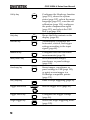
LCD display
TFT color, 320 x 234 resolution, wide angle view
LCD display.
Activates the functions which
appear in the left side of the LCD
display.
Function keys:
F1 (top) to
F5 (bottom)
Variable knob
VARIABLE
Increases or decreases values and
moves to the next or previous
parameter.
Acquire key
Acquire
Configures the acquisition mode
(page 78).
Display key
Display
Configures the display settings
(page 83).
Cursor key
Cursor
Runs cursor measurements (page
61).
(Continued on next page)
15
GDS-1000A-U Series User Manual
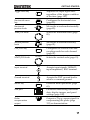
Utility key
Utility
Configures the Hardcopy function
(page 115), shows the system
status (page 107), selects the menu
language (page 107), runs the self
calibration (page 134), configures
the probe compensation signal
(page 135), and selects the USB
host type(page 104).
Help key
Help
Shows the Help contents on the
display (page 46).
Autoset key
Autoset
Automatically configures the
horizontal, vertical, and trigger
settings according to the input
signal (page 48).
Measure key
Measure
Configures and runs automatic
measurements (page 55).
Save/Recall key
Save/Recall
Saves and recalls images,
waveforms, or panel settings
(page 109).
Hardcopy key
Hardcopy
Stores images, waveforms, or
panel settings to USB (page 115),
or prints screen images to a
PictBridge compatible printer
(page 131).
Run/Stop key
Run/Stop
Runs or stops triggering (page 50).
Trigger level knob
TRIGGER
LEVE L
Trigger menu key
MENU
Single trigger key
SINGLE
16
Sets the trigger level (page 96).
Configures the trigger settings
(page 96).
Selects the single triggering mode
(page 103).
GETTING STARTED
Trigger force key
FORCE
Acquires the input signal once
regardless of the trigger condition
at the time (page 103).
Horizontal menu
key
MENU
Configures the horizontal view
(page 85).
Moves the waveform horizontally
(page 85).
Horizontal
position knob
TIME/DIV knob
TIME/DIV
Moves the waveform vertically
(page 91).
Vertical position
knob
CH1/CH2 key
VOLTS/DIV knob
Input terminal
CH 1
VOLTS/DIV
CH1
Configures the vertical scale and
coupling mode for each channel
(page 91).
Selects the vertical scale (page 91).
Accepts input signals: 1MΩ±2%
input impedance, BNC terminal.
Accepts the DUT ground lead to
achieve a common ground.
Ground terminal
MATH key
Selects the horizontal scale (page
85).
MATH
Performs math operations (page
63).
USB port
Facilitates transferring waveform
data, display images, and panel
settings (page 109).
Probe
compensation
output
Outputs a 2Vp-p, square signal for
compensating the probe (page
135) or demonstration.
17
GDS-1000A-U Series User Manual
External trigger
input
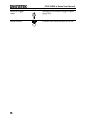
Power switch
18
EXT TRIG
Accepts an external trigger signal
(page 96).
Powers the oscilloscope on or off.
GETTING STARTED
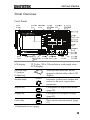
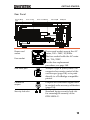
Rear Panel
Power cord
socket
Power cord socket accepts the AC
mains, 100 ~ 240V, 50/60Hz.
Fuse socket
The fuse socket holds the AC main
fuse, T1A/250V.
For the fuse replacement
procedure, see page 140.
USB slave port
Accepts a type B (slave) male USB
connector for remote control of the
oscilloscope (page 104) or to print
directly to a PictBridge compatible
printer.
Calibration
output
Outputs the calibration signal used
in vertical scale accuracy calibration
(page 134).
Security lock slot
Standard laptop security lock slot
for ensuring the security of the
GDS-1000A-U.
19
GDS-1000A-U Series User Manual
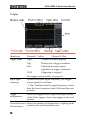
Display
Waveforms
Channel 1: Yellow
Channel 2: Blue
Trigger status
Trig’d
A signal is being triggered
Trig?
Waiting for a trigger condition
Auto
Updating the input signal
regardless of trigger conditions
STOP
Triggering is stopped
For trigger setting details, see page 96.
Input signal
frequency
Updates the input signal frequency (the trigger
source signal) in real-time.
“< 2Hz” Indicates that the signal frequency is less
than the lower frequency limit (2Hz) and thus not
accurate.
Trigger
configuration
Shows the trigger source, type, and slope. In case
of the Video trigger, shows the trigger source and
polarity.
Horizontal status Shows the channel configurations: coupling mode,
vertical scale, and horizontal scale.
Vertical status
20
GETTING STARTED
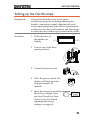
Setting up the Oscilloscope
Background
This section describes how to set up the
oscilloscope properly including adjusting the
handle, connecting a signal, adjusting the scale,
and compensating the probe. Before operating the
oscilloscope in a new environment, run these steps
to make sure the oscilloscope is functionally stable.
Procedure
1. Pull both bases of
the handle out
slightly.
2. Turn to one of the three
preset positions.
3. Connect the power cord.
4. Press the power switch. The
display will become active
in approximately 10
seconds.
5. Reset the system by recalling
the factory settings. Press
the Save/Recall key, then
Default Setup. For details
regarding the factory
settings, see page 45.
21
GDS-1000A-U Series User Manual
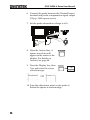
6. Connect the probe between the Channel1 input
terminal and probe compensation signal output
(2Vp-p, 1kHz square wave).
7. Set the probe attenuation voltage to x10.
8. Press the Autoset key. A
square waveform will
appear in the center of the
display. For details on
Autoset, see page 48.
9. Press the Display key, then
Type and select the vector
waveform type.
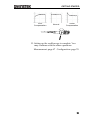
10. Turn the adjustment point on the probe to
flatten the square waveform edge.
22
GETTING STARTED
Over
Compensation
Normal
Under
Compensation
11. Setting up the oscilloscope is complete. You
may continue with the other operations.
Measurement: page 47 Configuration: page 78
23
GDS-1000A-U Series User Manual
QUICK REFERENCE
This chapter lists the oscilloscope menu tree,
operation shortcuts, built-in help coverage, and
default factory settings. Use this chapter as a
handy reference to access the oscilloscope
functions.
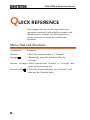
Menu Tree and Shortcuts
Conventions
Examples
Normal
= Press the functional key for “Normal”
Average
= Repeatedly press the functional key for
“Average”
Normal ~ Average = Select a menu from “Normal” to “Average” and
press its functionality key
Normal→VAR
24
= Press the functionality key for “Normal”, and
then use the Variable knob
QUICK REFERENCE
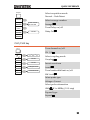
Select acquisition mode
Acquire
Normal ~ Peak-Detect
Select average number
Normal
Average
2/ 4/ 8/ 16/ 32/
64/ 128/ 256
Peak
Average
Turn Delay on/off
Detect
Delay
On/ Off
On
Delay On
Sample Rate
500MS/s
CH1/CH2 key
Turn channel on/off
CH 1
Coupling
CH 1/2
/
/
Select coupling mode
Invert
Off
On/ Off
Coupling
BW Limit
Off
On/ Off
Invert waveform
Voltage
x1
Expand
Center
Voltage/Current
Invert
Center/Ground
Turn bandwidth limit on/off
BW Limit
Select probe type
Voltage↔Current
Select probe attenuation
VAR
(0.1x~2000x) (1-2-5 step)
Expand type
Expand
25
GDS-1000A-U Series User Manual
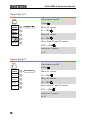
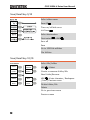
Cursor key 1/2
Turn cursor on/off
Cursor
Move X1 cursor
X1→ VAR
Move X2 cursor
X2→ VAR
Move both X1 and X2 cursor
X1X2→ VAR
Switch to Y cursor
X↔Y
Cursor key 2/2
Turn cursor on/off
Cursor
Cursor
Source
CH1
CH1/ 2/ MATH
Move Y1 cursor
Y1
123.4mV
Y1→ VAR
Y2
12.9mV
Move Y2 cursor
Y1Y2
Y2→ VAR
X↔Y
Move both Y1 and Y2 cursor
10 .5 m V
Y1Y2→ VAR
Switch to X cursor
X↔Y
26
QUICK REFERENCE
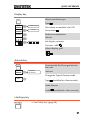
Display key
Select waveform type
Display
Type
Type
Vectors/ Dots
Vectors
Accumulate
On/ Off
Off
Waveform accumulate On/Off
Accumulate
Refresh
Refresh accumulation
Contrast
Refresh
/
Full
/
Set display contrast
Contrast→VAR
Select display grid
Autoset key
Autoset
Type
Fit Screen
Automatically find the signal and set
the scale
Fit Screen
AC Priority
Autoset
Change the Type of Autoset mode.
Undo
Type
(available for a few seconds)
Undo Autoset
Undo
(available for a few seconds)
Hardcopy key
→ See Utility key (page 40)
27
GDS-1000A-U Series User Manual
Help key
Turn help mode on/off
Help
Horizontal menu key
Switch from Horizontal Menu
to Horizontal Position Menu.
Horizontal MENU
Select main (default) display
Main
Select window mode
Window→TIME/DIV
Zoom in window mode
Window Zoom
Select window roll mode
Roll
Select XY mode
XY
Toggle adjustment mode
H Pos Adj
Reset horizontal marker
Reset
Set Horizontal marker/delete
horizontal marker.
HOR
Navigate to previous
horizontal marker.
Previous
Navigate to next horizontal
marker.
Next
28
→Set/Clear
QUICK REFERENCE
Math key 1/2 (+/-/x)
Math on/off
MATH
Operation
CH1+CH2
CH1+CH2
CH1-CH2
CH1xCH2
FFT
FFT rms
Math
Select math operation type (+/–
/x/FFT/FFT rms)
Operation
Position
0.00 Div
Unit/Div
2V
-12div ~ +12div
200mV~10V/div
Set result position
Position→VAR
Math result Volt/Div
Unit/Div→VOLTS/DIV(CH2)
29
GDS-1000A-U Series User Manual
Math key 2/2 (FFT/FFT rms)
MATH
Operation
FFT
Source
CH1
Window
Hanning
Vertical
2V
0.00 Div
Zoom
1X
0.0000Hz
CH1+CH2
CH1-CH2
CH1xCH2
FFT
FFT rms
CH1/2
Flattop/
Rectangular/
Blackman/
Hanning
-12div ~ +12div
20/10/5/2/1 dB
1/2/5/10/20X
Math on/off
Math
Select math operation type (+/–
/x/FFT/FFT rms)
Operation
Select FFT source channel
Source
Select FFT window
Window
Select FFT result position
Vertical→VAR
Select vertical scale
Vertical→VOLTS/DIV
Select vertical units
Vertical
Select Zoom level
Zoom(X)→VAR
Select Horizontal position
Zoom(Hz)→VAR
30
QUICK REFERENCE
Measure key
Measure
Measure
Vpp
Source 1
1:204mV
2: 300mV
Vavg
1: 1.93mV
2: 28.0mV
Frequency
1: 1.000kHz
2: 3.003kHz
CH1
Source 2
CH2
View all/Select
Measurements
(Voltage/
Time/Delay)
Voltage
Vpp
Duty Cycle
1: 50.01%
2: 49.88%
Rise Time
1. 76.20us
2. 70.11us
Previous
Menu
Turn on/off measurement
Measure
Select measurement type
Voltage/Time/Delay
Select measurement item
VAR
Go back to previous menu
Previous Menu
or Icon(F3)
/ → VAR
Run/Stop key
Freeze/unfreeze waveform or trigger
Run/Stop
31
GDS-1000A-U Series User Manual
Save/Recall key 1/10
Switch to Save or Recall menu
Save/Recall
Recall default setup
Default Setup
Change CSV format
CSV Format
Save/Recall key 2/10
Select other menu
Recall Setup
Select setup source
Source
→VAR
Recall setup
Recall
Go to USB file utilities
File Utilities
32
QUICK REFERENCE
Save/Recall key 3/10
Select other menu
Recall Waveform
Select waveform source
Source
→VAR
Select waveform destination
Destination→VAR
Recall waveform
Recall
Go to USB file utilities
File Utilities
Save/Recall key 4/10
Select other menu
Recall Image
Turn reference image on/off
Ref image
Recall waveform
Recall
Go to USB file utilities
File Utilities
33
GDS-1000A-U Series User Manual
Save/Recall key 5/10
Select other menu
Display Refs.
Turn ref. waveform A on/off
Ref.A
Turn ref. waveform B on/off
Ref.B
Save/Recall key 6/10
Select other menu
Save Setup
Select destination
Destination
→VAR
Save setup
Save
Go to USB file utilities
File Utilities
34
QUICK REFERENCE
Save/Recall key 7/10
Select other menu
Save Waveform
Select source
Source
→VAR
Select destination
Destination
→VAR
Save waveform
Save
Go to USB file utilities
File Utilities
Save/Recall key 8/10
Select other menu
Save Image
Turn on/off ink saver
Ink Saver
Save image
Save
Go to USB file utilities
File Utilities
35
GDS-1000A-U Series User Manual
Save/Recall key 9/10
Select other menu
Save All
Turn on/off ink saver
Ink Saver
Select destination
Destination
→VAR
Save all
Save
Go to USB file utilities
File Utilities
Save/Recall key 10/10
Select file/folder
File Utilities
Select
New
Folder
Enter
Character
Back
Space
VAR
→Select
Create or rename folder/file
New Folder/Rename
Rename
Delete
Save
Previous
Menu
Previous
Menu
VAR →Enter character / Backspace
/ Save / Previous menu
Delete folder/file
Delete
Go to previous menu
Previous menu
36
QUICK REFERENCE
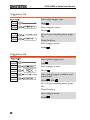
Trigger key 1/6
Trigger Type
Trigger Holdoff
MENU
MENU
Type
Holdoff
Edge
40.0ns
Source
Set to
CH1
Minimum
Select Trigger type or Trigger
Holdoff menu
Type
Slope /
Coupling
Mode
Auto
Trigger key 2/6
Select video trigger type
Type
Select trigger source
Source
Select video standard
Standard
Select video polarity
Polarity
Select video field/line
Line
→VAR
37
GDS-1000A-U Series User Manual
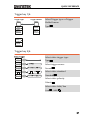
Trigger key 3/6
Select edge trigger type
Edge
Select trigger source
Source
Go to slope/coupling menu (page
39)
Slope/Coupling
Select trigger mode
Mode
Trigger key 4/6
Select pulse trigger type
Type
Select trigger source
Source
Select pulse trigger condition and
pulse width
When
→VAR
Go to slope/coupling menu (page
39)
Slope/Coupling
Select trigger mode
Mode
38
QUICK REFERENCE
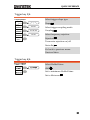
Trigger key 5/6
Select trigger slope type
Coupling/Slope
Slope
/
Coupling
AC/ DC
AC
Rejection
Off
LF/ HF/ Off
Noise Rej
Off
Previous
Menu
On/ Off
Slope
Select trigger coupling mode
Coupling
Select frequency rejection
Rejection
Turn noise rejection on/off
Noise Rej
Go back to previous menu
Previous Menu
Trigger key 6/6
Select Holdoff time
VAR
Set to minimum Holdoff time
Set to Minimum
39
GDS-1000A-U Series User Manual
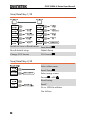
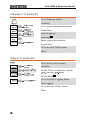
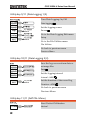
Utility key 1/11 (Utility #1)
Go to hardcopy menu
Hardcopy
Go to probe compensation menu
ProbeComp
Select language
Language
Show system information
System Info.
Go to the next Utility menu
More
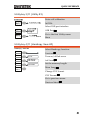
Utility 2/11 (Utility #2)
Go to the Go-NoGo menu
Go-NoGo
Set the NoGo conditions to inside
/outside
limits
No Go When
Go to the Data Logging Menu
Data Logging
Go to the next Utility menu
More
40
QUICK REFERENCE
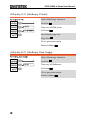
Utility key 3/11 (Utility #3)
Enter self calibration
Self CAL
Select USB port interface
USB Port
Go to the first Utility menu
More
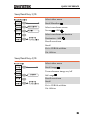
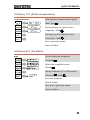
Utility key 4/11 (Hardcopy -Save All)
Hardcopy – Save All
Function
Function
Save All
Ink Saver
Off
Mem Leng
USB 1M
CSV Format
Fast
Previous
Menu
Select Hardcopy function
On/ Off
Turn on/off Ink saver
USB Normal
USB 1M/2M
Ink Saver
Fast/ Detail
Set the memory length
Mem Leng
Change CSV format
CSV Format
Go to previous menu
Previous Menu
41
GDS-1000A-U Series User Manual
Utility key 5/11 (Hardcopy -Printer)
Select Hardcopy function
Function
Turn on/off Ink saver
Ink Saver
Set default page size
Page Size
Go to previous menu
Previous Menu
Utility key 6/11 (Hardcopy -Save Image)
Select Hardcopy function
Function
Turn on/off Inksaver
Ink Saver
Go to previous menu
Previous Menu
42
QUICK REFERENCE
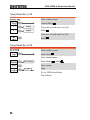
Utility key 7/11 (Probe compensation)
Select probe compensation signal
Probe compensation
Wave Type
Frequency
/
only)
1k ~ 100k
Set frequency for square wave
(
only)
5% ~ 95%
Frequency→VAR
1K
Duty Cycle
50%
Wave Type
(
Default
1kHz
Previous
Menu
Set duty cycle for square wave
Duty Cycle→VAR
Go to previous menu
Previous Menu
Utility key 8/11 (Go-NoGo)
Switch between templates
Template
Select the template source
Source
Set the tolerance (% or Divisions)
Tolerance
→VAR
Save the template
Save & Create
Go back to previous menu
Previous Menu
43
GDS-1000A-U Series User Manual
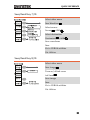
Utility key 9/11 (Data Logging 1/2)
Turn Data Logging On/Off
Data logging
Set the logging source
Source
Go to the Data Logging Edit menu
Setup
Go to the File Utilities menu
File Utilities
Go back to previous menu
Previous Menu
Utility key 10/11 (Data Logging 2/2)
Save the logs as waveform data or
as image files
Save
Set the logging interval
Interval→VAR
Set the duration of the record log
Duration→VAR
Go back to previous menu
Previous Menu
Utility key 11/11 (Self CAL Menu)
Start Vertical Calibration
Vertical
44
QUICK REFERENCE
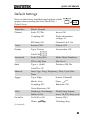
Default Settings
Here are the factory installed panel settings which
appear when pressing the Save/Recall key→
Default Setup.
Acquisition
Mode: Normal
Channel
Scale: 2V/Div
Invert: Off
Coupling: DC
Probe attenuation
voltage: x1
BW limit: Off
Channel 1 & 2: On
Cursor
Source: CH1
Cursor: Off
Display
Type: Vectors
Accumulate: Off
Grid: Full
Horizontal
Math
Scale: 2.5us/Div
Mode: Main Timebase
H Pos Adj: Fine
Hor Pos: 0
Type: + (Add)
Position: 0.00 Div
Unit/Div: 2V
Measure
Item: Vpp, Vavg, Frequency, Duty Cycle, Rise
Time
Trigger
Type: Edge
Source: Channel1
Mode: Auto
Slope:
Coupling: DC
Rejection: Off
Noise Rejection: Off
Utility
Hardcopy: SaveImage,
InkSaver On
ProbeComp: Square
wave, 1k, 50% duty cycle
Go-NoGo
Go-NoGo: Off
Source: CH1
When:
Violating: Stop
(Continued)
45
GDS-1000A-U Series User Manual
Data Logging
Data logging: Off
Source: CH1
Setup: Waveform
Interval: 2 secs
Duration: 5 mins
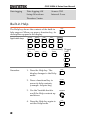
Built-in Help
The Help key shows the contents of the built-in
help support. When you press a function key, its
descriptions appear in the display.
Applicable keys
Acquire
Display
Cursor
Measure
Utility
Save/Recall Hardcopy
Autoset
Run/Stop
(Horizontal) (Trigger)
(Vertical)
CH 1
Help
Help
MATH
CH 2
MENU
MENU
SINGLE
FORCE
Procedure
1. Press the Help key. The
display changes to the Help
mode.
2. Press a functional key to
access its help contents.
(example: Acquire key)
46
Help
Acquire
3. Use the Variable knob to
scroll the Help contents up
and down.
VARIABLE
4. Press the Help key again to
exit the Help mode.
Help
MEASUREMENT
MEASUREMENT
The Measurement chapter describes how to
properly observe a signal using the oscilloscope’s
basic functions, and how to observe a signal in a
detailed manner using some of the advanced
functions such as:
Automatic measurements, cursor measurements,
and math operations.
Basic Measurements
This section describes the basic operations required in capturing and
viewing an input signal. For more detailed operations, see the
following chapters.
•
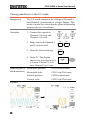
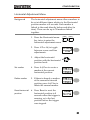
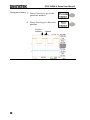
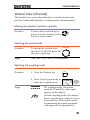
Measurements → from page 47
•
Configuration → from page 78
Activating a channel
Activating a
channel
To activate an input channel,
press the Channel key, CH1 or
CH2. The channel indicator
appears at the left side of the
display and the channel icon
changes accordingly.
CH 1
CH 2
or
(Continued on next page)
47
GDS-1000A-U Series User Manual
De-activating a
channel
To de-activate the channel, press the Channel key
twice (once if the channel menu is already
selected).
Using Autoset
Background
The Autoset function automatically configures the
panel settings to the best viewing conditions, in the
following way.
•
Selecting the horizontal scale
•
Positioning the waveform horizontally
•
Selecting the vertical scale
•
Positioning the waveform vertically
•
Selecting the trigger source channel
•
Activating the channels
Autoset can be configured into two types of
modes, AC Priority Mode or Fit Screen Mode.
AC Priority mode will scale the waveform to the
screen removing any DC component.
Fit Screen Mode will fit the waveform to the best
scale, including any DC components (offset).
48
MEASUREMENT
Procedure
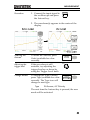
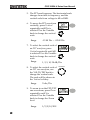
1. Connect the input signal to
the oscilloscope and press
the Autoset key.
Autoset
2. The waveform(s) appears in the center of the
display.
Undoing the
Autoset
To undo the Autoset, press
Undo (available for a few
seconds).
Adjusting the
trigger level
If the waveform is still
unstable, try adjusting the
trigger level up or down by
using the Trigger Level knob.
Change Modes
To change the type of mode,
press Type (available for a few
seconds). The Type icon will
change to next type.
Type
LEVE L
Fit Screen, AC Priority
The next time the Autoset key is pressed, the new
mode will be activated.
49
GDS-1000A-U Series User Manual
Limitation
Autoset does not work in the following situation.
•
Input signal frequency less than 2Hz
•
Input signal amplitude less than 30mV
Running and stopping the trigger
Background
In the trigger Run mode, the oscilloscope
constantly searches for a trigger condition and
updates the signal onto the display when the
condition is met.
In the trigger Stop mode, the oscilloscope stops
triggering and thus the last acquired waveforms
stay in the display. The trigger icon at the top of
the display changes into Stop mode.
Pressing the Trigger Run/Stop key
switches between the Run and Stop
mode.
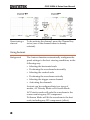
Trigger Run mode
Auto or
Trig icon
50
Run/Stop
Trigger Stop mode
Stop icon
MEASUREMENT
Waveform
operation
Waveforms can be moved or scaled in both the
Run and Stop mode. For details, see page 85
(Horizontal position/scale) and page 91 (Vertical
position/scale).
Changing the horizontal position and scale
For more detailed configurations, see page 85.
Setting the
horizontal
position
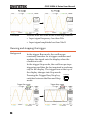
The horizontal position knob
moves the waveform left or right.
The position indicator moves along with the
waveform and the distance from the center point is
displayed as the offset in the upper side of the
display.
Horizontal offset
Position indicator
Selecting the
horizontal scale
To select the timebase (scale), turn
the TIME/DIV knob; left (slow) or
right (fast).
Range
TIME/DIV
1ns/Div ~ 10s/Div, 1-2.5-5 increment
51
GDS-1000A-U Series User Manual
Changing the vertical position and scale
For more detailed configuration, see page 91.
Set vertical
position
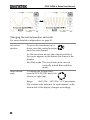
To move the waveform up or
down, turn the vertical position
knob for each channel.
As the waveform moves, the vertical position of
the cursor appears at the bottom left corner of the
display.
Run/Stop mode The waveform can be moved
vertically in both Run and Stop
mode.
Select vertical
scale
To change the vertical scale,
turn the VOLTS/DIV knob; left
(down) or right (up).
Range
VOLTS/DIV
2mV/Div ~ 10V/Div, 1-2-5 increments
The vertical scale indicator for each channel on the
bottom left of the display changes accordingly.
52
MEASUREMENT
Using the probe compensation signal
Background
This section introduces how to use
the probe compensation signal for
general usage, in case the DUT
signal is not available or to get a
second signal for comparison. For
probe compensation details, see
page 135.
Note: The frequency accuracy and duty factor are
not guaranteed. Therefore the signal should not be
used for reference purposes.
Waveform type
Square waveform used for probe
compensation. 1k ~ 100kHz, 5% ~
95%.
Demonstration signal for showing
the effects of peak detection. See page
78 for peak detection mode details.
View the probe
compensation
waveform
1. Connect the probe between the compensation
signal output and Channel input.
2. Press the Utility key.
Utility
3. Press ProbeComp.
53
GDS-1000A-U Series User Manual
4. Press Wave type repeatedly
to select the wave type.
5. (For
only) To change
the frequency, press
Frequency and use the
Variable knob.
Range
1kHz ~ 100kHz
only) To change
6. (For
the duty cycle, press Duty
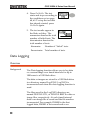
Cycle and use the Variable
knob.
Range
Probe
compensation
54
VARIABLE
VARIABLE
5% ~ 95%
For probe compensation details, see page 135.
MEASUREMENT
Automatic Measurements
The automatic measurement function measures input signal
attributes and updates them in the display. Up to 5 automatic
measurement items can be updated at any one time on the side
menus. All automatic measurement types can be displayed on
screen if necessary.
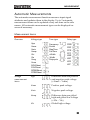
Measurement items
Overview
Voltage
measurement
items
Voltage type
Time type
Delay type
Vpp
Vmax
Vmin
Vamp
Vhi
Vlo
Vavg
Vrms
ROVShoot
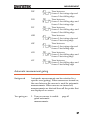
FOVShoot
RPREShoot
FPREShoot
Frequency
Period
RiseTime
FallTime
+Width
-Width
Dutycycle
FRR
FRF
FFR
FFF
LRR
LRF
LFR
LFF
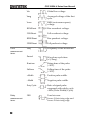
Vpp
Difference between positive
and negative peak voltage
(=Vmax − Vmin)
Vmax
Positive peak voltage.
Vmin
Negative peak voltage.
Vamp
Difference between global
high and global low voltage
(=Vhi − Vlo)
Vhi
Global high voltage.
55
GDS-1000A-U Series User Manual
Time
measurement
items
Delay
measurement
items
56
Vlo
Global low voltage.
Vavg
Averaged voltage of the first
cycle.
Vrms
RMS (root mean square)
voltage.
ROVShoot
Rise overshoot voltage.
FOVShoot
Fall overshoot voltage.
RPREShoot
Rise preshoot voltage.
FPREShoot
Fall preshoot voltage.
Freq
Frequency of the waveform.
Period
Waveform cycle time
(=1/Freq).
Risetime
Rising time of the pulse
(~90%).
Falltime
Falling time of the pulse
(~10%).
+Width
Positive pulse width.
–Width
Negative pulse width.
Duty Cycle
Ratio of signal pulse
compared with whole cycle
=100x (Pulse Width/Cycle)
FRR
Time between:
Source 1 first rising edge and
Source 2 first rising edge
MEASUREMENT
FRF
Time between:
Source 1 first rising edge and
Source 2 first falling edge
FFR
Time between:
Source 1 first falling edge and
Source 2 first rising edge
FFF
Time between:
Source 1 first falling edge and
Source 2 first falling edge
LRR
Time between:
Source 1 first rising edge and
Source 2 last rising edge
LRF
Time between:
Source 1 first rising edge and
Source 2 last falling edge
LFR
Time between:
Source 1 first falling edge and
Source 2 last rising edge
LFF
Time between:
Source 1 first falling edge and
Source 2 last falling edge
Automatic measurement gating
Background
Automatic measurements can be restricted to a
specific area (gating). When cursors are turned on,
the area between the cursors is used for automatic
measurements. When cursors are turned off,
measurements are derived from all the points that
are displayed on screen.
Turn gating on
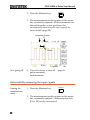
1. Turn on cursors to enable
gated automatic
measurements.
page 61
57
GDS-1000A-U Series User Manual
2. Press the Measure key.
Measure
3. The measurement results appear on the menu
bar, constantly updated. All measurements are
derived from the cursor positions. See
Automatically measuring the input signals for
more details (page 58).
Horizontal Cursor
X1
X2
Gating
Turn gating off
4. Turn off cursors to turn off
gated automatic
measurements.
page 61
Automatically measuring the input signals
Viewing the
measurement
result
1. Press the Measure key.
Measure
2. The measurement results appear on the menu
bar, constantly updated. 5 measurement slots
(F1 to F5) can be customized.
58
MEASUREMENT
Editing a
measurement
item
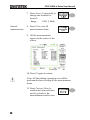
3. Press the corresponding
menu key (F1~F5) to select
the measurement slot to be
edited.
4. The editing menu appears
Change
measurement
item
5. Use the Variable knob to
select a different
measurement item.
Change
measurement
source
6. Press Source 1 repeatedly to
change Source1 from CH1
to CH2 or MATH.
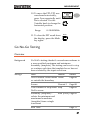
Range
VARIABLE
CH1, 2, Math
59
GDS-1000A-U Series User Manual
7. Press Source 2 repeatedly to
change the channel for
Source2.
Range
View all
measurements
CH1, 2, Math
8. Press F3 to view all
measurement items.
9. All the measurements
appear in the center of the
screen.
10. Press F3 again to return.
Note: All the editing operations can still be
performed when viewing all the measurement
items.
11. Press Previous Menu to
confirm the item selection
and to go back to the
measurement results view.
60
MEASUREMENT
Cursor Measurements
Cursor lines, horizontal or vertical, show the precise position of the
input waveforms or the math operation results. The horizontal
cursors can track time, voltage/current* and frequency, whilst the
vertical cursors can track voltage/current*. All measurements are
updated in real-time. *probe type dependant (page 94).
Using the horizontal cursors
Procedure
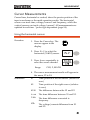
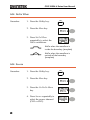
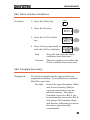
1. Press the Cursor key. The
cursors appear in the
display.
Cursor
2. Press X↔Y to select the
horizontal (X1&X2) cursor.
3. Press Source repeatedly to
select the source channel.
Range
CH1, 2, MATH
4. The cursor measurement results will appear in
the menu, F2 to F4.
Parameters
X1
Time position of the left cursor. (relative to
zero)
X2
Time position of the right cursor. (relative
to zero)
X1X2
The difference between the X1 and X2.
∆: us
The time difference between X1 and X2.
f: Hz
The time difference converted to
frequency.
V/A
The voltage/current difference from X1
and X2.
61
GDS-1000A-U Series User Manual
M1:dB Position of the left cursor in dB.
M2:dB Position of the right cursor in dB.
Moving the
horizontal
cursors
∆: dB
The dB difference between M1 and M2.
Div:
The frequency per division.
To move the left cursor, press
X1 and then use the Variable
knob.
To move the right cursor, press
X2 and then use the Variable
knob.
To move both cursors at once,
press X1X2 and then use the
Variable knob.
Remove cursors
Press Cursor to remove the
onscreen cursors.
Cursor
Using the vertical cursors
Procedure
1. Press the Cursor key.
Cursor
2. Press X↔Y to select the
vertical (Y1&Y2) cursor.
3. Press Source repeatedly to
select the source channel.
Range
CH1, 2, MATH
4. The cursor measurement results will appear in
the menu.
Parameters
62
Y1
Voltage level of the upper cursor
Y2
Voltage level of the lower cursor
MEASUREMENT
Moving the
vertical cursors
Y1Y2
The difference between the upper and
lower cursor
V/A
The voltage/current difference (Y1-Y2).
To move the upper cursor,
press Y1 and then use the
Variable knob.
To move the lower cursor,
press Y2 and then use the
Variable knob.
To move both cursors at once,
press Y1Y2 and then use the
Variable knob.
Remove cursors
Press Cursor to remove the
onscreen cursors.
Cursor
Math Operations
The Math operations can add, subtract, multiply or perform
FFT/FFT RMS on the input waveforms. The resulted waveform can
be measured using the cursors, and saved or recalled just like
normal input signals.
Overview
Addition (+)
Adds the amplitude of CH1 & CH2 signals.
Subtraction (–)
Extracts the amplitude difference between CH1 &
CH2.
Multiplication (×) Multiplies CH1 and CH2.
FFT
Performs a FFT calculation on a signal. Four types
of FFT windows are available: Hanning, Flattop,
Rectangular, and Blackman.
63
GDS-1000A-U Series User Manual
FFT RMS
Performs a FFT RMS calculation on a signal. RMS
is similar to FFT, however the amplitude is
calculated as RMS and not dB. Four types of FFT
windows are available: Hanning, Flattop,
Rectangular, and Blackman.
Hanning FFT
window
Frequency resolution Good
Amplitude resolution Not good
Suitable for....
Flattop FFT
window
Frequency resolution Not good
Amplitude resolution Good
Suitable for....
Rectangular FFT
window
Amplitude measurement on
periodic waveforms
Frequency resolution Very good
Amplitude resolution Bad
Suitable for....
Blackman FFT
window
Frequency measurement on
periodic waveforms
Single-shot phenomenon
(this mode is the same as
having no window at all)
Frequency resolution Bad
Amplitude resolution Very good
Suitable for....
Amplitude measurement on
periodic waveforms
Adding, subtracting or multiplying signals
Procedure
64
1. Activate both CH1 and
CH2.
CH 1
2. Press the Math key.
MATH
CH 2
MEASUREMENT
3. Press Operation repeatedly
to select addition (+),
subtraction (–) or
multiplication (×).
4. The math measurement
result appears in the
display.
VARIABLE
5. To move the math result
vertically, use the Variable
knob. The position will be
displayed in Position.
6. To clear the math result
from the display, press the
Math key again.
MATH
Using the FFT function
Procedure
1. Press the Math key.
MATH
2. Press Operation repeatedly
to select FFT or FFT RMS.
3. Press Source repeatedly to
select the source channel.
4. Press Window repeatedly to
select the FFT window type.
65
GDS-1000A-U Series User Manual
5. The FFT result appears. The horizontal scale
changes from time to frequency, and the
vertical scale from voltage to dB or RMS.
6. To move the FFT waveform
vertically, press Vertical
repeatedly until Div is
selected. Use the Variable
knob to change the vertical
scale.
Range
–12.00 Div ~ +12.00 Div
7. To select the vertical scale of
an FFT waveform, press
Vertical repeatedly until dB
is selected. Use the Variable
knob to change the vertical
scale.
Range
66
VOLTS/DIV
Volts/Div
9. To zoom in on the FFT/FFT
rms waveform, press Zoom
repeatedly until X is
selected. Use the Variable
knob to change the Zoom
level.
Range
VARIABLE
1, 2, 5, 10, 20 dB/Div
8. To select the vertical scale of
an FFT rms waveform, use
the VOLTS/DIV knob to
change the vertical scale.
The scale will be shown in
the Vertical soft-key.
Range
VARIABLE
1/2/5/10/20X
VARIABLE
MEASUREMENT
10. To move the FFT/FFT rms
waveform horizontally,
press Zoom repeatedly until
Hz is selected. Use the
Variable knob to change the
horizontal position.
Range
VARIABLE
0~50.000MHz
11. To clear the FFT result from
the display, press the Math
key again.
MATH
Go No-Go Testing
Overview
Background
Go-NoGo testing checks if a waveform conforms to
a user-specified maximum and minimum
boundary (template). The testing can be set to stop
or continue each time the template has or has not
been violated by the input waveform.
Settings
Item
Default
Details
NoGo criteria: When inside Inside
or outside the boundary
Page 68
Source
Page 68
Channel 1
Test continue or stop when Stop
NoGo occurs
Boundary (template) –
selects the minimum and
maximum boundaries
(template) from a single
waveform
Run Tests
Page 69
Auto (0.4%) Page 69
Page 73
67
GDS-1000A-U Series User Manual
Edit: NoGo When
Procedure
1. Press the Utility key.
Utility
2. Press the More key.
3. Press No Go When
repeatedly to select the
NoGo conditions.
NoGo when the waveform is
inside the boundary (template)
NoGo when the waveform is
outside of the boundary
(template)
Edit: Source
Procedure
1. Press the Utility key.
2. Press the More key.
3. Press the Go-NoGo Menu
key.
4. Press Source repeatedly to
select the source channel
(CH1 or CH2).
68
Utility
MEASUREMENT
Edit: NoGo Violation Conditions
Procedure
1. Press the Utility key.
Utility
2. Press the More key.
3. Press the Go-NoGo Menu
key.
4. Press Violating repeatedly to
select the NoGo conditions.
Stop
Stops the test when the NoGo
conditions have been met.
Continue
The tests continue even when the
NoGo conditions have been met.
Edit: Template (boundary)
Background
The NoGo template sets the upper and lower
amplitude boundary. Two methods are available:
Min/Max and Auto.
Min/Max
Selects the upper boundary (Max)
and lower boundary (Min) as
separate waveforms, from the
internal memory. The upper
boundary is saved to Ref A, the
lower boundary is saved to Ref. B.
Advantage: The template shape
and distance (allowance) between
the source signal are fully
customizable.
69
GDS-1000A-U Series User Manual
Disadvantage: The waveforms
(templates) have to be stored
internally prior to this selection.
Auto
Creates the upper and lower
boundary (template) from the
source signal, not from an
internally stored waveform.
Advantage: No need to store the
waveforms prior to this selection.
Disadvantage: The template shape
is proportional to the source
signal. The distance (allowance)
between the source signal and the
upper and lower template is the
same.
Max/Mix
1. The template is based on the source signal.
Ensure the source signal appears on the
display.
2. Press the Utility key.
3. Press the More key.
4. Press the Go-NoGo Menu
key.
5. Press the Template Edit key.
6. Press Template repeatedly to
select the upper (Max) or
lower (Min) boundaries.
70
Utility
MEASUREMENT
7. Press Source and use the
Variable knob to select the
waveform template.
VARIABLE
Max
Waveform A: Ref A, W01~W15
Min
Waveform B: Ref B, W01~W15
8. Press Position and use the
Variable knob to set the
waveform amplitude.
VARIABLE
9. Repeat steps 5-7 for the other template setting
(Max or Min).
10. When both Max and Min
templates have been
configured, press Save &
Create to save the templates.
Max: Waveform A
Position
Min: Waveform B
71
GDS-1000A-U Series User Manual
Auto
1. The template is based on the source signal.
Ensure the source signal appears on the
display.
2. Press the Utility key.
Utility
3. Press the More key.
4. Press the Go-NoGo Menu
key.
5. Press the Template Edit key.
6. Press Template repeatedly to
select the Auto template.
7. Press Source and use the
Variable knob to select the
template source.
VARIABLE
Source
CH1, CH2
8. Press Tolerance repeatedly to
choose the tolerance units,
% or Div. Use the Variable
knob to set the tolerance.
The tolerance is for both the
horizontal and vertical axis.
%
72
0.4% ~ 40.0%
VARIABLE
MEASUREMENT
Div
0.04 Div ~ 4.0 Div
9. When the Auto template has
been configured, press Save
& Create to save the
template.
Run Go-NoGo Tests
Procedure
1. Press the Utility key.
Utility
2. Press the More key.
3. Press the Go-NoGo Menu
key.
Ensure the source signal and boundary templates
appear on the screen.
73
GDS-1000A-U Series User Manual
4. Press Go-NoGo. The test
starts and stops according to
the conditions set on page
68, 69. To stop the test that
has already started, press
Go-NoGo again.
5. The test results appear in
the Ratio soft-key. The
numerator denotes the total
number of failed tests. The
denominator denotes the
total number of tests.
Numerator
Number of “failed“ tests.
Denominator
Total number of tests.
Data Logging
Overview
Background
The Data logging function allows you to log data
or a screen image over timed intervals for up to
100 hours to a USB flash drive.
The data or images are stored to a USB flash drive
in a directory named LogXXXX. LogXXXX is
incremented each time the data logging function is
used.
The files saved in the LogXXXX directory are
named DSXXXX.CSV, or DSXXXX.BMP for data or
image files, respectively. At each timed interval
data or an image file is saved and the file number
incremented. For example, DS0000 is the first
logged data, DS0001 is the second and so on.
74
MEASUREMENT
Edit: Source
Procedure
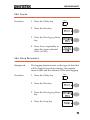
1. Press the Utility key.
Utility
2. Press the More key.
3. Press the Data logging Menu
key.
4. Press Source repeatedly to
select the source channel
(CH1 or CH2).
Edit: Setup Parameters
Background
The logging function must set the type of data that
will be logged (waveform/image), the capture
interval time and the duration of the data logging.
Procedure
1. Press the Utility key.
Utility
2. Press the More key.
3. Press the Data logging Menu
key.
4. Press the Setup key.
75
GDS-1000A-U Series User Manual
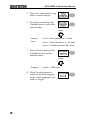
5. Press Save repeatedly to log
data or screen images.
6. Press Interval and use the
Variable knob to select the
interval time.
VARIABLE
Interval
time
2 secs~ 2min (duration = 5 min)
2 secs~ 5 min (duration 5~ 30 min)
2 secs~ 30 min (duration 30+ min)
7. Press Duration and use the
Variable knob to set the
duration time.
VARIABLE
Duration
5 mins ~ 100 hours
8. Press Previous menu to
return to the Data logging
menu. Data logging is now
ready to begin.
76
MEASUREMENT
Run Data logging
Background
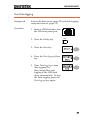
Ensure the data source (page 75) and data logging
setup has been set (page 75).
Procedure
1. Insert a USB flash drive into
the USB front panel port.
2. Press the Utility key.
Utility
3. Press the More key.
4. Press the Data logging Menu
key.
5. Press Data logging to turn
data logging On.
Data/image files start
logging to the USB flash
drive automatically. To stop
the Data logging, press the
Data logging key again.
77
GDS-1000A-U Series User Manual
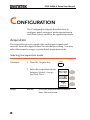
CONFIGURATION
The Configuration chapter describes how to
configure panel settings to make measurements
and observations suited to the application needs.
Acquisition
The acquisition process samples the analog input signals and
converts them into digital format for internal processing. You may
select the normal, average, or peak detect acquisition mode.
Selecting the acquisition mode
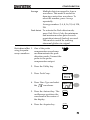
Procedure
1. Press the Acquire key.
Acquire
2. Select the acquisition mode
between Normal, Average
and Peak Detect.
Range
78
Normal
All of the acquired data is used to
draw the waveform.
CONFIGURATION
Average
Multiple data is averaged to form a
waveform. This mode is useful for
drawing a noise-free waveform. To
select the number, press Average
repeatedly.
Average number: 2, 4, 8, 16, 32, 64, 128,
256
Peak detect To activate the Peak detect mode,
press Peak-Detect. Only the minimum
and maximum value pairs for each
acquisition interval (bucket) are used.
This mode is useful for catching
abnormal glitches in a signal.
Peak detect effect 1. One of the probe
using the probe
compensation waveforms
comp. waveform
can demonstrate the peak
detection mode. Connect the
probe to the probe
compensation output.
2. Press the Utility key.
Utility
3. Press ProbeComp.
4. Press Wave Type and select
the
waveform.
5. Press the Autoset key. The
oscilloscope positions the
waveform in the center of
the display.
Autoset
6. Press the Acquire key.
Acquire
79
GDS-1000A-U Series User Manual
7. Press Normal.
8. Press Peak-Detect and see
that a spike noise is
captured.
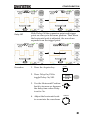
Example
The peak detect mode reveals the occasional glitch.
Normal mode
Peak detect mode
Selecting Delay mode
Background
Delay On
80
When delay time is ON, the displayed output is
delayed for a defined amount of time from the
trigger point. Using the delay function is useful
for observing an area of the waveform that occurs
some time after the trigger point.
With Delay On the expansion point and trigger
point become separated by the amount of delay
time. As the delay time is increased the trigger
point moves left from the expansion point. When
the horizontal scale is adjusted, the waveform
expands from the expansion point, not the trigger
point.
CONFIGURATION
Delay Off
Procedure
With Delay Off the expansion point and trigger
point are always in the same position. Thus when
the horizontal scale is adjusted, the waveform
expands from the trigger point.
1. Press the Acquire key.
Acquire
2. Press Delay On/Off to
toggle Delay On/Off.
3. Use the Horizontal Position
knob to increase or decrease
the delay time when Delay
is set to On.
4. Adjust the horizontal scale
to zoom into the waveform.
TIME/DIV
81
GDS-1000A-U Series User Manual
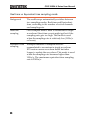
Real time vs Equivalent time sampling mode
Background
The oscilloscope automatically switches between
two sampling modes, Real-time and Equivalenttime, according to the number of active channels
and sampling rate.
Real-time
sampling
Once sampled data is used to reconstruct a single
waveform. Short-time events might get lost if the
sampling rate gets too high. This mode is used
when the sampling rate is relatively low (1GSa/s
or lower).
Equivalent-time
sampling
Multiple numbers of sampled data are
accumulated to reconstruct a single waveform.
ETS restores more waveform detail but takes
longer to update the waveform. This mode is used
when the sampling rate becomes higher than
1GSa/s. The maximum equivalent-time sampling
rate is 25GSa/s.
82
CONFIGURATION
Display
The Display section describes how to configure the display settings:
drawing type, waveform accumulation, contrast adjustment, and
grid settings.
Selecting vector or dot drawing
Procedure
1. Press the Display key.
Display
2. Press Type repeatedly to
select the waveform
drawing.
Types
Dots
Only the sampled dots are displayed.
Vectors
The sampled dots are connected by
lines.
Accumulating the waveform
Background
Accumulation preserves the old waveform
drawings and overwrites new waveforms on top
of it. It is useful for observing waveform variation.
Procedure
1. Press the Display key.
Display
2. Press Accumulate to turn on
the waveform accumulation.
3. To clear the accumulation
and start it over (refresh),
press Refresh.
83
GDS-1000A-U Series User Manual
Example
Accumulation off
Accumulation on
Adjusting the display contrast
Display
Procedure
1. Press the Display key.
2. Press Contrast.
3. Turn the Variable knob left
to lower the contrast (dark
display) or right to raise the
contrast (bright display).
VARIABLE
Selecting the display grid
Procedure
1. Press the Display key.
Display
2. Press the grid icon
repeatedly to select the grid.
Parameters
Shows the full grid.
Shows the outer frame and X/Y axis.
Shows only the outer frame.
84
CONFIGURATION
Horizontal View
The Horizontal view section describes how to configure the
horizontal scale, position, waveform update mode, window zoom,
and X-Y mode.
Moving the waveform position horizontally
Procedure
The horizontal position knob
moves the waveform left or
right. The position indicator at
the top of the display shows the
center and current position.
Center position
Moving right
Selecting the horizontal scale
Select horizontal To select the timebase (scale),
scale
turn the TIME/DIV knob; left
(slow) or right (fast).
Range
TIME/DIV
1ns/Div ~ 50s/Div, 1-2.5-5-10 increment
The timebase indicator at the bottom of the display
updates the current horizontal scale.
85
GDS-1000A-U Series User Manual
Selecting the waveform update mode
Background
The display update mode is switched
automatically or manually according to the
horizontal scale.
Main mode
Updates the whole displayed waveform at once.
The main mode is automatically selected when the
horizontal scale (timebase) is fast.
Roll mode
Horizontal scale
≤100ms/div
Trigger
All modes available
Updates and moves the waveform gradually from
the right side of the display to the left. The Roll
mode is automatically selected when the
horizontal scale (timebase) is 50ms or slower.
When in the Roll mode, an indicator appears at the
bottom of the display. When in roll mode the
record length is 2M (1 channel) or 1M (2 channel).
Main mode
Timebase
≥50ms/div (≤1.25MS/s)
Trigger
Auto mode only
Selecting the Roll 1. Press the Horizontal menu
mode manually
key.
2. Press Roll. The horizontal
scale automatically becomes
50ms/div and the
waveform starts scrolling
from the right side of the
display (If the oscilloscope
is already in the Roll mode,
there will be no change).
86
Roll mode
MENU
CONFIGURATION
Zooming the waveform horizontally
Procedure/ range 1. Press the Horizontal Menu
key.
MENU
2. Press Window.
3. Use the horizontal position
knob to move the zoom
range sideways, and
TIME/DIV knob to change
the zoom range width.
TIME/DIV
The width of the bar in the middle of the
display is the actual zoomed area.
Zoom range
1ns ~ 25s
4. Press Window Zoom. The
specified range gets
zoomed.
Example
Setting the zoom width
Zooming in
Zoom width
87
GDS-1000A-U Series User Manual
Viewing waveforms in the X-Y mode
Background
The X-Y mode compares the voltage of Channel 1
and Channel 2 waveforms in a single display. This
mode is useful for observing the phase relationship
between the two waveforms.
Procedure
1. Connect the signals to
Channel 1 (X-axis) and
Channel 2 (Y-axis).
2. Make sure both Channel 1
and 2 are activated.
3. Press the Horizontal key.
CH 1
CH 2
MENU
4. Press XY. The display
shows two waveforms in XY format; Channel 1 as Xaxis, Channel 2 as Y-axis.
Adjusting the X-Y Horizontal position
mode waveform
Horizontal scale
Example
88
CH1 Position knob
CH1 Volts/Div knob
Vertical position
CH2 Position knob
Vertical scale
CH2 Volts/Div knob
CONFIGURATION
Horizontal Adjustment Menu
Background
The horizontal adjustment menu allows markers to
be set at different times relative to the Horizontal
position marker at 0 seconds. Each marker is
linked to the mark directly before and after (in
time). There can be up to 30 markers linked
together.
1. Press the Horizontal menu
key twice to enter the
horizontal adjustment menu
MENU
MENU
2. Press H Pos Adj to toggle
between coarse and fine
adjustments.
3. Adjust the horizontal
position with the horizontal
position knob.
Set marker
4. Press Set/Clear to create a
marker at the current
horizontal position.
Delete marker
5. If there is already a marker
at the current horizontal
position press Set/Clear to
delete the current marker.
Reset horizontal
position
6. Press Reset to reset the
horizontal position to 0
seconds when the trigger is
running, or to the last
position before the trigger
was stopped.
89
GDS-1000A-U Series User Manual
Navigate markers 7. Press Previous to go to the
previous marker.
8. Press Next to go to the next
marker.
Position
Indicator
90
Marker
CONFIGURATION
Vertical View (Channel)
The Vertical view section describes how to set the vertical scale,
position, bandwidth limitation, coupling mode, and attenuation.
Moving the waveform position vertically
Procedure
To move the waveform up or
down, turn the vertical position
knob for each channel.
Selecting the vertical scale
VOLTS/DIV
Procedure
To change the vertical scale,
turn the VOLTS/DIV knob; left
(down) or right (up).
Range
2mV/Div ~ 10V/Div, 1-2-5 increments
Selecting the coupling mode
Procedure
1. Press the Channel key.
CH 1
2. Press Coupling repeatedly to
select the coupling mode.
Range
DC coupling mode. The whole
portion (AC and DC) of the signal
appears on the display.
Ground coupling mode. The display
shows only the zero voltage level as a
horizontal line. This mode is useful
for measuring the signal amplitude
with respect to the ground level.
91
GDS-1000A-U Series User Manual
AC coupling mode. Only the AC
portion of the signal appears on the
display. This mode is useful for
observing AC waveforms mixed with
DC components.
Expand Vertical Scale Center / Ground
Background
Expand Ground
Expand Center
92
Normally when the vertical scale is increased, the
scaled image is centered from ground. However a
signal with a voltage bias could be obscured when
the vertical scale is increased. The Expand Center
function expands the image from the center of the
signal, rather than ground.
CONFIGURATION
Procedure
CH 1
1. Press the Channel key.
2. Press F5 to toggle between
Expand Center and Expand
Ground.
3. To change the vertical scale,
turn the VOLTS/DIV knob;
left (down) or right (up).
VOLTS/DIV
The vertical scale indicator on
the bottom left of the display
changes accordingly.
Inverting the waveform vertically
Procedure
CH 1
1. Press the Channel key.
2. Press Invert. The waveform
becomes inverted (upside
down) and the Channel
indicator in the display
shows a down arrow.
Original
Inverted
93
GDS-1000A-U Series User Manual
Limiting the waveform bandwidth
Background
Bandwidth limitation puts the input signal into a
20MHz (−3dB) low-pass filter. This function is
useful for cutting off high frequency noise to see
the clear waveform shape.
Procedure
1. Press the Channel key.
CH 1
2. Press BW Limit to turn on or
off the limitation. When
turned on, the BW indicator
appears next to the Channel
indicator in the display.
Example
BW Limit Off
BW Limit On
Probe attenuation level and type
Background
The probe can be set to either voltage or current.
A signal probe has an attenuation switch to lower
the original DUT signal level to the oscilloscope
input range, if necessary. The probe attenuation
selection adjusts the vertical scale so that the
voltage or current level on the display reflects the
real value, not the attenuated level.
Procedure
94
1. Press the Channel key.
CH 1
CONFIGURATION
2. Press F4 repeatedly to select
voltage or current probes.
3. Use the variable knob to
edit the voltage or current
attenuation.
VARIABLE
4. The voltage/current scale in the channel
indicator changes accordingly. There is no
change in the waveform shape.
Range
0.1X~2000X (1-2-5 steps)
Note: The attenuation factor adds no influence on
the real signal; it only changes the voltage/current
scale on the display.
95
GDS-1000A-U Series User Manual
Trigger
The Trigger function configures the conditions by which the
oscilloscope captures the incoming signals.
Trigger type
Edge
Triggers when the signal crosses an amplitude
threshold in either a positive or negative slope.
Video
Extracts a sync pulse from a video format signal
and triggers on a specific line or field.
Pulse
Triggers when the pulse width of the signal
matches the trigger settings.
Indicators
Video
Edge/Pulse
(CH1, Edge, Rising edge,
DC coupling)
(CH1, Video, Positive
polarity, NTSC standard)
Trigger parameter
Trigger source
Trigger mode
96
CH1, 2
Channel 1, 2 input signals
Line
AC mains signal
Ext
External trigger input
signal
Auto
The oscilloscope updates the input signal
regardless of the trigger conditions (if
there is no trigger event, the oscilloscope
generates an internal trigger). Select this
mode especially when viewing rolling
waveforms at a slow timebase.
CONFIGURATION
The Auto trigger status appears in the
upper right corner of the display.
Single
The oscilloscope acquires the
input signals once when a
trigger event occurs, then
stops acquiring. Pressing the
Single key again will repeat
the process.
SINGLE
The Single trigger status appears in the
upper right corner of the display.
(Searching)
Normal
(Triggered)
The oscilloscope acquires and updates
the input signals only when a trigger
event occurs.
The Normal trigger status appears in the
upper right corner of the display.
(Searching)
(Triggered)
Holdoff
The holdoff function defines the waiting period
before the GDS-1000A-U starts triggering again
after a trigger point. The Holdoff function ensures
a stable display.
Video standard
(video trigger)
NTSC
National Television System Committee
PAL
Phase Alternative by Line
SECAM
SEquential Couleur A Mémoire
Positive polarity
Sync polarity
(video trigger)
Video line
(video trigger)
Negative polarity
Selects the trigger point in the video signal.
field
1 or 2
97
GDS-1000A-U Series User Manual
1~263 for NTSC, 1~313 for PAL/SECAM
line
Pulse condition
(pulse trigger)
Sets the pulse width (20ns ~ 10s) and the triggering
condition.
>
Longer than
=
Equal to
<
Shorter than
≠
Not equal to
Triggers on the rising edge.
Trigger slope
Triggers on the falling edge.
Trigger coupling
Frequency
rejection
AC
Triggers only on AC component.
DC
Triggers on AC+DC component.
LF
Puts a high-pass filter and rejects the
frequency below 50kHz.
HF
Puts a low-pass filter and rejects the
frequency above 50kHz.
Noise rejection
Rejects noise signals.
Trigger level
LEVE L
Using the trigger level knob moves the
trigger point up or down.
Configuring Holdoff
Background
The Holdoff function defines the waiting period
before GDS-1000A-U starts triggering again after
the trigger point. The holdoff function is especially
useful for waveforms with two or more repetitive
frequencies or periods that can be triggered.
Panel operation
1. Press the Trigger menu key
twice.
2. To set the Holdoff time, use
the Variable knob. The
resolution depends on the
horizontal scale.
Range
98
40ns~2.5s
MENU
MENU
CONFIGURATION
Pressing Set to Minimum
sets the Holdoff time to the
minimum, 40ns.
Note: The holdoff function is automatically
disabled when the waveform update mode is
in Roll mode.
Configuring the edge trigger
Procedure
1. Press the Trigger menu key.
MENU
2. Press Type repeatedly to
select edge trigger.
3. Press Source repeatedly to
select the trigger source.
Range
Channel 1, 2, Line, Ext
4. Press Mode repeatedly to
select the Auto or Normal
trigger mode. To select the
single trigger mode, press
the Single key.
Range
SINGLE
Auto, Normal
5. Press Slope/coupling to enter
into the trigger slope and
coupling selection menu.
6. Press Slope repeatedly to
select the trigger slope,
rising or falling edge.
Range
Rising edge, falling edge
99
GDS-1000A-U Series User Manual
7. Press Coupling repeatedly to
select the trigger coupling,
DC or AC.
Range
DC, AC
8. Press Rejection to select the
frequency rejection mode.
Range
LF, HF, Off
9. Press Noise Rej to turn the
noise rejection on or off.
Range
On, Off
10. Press Previous menu to go
back to the previous menu.
Configuring the video trigger
Procedure
1. Press the Trigger menu key.
2. Press Type repeatedly to
select video trigger. The
video trigger indicator
appears at the bottom of the
display.
3. Press Source repeatedly to
select the trigger source
channel.
Range
100
Channel 1, 2
MENU
CONFIGURATION
4. Press Standard repeatedly to
select the video standard.
Range
NTSC, PAL, SECAM
5. Press Polarity repeatedly to
select the video signal
polarity.
Range
positive, negative
6. Press Line repeatedly to
select the video field line.
Use the Variable knob to
select the field.
Field
VARIABLE
NTSC: 1 ~ 262 (Field 2), 1 ~ 263
(Field 1) PAL/SECAM: 1 ~ 312
(Field 2), 1 ~ 313 (Field1)
Configuring the pulse width trigger
Procedure
1. Press the Trigger menu key.
MENU
2. Press Type repeatedly to
select pulse width trigger.
The pulse width trigger
indicator appears at the
bottom of the display.
3. Press Source repeatedly to
select the trigger source.
Range
Channel 1, 2, Ext
101
GDS-1000A-U Series User Manual
4. Press Mode repeatedly to
select the trigger mode,
Auto or Normal. To select
the Single trigger mode,
press the Single key.
Range
SINGLE
Auto, Normal
5. Press When repeatedly to
select the pulse condition.
Then use the Variable knob
to set the pulse width.
VARIABLE
Condition > , < , = , ≠
Width
20ns ~ 10s
6. Press Slope/Coupling to set
trigger slope and coupling.
7. Press Slope repeatedly to
select the trigger slope,
which also appears at the
bottom of the display.
Range
Rising edge, falling edge
8. Press Coupling repeatedly to
select the trigger coupling.
Range
DC, AC
9. Press Rejection to select the
frequency rejection mode.
Range
102
LF, HF, Off
CONFIGURATION
10. Press Noise Rej to turn the
noise rejection on or off.
Range
On, Off
11. Press Previous menu to go
back to the previous menu.
Manually triggering the signal
Note: This section describes how to manually
trigger the input signals when the oscilloscope
does not capture them. This section applies to the
Normal and Single trigger mode, since in the Auto
trigger mode, the oscilloscope keeps updating the
input signal regardless of the trigger conditions.
To acquire the
signal regardless
of trigger
conditions
To acquire the input signal
regardless of the trigger
condition, press the Force key.
The oscilloscope captures the
signals once.
FORCE
In the Single
trigger mode
Press the Single key to start
waiting for the trigger
condition. To break out of the
Single mode, press the
Run/Stop key. The trigger
mode changes to the Normal
mode.
SINGLE
Run/Stop
103
GDS-1000A-U Series User Manual
Rear Panel USB Port Interface
The USB slave port on the rear panel can be set to auto detect,
however occasionally the USB host type cannot be detected. The
USB Port function allows the USB host type to be manually or
automatically set for the rear panel.
USB connection
PC / Printer end
Type A, host
GDS-1000A-U end Type B, slave
Speed
Procedure
1.1/2.0 (full speed)
1. Connect the USB cable to
the USB slave port on the
GDS-1000A-U.
2. Insert the other end of the
USB cable into the PC or
Printer USB port.
3. Press the Utility key.
Utility
4. Press More twice.
x2
5. Press USB Port repeatedly to
set the host device .
Range
104
Printer, PC, Auto Detect
CONFIGURATION
Remote Control Interface
The Remote control interface section describes how to set up the
USB interface for PC connection. Remote control command details
are described in the GDS-1000A-U Programming Manual. Note that
printing to a PictBridge compatible printer and remote control
cannot be supported at the same time as the same USB port is used.
USB connection
PC / Printer end
Type A, host
GDS-1000A-U end Type B, slave
Speed
Procedure
1.1/2.0 (full speed)
1. Connect the USB cable to
the USB slave port.
2. The USB port may need to
be configured if the USB
port is not automatically
detected.
page 104
3. When the PC asks for the USB driver, select
dso_cdc_1000.inf (Windows XP) or
dso_vista_cdc.inf (Vista 32bit) which are
downloadable from the GW website,
www.gwinstek.com, GDS-1000A-U product
corner.
4. On the PC, activate a terminal application such
as Hyper Terminal. To check the COM port
No., see the Device Manager in the PC. For
WindowsXP, select Control panel → System →
Hardware tab.
105
GDS-1000A-U Series User Manual
5. Run this query command via the terminal
application.
*idn?
This command should return the manufacturer,
model number, serial number, and firmware
version in the following format.
GW, GDS-1152A-U, XXXXXXX, V1.00
6. Configuring the command interface is
complete. Refer to the programming manual for
the remote commands and other details.
106
CONFIGURATION
System Settings
The system settings show the oscilloscope’s system information and
allow changing the language.
Viewing the system information
Procedure
Utility
1. Press the Utility key.
2. Press System Info. The upper
half of the display shows the
following information.
•
Manufacturer
•
Model
•
Serial number
•
Firmware version
•
Web address
3. Press any other key to go
back to the waveform
display mode.
Selecting the language
Parameter
Language selection differs according to the region
to which the oscilloscope is shipped.
•
English
•
Chinese (traditional)
•
Chinese (simplified)
•
Japanese
•
Korean
•
French
•
German
•
Russian
•
Portuguese
•
Italian
•
Polish
•
Spanish
107
GDS-1000A-U Series User Manual
Procedure
1. Press the Utility key.
2. Press Language repeatedly to
select the language.
108
Utility
SAVE/RECALL
SAVE/RECALL
The save function allows saving display images,
waveform data, and panel settings into the
oscilloscope’s internal memory or to the front
panel USB port. The recall function allows
recalling the default factory settings, waveform
data, and panel settings from the oscilloscope’s
internal memory or from USB.
File Structures
Three types of file are available: display image, waveform file, and
panel settings.
Display image file format
Format
xxxx.bmp (Windows bitmap format)
Contents
The current display image in 234 x 320 pixels, color
mode. The background color can be inverted (Ink
saver function).
Waveform file format
Format
xxxx.csv (Comma-separated values format which
can be opened in spreadsheet applications such as
Microsoft Excel)
Files can be saved as two different types of CSV
formats. The GDS-1000A-U can recall any of the
two formats
109
GDS-1000A-U Series User Manual
Waveform type
Storage location
Waveform
Memory Depth
Detail
Contains the waveform amplitude and
time of each point (4k/1M/2M)
relative to the trigger point.
Fast
Only contains the waveform
amplitude data for each point
(4k/1M/2M).
CH1, 2
Input channel signal
Math
Math operation result (page 63)
Internal
memory
The oscilloscope’s internal memory,
which can hold 15 waveforms.
External
USB Flash
drive
A USB flash drive (FAT or FAT32
format) can hold practically an
unlimited number of waveforms.
Ref A, B
Two reference waveforms are used as
a buffer to recall a waveform in the
display. You have to save a waveform
into internal memory or to USB, then
copy the waveform into the reference
waveform slot (A or B), and then recall
the reference waveform into the
display.
The memory depth is limited to 1 M points when
both channels are activated or 2M points when
only a single channel is activated. The signal must
be triggered /stopped to have access to the full
memory depth. Therefore when a signal is saved
the waveform will be automatically stopped if it is
not manually triggered /stopped first.
There are a number of conditions when all of the
available memory is not utilized due to a limited
number of different sample rates. This can be
caused by an un-triggered signal, or a time/div
setting that is too fast to display all the points on
screen.
110
SAVE/RECALL
Note: 2M point memory lengths are only available
for time bases slower than 10ns/div on a single
channel, and 1 M point memory lengths are only
available for time bases slower than 25ns/div on
two channels.
Waveform file
contents: other
data
A waveform file also includes the following
information.
•
Memory Length
•
Trigger Level
•
Source
•
Probe
•
Vertical Units
•
Vertical Scale
•
Vertical Position
•
Horizontal Units
•
Horizontal Scale
•
Horizontal Position
•
Horizontal Mode
•
Sampling Period
•
Firmware
•
Time
•
Mode
•
Waveform Data
111
GDS-1000A-U Series User Manual
Setup file format
Format
xxxx.set (proprietary format)
A setup file saves or recalls the following settings.
Contents
Acquire
•
mode
Cursor
•
source channel
•
cursor location
•
dots/vectors
•
grid type
Measure
•
item
Utility
•
Display
Horizontal
Trigger
Channel
(vertical)
Math
112
•
cursor on/off
•
accumulation
on/off
hardcopy type
•
ink saver on/off
•
language
•
•
Data Logging
settings
Go-Nogo
settings
•
display mode
•
scale
•
position
•
trigger type
•
source channel
•
trigger mode
•
video standard
•
video polarity
•
video line
•
pulse timing
•
slope/coupling
•
vertical scale
•
vertical position
•
coupling mode
•
invert on/off
•
bandwidth limit
on/off
•
voltage/current
(probe)
•
operation type
•
source channel
•
vertical position
•
unit/div
•
FFT window
SAVE/RECALL
Using the USB file utilities
Background
When a USB flash drive is inserted into the
oscilloscope, file utilities (file deletion, folder
creation and file/folder renaming) are available
from the front panel.
Procedure
1. Insert a USB flash drive into
the front panel USB port.
2. Press the Save/Recall key.
Select any save or recall
function. For example USB
Destination in the Save
image function.
Save/Recall
(Example)
3. Press File Utilities. The
display shows the USB flash
drive contents.
4. Use the Variable knob to
move the cursor. Press Select
to go into the folder or go
back to the previous
directory level.
USB flash drive
indicator
VARIABLE
When a USB flash drive is inserted into the
oscilloscope, an indicator appears at the right
bottom corner of the display. (The USB flash drive
shouldn’t be removed when a file is saved or
retrieved from USB).
USB
113
GDS-1000A-U Series User Manual
Creating a new
1. Move the cursor to the file
folder / renaming
or folder location and press
a file or folder
New Folder or Rename. The
file/folder name and the
character map will appear
on the display.
2. Use the Variable knob to
move the pointer to the
characters. Press Enter
Character to add a character
or Back Space to delete a
character.
3. When editing is complete,
press Save. The
new/renamed file or folder
will be saved.
Deleting a folder 1. Move the cursor to the
or file
folder or file location and
press Delete. The message
“Press F4 again to confirm this
process” appears at the
bottom of the display.
2. If the file/folder still needs
to be deleted, press Delete
again to complete the
deletion. To cancel the
deletion, press any other
key.
114
New
Folder
Rename
VARIABLE
Enter
Character
Back
Space
SAVE/RECALL
Quick Save (HardCopy)
Background
The Hardcopy key works as a
shortcut for printing screen
images directly to a printer or
to save display images,
waveform data, and panel
settings onto a USB flash drive
card.
Hardcopy
The Hardcopy key can be configured into three
types of operations: save image, save all (image,
waveform, setup) and printer.
Using the Save/Recall key can
also save files with more
options. For details, see page
117.
Functionalities
Procedure
Save/Recall
Save image
(*.bmp)
Saves the current display image into
a USB flash drive.
Save all
Saves the following items into a USB
flash drive.
• Current display image (*.bmp)
• Current system settings (*.set)
• Current waveform data (*.csv)
1. Insert a USB flash drive into
the front panel USB port.
2. Press the Utility key.
Utility
3. Press Hardcopy Menu.
4. Press Function repeatedly to
select Save Image or Save All.
115
GDS-1000A-U Series User Manual
5. To invert the color in the
display image, press Ink
Saver. This turns Ink Saver
on or off.
6. If Save Image was selected,
press Mem Leng repeatedly
to select USB Normal or USB
1M/2M. USB Normal and
USB 1M/2M sets the
waveforms to a 4k and
1M/2M memory length
when saving, respectively.
1M memory length is
available when both CH1
and CH2 are active; 2M
memory length is available
when a single channel is
active only.
7. Press the Hardcopy key.
The file or folder will be
saved to the root directory
of the USB flash drive.
116
Hardcopy
SAVE/RECALL
Save
This section describes how to save data using the Save/Recall menu.
File type/source/destination
Item
Source
Panel setup
(xxxx.set)
•
Waveform data
(xxxx.csv)
Panel settings
Destination
•
Internal memory: S1 ~
S15
•
External memory: USB
•
Channel 1, 2
•
•
Math operation
result
Internal memory: W1 ~
W15
•
Reference waveform A, B
•
Reference
waveform A, B
•
External memory: USB
Display image
(xxxx.bmp)
•
Display image
•
External memory: USB
Save All
•
Display image
(xxxx.bmp)
•
External memory: USB
•
Waveform data
(xxxx.csv)
•
Panel settings
(xxxx.set)
117
GDS-1000A-U Series User Manual
Saving the panel settings
Procedure
1. (For saving to USB flash
drive) Insert the USB flash
drive into the front panel
USB port.
2. Press the Save/Recall key
twice to access the Save
menu.
Save/Recall Save/Recall
3. Press Save Setup.
4. Press Destination repeatedly
to select the saved location.
Use the Variable knob to
change the internal memory
location (S1 ~ S15).
VARIABLE
Memory
Internal memory, S1 ~ S15
USB
USB, no practical limitation for the
amount of files. When saved, the
setup file will be placed in the root
directory.
5. Press Save to confirm
saving. When completed, a
message appears at the
bottom of the display.
Note
118
The file will not be saved if the
power is turned off or the USB flash
drive is removed before completion.
SAVE/RECALL
File utilities
To edit the USB drive contents
(create/ delete/ rename files
and folders), press File Utilities.
For details, see page 113.
Saving the waveform
Procedure
1. (For saving to USB flash
drive) Insert the USB flash
drive into the front panel
USB port.
2. Press the Save/Recall key
twice to access the Save
menu.
Save/Recall Save/Recall
3. Press Save Waveform.
4. Press Source. Use the
Variable knob to select the
source signal.
VARIABLE
CH1 ~ CH2
Channel 1 ~ 2 signal
Math
Math operation result (page 63)
RefA, B
Internally stored reference
waveforms A, B
5. Press Destination repeatedly
to select the file destination.
Use the Variable knob to
select the memory location.
VARIABLE
119
GDS-1000A-U Series User Manual
Memory
Internal memory, W1 ~ W15
USB
Normal
Save to the USB flash drive with a
4k waveform memory length.
USB 1M
Save to the USB flash drive with a
1M waveform memory length. For
2 channel operation only.
USB 2M
Save to the USB flash drive with a
2M waveform memory length. For
single channel operation only.
Ref
Internal reference waveform, A/B
6. Press Save to confirm
saving. When completed, a
message appears at the
bottom of the display.
Note
The file will not be saved if the
power is turned off or the USB flash
drive is removed from the USB
port.
It takes approximately 1 min to save
a 2M waveform to the USB drive in
fast mode. Detailed mode may take
over 10 times longer depending on
the speed of the USB flash drive.
File utilities
120
To edit the USB drive contents
(create/ delete/ rename files
and folders), press File Utilities.
For details, see page 113.
SAVE/RECALL
Saving the display image
Background
Procedure
Saving the display image can be used as a screen
capture or it can be used as a reference waveform.
1. Insert the USB flash drive
into the front panel USB
port. (Image files can only
be saved to USB)
2. Press the Save/Recall key
twice to access the Save
menu.
Save/Recall Save/Recall
3. Press Save Image.
4. Press Ink Saver repeatedly to
invert the background color
(on) or not (off).
5. Note: Destination is set as
USB. This cannot be
changed.
6. Press Save to confirm
saving. When completed, a
message appears at the
bottom of the display.
Note
File utilities
The file will not be saved if the
power is turned off or the USB flash
drive is removed before completion.
To edit the USB drive contents
(create/ delete/ rename files
and folders), press File Utilities.
For details, see page 113.
121
GDS-1000A-U Series User Manual
Saving all (panel settings, display image, waveform)
Procedure
1. (For saving to USB flash
drive) Insert the USB flash
drive into the front panel
USB port.
2. Press the Save/Recall key
twice to access the Save
menu.
Save/Recall Save/Recall
3. Press Save All. The following
information will be saved.
Setup file
(Axxxx.set)
Two types of setups are saved:
the current panel setting and
the last internally saved
settings (one of S1 ~ S15).
Display image
(Axxxx.bmp)
The current display image in
bitmap format.
Waveform data Two types of waveform data
(Axxxx.csv)
are saved: the currently active
channel data and the last
internally saved data (one of
W1 ~ W15).
4. Press Ink Saver repeatedly to
invert the background color
(on) or not (off) for the
display image.
5. Press Destination.
USB
Normal
122
Save to the USB flash drive with a
4k waveform memory length.
SAVE/RECALL
USB 1M
Save to the USB flash drive with a
1M waveform memory length. For
2 channel operation only.
USB 2M
Save to the USB flash drive with a
2M waveform memory length. For
single channel operation only.
6. Press Save to confirm
saving. When completed, a
message appears at the
bottom of the display.
Note
The file will not be saved if the
power is turned off or the USB flash
drive is removed from the USB
port.
It takes approximately 1 min to save
a 2M waveform to the USB drive in
fast mode. Detailed mode may take
over 10 times longer depending on
the speed of the USB flash drive.
7. The current waveform(s) (*.CSV), setup file
(*.SET) and display image (*.BMP) are saved to
a directory (ALLXXXX).
File utilities
To edit the USB drive contents
(create/ delete/ rename files
and folders), press File Utilities.
For details, see page 113.
123
GDS-1000A-U Series User Manual
Recall
File type/source/destination
Item
Source
Default panel
setup
•
Factory installed
setting
•
Current front panel
Reference
waveform
•
Internal memory: A, B
•
Current front panel
Panel setup
(DSxxxx.set)
•
Internal memory: S1 ~
S15
•
Current front panel
•
External memory: USB
flash drive
•
Internal memory: W1 ~
W15
•
Reference waveform
A, B
•
External memory: USB
flash drive
Waveform data
(DSxxxx.csv)
124
Destination
SAVE/RECALL
Recalling the default panel settings
Procedure
1. Press the Save/Recall key.
Save/Recall
2. Press Default Setup. The
factory installed setting will
be recalled.
Setting contents
Acquisition
Channel
Cursor
Display
Horizontal
Math
Measure
Trigger
Utility
The following is the default panel setting contents.
Mode: Normal
Coupling: DC
Invert: Off
BW limit: Off
voltage: x1
Source: CH1
Horizontal: None
Vertical: None
Type: Vectors
Accumulate: Off
Graticule:
Scale: 2.5us/Div
Mode: Main Timebase
H Pos Adj: Fine
Hor Pos: 0
Type: + (Add)
Channel: CH1+CH2
Position: 0.00 Div
Unit/Div: 2V
Item: Vpp, Vavg, Frequency, Duty cycle, Rise Time
Type: Edge
Source: Channel1
Mode: Auto
Slope:
Coupling: DC
Rejection: Off
Noise Rejection: Off
SaveImage, InkSaver On, Probe squarewave 1kHz
50% duty.
125
GDS-1000A-U Series User Manual
Recalling a reference waveform to the display
Procedure
1. The reference waveform must be stored in
advance. See page 119 for details.
2. Press the Save/Recall key.
Save/Recall
3. Press Display Refs. The
reference waveform display
menu appears.
4. Select the reference
waveform, Ref A or Ref B,
and press it. The waveform
appears on the display and
the period and amplitude of
the waveform appears in the
menu.
5. To clear the waveform from
the display, press RefA/B
again.
Recalling panel settings
Procedure
1. (For recalling to USB) Insert
the USB flash drive into the
front panel USB port.
2. Press the Save/Recall key.
126
Save/Recall
SAVE/RECALL
3. Press Recall Setup.
4. Press Source repeatedly to
select the file source,
internal or external
memory. Use the Variable
knob to change the memory.
VARIABLE
Memory
Internal memory, S1 ~ S15
USB
USB flash drive, DSXXXX.SET. The
setup file(s) must be placed in the
root directory to be recognized.
5. Press Recall to confirm
recalling. When completed,
a message appears at the
bottom of the display.
Note
File utilities
The file will not be recalled if the
power is turned off or the USB flash
drive is removed before completion.
To edit the USB drive contents
(create/ delete/ rename files
and folders), press File Utilities.
For details, see page 113.
Recalling a waveform
Procedure
1. (For recalling to USB) Insert
the USB flash drive into the
front panel USB port.
2. Press the Save/Recall key.
Save/Recall
127
GDS-1000A-U Series User Manual
3. Press Recall Waveform. The
display shows the available
source and destination
options.
4. Press Source repeatedly to
select the file source,
internal memory or USB.
Use the Variable knob to
change the memory location
(W1 ~ W15)/DSXXXX.CSV.
VARIABLE
Memory
Internal memory, W1 ~ W15
USB
USB flash drive,
DSXXXX.CSV. The waveform
file(s) must be placed in the
root directory to be loaded.
5. Press Destination. Use the
Variable knob to select the
memory location.
RefA, B
VARIABLE
Internally stored reference
waveforms A, B
6. Press Recall to confirm
recalling. When completed,
a message appears at the
bottom of the display.
Note
128
The file will not be recalled if the
power is turned off or the USB flash
drive is removed before completion.
SAVE/RECALL
File utilities
To edit the USB drive contents
(create/ delete/ rename files
and folders), press File Utilities.
For details, see page 113.
Recall Image
Background
Recall Image is useful for recalling reference
images that would not be possible using the Recall
Waveform function, such as in X-Y mode. Using
the Recall Image function will superimpose the
reference image on the screen.
Before recalling an image, an image must first be
saved to USB, see page 121.
Reference off
Procedure
Reference on
1. Insert the USB flash drive
into the front panel USB.
2. Press the Save/Recall key.
Save/Recall
3. Press Recall Image. The
display shows the available
source and destination
options.
129
GDS-1000A-U Series User Manual
4. Use the Variable knob to
choose a file name
(DSXXXX.BMP).
USB
VARIABLE
The image file must be placed
in the root directory to be
recognized.
5. Press Recall to confirm
recalling. When completed,
a message appears at the
bottom of the display.
6. Press Reference Image to turn
on /off the current image.
Note
File utilities
130
The file will not be recalled if the
power is turned off or the USB flash
drive is removed before completion.
To edit the USB drive contents
(create/ delete/ rename files
and folders), press File Utilities.
For details, see page 113.
PRINT
PRINT
The GDS-1000A-U is able to print screen images
directly to a PictBridge compatible printer. The
printed images can use the “Ink Saver” feature to
print onto a white rather than a black background
to reduce the amount of ink used. Note that
printing and remote control cannot be used at the
same time.
Print (Hardcopy)
Background
The Hardcopy key works as a
shortcut for printing screen
images directly to a printer or
to save display images,
waveform data, and panel
settings onto USB.
Hardcopy
The Hardcopy key can be configured into three
types of operations: save image, save all (image,
waveform, setup) and printer.
USB connection
Printer end
Type A, host
GDS-1000A-U end Type B, slave
Speed
Procedure
1.1/2.0 (full speed)
1. Connect the USB cable to
the USB slave port on the
GDS-1000A-U rear panel.
131
GDS-1000A-U Series User Manual
2. Insert the other end of the
USB cable into the printer
USB port.
LINE VOLTAGE
AC 100
RANGE
FREQUENCY
240V
50
60Hz
FUSE RATING
T1A
250V
POWER MAX.
18W 40VA
3. Press the Utility key.
Utility
4. Press the More key twice.
X2
5. Press USB Port repeatedly to
set the USB Port to Printer.
6. Press the Utility key.
7. Press Hardcopy Menu.
8. Press Function repeatedly to
select Printer.
9. To invert the color in the
display image, press Ink
Saver. This turns Ink Saver
on or off.
132
Utility
PRINT
10. To change the default page
size, press Page Size.
Default
Default printer page setting.
4X6
4 X 6 inches
A4
Standard A4 size
11. Press the Hardcopy key.
The current screen image
will be printed to the
printer.
Hardcopy
The Hardcopy key can be used to print to a printer
each time until it is configured otherwise.
Note
If the error message “Printer Not Ready” is
displayed, please check to ensure the printer is
turned on, the USB cable is properly connected,
and that the printer is ready.
133
GDS-1000A-U Series User Manual
MAINTENANCE
Two types of maintenance operations are
available: calibrating the vertical resolution, and
compensating the probe. Run these operations
when using the oscilloscope in a new environment.
Vertical Resolution Calibration
Procedure
1. Press the Utility key.
Utility
2. Press the More key twice.
x2
3. Press Self Cal Menu.
4. Press Vertical. The message
“Set CAL to CH1, then press
F5” appears at the bottom of
the display.
5. Connect the calibration
signal between the rear
panel CAL out terminal and
the Channel1 input.
6. Press F5. The calibration automatically starts.
134
MAINTENANCE
7. The Channel1 calibration
will complete in less than 5
minutes.
8. When finished, connect the
calibration signal to the
Channel 2 input and repeat
the procedure.
Ch1 calibration 1/3
Done!!
9. When the calibration is complete the display
will go back to the previous state.
Probe Compensation
Procedure
1. Connect the probe between the Channel1 input
and the probe compensation output (2Vp-p,
1kHz square wave) on the front panel. Set the
probe voltage attenuation to x10.
2. Press the Utility key.
Utility
3. Press ProbeComp.
135
GDS-1000A-U Series User Manual
4. Press Wavetype repeatedly to
select the standard square
wave.
5. Press the Autoset key. The
compensation signal will
appear in the display.
Autoset
6. Press the Display key, then
Type to select the vector
waveform.
7. Turn the adjustment point on the probe until
the signal edge becomes sharp.
Over
Compensation
136
Normal
Under
Compensation
FAQ
FAQ
• The input signal does not appear in the display.
• I want to remove some contents from the display.
• The waveform does not update (frozen).
• The probe waveform is distorted.
• Autoset does not catch the signal well.
• I want to clean up the cluttered panel settings.
• The accuracy does not match the specifications.
• The oscilloscope will not allow a 2M waveform to be saved.
The input signal does not appear in the display.
Make sure you have activated the channel by pressing the CH key
(page 47).
I want to remove some contents from the display.
To clear the math result, press the Math key again (page 63).
To clear the cursor, press the Cursor key again (page 61).
To clear the Help contents, press the Help key again (page 46).
137
GDS-1000A-U Series User Manual
The waveform does not update (frozen).
Press the Run/Stop key to unfreeze the waveform. See page 50 for
details. For trigger setting details, see page 96.
If this does not help, press the CH key. If the signal still does not
appear, press the Autoset key.
The probe waveform is distorted.
You might need to compensate the probe. For details, see page 135.
Note that the frequency accuracy and duty factor are not specified
for probe compensation waveforms and therefore it should not be
used for other reference purposes.
Autoset does not catch the signal well.
The Autoset function does not catch signals well under 30mV or 2Hz.
Please operate the oscilloscope manually. See page 48 for details.
I want to clean up the cluttered panel settings.
Recall the default settings by pressing the Save/Recall key→Default
Setting. For default setting contents, see page 45.
The saved display image is too dark on the background.
Use the Inksaver function which reverses the background color. For
details, see page 121.
138
FAQ
The accuracy does not match the specifications.
Make sure the device is powered on for at least 30 minutes, within
+20°C~+30°C. This is necessary to stabilize the unit to match the
specification.
The oscilloscope will not allow a 2M waveform to be saved.
Make sure that only 1 channel is active. Make sure that the signal
has been triggered and that the STOP or Single key has been pressed.
Ensure the time base is slower than 10 ns/div. See page 109.
For more information, contact your local dealer or GWInstek at
www.gwinstek.com / [email protected].
139
GDS-1000A-U Series User Manual
APPENDIX
Fuse Replacement
Procedure
1. Remove the power cord and remove the fuse
socket using a minus driver.
2. Replace the fuse in the holder.
Ratings
140
T1A, 250V
APPENDIX
GDS-1000A-U Series Specifications
The specifications apply when the oscilloscope is powered on for at
least 30 minutes under +20°C~+30°C.
Model-specific specifications
GDS-1072A-U
GDS-1102A-U
GDS-1152A-U
Bandwidth (–3dB) DC coupling: DC ~ 70MHz
AC coupling: 10Hz ~ 70MHz
Bandwidth Limit 20MHz (−3dB)
Trigger Sensitivity 0.5div or 5mV (DC ~ 25MHz)
1.5div or 15mV (25MHz~70MHz)
External Trigger
~ 50mV (DC~25MHz)
Sensitivity
~ 100mV (25MHz~70MHz)
Rise Time
< 5ns approx.
Bandwidth (–3dB) DC coupling: DC ~ 100MHz
AC coupling: 10Hz ~ 100MHz
Bandwidth Limit 20MHz (−3dB)
Trigger Sensitivity 0.5div or 5mV (DC ~ 25MHz)
1.5div or 15mV (25MHz~100MHz)
External Trigger
~ 50mV (DC~25MHz)
Sensitivity
~ 100mV (25MHz~100MHz)
Rise Time
< 3.5ns approx.
Bandwidth (–3dB) DC coupling: DC ~ 150MHz
AC coupling: 10Hz ~ 150MHz
Bandwidth Limit 20MHz (−3dB)
Trigger Sensitivity 0.5div or 5mV (DC ~ 25MHz)
1.5div or 15mV (25MHz~150MHz)
External Trigger
~ 50mV (DC~25MHz)
Sensitivity
~ 100mV (25MHz~100MHz)
Rise Time
< 2.3ns approx.
141
GDS-1000A-U Series User Manual
Common specifications
Vertical
Trigger
External trigger
Horizontal
X-Y Mode
Signal Acquisition
142
Sensitivity
Accuracy
Bandwidth
Rise Time
Input Coupling
Input Impedance
Polarity
Maximum Input
Math Operation
Offset Range
2mV/div~10V/Div (1-2-5 increments)
± (3% x |Readout|+0.1div + 1mV)
See model-specific specifications
See model-specific specifications
AC, DC, Ground
1MΩ±2%, ~15pF
Normal, Invert
300V (DC+AC peak), CAT II
+, –, ×, FFT, FFT rms
2mV/div~50mV/div: ±0.4V
100mV/div~500mV/div: ±4V
1V/div~5V/div: ±40V
10V/div : ±300V
Sources
CH1, CH2, Line, EXT
Modes
Auto, Normal, Single, TV, Edge, Pulse
Coupling
AC, DC, LF rej, HF rej, Noise rej
Sensitivity
See model-specific specifications
Holdoff
40ns ~ 2.5s
Range
DC: ±15V, AC: ±2V
Sensitivity
See model-specific specifications
Input Impedance 1MΩ±2%, ~15pF
Maximum Input 300V (DC+AC peak), CATII
Range
1ns/div~50s/div, 1-2.5-5 increment
Roll: 50ms/div – 50s/div
Modes
Main, Window, Window Zoom, Roll, X-Y
Accuracy
±0.01%
Pre-Trigger
10 div maximum
Post-Trigger
1000 div
X-Axis Input
Channel 1
Y-Axis Input
Channel 2
Phase Shift
±3° at 100kHz
Real-Time
1G Sa/s maximum
Equivalent
25G Sa/s maximum
Vertical
8 bits
Resolution
Record Length
Maximum; 2M points (1 channel), 1M
points (2 channels)
Acquisition
Normal, Peak Detect, Average
Peak Detection
10ns (500ns/div ~ 50s/div)
Average
2, 4, 8, 16, 32, 64, 128, 256
APPENDIX
Cursors and
Measurement
Control Panel
Function
Display
Interface
Probe
Compensation
Signal
Power Source
Operation
Environment
Storage
Environment
Dimensions
Weight
Voltage
Vpp, Vamp, Vavg, Vrms, Vhi, Vlo, Vmax,
Vmin, Rise Preshoot/ Overshoot, Fall
Preshoot/ Overshoot
Time
Freq, Period, Rise Time, Fall Time, +
Width, – Width, Duty Cycle
Delay
FRR, FRF, FFR, FFF, LRR, LRF, LFR, LFF
Cursors
Voltage difference (ΔV) and
Time difference (ΔT) between cursors
Auto Counter
Resolution: 6 digits, Accuracy: ±2%
Signal source: All available trigger source
except the Video trigger
Autoset
Automatically adjust Vertical Volt/div,
Horizontal Time/div, and Trigger level
Save/Recall
Up to 15 sets of measurement
conditions and waveforms
LCD
5.7 inch, TFT, brightness adjustable
Resolution (dots) 234 (Vertical) x 320 (Horizontal)
Graticule
8 x 10 divisions
Display Contrast Adjustable
USB Slave
USB1.1 & 2.0 full speed compatible
Connector
(flash disk not supported)
USB Host
Image (BMP) and waveform data (CSV)
connector
Frequency range 1kHz ~ 100kHz adjustable, 1kHz step
Duty cycle
5% ~ 95% adjustable, 5% step
Amplitude
2Vpp±3%
Line Voltage
100V~240V AC, 47Hz~63Hz
Power
18W, 40VA maximum
Consumption
Fuse Rating
1A slow, 250V
Ambient temperature 0 ~ 50°C
Relative humidity ≤ 80%, 40°C or below
≤ 45%, 41°C~50°C
Storage Temperature: -10°C~60°C, no condensationRelative humidity 93% @ 40°C
65% @ 41°C~60°C
310(W) x 142(H) x 140(D) mm
Approx. 2.5kg
143
GDS-1000A-U Series User Manual
Probe Specifications
GDS-1072A-U Probe
Applicable model &
GDS-1072A-U
probe
GTP-070A-4*
Position x 10
Attenuation Ratio 10:1
Bandwidth
DC ~ 70MHz
Input Resistance 10MΩ when used with 1MΩ input
Input Capacitance 28pF~32pF
Maximum Input ≤600Vpk, Derating with frequency
Voltage
Position x 1
Attenuation Ratio 1:1
Bandwidth
DC ~ 6MHz
Input Resistance 1MΩ when used with 1MΩ input
Input Capacitance 120pF~220pF
Maximum Input ≤200Vpk, Derating with frequency
Voltage
Operating Cond.
Temperature
–10°C ~ 50°C
Relative Humidity ≤85%
Safety Standard
EN 61010-031 CAT II
GDS-1102A-U Probe
Applicable model &
probe
Position x 10
Attenuation Ratio
Bandwidth
Input Resistance
Input Capacitance
Maximum Input
Voltage
Position x 1
Attenuation Ratio
Bandwidth
Input Resistance
Input Capacitance
Maximum Input
Voltage
Operating Cond.
Temperature
Relative Humidity
Safety Standard
144
GDS-1102A-U
GTP-100A-4*
10:1
DC ~ 100MHz
10MΩ when used with 1MΩ input
14.5~17.5pF approx.
≤600Vpk, Derating with frequency
1:1
DC ~ 6MHz
1MΩ when used with 1MΩ input
85~115pF approx.
≤200Vpk, Derating with frequency
–10°C ~ 50°C
≤85% @35°C
EN 61010-031 CAT II
APPENDIX
GDS-1152A-U Probe
Applicable model &
probe
Position x 10
Attenuation Ratio
Bandwidth
Input Resistance
Input Capacitance
Maximum Input
Voltage
Position x 1
Attenuation Ratio
Bandwidth
Input Resistance
Input Capacitance
Maximum Input
Voltage
Operating Cond.
Temperature
Relative Humidity
Safety Standard
GDS-1152A-U
GTP-150A-2*
10:1
DC ~ 150MHz
10MΩ when used with 1MΩ input
17pF approx.
500V CAT I, 300V CAT II (DC+Peak
AC)Derating with frequency
1:1
DC ~ 6MHz
1MΩ when used with 1MΩ input
47pF approx.
300V CAT I, 150V CAT II (DC+Peak
AC)Derating with frequency
–10°C ~ 55°C
≤85% @35°C
EN 61010-031 CAT II
* Note: GW Instek reserves the right to change the probe model type (GTP-070A-4,
GTP-100A-4, GTP-150A-2) at anytime without notice for probe model types of similar
specification.
145
GDS-1000A-U Series User Manual
Dimensions
341.5
159.0
115.1
VARIABLE
Acquire
Display
Utility
Help
Autoset
Cursor
Measure
Save/Recall
Hardcopy
Run/Stop
VERTICAL
HORIZONTAL
TRIGGER
MATH
CH 2
MENU
VOLTS/DIV
TIME/DIV
MENU
SINGLE
VOLTS/DIV
FORCE
CH1
CH2
X
GDS-1152A-U
EXT TRIG
Y
Digital Storage Oscilloscope
150 MHz 1 G Sa/s
1M
300V
15pF
CAT
MAX. 300Vpk
310.0
146
142.0
162.3
LEVEL
CH 1
1M
300V
15pF
CAT
MAX. 300Vpk
149.0
APPENDIX
EC Declaration of Conformity
We
GOOD WILL INSTRUMENT CO., LTD.
No.7-1, Jhongsing Rd., Tucheng Dist., New Taipei City 236, Taiwan
GOOD WILL INSTRUMENT (SUZHOU) CO., LTD.
No. 69, Lushan Road, Suzhou New District Jiangsu, China
declares that the below mentioned product
GDS-1072A-U, GDS-1102A-U, GDS-1152A-U
Are herewith confirmed to comply with the requirements set out in the
Council Directive on the Approximation of the Law of Member States
relating to Electromagnetic Compatibility (2004/108/EC) and Low
Voltage Equipment Directive (2006/95/EC). For the evaluation
regarding the Electromagnetic Compatibility and Low Voltage
Equipment Directive, the following standards were applied:
◎ EMC
EN 61326-1 :
EN 61326-2-1:
Electrical equipment for measurement, control and
laboratory use –– EMC requirements (2006)
Conducted and Radiated Emissions
EN 55011: 2009+A1: 2010
Current Harmonic
EN 61000-3-2: 2006+A1: 2009+A2: 2009
Voltage Fluctuation
EN 61000-3-3: 2008
-------------------------------------------------------------------------------------------------
Electrostatic Discharge
EN 61000-4-2: 2009
Radiated Immunity
EN 61000-4-3: 2006+A1: 2008+A2 :2010
Electrical Fast Transients
EN 61000-4-4: 2004+A1: 2010
Surge Immunity
EN 61000-4-5: 2006
Conducted Susceptibility
EN 61000-4-6: 2009
Power Frequency Magnetic Field
EN 61000-4-8: 2010
Voltage Dips/ Interrupts
EN 61000-4-11: 2004
◎ Safety
Low Voltage Equipment Directive 2006/95/EC
Safety Requirements
EN 61010-1: 2010
EN 61010-2-030: 2010
147
GDS-1000A-U Series User Manual
INDEX
2M memory length limits ....... 110
AC coupling ............................... 92
Accumulating waveform.......... 83
Acquisition ................................. 78
menu tree ....................................... 25
specification ................................. 142
Addition ..................................... 64
Amplitude measure .................. 55
Auto set....................................... 49
exception ........................................ 50
specification ................................. 143
type ................................................. 49
Auto trigger ................................ 96
Automatic measurement .......... 58
menu tree ....................................... 31
overview ........................................ 55
specification ................................. 143
Automatic measurement gating
................................................. 57
Average acquisition .................. 79
Average voltage measure ......... 56
Bandwidth limitation ................ 94
Blackman window..................... 64
Calibration
menu tree ....................................... 41
Calibration, vertical resolution
............................................... 134
Caution symbol............................ 8
Channel ....................................... 47
faq.................................................. 137
menu tree ....................................... 25
Cleaning the instrument ........... 10
Configure remote control ....... 106
Coupling mode .......................... 91
menu tree ....................................... 25
Cursor ......................................... 61
faq.................................................. 137
148
menu tree ....................................... 26
specification ................................. 143
Cycle time measure ................... 56
Data logging
menu tree ....................................... 44
overview ........................................ 74
run ................................................... 77
setup ............................................... 75
source ............................................. 75
DC coupling ............................... 91
Declaration of conformity....... 147
Default setup ............................ 125
contents .......................................... 45
menu tree ....................................... 32
Delay measure............................ 56
Delay mode ................................ 80
Delay Off ..................................... 81
Delay On ..................................... 80
Display ........................................ 84
contrast setting .............................. 84
diagram .......................................... 20
grid setting..................................... 84
menu tree ....................................... 27
specification ................................. 143
Display image
faq ................................................. 138
file format .................................... 109
recall menu tree ............................ 33
save ............................................... 121
save menu tree .............................. 35
Disposal instructions ................. 11
Dot waveform ............................ 83
Duty cycle measure ................... 56
Edge trigger ................................ 99
menu tree ....................................... 38
EN 61010-031 .................... 144, 145
EN61010
measurement category .................. 9
INDEX
pollution degree............................ 11
faq ................................................. 137
Environment............................. 143
High voltage measure ............... 55
Holdoff ........................................ 98
Horizontal ................................... 85
safety instructions ........................ 10
Equivalent time sampling......... 82
Expand Center ........................... 92
Expand Ground ......................... 92
External trigger .......................... 96
input terminal ............................... 18
Falling time measure ................. 56
Faq ............................................. 138
FFT ............................................... 65
menu tree ....................................... 30
overview .................................. 63, 64
File format................................. 109
Firmware version ..................... 107
Flattop window .......................... 64
Force trigger ............................. 103
Frequency measure ................... 56
Frequency rejection ................... 98
Front panel diagram .................. 15
Fuse replacement ..................... 140
safety instruction .......................... 10
Gated Automatic measurements
................................................. 57
General purpose signal ............. 53
Go-NoGo
conditions ...................................... 69
menu tree ....................................... 40
overview ........................................ 67
run ................................................... 73
source ............................................. 68
template ......................................... 69
when ............................................... 68
Ground
coupling ......................................... 91
symbol .............................................. 8
terminal .......................................... 17
Hanning window....................... 64
Hardcopy .................................. 115
Hardcopy – Print
menu tree ....................................... 42
Hardcopy – Save All
menu tree ....................................... 41
Hardcopy – Save image
menu tree ................................. 42, 44
Help ............................................. 46
basic operation .............................. 51
cursor operation............................ 61
menu tree ....................................... 28
position........................................... 85
scale ................................................ 85
specification ................................. 142
Image
recall ............................................. 129
Ink saver
in hardcopy ................................. 116
in print .......................................... 132
in save all ..................................... 122
Input frequency indicator ......... 20
Invert waveform ........................ 93
Language selection .................. 107
List of features ............................ 13
Low voltage measure ................ 56
Math
faq ................................................. 137
menu tree ....................................... 29
overview ........................................ 63
Measurement .............................. 47
Memory Length
faq ................................................. 139
Model caomparison ................... 13
Multiplication ............................. 64
Negative peak measure ............. 55
Noise rejection ............................ 98
Normal acquisition .................... 78
Normal trigger............................ 97
NTSC ........................................... 97
Operating environment ........... 143
Overshoot voltage measure ...... 56
Page size
in print .......................................... 133
PAL .............................................. 97
Peak detect acquisition .............. 79
Peak to peak measure ................ 55
Peak voltage measure ................ 55
Power on/off
safety instruction .......................... 10
switch overview............................ 19
149
GDS-1000A-U Series User Manual
Preshoot voltage measure ........ 56
Print ........................................... 131
Probe ......................................... 135
attenuation level ........................... 94
attenuation menu tree .................. 25
compensation menu tree ............. 43
compensation signal overview... 53
faq.................................................. 138
peak detect demonstration.......... 79
Pulse time measure ................... 56
Pulse width trigger .................. 101
condition ........................................ 98
menu tree ....................................... 38
Real time sampling .................... 82
Rear panel diagram ................... 19
Recall ......................................... 124
default setup ................................ 125
image ............................................ 129
menu tree ....................................... 32
reference waveform ................... 126
setup ............................................. 126
waveform ..................................... 127
Rectangular window ................. 64
Reference waveform
menu tree ....................................... 34
recall ............................................. 126
Remote control interface..104, 105
Rising time measure .................. 56
Roll mode ................................... 86
Root mean square measure ...... 56
Run/stop .................................... 50
faq.................................................. 138
Save ........................................... 117
display image .............................. 121
menu tree ....................................... 32
setup ............................................. 118
specification ................................. 143
waveform ..................................... 119
Save all ...................................... 122
menu tree ....................................... 36
SECAM ....................................... 97
Security lock slot........................ 19
Serial number ........................... 107
Service operation
about disassembly .......................... 9
contact .......................................... 139
Setting the handle ...................... 21
150
Setting up the oscilloscope ....... 21
Setup
default contents ............................ 45
file format .................................... 112
how to save .................................. 118
recall ............................................. 126
recall menu tree ............................ 32
save menu tree .............................. 34
Single trigger ............................ 103
Single trigger mode ................... 97
Specifications ............................ 141
faq ................................................. 139
Subtraction.................................. 64
System information ................. 107
Timebase indicator .................... 85
Trigger ......................................... 96
coupling ......................................... 98
edge................................................. 99
force .............................................. 103
indicator ......................................... 96
level knob....................................... 98
menu tree ....................................... 37
parameter ....................................... 96
pulse width .................................. 101
specification ................................. 142
status indicator ............................. 20
video ............................................. 100
UK power cord........................... 12
USB
file operation ............................... 113
file utilities menu tree .................. 36
Utility
key overview ................................. 16
menu tree ....................................... 40
Vector waveform ....................... 83
Vertical ........................................ 91
basic operation .............................. 52
cursor operation............................ 62
position........................................... 91
resolution calibration ................. 134
scale ................................................ 91
specification ................................. 142
Video line .................................... 97
Video trigger ............................ 100
menu tree ....................................... 37
Warning symbol .......................... 8
Waveform
INDEX
expand waveform ........................ 92
file format .................................... 109
invert waveform ........................... 93
Memory depth ............................ 110
recall ............................................. 127
recall menu tree ............................ 33
roll mode ........................................ 86
save ............................................... 119
save menu tree .............................. 35
x-y mode .................................. 88, 89
zoom mode .................................... 87
Waveform accumulation ........... 83
X-Y mode .............................. 88, 89
specification ................................. 142
Zoom waveform ......................... 87
151