1
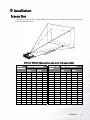
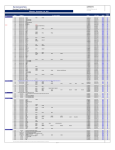
PB7110 (SVGA) screen size chart (16:9 aspect ratio)
Distance
from screen
feet
4
6
8
10
12
14
16
18
20
22
24
26
28
30
32
inches
48
72
96
120
144
168
192
216
240
264
288
312
336
360
384
Diagonal measurement
Minimum
Maximum
zoom
zoom
Distance from Diagonal measurement
screen
Minimum
Maximum
zoom
zoom
feet inches feet inches
1.80
21.6
2.20
26.4
2.70
32.4
4.20
50.4
3.61
433
5.60
67.2
4.51
54.1
7.00
84.0
5.41
64.9
8.40 100.8
6.31
75.7
9.80 117.6
7.21
86.5 11.20 134.4
8.11
97.3 12.60 151.2
9.01 108.2 14.00 167.9
9.91 119.0 15.39 184.7
10.82 129.8 16.79 201.5
11.72 140.6 18.19 218.3
12.62 151.4 19.59 235.1
13.52 162.2 20.99 251.9
14.42 173.1 22.39 268.7
meters
1
1.5
2
2.5
3
3.5
4
4.5
5
5.5
6
6.5
7
7.5
8
cm
100
150
200
250
300
350
400
450
500
550
600
650
700
750
800
meters
0.45
0.68
0.90
1.13
1.35
1.58
1.80
2.03
2.25
2.48
2.70
2.93
3.15
3.38
3.61
cm meters cm
45.1 0.55 55.0
67.6 0.82 82.5
90.1 1.10 110.0
112.7 1.37 137.5
135.2 1.65 164.9
157.7 1.92 192.4
180.3 2.20 219.9
202.8 2.47 247.4
225.3 2.75 274.9
247.9 3.02 302.4
270.4 3.30 329.9
292.9 3.57 357.4
315.5 3.85 384.9
338.0 4.12 412.4
360.5 4.40 439.8
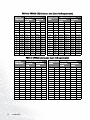
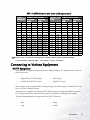
There is 3% ~ 5% tolerance among these numbers due to optical component limits.
* 1m = 3.28 feet, 1 feet = 0.305m, 1m = 100cm, 1 feet = 12 inches
Connecting to Various Equipment
HDTV Equipment
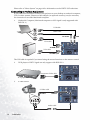
The projector is capable of displaying various High Definition TV display modes. Some of
these sources are:
•
Digital-VHS (D-VHS) player
•
DVD player
•
Satellite Dish HDTV receiver
•
Digtial TV tuners
Most of these sources will provide an analog component video output, a standard VGA output, or a YPbPr (default) format.
The projector is capable of accepting HDTV data through a Component Video connector.
Use a Component Video cable that came with your projector to display these images.
The following standards are supported in the HDTV function:
•
480i
•
480p
•
720p
•
1080i
Installation
13