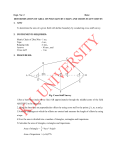
1
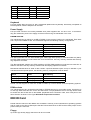
Pin
1
3
5
7
9
Description
Red
Green
Blue
Horizontal Sync
Vertical Sync
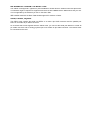
Pin
2
4
6
8
10
Description
Ground
Ground
Ground
Ground
No connection
Keyboard
Five-pin female DIN connector for MF-II keyboards (IBM-PC/AT keyboards). Electrically compatible to
PS/2 keyboards. Passive adaptors can be used.
Power Supply
Four-pin male connector for industry standard drive power supplies with +5V and +12V. To avoid bending the mainboard, press in the supply connector before fixing the mainboard in the case.
DRAM sockets
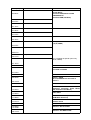
The mainboard lets you add up to 32 MB of DRAM via two memory banks on the mainboard. Each bank
has a 72-pin PS/2-SIMM socket. The mainboard supports the following memory configurations:
Bank 0
4 MB (single-sided)
16 MB (single-sided)
16 MB (single-sided)
16 MB (single-sided)
32 MB (double-sided)
Bank 1
None
None
4 MB (single-sided)
16 MB (single-sided)
none
Total memory
4 MB
16 MB
20 MB
32 MB
32 MB
The Q40 mainboard can use both DRAM types: Fast Page Mode (FPM) or Extended Data Out (EDO).
All PS/2 SIMM modules must be faster than 70 ns access time. Use only memory modules with decoupling capacitors on board!
The Q60 mainboard supports only EDO modules. All PS/2 SIMM modules must be 60 ns access time or
faster for the Q60. Use only memory modules with decoupling capacitors on board!
Mainboards manufactured in 2002 or later contain a special hardware option for up to 128 MB. If your
mainboard has this special option, the following memory configurations will be added:
Bank 0
64 MB (single-sided)
64 MB (single-sided)
64 MB (single-sided)
Bank 1
None
16 MB (single-sided)
64 MB (single-sided)
Total memory
64 MB
80 MB
128 MB
Please note that support for more than 32 MB of RAM may not be available under all operating systems.
ROM sockets
The mainboard uses two 16 data bit wide ROM or EPROM devices for 32 bit wide access. One device is
for the high data words and one for the low data words. The (EP)ROM device for the High Words must
be seated into the socket near to the DRAM. (EP)ROMs have a direction mark, whic must point to the
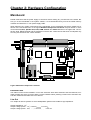
same direction as shown in the figure Mainbord Component Locations.
IDE/IO Card
Please read the manual of the IDE/IO card for details. Currently most combinations of operating systems
and IO cards on the Q40 or Q60 require that the Printer Mode ist set to SPP and the IRQ7 jumper for the
printer interrupt is removed.
Floppy
Up to two high density floppy disk drives can be connected.