1
English
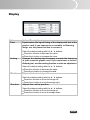
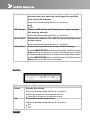
Display
Option
Phase
Tracking
Actions/Descriptions
Synchronizes the signal timing of the display with that of the
graphic card. If you experience an unstable or flickering
image, use the phase function to correct it.
Select the desired setting with the e / f buttons:
Press the e button to decrease the value.
Press the f button to increase the value.
Changes the display data frequency to match the frequency
of your computer graphic card. If you experience a vertical
flickering bar, use the tracking function to make an adjustment.
H.Position
Select the desired setting with the e / f buttons:
Press the e button to decrease the value.
Press the f button to increase the value.
Adjusts the horizontal position.
V.Position
Select the desired setting with the e / f buttons:
Press the e button to move the image left.
Press the f button to move the image right.
Adjusts the vertical position.
Select the desired setting with the e / f buttons:
Press the e button to move the image up.
Press the f button to move the image down.
EN-29