1
USER’S MANUAL. TE-2000 HD
For the power measurement of a digital channel to be correct it is essential to have previously
defined the channel bandwidth using the Channel BW option, in the Measurements
Configuration menu that appears when pressing
5.14.7
[17] key.
Digital TV: Measuring BER
The TE-2000 HD offers three ways to measure the error rate (BER) of digital signals
depending on the type of used modulation.
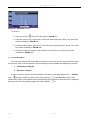
To select the BER measurement mode:
1)
Select digital signals Measurements Configuration pressing
2)
Select by means of Signal option from CONFIGURATION menu: DVB-C for the
measurement of QAM modulated signals, DVB-T/H for the measurement of COFDM
modulated signals or DVB-S/S2 for the measurement of QPSK/8PSK modulated signals.
3)
Enter the parameters relative to the digital signal which appear in the measurement
CONFIGURATION menu, as described previously.
4)
Select the option to exit from measurements CONFIGURATION menu.
5.14.7.1
[17] key.
DVB-C signals
Once determined the parameters of QAM signal, it will be possible to measure BER, press
the
[12] key until the BER measurement display appears.
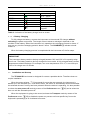
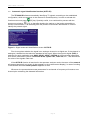
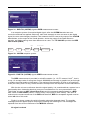
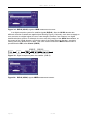
In the BER measurement mode, the monitor will show a display like the following one:
Figure 29.- DVB-C (QAM) signals BER measurement screen.
The BER measurement before error correction is shown: BER before FEC (Forward Error
Correction).
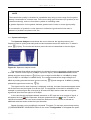
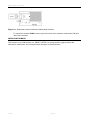
In a digital reception system for cable signals, after the QAM demodulator an error correction
method called Reed-Solomon is applied (see following Figure). Obviously, the error rate after the
corrector is lower to the error rate at the QAM decoder output. This is the reason because this
screen provides the BER measurement before FEC (Forward Error Correction).
Page 52
02/2010