1
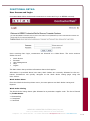
Data can also be filtered by the dropdown lists:
•
•
•
•
•
•
•
Sort Order
Sort Method
Last X Days
Work Order No
Trade Code
Trade Status
Building
A Refresh Rate can also be set using the dropdown list provided. Setting the refresh rate
tells ContractorWeb how often it should look for any new Work Orders that have been allocated to the contractor and adds them to the list. Clicking on the ‘GO’ button will also refresh the list.
To navigate to a particular Work Order, the contractor can click either the hyperlink of the
Work Order number or the Work Order description.
Work Order Details
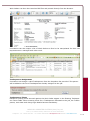
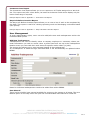
Upon clicking on a Work Order Listing, the Work Order Details page will open. BEIMS
Administrators have the ability to alter the fields displayed to contractors.
The fields on the screen are divided into 6 Sections:
Work Order
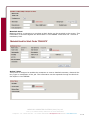
All of the fields in this section are display only. They summarise the basic details of the
Work Order such as Requested Date/Time, Description, Location and Extra Details (see
sample below)
MERCURY COMPUTER SYSTEMS (Aust) Pty Ltd
Level 3, 271 William Street, Melbourne VIC 3000 AUSTRALIA
4 of 12