1
Chapter 6: Advanced Chassis Setup
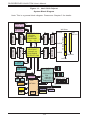
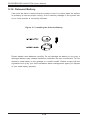
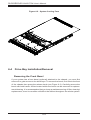
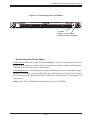
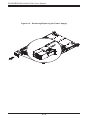
Figure 6-3. Removing the Front Bezel
1. Unlock
2. Press release knob
3. Remove bezel assembly
Accessing the Drive Bays
SATA Drives: Because of their hot-swap capability, you do not need to access the
inside of the chassis or power down the system to install or replace SATA drives.
Proceed to the next section for instructions.
DVD-ROM Drives: For installing/removing a DVD-ROM drive, you will need to gain
access to the inside of the 6018R-TDW by removing the top cover of the chassis. Proceed to the "DVD-ROM Drive Installation" section later in this chapter for
instructions.
Note: Only "slim" DVD-ROM drives will fit into the 6018R-TDW.
6-5