1
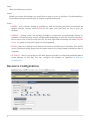
This part is most likely already correctly configured for you as you get fully functional backup server
out of the box (installed and configured by Abakus). However, if any of the following properties change
in your environment, make sure to reflect those changes over here. We have already mentioned
Resource Type and Resource Name in the "Resources" chapter.
Resource Name
Name of the resource is also used when backup server creates filesystem folders for your backups.
That is why you cannot change it once created (you would not be able to see your backups, even
though they would not get deleted).
Resource Type
This determines what software should be used to open a restored backup when opened in one of
the slots. This can be virtualization software for vm backups, database software for database
backups, etc. Note that such software must be installed and pre-configured for each backup server
by Abakus. Special value 'Other' can be used to disable use of any such software for this resource.
Virtual Host
Can either be ''native'' in which case no virtualization is used or the name of virtual machine in
which the restored resource will become available when you open it in one of the slots. This choice
usually depends on the software used as some software is only supported on specific operating
systems. Virtual hosts must be installed and preconfigured by Abakus before you can select it in this
menu.
Schedule
Backup is created only on the days you select. On every selected day it starts at the same time, as
configured in Hour and Time fields.
Oracle Database Specific Configuration
Standby SID and Standby Host
Backup Server uses Physical Standby Database to maintain current copy of Oracle Database. It can
either be Oracle DataGuard or a set of procedures provided by Abakus Amon Scripts. It may run on
the same server as the backup server, on a virtual machine inside backup server or on a completely
separated host by mounting backup server’s disks. Because of this diversity, we need to know where
this current copy is located in order to collect data for status report (current controlfile time, etc).
Oracle Database Instances
4