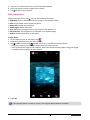
1
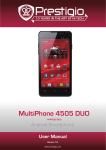
MultiPhone 4044 DUO
PAP4044 DUO
Android Smartphone
User Manual
Version 1.0
www.prestigio.com
About this user manual
This user manual is specially designed to detail the device’s functions and features.
-- Please read this manual before using the device to ensure safe and proper use.
-- Descriptions are based on the device’s default settings.
-- Images and screenshots may differ in appearance from the actual product.
-- Prestigio continuously strives to improve its products. Due to software upgrading, some
contents in this user manual may be different from your product. Prestigio reserves the rights
to revise this user manual or withdraw it at any time without prior notice. Please take your
product as standard.
-- The Android Applications which are provided by your device have been developed by
Android's users or other companies, not by Prestigio and are provided at no charge. Unless
indicated, otherwise, Prestigio makes no promises nor representations and takes no
responsibilities about their performance, quality, content or intellectual property rights.
Conventions used in this manual
In this user manual, we use the following symbols to indicate useful and important information:
Caution: provides safety precaution and important information.
Note: gives additional information.
Tips: usage tips.
>
the order of options or menus you must select to perform a step.
© Copyright 2013 Prestigio. All rights reserved.
Contents
1.Unboxing������������������������������������������������������������������������������������������������������������������������� 1
Open your package�����������������������������������������������������������������������������������������������������������������1
Your phone at a glance�����������������������������������������������������������������������������������������������������������1
Buttons������������������������������������������������������������������������������������������������������������������������������������ 1
2. Getting started����������������������������������������������������������������������������������������������������������������� 2
Install the SIM card�����������������������������������������������������������������������������������������������������������������2
Insert a memory card��������������������������������������������������������������������������������������������������������������3
Insert the battery��������������������������������������������������������������������������������������������������������������������4
Replace the back cover�����������������������������������������������������������������������������������������������������������4
Power on your phone��������������������������������������������������������������������������������������������������������������5
Home screens��������������������������������������������������������������������������������������������������������������������������5
List menu��������������������������������������������������������������������������������������������������������������������������������� 6
3.Basics������������������������������������������������������������������������������������������������������������������������������� 7
Finger tips�������������������������������������������������������������������������������������������������������������������������������� 7
Motion gesture�����������������������������������������������������������������������������������������������������������������������8
Charge the battery������������������������������������������������������������������������������������������������������������������8
Connect to your PC�����������������������������������������������������������������������������������������������������������������9
Lock and unlock the screen���������������������������������������������������������������������������������������������������10
Voice control�������������������������������������������������������������������������������������������������������������������������11
Recently used apps���������������������������������������������������������������������������������������������������������������11
Notifications panel����������������������������������������������������������������������������������������������������������������11
Enter text������������������������������������������������������������������������������������������������������������������������������ 12
Use widgets���������������������������������������������������������������������������������������������������������������������������14
System upgrade��������������������������������������������������������������������������������������������������������������������14
Status icons���������������������������������������������������������������������������������������������������������������������������15
4.Phone���������������������������������������������������������������������������������������������������������������������������� 16
Make a call����������������������������������������������������������������������������������������������������������������������������16
Answer a call�������������������������������������������������������������������������������������������������������������������������16
Reject a call���������������������������������������������������������������������������������������������������������������������������16
End a call������������������������������������������������������������������������������������������������������������������������������� 16
Contacts�������������������������������������������������������������������������������������������������������������������������������� 16
Use speed dial�����������������������������������������������������������������������������������������������������������������������18
Call a phone number in a text message��������������������������������������������������������������������������������18
Call a phone number in an email������������������������������������������������������������������������������������������18
Set up a conference call��������������������������������������������������������������������������������������������������������18
Make an emergency call�������������������������������������������������������������������������������������������������������19
5.Messages����������������������������������������������������������������������������������������������������������������������� 20
Send a message���������������������������������������������������������������������������������������������������������������������20
Check your message��������������������������������������������������������������������������������������������������������������20
Reply to a message���������������������������������������������������������������������������������������������������������������20
Forward a message���������������������������������������������������������������������������������������������������������������20
Delete messages�������������������������������������������������������������������������������������������������������������������21
6.Mail������������������������������������������������������������������������������������������������������������������������������� 22
Set up a email account����������������������������������������������������������������������������������������������������������22
Send a mail����������������������������������������������������������������������������������������������������������������������������22
View your mails���������������������������������������������������������������������������������������������������������������������22
Reply to a mail�����������������������������������������������������������������������������������������������������������������������23
Delete mails��������������������������������������������������������������������������������������������������������������������������23
Gmail������������������������������������������������������������������������������������������������������������������������������������� 23
7.Camera�������������������������������������������������������������������������������������������������������������������������� 25
Your camera at a galance������������������������������������������������������������������������������������������������������25
Take a photo�������������������������������������������������������������������������������������������������������������������������25
Take a photo of yourself�������������������������������������������������������������������������������������������������������26
Take a panoramic photo�������������������������������������������������������������������������������������������������������26
Take a group shot������������������������������������������������������������������������������������������������������������������26
Take continuous shots����������������������������������������������������������������������������������������������������������26
Using HDR�����������������������������������������������������������������������������������������������������������������������������26
Record a video����������������������������������������������������������������������������������������������������������������������27
Camera scenes����������������������������������������������������������������������������������������������������������������������27
Camera and video settings����������������������������������������������������������������������������������������������������27
8.Multimedia�������������������������������������������������������������������������������������������������������������������� 29
Gallery ���������������������������������������������������������������������������������������������������������������������������������� 29
Video player��������������������������������������������������������������������������������������������������������������������������32
Music player��������������������������������������������������������������������������������������������������������������������������33
FM radio�������������������������������������������������������������������������������������������������������������������������������� 34
Voice recorder�����������������������������������������������������������������������������������������������������������������������35
9. Web & network�������������������������������������������������������������������������������������������������������������� 37
Connect to internet���������������������������������������������������������������������������������������������������������������37
VPN��������������������������������������������������������������������������������������������������������������������������������������� 40
Web browse��������������������������������������������������������������������������������������������������������������������������40
10.Bluetooth����������������������������������������������������������������������������������������������������������������������� 42
11.Apps������������������������������������������������������������������������������������������������������������������������������ 43
Play store������������������������������������������������������������������������������������������������������������������������������43
Manage your apps����������������������������������������������������������������������������������������������������������������43
12.eReader Prestigio����������������������������������������������������������������������������������������������������������� 45
Your eReader at a glance������������������������������������������������������������������������������������������������������45
Download an eBook��������������������������������������������������������������������������������������������������������������45
Read an eBook����������������������������������������������������������������������������������������������������������������������45
eReader settings�������������������������������������������������������������������������������������������������������������������46
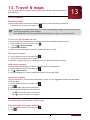
13.Travel & maps���������������������������������������������������������������������������������������������������������������� 47
Find a location�����������������������������������������������������������������������������������������������������������������������47
Get directions������������������������������������������������������������������������������������������������������������������������47
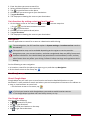
Navigation�����������������������������������������������������������������������������������������������������������������������������48
Use Google maps������������������������������������������������������������������������������������������������������������������48
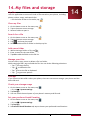
14.My files and storage������������������������������������������������������������������������������������������������������� 50
My files���������������������������������������������������������������������������������������������������������������������������������� 50
Storage���������������������������������������������������������������������������������������������������������������������������������� 50
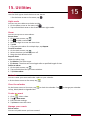
15.Utilities�������������������������������������������������������������������������������������������������������������������������� 52
Clock�������������������������������������������������������������������������������������������������������������������������������������� 52
Calendar�������������������������������������������������������������������������������������������������������������������������������� 52
Calculator������������������������������������������������������������������������������������������������������������������������������53
ToDo list�������������������������������������������������������������������������������������������������������������������������������� 53
FreeNote������������������������������������������������������������������������������������������������������������������������������� 54
Google search�����������������������������������������������������������������������������������������������������������������������55
16.Set up your phone���������������������������������������������������������������������������������������������������������� 57
Wireless & Networks�������������������������������������������������������������������������������������������������������������57
Device������������������������������������������������������������������������������������������������������������������������������������ 57
Personal�������������������������������������������������������������������������������������������������������������������������������� 58
Accounts�������������������������������������������������������������������������������������������������������������������������������� 58
System����������������������������������������������������������������������������������������������������������������������������������� 59
17.Specifications����������������������������������������������������������������������������������������������������������������� 60
18.Troubleshooting������������������������������������������������������������������������������������������������������������� 61
1.Unboxing
1
Open your package
•Prestigio MultiPhone
•Earphone
•AC adapter
•Quick start guide
•Legal and safety notices
•Battery
•USB cable
•Pouch
•Warranty card
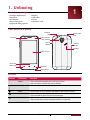
Your phone at a glance
Headset
jack
Earpiece
Micro USB
port
Front camera
Rear camera
Power
button
Volume
button
Speaker
Touch screen
Home key
Menu key
Back key
Microphone
Buttons
Button
Definition
Function
Power
•Press and hold to power on or off your phone.
•Press to lock or unlock the screen display.
•Press to adjust the volume.
Volume
Menu
Home
Back
•Tap to open a list of options available on the current screen.
•Tap to return to home screen.
•Tap and hold to open the list of recent apps.
•Tap to return to the previous screen.
•Tap to hide the onscreen keyboard when it is opened.
USER MANUAL
MultiPhone PAP4044 DUO
1
2.Getting started
Congratulations on your purchase and welcome to Prestigio.
To get the most of your product and enjoy all Prestigio has to offer, please
access:
http://www.prestigio.com/catalogue/MultiPhones
2
More details about your product, please access:
http://www.prestigio.com/support
Please read the "MultiPhone legal and safety notices" on your package before use.
•Do not cover the antenna area with your hands or other objects. This may cause
connectivity problems or drain the battery.
•Do not allow water to contact the touch screen. The touch screen may malfunction in
humid conditions or when exposed to water.
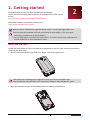
Install the SIM card
Follow the steps below to insert your SIM card. Remember to turn off your mobile phone before
removing the back cover.
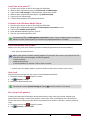
1. Securely hold your MultiPhone. With your finger, remove the back cover.
•Be careful not to damage your fingernails when you remove the back cover.
•Do not bend or twist the back cover excessively. Doing so may damage the cover.
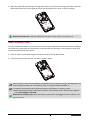
2. With your thumb or finger, lift the battery from the battery compartment.
USER MANUAL
MultiPhone PAP4044 DUO
2
3. With the SIM card’s gold contacts facing down and its cut-off corner facing outwards, insert the
SIM card all the way into the SIM card slot. Push the SIM card in until it clicks into place.
Remove the SIM card: Push the SIM card in to eject it from its slot, and remove it.
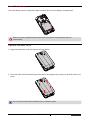
Insert a memory card
You can expand the memory of your phone and store more additional multimedia files by adding a
micro-SD card. Depending on the memory card manufacturer and type, some memory cards may
not be compatible with your device.
1. Insert a memory card with the gold-coloured contacts facing downwards.
2. Push the memory card into the slot until it locks in place.
S ome memory cards may not be fully compatible with the device. Using a incompatible card
may damage the device or the memory card, or corrupt the data stored in it.
•Frequent writing and erasing of data shortens the lifespan of memory cards.
•When inserting a memory card into the device, the memory card’s file directory appears
in the File manager > SD card.
Remove the memory card: push the memory card until it disengages from the device, and
then pull it out.
USER MANUAL
MultiPhone PAP4044 DUO
3
Insert the battery
Insert the battery (with its exposed copper contacts first) into the battery compartment.
lease use only original batteries that came in the box or replacements that we
P
recommend.
Replace the back cover
1. Align the back cover onto the top part of your phone.
2. Press the sides and the bottom part of the back cover against your phone to lock the cover into
place.
You will hear a click when the back cover is locked in place.
USER MANUAL
MultiPhone PAP4044 DUO
4
Power on your phone
Press and hold the Power button for a few seconds to power on your phone.
1. When turning on the device for the first time, follow the on-screen instructions to set up your
device.
2. After set up your phone, there is an Installer Prestigio wizard appears on the screen. It offers
you some third-party apps, tap the apps you want to install on your phone. Follow the onscreen instructions to install the apps.
3. It might take a certain time for your phone to install the apps.
To turn off your phone, press and hold the Power button, and then tap Power off on the
pop up screen.
If you do not install the apps provided by the Installer Prestigio wizard for the first time, you
can tap
on the home screen to install the apps next time.
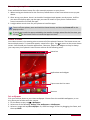
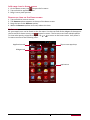
Home screens
Your Home screen is the starting point to access all of the phone’s features. The Home screen can
have multiple panels. To view other panels, swipe left or right. Tap to return to the center home
screen. You can add your favorite applications, shortcuts, folders and widgets so they’re always
just a tap away. Your phone’s home screen consists of the following areas:
Status bar
Applications and widgets
Tap to enter the list menu
Shortcut
Set wallpaper
Pick your favorite photo as your Home wallpaper. Choose from the available wallpapers, or use
any photo you've taken with the camera.
1. On the Home screen, tap > Wallpaper.
2. Select one of the following: Gallery, Live wallpapers or Wallpapers.
3. Select an image and tap Set wallpaper. Or, select an image, resize it by dragging the frame, and
then tap CROP.
USER MANUAL
MultiPhone PAP4044 DUO
5
Add a app icon to home screen
1. On the Home screen, tap
to open the list menu.
2. Tap and hold an application icon.
3. Drag it into a panel preview.
Remove an item on the Home screen
1. Tap and hold an item to remove.
2. The Remove options appears at the top of the Home screen.
3. Drag the item to the Remove options.
4. When the Remove options turns red, release the item.
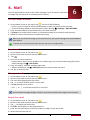
List menu
All yours apps' icons can be found on the list menu. You also can find all the widgets of the apps on
the list menu.On home screen, tap
to open list menu. The list menu can have multiple panels.
To view other panels, swipe left or right. Tap or to return to the home screen. Your phone’s
list menu consists of the following areas:
Applications tab
Tap to enter app shop
Widgets tab
Applications
USER MANUAL
MultiPhone PAP4044 DUO
6
3.Basics
3
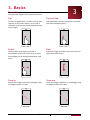
Finger tips
Only use your fingers to use the touch screen.
Tap
Tap and hold
Swipe
Slide
Zoom in
Zoom out
To open an application, to select a menu item,
to press an on-screen button, or to enter a
character using the on-screen keyboard, tap it
with a finger.
Quickly swipe your finger vertically or
horizontally across the screen to go to other
Home pages, scroll through documents, and
more.
Spread two fingers apart on a webpage, map,
or image to zoom in a part.
Tap and hold an item for more than 2 seconds
to access available options.
Slide your finger vertically across the screen to
open drop-down menu.
Pinch two fingers together on a webpage, map,
or image to zoom out a part.
USER MANUAL
MultiPhone PAP4044 DUO
7
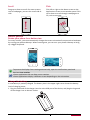
Scroll
Drag up or down to scroll. On some screens,
such as webpages, you can also scroll side to
side.
Flick
Flick left or right on the Home screen or the
Applications screen to see another panel. Flick
up or down to scroll through a webpage or a
list, such as contacts.
Motion gesture
Rotate your phone for a better view
For many screens, you can automatically change the screen orientation from portrait to landscape
by turning your phone sideways. When entering text, you can turn your phone sideways to bring
up a bigger keyboard.
To prevent the display from rotating automatically, open the notifications panel and
deselect Auto rotation.
•Some applications do not allow screen rotation.
•Some applications display a different screen depending on the orientation.
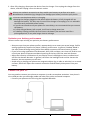
Charge the battery
A new battery is partially charged. The battery icon in the upper-right corner shows the battery
level of charging status.
1. Plug the small end of the charger into the micro USB port of the device, and plug the large end
of the charger into an electric socket.
USER MANUAL
MultiPhone PAP4044 DUO
8
2. After fully charging, disconnect the device from the charger. First unplug the charger from the
device, and then unplug it from the electric socket. lways use authentic accessories as they enable your battery to perform at its peak.
A
Nonauthentic accessories (eg. chargers) can damage your battery and even your phone.
•You can use the phone while it is charging.
•Keeping the charger plugged to the phone when the battery is fully charged will not
damage the battery. The only way to turn off the charger is to unplug it, so it is advisable
to use an easily accessible power socket.
•If you do not intend to use your phone for several days, we recommend that you remove
the battery.
•If a fully charged battery left unused, it will lost its charge over time.
•If a battery is being used for the first time or the battery has not been used for a
prolonged period, it may take longer time to recharge.
Optimize your battery performance
Here are some steps to help you optimize your battery performance.
-- Always ensure that your phone profile is appropriately set to meet your actual usage. Profile
setting significantly impacts the phone’s battery performance. In general, Outdoor Mode is
the most power-draining setting while Silent Mode consumes the least amount of power.
-- If you’re not using applications like Bluetooth, WIFI, GPS and Apps, turn them off. And be sure
to lock your phone to prevent accidental pressing of the keys with the auto-lock feature.
-- Adjust the intensity and duration of your display screen’s backlight to low or medium level
and for the shortest duration. In general, the lower the backlight level and the shorter the
duration, the more power you will save.
-- Avoid using or placing your phone near magnetic objects (eg. a radio or television) or on metal
surfaces, which will impact the network connection and ultimately drain power from your
battery.
Connect to your PC
You may need to connect your phone to computer in order to complete activation. Your phone’s
micro USB port lets you exchange media and other files with a connected computer.
-- Connect your phone to the PC using the supplied USB cable.
USER MANUAL
MultiPhone PAP4044 DUO
9
Load files from your PC
1. Connect your phone to the PC by using the USB cable.
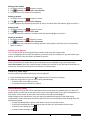
2. Slide to open notification panel, tap Connected as USB Storage.
3. Tap to select USB storage in USB computer connection screen.
4. Slide to open notification panel again, tap USB connected.
5. Tap to turn on USB storage.
6. Transfer files between your phone and the PC.
Connect with Windows Media Player
1. Connect your phone to the PC by using the USB cable.
2. Slide to open notification panel, open USB computer connection screen.
3. Tap to select Media device (MTP).
4. Open Windows Media Player on your PC.
5. You can sync multimedia files now.
Tap Camera (PTP) on USB computer connection screen, if your computer does not support
Media Transfer Protocol (MTP) or not have any appropriate driver installed.
Lock and unlock the screen
When not in use, lock your phone to prevent unwanted operation and save the battery.
-- Lock: press the power button.
When your phone is locked, nothing happens if you touch the screen. your phone can still:
•Receive calls, text messages, and other updates.
•Listen to music.
•Adjust the volume.
•Use the headset to answer a call or listen to music.
-- Unlock: press the power button, and then slide the lock icon to unlock your screen.
Auto lock
You can set an time span for the screen to be locked automatically.
1. On home screen, tap
to open list menu.
2. Tap
>Display > Sleep.
3. Select your desired time span.
You also can access System settings by taping
on home screen or list menu.
Set screen lock pattern
Protect your personal information and prevent others from using your phone without your
permission by setting a screen lock pattern, face unlock, PIN, or password. You'll be asked to
unlock the screen every time your phone is powered on or when it’s idle for a certain period of
time.
1. On home screen, tap
to open list menu.
2. Tap
>Security > Screen lock.
USER MANUAL
MultiPhone PAP4044 DUO
10
Setting a face unlock
1. On home screen, tap
to open list menu.
2. Tap
>Security > Screen lock > Face Unlock.
3. Fit your face in the frame to be captured.
Setting a pattern
1. On home screen, tap
to open list menu.
2. Tap
>Security > Screen lock > Pattern.
3. Draw a pattern by connecting four dots or more, and then draw the pattern again to verify it.
Setting a PIN
1. On home screen, tap
to open list menu.
2. Tap
>Security > Screen lock > PIN.
3. Enter at least four numbers, and then enter the password again to verify it.
Setting a password
1. On home screen, tap
to open list menu.
2. Tap
>Security > Screen lock > Password.
3. Enter at least four characters including numbers and symbols, and then enter the password
again to verify it.
Unlock your phone
Turn on the screen by pressing the Power button, and enter the unlock code.
If you’ve forgotten your screen lock pattern, you have up to five attempts to try and unlock your
phone. If this fails, take the device to dealer to reset it.
Voice control
Voice Control lets you make phone calls and control music playback using voice commands.
Use Voice Control: press the volume button to adjust the volume. Press the top of the button to
volume up, and press the bottom of the button to volume down.
Recently used apps
You can easily access apps you've just recently opened.
1. Press and hold the Home button to open the list of recently-used apps.
2. Slide your finger left or right to see recently-opened apps.
-- To switch back to an app, just tap it.
-- To remove an app from the list, swipe it.
Notifications panel
To help make sure you don’t miss important events, many apps can provide alerts. An alert can
appear briefly as a banner at the top of the screen, which goes away if you don’t respond to it, or
as a notice in the center of the screen that remains until you acknowledge it.
When you get a new notification, you can open the Notifications panel to see what event
notification or new information you have received. You can also quickly access settings from the
Notifications panel.
-- To open the Notifications panel, slide down from the top of the screen.
-- To close the notifications panel, drag up the bar that is on the bottom of the screen.
-- To dismiss the notificaion, tap .
-- To enter system settings, tap
.
USER MANUAL
MultiPhone PAP4044 DUO
11
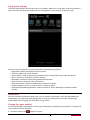
Using Quick Settings
The Quick Settings tab lets you easily turn on Airplane mode, Wi-Fi, and more, and also provides a
quick shortcut to change the mode and set the brightness, auto rotation if swipe the tab.
You can view your phone’s current status and use the following options:
-- Brightness: adjust the brightness of the screen.
-- Timeout: adjust the screen timeout.
-- Auto rotation: allow or prevent the interface from rotating when you rotate the device.
-- Wi-Fi: activate or deactivate the Wi-Fi feature.
-- Bluetooth: activate or deactivate the Bluetooth feature.
-- GPS: activate or deactivate the GPS feature.
-- Data connection: activate or deactivate the data connection.
-- Airplane mode: turn on or off your phone's wireless radios.
-- General/Silent/Meeting/Outdoor: switch to General, Silent, Meeting or Outdoor profiles
quickly.
Enter text
Use the onscreen keyboard to enter text, such as contact information, mail, and web addresses.
Depending on the app and the language you’re using, the keyboard may correct misspellings,
predict what you’re typing, and even learn as you use it.
Change the input method
You can download a input app or use the input method pre-installed on your phone. To change the
input method, follow the steps:
1. On home screen, tap
to open list menu.
USER MANUAL
MultiPhone PAP4044 DUO
12
2. Tap
>Language & input > Default.
3. Choose the desired input method.
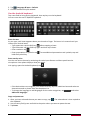
Use the Android keyboard
Tap a text field to bring up the keyboard, then tap keys on the keyboard.
You can enter the text in QWERTY keyboard.
Enter the text
As you type, each letter appears above your thumb or finger. The letter isn’t entered until you
choose your desired word.
-- Type uppercase: tap the Shift key
before tapping a letter.
-- Type lowercase: tap the Shift key again and then tap a letter.
-- Enter numbers: tap
.
-- Enter punctuation or symbols: tap . To see additional punctuation and symbols, tap and
hold the Symbol key.
Enter text by voice
You also can enter the text by activating the voice input feature and then speak into the
microphone. Your phone displays what you speak.
Voic typing: open the Android keyboard, tap
.
-- If the device does not recognise your words correctly, tap the underlined text and select an
alternative word or phrase from the dropdown list.
-- To change the language or add languages for the voice recognition, tap
and select
Add more languages.
Copy and paste text
1. After you have selected the text you want to copy, tap
. The selected text is then copied to
the clipboard.
2. In a text entry field, press and hold at the point where you want to paste the text.
3. Tap Paste.
USER MANUAL
MultiPhone PAP4044 DUO
13
Move a text
1. After you have selected the text you want to cut, tap
. The selected text is then cut to the
clipboard.
2. In a text entry field, press and hold at the point where you want to paste the text.
3. Tap Paste.
You can tap
to select all the text you have entered.
Use widgets
Widgets put at-a-glance important information and media content up front on your Home screen.
Some widgets are already added to your Home screen for your convenience. You can add more
from the available selections of widgets.
Add a widget to the Home screen
1. On home screen, tap
to open the list menu.
2. Tap WIDGETS to open widgets list.
3. Scroll left or right on the widgets panel.
4. Tap and hold the desired widgets to add it to the home screen.
•Some widgets connect to web services. Using a web-based widget may result in additional
charges.
•The widgets available may vary depending on the region or service provider.
System upgrade
Your phone can check and notify you if there’s a new upgrade available. You can also manually
check if there's an available update.
You can set this option in Settings > About phone > System updates.
Do not press any buttons while the device is upgrading.
USER MANUAL
MultiPhone PAP4044 DUO
14
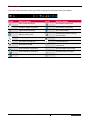
Status icons
The icons in the status bar at the top of the screen give information about your phone:
Icons
What it means
Icons
What it means
Silent mode activated.
3G network connected.
Vibration mode activated.
4G network connected.
Flight mode activated.
Wi-Fi connected.
Battery power level.
Roaming (outside of normal
service area).
Call in progress.
Bluetooth is activated.
You have a missed call.
Connected to PC.
New SMS or MMS.
Wired microphone headset
connected.
GPRS network connected.
Wired headset connected.
EDGE network connected.
No SIM card or no signal.
HSDPA network connected.
Alarm is set.
USER MANUAL
MultiPhone PAP4044 DUO
15
4.Phone
Learn to use calling functions, such as making and answering calls, using options
available during a call or customising and using call-related features.
4
Make a call
1. Tap
to open the dial pad, enter your number directly. Or enter the first few digits of a
phone number, then choose a contact.
2. Tap
or
.
You also can use the following methods to make a call:
-- Make a call from the history of incoming and outgoing calls and messages.
-- Make a call from the contacts list.
-- Make a call from the list of favourite contacts.
The phone dialer’s Smart dial features makes it quick and easy for you to make a call. Simply
enter the phone number or first few letters of the person’s name you want to call. Smart
dial automatically searches and filters your stored contacts and the phone numbers from
the call history.
Answer a call
When you receive a phone call from a contact, the incoming call screen appears. To pick up the
phone, do the following:
-- Slide
to
.
•If there is a headset connected to your phone, you can pick up a call by pressing the
center button of your headset.
•If the call waiting service is active, another call can be made. When the second call is
answered, the first call is put on hold.
Reject a call
When a call comes in, do the following to reject the call:
-- Slide
to
, reject the call immediatelly.
-- Slide
to
, you can send a message to the caller or create a task for returning the call.
-- Press the Power button or Volume button to mute the ringing sound without rejecting the
call.
End a call
Tap
to end a call. Or press the center button of your headset.
Contacts
Contacts are stored in one of the two available phonebooks: SIM phonebook (located on your SIM
card, by which the number of entries you can store depends on the card capacity) or the Smart
Phonebook (located on your phone). When adding new contacts, the contacts will only be added
USER MANUAL
MultiPhone PAP4044 DUO
16
to the phonebook you have selected.
View contacts
Do the following methods to view the contact list:
-- On the home screen, tap
.
-- Or on the list menu, tap
.
Search for a contact
1. Go to
to view the contact list.
2. Scroll up or down the contact list.
3. Tap
and enter the first few letters of the name in the search bar.
4. Select the contact from the option list.
Call a contact
1. Go to
to view the contact list.
2. Scroll the list to select your desired contact.
-- Tap the number area to call the cotact.
-- Tap
to make a video call with the cotact.
Add a new contact
Method one:
1. On the home screen, tap
to display dial pad.
2. Enter a number, tap > Add to contacts.
3. Tap Create new contact, select your desired storage.
4. Add details as desired.
5. Tap Done to finish saving.
Method two:
1. Go to
to view the contact list.
2. Tap
to add a new contact.
For contacts on the smart phonebook, you can add detailed information, like home
number, office number, contact pictures and etc.
My favorites
Add a contact to favorites
You can add your contacts stored on the smart phonebook to your favorites.
1. Search for the desired contact.
2. Tap
to add the contact to your favorites.
View your favorites
1. Go to
to view the contact list.
2. Tap
to view your favorites.
Contact groups
You can group your contacts as different groups. For different groups, you can use different
identification, and send messages to a group.
USER MANUAL
MultiPhone PAP4044 DUO
17
Add contacts to a group
1. Go to
to view the contact list.
2. Tap
to view contact groups.
3. Tap
to add contacts to a group.
4. Enter your group’s name, and tap
to add contacts.
Import/Export contacts
1. Go to
to view the contact list.
2. Tap > Import/export.
3. Select the contacts storage.
4. Follow the on-screen steps to finish.
Delete contacts
1. Go to
to view the contact list.
2. Tap > Delete contact.
3. Choose the desired contacts.
4. Tap OK to delete the contacts.
Use speed dial
Use Speed dial to call a phone number with a single tap. For example, if you assign a contact’s
number to the number 2 key, you can just press and hold 2 to dial the number.
T he number 1 key is generally reserved for your voicemail. Press and hold this key to call
voicemail and retrieve your voicemail messages.
To assign a contact to a speed-dial key
1. On the home screen, tap
to display dial pad.
2. Tap > Speed dial.
3. Choose a numeric key.
4. Tap the desired contacts from your phone book.
Call a phone number in a text message
1. Tap the phone number within the message.
2. Tap
to call the number.
To call the message sender, tap
on the top of your screen.
Call a phone number in an email
1. Tap the phone number in the email body.
2. Tap
to call the number.
Set up a conference call
If network applicable, you can make the first call (or accept a call), and then simply dial each
subsequent call to add it to the conference.
Make sure your SIM card is enabled with conference calling service. Contact your mobile
operator for details.
USER MANUAL
MultiPhone PAP4044 DUO
18
1. During a call, tap
to enter a phone number or select a contact from your phonebook.
2. Tap
to dial the number.
3. The second number is dialled, and the first call is put on hold at this time.
-- You can tap
-- Tap
to toggle between 2 calls.
to add the contact to a conference call.
Make an emergency call
In some regions, you can make emergency calls even if you don’t have a SIM card installed or your
SIM card has been blocked.
If you don't have a network signal, you won't be able to make an emergency call.
1. On the Home screen, tap
to open the dial pad.
2. Dial the emergency number for your local, and then tap
.
In Europe, the standard emergency number is 112; in the UK, it is 999.
USER MANUAL
MultiPhone PAP4044 DUO
19
5.Messages
Messages lets you exchange text messages with other SMS and MMS devices via
your cellular connection. Your sent and received messages are neatly grouped
into conversations, by contact name or phone number.
5
Send a message
1. On the home screen or list menu, tap
.
2. Tap
to start composing a new message.
3. Use the following methods to add recipients:
-- Enter a phone number.
-- Tap
, select contacts, and then tap OK.
4. Enter the text message in the text box.
5. Tap
to add picture/video/audio/slideshow if you want to sent an MMS message.
6. Tap
to send the message.
After finish entering your text, you can just tap
to save the message as a draft.
•There is a limit on the number of characters for a single text message (displayed above
the send button). If you exceed the limit, your text message will be delivered as one but
will be billed as more than one message.
•Your text message automatically becomes a multimedia message if you enter an email
address as the recipient, add a message subject, attach an item, or compose a very long
message.
Check your message
Depending on your notification settings,your phone plays a sound, vibrates, or displays the
message briefly in the status bar when you receive a new message. A new message icon is also
displayed in the status bar. Incoming messages are grouped into message threads by contact.
Check your text message
-- Open the Notifications panel, and then tap the new message notification.
-- Go to the Messages app and open the message.
Listen to a voice message
When you received a voice message, check the message and tap
to start voice playback.
Reply to a message
1. On the Messages screen, tap a contact (or phone number) to display the exchange of messages
with that contact.
2. In the text box, enter your message.
3. Tap
to send the message.
Forward a message
1. On the Messages screen, tap a contact (or phone number) to view the exchange of message
with that contact.
2. Tap and hold a message.
3. In the pop up window (Message options), select Forward.
4. Use the following methods to add recipients:
USER MANUAL
MultiPhone PAP4044 DUO
20
-- Enter a phone number.
-- Tap
, select contacts, and then tap OK.
5. Enter more text if you wanted.
6. Tap
to send the message.
Delete messages
Delete a message
1. On the home screen or list menu, tap
.
2. The messages screen displayed.
3. Tap a contact (or phone number) to view the exchange of message with that contact.
4. Tap and hold a message.
5. In the pop up window (Message options), select Delete.
Delete a conversation
1. On the home screen or list menu, tap
.
2. The messages screen displayed.
3. Tap and hold a contact or phone number.
4. Tap
on the bottom of the screen.
USER MANUAL
MultiPhone PAP4044 DUO
21
6.Mail
Use this application to send or view email messages. Learn to send or view email
messages via your personal or company email account.
6
Set up a email account
1. On the home screen or list menu, tap
, do one of the following:
-- If this is your first time to add an email account in Mail, just move to the next step.
-- If you’ve already added an email account in Mail, then tap > Settings > ADD ACCOUNT.
2. Enter the email address and password for your email account.
3. Tap Next for a private email account, or tap Manual setup for a company email account.
4. Follow on-screen instructions to complete the setup.
When you are finished setting up the email account, the email messages are downloaded to
your device.
Consult your mail service provider for the mail server configuration.
Send a mail
1. On the home screen or list menu, tap
.
2. Switch to the email account that you want to use.
3. Tap
.
4. Fill in one or more recipients.
-- If you want to loop in more recipients in a carbon copy (Cc) or blind carbon copy (Bcc) of the
email message, tap > Add Cc/Bcc.
5. Enter the subject, and then compose your mail.
-- Add an attachment: tap > Attach file and then choose what you want.
6. Tap
to send the mail.
View your mails
1. On the home screen or list menu, tap
.
2. Switch to the email account that you want to use.
3. The mail inbox displayed on the screen.
4. Tap
to check whether there is a new mail.
5. Tap the desired mail to read it.
-- Use
or
to view the previous or next mail.
Unread email messages display in bold in your inbox and color bars appear next to them.
Search for a mail
1. On the home screen or list menu, tap
.
2. Switch to the email account that you want to use.
3. Tap
to display the search bar.
4. Choose a search option in the drop-down list.
5. Enter the first few letters of the mail sender or subject in the search bar.
6. Select the mail from the list.
USER MANUAL
MultiPhone PAP4044 DUO
22
Reply to a mail
1. On the home screen or list menu, tap
.
2. Switch to the email account that you want to use.
3. In the email account inbox, tap the email message.
4. Tap
, and then compose your mail.
5. Tap
to send the mail.
Delete mails
1. On the home screen or list menu, tap
.
2. Switch to the email account that you want to use.
3. Tap the desired mail, and then tap
.
Gmail
Use this application to quickly and directly access the Google Mail service.
View your Gmail Inbox
All your received email messages are delivered to your Inbox.
1. On the home screen or list menu, tap
.
2. The mail inbox displayed on the screen.
3. Tap
to check whether there is a new mail.
4. Tap the desired mail to read it.
5. Swipe left or right to view the previous or next mail.
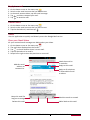
Mark the email as
a reminder.
Reply to this email.
Add this email
address to
contacts list.
Reply to all recipients
or forward this email
to others.
Keep this email for
long-term storage.
Mark the email as unread.
Add a label to this email.
Delete this email.
USER MANUAL
MultiPhone PAP4044 DUO
23
Search for a mail
1. On the home screen or list menu, tap
.
2. Tap
to display the search bar.
3. Enter the first few letters of the mail sender or subject in the search bar.
4. Select the mail from the list.
Send a mail in Gmail
1. On the home screen or list menu, tap
.
2. Tap
.
3. Fill in one or more recipients.
-- If you want to loop in more recipients in a carbon copy (Cc) or blind carbon copy (Bcc) of the
email message, tap > Add Cc/Bcc.
4. Enter the subject, and then compose your mail.
-- Add an attachment: tap > Attach file and then choose what you want.
5. Tap
to send the mail.
Reply to a mail in Gmail
1. On the home screen or list menu, tap
.
2. In the email account inbox, tap the email message.
3. Tap
, and then compose your mail.
4. Tap
to send the mail.
Delete mail in Gmail
1. On the home screen or list menu, tap
2. Tap the desired mail, and then tap
.
.
USER MANUAL
MultiPhone PAP4044 DUO
24
7.Camera
With your phone, you can take both photos and videos as desried. In addition
to the rear camera on the back, there’s a camera on the front for video calls and
self-portraits. An LED flash on the back gives you extra light when you need it.
-- To use the camera, on the home screen or list menu, tap
.
7
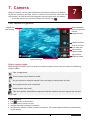
Your camera at a galance
Swtich between
the front and rear
camera.
Image preview.
Change the
flash setting.
Capture a photo.
Scroll it to zoom
in or zoom out.
Tap to select
capture mode.
Tap to select
different mode.
Change the
camera settings.
Select capture mode
While using your camera, you can select your desired capture mode. You can choose the following
capture modes:
Take a single photo.
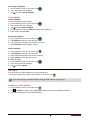
Switch to auto scene detection mode.
Set your phone to recognise people’s faces and help you take photos of them.
Auto capture when smile is detected.
Switch to best shot mode.
T ake three photos with different exposures and then combine them to improve the contrast
ratio.
Take a photo
1. Tap
to turn on the camera.
2. Scroll the ball to zoom in or out.
3. Change the camera setting if necessary.
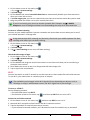
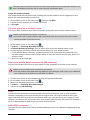
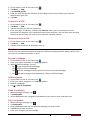
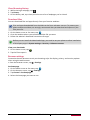
4. Just point the camera at what you want to capture. The camera adjusts the focus automatically
as you move it.
USER MANUAL
MultiPhone PAP4044 DUO
25
5. Tap
to capture the photo.
Take a photo of yourself
1. Tap
to turn on the camera.
2. On the screen, tap
.
3. Tap
to capture the photo.
Set self timer
1. Tap
to turn on the camera.
2. Tap
to customize your camera.
3. On the pop up window, tap
> Self timer, select your time span.
4. When you’re ready to take a photo, tap
. The photo will be captured after the set time span.
Take a panoramic photo
You can capture anything wide or tall in a single photo by using your phone.
1. Tap
to turn on the camera.
2. Tap
to select panoramic photo mode..
3. When you’re ready to take the first shot, tap
. Directional arrows appear, prompting you to
pan left or right in landscape view (or pan up or down in portrait view).
4. Pan your phone as smoothly as you can, and then pause when you see a complete frame on the
Viewfinder screen. The camera automatically captures the shot.
5. Repeat the previous step to take the remaining shots.
6. The camera stitches the shots into a single photo.
Zoom and flash are disabled when you're in this mode.
Take a group shot
Using your phone, you can you get perfect group portraits with the most smiles
and the fewest blinks.
1. Tap
to turn on the camera.
2. Scroll the capture mode, and then tap
.
3. When you’re ready to take the photo, tap
.
4. The camera takes several shots and merges them into the best possible group photo.
Take continuous shots
With your phone, you can take continous shots by just holding the capture icon once.
Make sure that you're in normal capture by tapping
.
1. Tap
to turn on the camera.
2. Tap
to customize your camera.
3. On the pop up window, tap
> Continuous shot, select your desired shots.
4. When you’re ready to take the photo, tap and hold
.
5. To save more photos from the batch, just delete the photos you don’t want to keep.
Using HDR
When shooting portraits against a bright background, use the HDR (High Dynamic Range) scene to
capture your subjects clearly. HDR brings out the details of both the highlights and shadows, even
in high contrast lighting.
1. Tap
to turn on the camera.
USER MANUAL
MultiPhone PAP4044 DUO
26
2. Tap
to customize your camera.
3. On the pop up window, tap HDR.
4. When you’re ready to take the photo, tap
.
Do not move your phone during HDR capturing.
Record a video
1. Tap
to turn on the camera, and then tap
.
2. When you’re ready to start recording, tap .
3. While recording, use the following actions:
-- Freely scroll the ball to zoom in or out.
-- Change focus to a different subject or area by just tapping it on the Viewfinder screen.
-- To capture an image from the video while recording, tap
.
4. To stop recording, tap
.
Camera scenes
A scene is a collection of settings to suit the lighting and environment. Use Normal and let the
camera automatically determine optimal settings, or choose from a wide selection of scenes
before you start taking photos. Predefined settings make point-and-shoot photos easier to take.
1. Tap
to turn on the camera.
2. Tap
to customize your camera.
3. On the pop up window, tap SCN.
Camera and video settings
Before taking photos/recording videos, customise your camera settings.
1. Tap
to turn on the camera.
2. Tap
to customize your camera.
3. The available options vary depending on the mode used.
Camera settings:
-- HDR: Turn on or off HDR.
-- Flash mode: Turn on/off flash mode depending on your lighting conditions.
-- White balance: Select an appropriate white balance, so images have a true-to-life colour
range. The settings are designed for specific lighting situations. These settings are similar to
the heat range for white-balance exposure in professional cameras.
-- Color Effect: Select among various photo effects that are available.
-- Scene mode: Change the scene mode.
-- ZSD: Turn on or off ZSD(zero shutter delay). It helps you to capture photos immediatelly.
-- Store location: Set the camera to include location information for your photos. To use this
feature, you must activate location services.
-- Continuous shot: set continuous shots.
-- Exposure: This determines how much light the camera’s sensor receives. For lowlight
situations, use a higher exposure.
-- Self timer: Select a time span for auto photographing.
-- Sharpness: Sharpen or blur the borders between objects.
-- Saturation: Make colors more or less pronounced.
-- Brightness: Adjust the brightness level.
-- Contrast: Adjust the contrast.
-- Picture size: Select the size of picture.
USER MANUAL
MultiPhone PAP4044 DUO
27
-- ISO: Set the ISO level manually.
-- AE meter: Select Spot, Center-weighted or Average mode.
-- Anti-flicker: Select a band to avoid the impacts on photos caused by flickers from lighting
sources.
-- Restore defaults: Restore to default settings.
Video settings:
-- Time lapse interval: Set the time lapse interval.
-- Video quality: Set the quality level for videos.
-- Store location: Set the camera to include location information for your videos. To use this
feature, you must activate location services.
-- EIS: Adjust the EIS level.
-- Focus mode: Select to use either type of focus mode.
-- Video duration: Select time and size limit for the file.
-- Microphone: Enable or disenable microphone while recording a video.
-- Hue: Adjust the Hue level.
•To improve GPS signals, avoid shooting in locations where the signal may be obstructed,
such as between buildings or in low-lying areas, or in poor weather conditions.
•Your location may appear on your photos when you upload them to the Internet. To avoid
this, deactivate the GPS location info.
USER MANUAL
MultiPhone PAP4044 DUO
28
8.Multimedia
Your phone provides you several entertainment ways. You can view the photos
taken by the camera. You can also enjoy music and video playing.
8
Gallery
Use Gallery to view all your photos and videos that are on your phone.
-- To open your gallery, on the home screen or list menu, tap
.
•Some file formats are not supported depending on the software installed on the device.
•Some files may not play properly depending on how they are encoded.
View your photos
View photos in the album
1. On the home screen or list menu, tap
.
2. Tap
to open drop-down list, and then tap Albums.
3. Browse to an album or a group of photos.
4. Tap a photo to view it in full screen.
View photos by locations
1. On the home screen or list menu, tap
.
2. Tap
to open drop-down list, and then tap Locations.
3. Pinch the screen or pan across the map until (location indicator) appears. The location indicator
shows how many photos are taken in that area. Only photos with geo-tag info appear on the
map.
4. Tap the location indicator. The photos taken in the same area are displayed.
View photos by time
View photos and videos based on when they were taken.
1. On the home screen or list menu, tap
.
2. Tap
to open drop-down list, and then tap Time. Photos and videos stored on your phone
are displayed according to the time they were taken.
3. Tap the sorted photos by a time. All the photos taken around that time are displayed.
Zoom in and out
Use one of the following methods to zoom in an image:
•Double-tap anywhere to zoom in.
•Spread two fingers apart on any place to zoom in. Pinch to zoom out, or double-tap to return.
Start a photo slideshow
1. On the home screen or list menu, tap
.
2. Browse to an album or a group of photos.
3. Tap > Slideshow.
Watch a video
1. On the home screen or list menu, tap
.
2. In the Gallery app's Album, go to the video that you want to watch.
USER MANUAL
MultiPhone PAP4044 DUO
29
3. Tap the on-screen controls to control the video playback.
4. Press the volume button to adjust the volume.
5. Tap to select more options.
Edit your photos
When viewing a photo, tap and use the following functions:
•Slideshow: Start a slideshow with the images in the current folder.
•Edit: Launch Paper Artist to edit the photo.
•Rotate left: Rotate anticlockwise.
•Rotate right: Rotate clockwise.
•Crop: Resize the orange frame to crop and save the photo in it.
•Set picture as: Set the photo as a wallpaper or a contact image.
•Details: Check information of the photo.
Crop a photo
1. On the home screen or list menu, tap
.
2. Browse to the photo that you want to edit.
3. Tap > Edit, and then tap
> Crop. You’ll see a crop box around the photo.
-- Drag the crop box over the part of the photo you want to crop.
-- Press and hold the edge of the crop box. When directional arrows appear, drag your finger
inward or outward to resize the crop box.
4. Tap Save.
The cropped photo is saved as a copy. The original photo remains unedited.
USER MANUAL
MultiPhone PAP4044 DUO
30
Add photo effects
1. On the home screen or list menu, tap
.
2. Browse to the photo that you want to edit.
3. Tap > Edit, and then tap .
4. Tap an effect to apply to the photo.
5. Tap Save.
The enhanced photo is saved as a copy. The original photo remains unedited.
Share your photos
You can share your photos with another device via email, MMS or Bluetooth.
Share photos by Email
1. On the home screen or list menu, tap
.
2. Browse to the photo that you want to share.
3. Tap
to open the drop-down list, and then tap Email.
4. Choose an Email account.
5. Compose your message.
6. Tap
to send the mail.
If you have multiple email accounts, the default email account will be used.
Share a photo by MMS
1. On the home screen or list menu, tap
.
2. Browse to the photo that you want to share.
3. Tap
to open drop-down list, and then tap Messaging.
4. Enter a phone number or add a contact from your phonebook.
5. Compose your message.
6. Tap
to send the message.
Share photos via Bluetooth
1. On the home screen or list menu, tap
.
2. Browse to the photo that you want to share.
3. Tap
to open drop-down list, and then tap Bluetooth.
4. Tap Next.
You’ll be asked to turn on Bluetooth and connect to the receiving Bluetooth device so the
files can be sent.
Delete photos
1. On the home screen or list menu, tap
.
2. Browse to the photo that you want to delete.
3. Tap .
Set as wallpaper
1. On the home screen or list menu, tap
.
2. Browse to the photo that you want to set as wallpaper.
USER MANUAL
MultiPhone PAP4044 DUO
31
3. Tap , and then tap Set picture as.
4. Select Wallpaper.
5. You’ll see a crop box around the photo.
-- Drag the crop box over the part of the photo you want to crop.
-- Press and hold the edge of the crop box. When directional arrows appear, drag your finger
inward or outward to resize the crop box.
6. Tap CROP to set the photo as your wallpaper.
Video player
You can use the video player on your phone to watch the videos.
Watch a video by using video player
1. On the home screen or list menu, tap
.
2. Tap the video that you want to watch.
3. Tap the on-screen controls to control the video playback.
4. Press the volume button to adjust the volume.
5. Tap to select more options.
Share your videos
You can share your photos with another device via email, MMS or Bluetooth.
Share videos by Email
1. On the home screen or list menu, tap
.
2. Tap the video that you want to share.
3. Tap
to open drop-down list, and then tap Email.
4. Choose an Email account.
5. Compose your message.
6. Tap
to send the mail.
If you have multiple email accounts, the default email account will be used.
Share a video by MMS
1. On the home screen or list menu, tap
.
2. Tap the video that you want to share.
3. Tap
to open drop-down list, and then tap Messaging.
4. Enter a phone number or add a contact from your phonebook.
5. Compose your message.
6. Tap
to send the message.
Share videos via Bluetooth
1. On the home screen or list menu, tap
2. Tap the video that you want to share.
.
3. Tap
to open drop-down list, and then tap Bluetooth.
4. Tap Next.
You’ll be asked to turn on Bluetooth and connect to the receiving Bluetooth device so the
files can be sent.
USER MANUAL
MultiPhone PAP4044 DUO
32
Music player
You can listen to your favourite music with the music player. The Music app is a central hub for
your favorite music whether it is on your phone or streamed through a music service.
-- To use the music player, on the home screen or list menu, tap
.
•Some file formats are not supported depending on the device’s software version.
•Some files may not play properly depending on the encoding used.
Browse music
1. From the Home screen, tap
.
2. You can:
-- Tap Artists/Albums/Playlists, you can browse songs sorted by artists, albums, or playlists.
-- Tap Songs, browse all songs.
-- Tap Now playing, check the song is playing now.
The Now playing selection is only available when your phone in landscape view.
Listen to music
1. On the home screen or list menu, tap
.
2. Tap a song from the category.
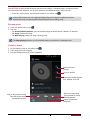
3. Use the following keys to control playback:
Bakc to current
playlist.
Turn on shuffle.
Select play mode: Repeat
one, Repeat all or Off.
Skip to the next song.
Tap and hold to move
fowards quickly.
Pause and resume
playback.
Skip to the previous song.
Tap and hold to move
backwards quickly.
USER MANUAL
MultiPhone PAP4044 DUO
33
Set a song as ringtone
1. On the home screen or list menu, tap
2. Tap a song from the category.
3. Tap to select Use as ringtone.
.
Your playlist
Create a playlist
You can make your own playlist.
1. On the home screen or list menu, tap
.
2. Tap a song from the category.
3. Tap to select Add to playlist.
4. On the pop up screen, tap New to create a new playlist.
5. Enter a title and tap Save.
Rename the playlist
1. On the home screen or list menu, tap
.
2. Tap Playlists to view all your playlists.
3. Tap and hold the playlist you want to rename.
4. Select Rename on the pop up screen.
Delete a playlist
1. On the home screen or list menu, tap
.
2. Tap Playlists to view all your playlists.
3. Tap and hold the playlist you want to delete.
4. Select Delete on the pop up screen.
Delete a song
1. On the home screen or list menu, tap
2. Tap a song from the category.
3. Tap to select Delete.
.
FM radio
You can listen to radio programs by using your phone.
•To use the FM radio, on the home screen or list menu, tap
.
You must connect a headset before using the FM radio on your phone.
Listen to a radio station
1. On the home screen or list menu, tap
.
2. Tap
> Search. It starts scanning automatically and save the available channels.
3. Use the following keys to control playback:
USER MANUAL
MultiPhone PAP4044 DUO
34
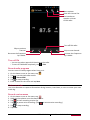
More options.
Open the channel list.
Use headset or
speaker to listen
to FM radio.
Turn off FM radio.
Skip to previous
channel.
Skip to next channel.
Decrease the frequence
by 0.1MHz.
Increase the frequence
by 0.1MHz.
Turn off FM
-- You can use other apps while listening to the radio.
-- To turn off FM Radio completely, tap
> Exit.
Record radio programs
You can record a radio program when listen to it.
1. On the home screen or list menu, tap
.
2. Tune to your desired radio station.
3. Tap
> Record FM.
4. Tap
to stop recording.
5. Enter a name for the voice and tap Save.
Voice recorder
Use Voice Recorder to capture information during lectures, interviews, or even to create your own
audio log.
Record a voice memo
1. On the home screen or list menu, tap
.
2. Hold the microphone near the sound source.
3. Tap
to start recording a voice clip.
4. Tap
to pause voice recording. (Tap
to resume voice recording.)
5. Tap
to stop recording.
6. Tap Save.
USER MANUAL
MultiPhone PAP4044 DUO
35
Voice Recorder can run in the background while you do other things on your phone, except
when you open other apps that also use audio functions.
Play a voice memo
1. On the home screen or list menu, tap
2. Tap
to open recording file list.
3. Select your voice memo and tap it.
.
Delete a voice memo
1. On the home screen or list menu, tap
.
2. Tap
to open recording file list.
3. Tap and hold the voice memo you want to delete.
4. Tap
to delete the file.
USER MANUAL
MultiPhone PAP4044 DUO
36
9.Web & network
You can connect your phone to internet and browse a webpage on the websit.
Connect to internet
9
Your phone connects to the Internet whenever necessary, using a Wi-Fi
connection (if available) or your mobile operator's data connection.
Data connection
You can use your mobile operator's data connection. Some apps and services may transfer data
over your mobile operator's cellullar network, which may result in additional fees. Contact your
mobile operator for details.
Turn on or off data connection
1. On the home screen or list menu, tap
.
-- Or, tap > System settings.
2. Tap More... > Mobile networks > Data connection.
3. Tap to turn on or off data connection.
Y ou can tap to turn on or off data connection on notification panel. On notification panel,
tap Data connection.
If you don’t have the data connection turned on and you’re also not connected to a Wi‑Fi
network, you won’t receive automatic updates to your email, social network accounts, and
other synced information.
Add a new access point
Access Point Names (APNs) connect your phone to data networks for services such as mobile web
browsing.
efore you add another data connection, have the access point name and settings from
B
your mobile operator ready (including username and password if required).
1. On the home screen or list menu, tap
.
-- Or, tap > System settings.
2. Tap More... > Mobile networks > Access Point Names.
3. On the APNs screen, tap > New APN.
4. Enter the APN settings.
5. Tap > Save.
6. Select the new APN on the APNs screen.
Keep track of your data usage
If you're on a limited data allowance, it's important to keep track of the activities and apps that
usually send and receive data, such as browsing the web, syncing online accounts, and sending
email or sharing status updates.
To help you save on data usage, connect to a Wi‑Fi network whenever possible and set your
online accounts and emails to sync less frequently.
Data usage measured by your phone may vary with your actual data usage.
USER MANUAL
MultiPhone PAP4044 DUO
37
1. On the home screen or list menu, tap .
-- Or, tap > System settings.
2. Tap Data usage.
3. On the Mobile tab, select Set mobile data limit to automatically disable your data connection
when you reach the set limit.
4. Tap Data usage cycle, you can set a particular time interval to see how much data you've used.
5. Drag the yellow line marker to set your monthly data limit.
If you're connecting your phone to another portable Wi‑Fi hotspot, tap > Mobile
hotspots to restrict background data from downloading that may incur extra data fees.
Turn on or off data roaming
Connect to your mobile operator’s partner networks and access data services when you’re out of
your mobile operator’s coverage area.
Using data services while roaming may be costly. Check with your mobile operator for data
roaming rates before you use data roaming.
1. On the home screen or list menu, tap .
-- Or, tap > System settings.
2. Tap Data usage.
3. Tap > Data roaming to turn on or off data roaming.
Check the data usage of apps
1. On the home screen or list menu, tap .
-- Or, tap > System settings.
2. Tap Data usage.
3. On the Mobile tab, drag the vertical line markers to see how much data you've used during a
particular time interval.
4. Scroll down the screen to see a list of apps and their data usage info.
5. Tap an app to see more details.
Wi-Fi
Connect the device to a Wi-Fi network to use the Internet or share media files with other devices.
To use Wi-Fi, you need access to a wireless point or hotspot.
T he availability and strength of the Wi-Fi signal will vary depending on objects, such as
buildings or simply a wall between rooms, the Wi-Fi signal has to pass through.
Turn on or off Wi-Fi
Do the following method:
-- On notification panel, tap WI-FI.
-- On the home screen or list menu, tap
, and then tap Wi-Fi to turn on or off it.
Connect to a wireless network
1. On the home screen or list menu, tap
, and then tap Wi-Fi to turn on it.
2. Detected Wi-Fi networks will be listed in the Wi-Fi networks section.
3. Tap the desired Wi-Fi network you want to connect.
-- If you selected a secured network, you’ll be asked to enter the network key or password.
USER MANUAL
MultiPhone PAP4044 DUO
38
T he next time your phone connects to a previously accessed secured wireless network, you
won’t be asked to enter the key or other security information again.
Forget the wireless network
Any network that has ever been used, including the current network, can be forgotten so your
phone will not automatically connect to it.
1. On the home screen or list menu, tap
, and then tap Wi-Fi.
2. Tap the wireless network you've been connected.
3. Tap Forget.
Use your phone as a wireless router
Share your data connection with other devices by turning your phone into a wireless router.
•Make sure the data connection is turned on.
•You must have an approved data plan associated with your account from your mobile
service provider to use this service.
1. On the home screen or list menu, tap
.
2. Tap More....> Tethering & portable hotspot.
3. In Hotspot & tethering settings, enter a router name or use the default router name.
4. Choose the type of security and set the password (key) for your wireless router.
-- If you selected None in Security, you don’t need to enter a password.The password is the
key other people need to enter on their device so they can connect and use your phone as a
wireless router.
5. Tap to turn on Wi-Fi hotspot.
Share your mobile data connection by USB tethering
You can use the data connection of your phone for your computer to connect to the Internet.
•Make sure your SIM card is inserted on your phone.
•You may need to have USB tethering added to your data plan, and it may incur additional
cost. Contact your mobile service provider for details.
1. Connect your phone to the computer by using the provided USB cable.
2. On the home screen or list menu, tap
.
3. Make sure that data connection is turned on.
4. Tap More....> Tethering & portable hotspot.
5. Tap to turn on USB tethering.
VPN
You can connect and access resources inside a secured local network, such as your corporate
network. Depending on the type of VPN you’re using at work, you may be asked to enter your
login credentials and install security certificates before you can connect to your company’s local
network. You can get this information from your network administrator. You must first establish a
Wi-Fi or data connection before you can start a VPN connection.
Add a VPN connection
You must first set a lock screen PIN or password before you can use credential storage and set up
the VPN.
USER MANUAL
MultiPhone PAP4044 DUO
39
1. On the home screen or list menu, tap
.
2. Tap More... > VPN.
3. Tap Add VPN profile.
4. Enter the VPN settings and set them up according to the security details your network
administrator gave you.
5. Tap Save.
Connect to a VPN
1. On the home screen or list menu, tap
.
2. Tap More... > VPN.
3. Tap the VPN that you want to connect to.
4. Enter your log in credentials, and then tap Connect. When you’re connected, the VPN
connected icon appears in the notification area of the status bar. You can then open the web
browser to access resources such as your corporate network intranet.
Disconnect from a VPN
1. On the home screen or list menu, tap
.
2. Tap More... > VPN.
3. Tap the VPN connection to disconnect from it.
Web browse
You can use your phone to browse the websites. Before browsing a website, please confirm that
you have turn on data connection or Wi-Fi.
Browse a webpage
1. On the home screen or list menu, tap
.
2. Enter your search keywords or a webpage address.
3. While browse a webpage, you can:
-- Tap
to go to the previous webpage.
-- Tap to go to the next webpage.
-- Tap
to open webpage preview, and you can tap to close the webpage.
-- Tap
to browse wepages from Bookmarks, History and Saved pages.
Add bookmarks
1. On the home screen or list menu, tap
.
2. Enter your search keywords or a webpage address.
3. Browse a webpage.
4. Tap > Save to bookmarks.
Open a bookmark
1. While viewing a webpage, tap .
2. Tap Bookmarks.
3. On the Bookmarks tab, navigate to the bookmark you want to open, and then tap it.
Edit a bookmark
1. While viewing a webpage, tap .
2. Tap Bookmarks.
3. On the Bookmarks tab, tap and hold the webpage you want to edit.
4. Tap Edit on the pop up screen.
5. Enter your changes, and then tap OK.
USER MANUAL
MultiPhone PAP4044 DUO
40
View Browsing history
1. While viewing a webpage, tap .
2. Tap History.
3. On the History tab, tap a time period to see a list of webpages you’ve visited.
Download files
You can download files and apps directly from your favorite websites.
Files and apps downloaded from the Web can be from unknown sources. To protect your
phone and personal data, we strongly recommend that you download and open only the
files you trust.
1. On the home screen or list menu, tap
.
2. Go to the website where you can download the file you want.
3. Follow the website's download instructions for apps.
efore you can install the downloaded app, you need to set your phone to allow installation
B
of third-party apps in System settings > Security > Unknown sources.
View your downloads
1. On the home screen, tap
2. Tap the file to open it.
.
Browser settings
Customize the web browser to suit your browsing style. Set display, privacy, and security options
when using the web browser.
•From the browser screen, tap > Settings.
Set homepage
1. On the home screen or list menu, tap
.
2. On the browser screen, tap > Settings.
3. Tap General > Set hompage.
4. Select the homepage you want to use.
USER MANUAL
MultiPhone PAP4044 DUO
41
10.Bluetooth
Your phone can connect to a compatible Bluetooth device for exchanging data.
Bluetooth creates a direct wireless connection between two devices over short
distances.
10
Do not use the Bluetooth feature for illegal purposes (for example, pirating copies of files or
illegally tapping communications for commercial purposes).
Turn on or off Bluetooth
1. On the home screen or list menu, tap
.
-- Or, tap > System settings.
2. Tap to turn on or off Bluetooth.
You can tap to turn on or off Bluetooth on notification panel. On notification panel, tap
Bluetooth.
Pair with a Bluetooth device
1. On the home screen or list menu, tap
.
-- Or, tap > System settings.
2. Tap to turn on or off Bluetooth.
3. A list of available Bluetooth devices appears.
4. Select the device you wish to connect.
5. Tap Pair. The pairing is made if your pairing request is accepted by the other part.
Unpair with a Bluetooth device
1. On the home screen or list menu, tap
.
-- Or, tap > System settings.
2. Tap Bluetooth.
3. Select the device you want to unpair and then tap
4. Tap Unpair.
.
Receive data via Bluetooth
1. On the home screen or list menu, tap
.
-- Or, tap > System settings.
2. Tap to turn on or off Bluetooth.
3. Tap your phone model to make it visible to all nearby Bluetooth devices.
4. Accept the request and pair with the other Bluetooth device.
5. Slide to open notifications panel, tap Accept.
•If you do not use the Bluetooth feature for some time, you should deactivate it in order to
conserve battery power.
•The files received via Bluetooth are stored in the Bluetooth folder.
Send data via Bluetooth
1. On the home screen or list menu, tap
.
-- Or, tap > System settings.
2. Tap to turn on or off Bluetooth.
3. Pair with a Bluetooth device.
4. Tap
on the home screen or list menu.
5. Tap the file you want to share.
6. Tap
and select Bluetooth.
7. Select a device to start sending the file.
USER MANUAL
MultiPhone PAP4044 DUO
42
11.Apps
Play store
Use the Google Play station to purchase and download applications and games
that are able to run on the your phone. Choose from a wide variety of free and
paid apps ranging from productivity apps, entertainment, to games.
-- On the home screen or list menu, tap
.
11
•A Google Wallet™ payment service is required to purchase a paid app. You will be asked
to confirm method of payment when you purchase an app.
•The name of the Play Store app may differ depending on your region.
•The ability to purchase apps varies by region.
Search and install an app
1. On the home screen or list menu, tap
.
2. Browse applications by category, or tap
to search with a keyword.
3. Select an application to view information.
4. To download it, tap Install.
-- If there is a charge for the application, tap the price, and follow on-screen instructions to
complete the purchase process.
•When a new version is available for any installed application, an update icon appears at
the top of the screen to alert you to the update. Open the notifications panel and tap the
icon to update the application.
•To install applications that you downloaded from other sources, you need to set your
phone to allow installation of third-party apps in System settings > Security > Unknow
sources.
Uninstall an app in Play store
1. On the home screen or list menu, tap
2. Tap > My Apps.
3. Select an app you want to unintall.
4. Tap Uninstall.
.
Manage your apps
Check the running apps
1. On the home screen or list menu, tap
> Apps.
-- Or, tap > Manage apps.
2. Go to Running tab, you can check all the apps is running now.
Stop an app
1. On the home screen or list menu, tap
-- Or, tap > Manage apps.
2. Tap the app you want to stop.
3. Tap Stop.
> Apps.
USER MANUAL
MultiPhone PAP4044 DUO
43
Uninstall an app
1. On the home screen or list menu, tap
-- Or, tap > Manage apps.
2. Tap the app you want to uninstall.
3. Tap Uninstall.
> Apps.
•For different apps, the options may be vary.
•You can not uninstall the essential apps and system app, such as Contacts, Settings and
etc.
USER MANUAL
MultiPhone PAP4044 DUO
44
12.eReader Prestigio
12
With the eReader Prestigio, you can read eBooks on your phone.
-- On the home screen or list menu, tap
.
Your eReader at a glance
Find eBooks in
your library.
Go to Bookstore.
View your
bookshelf.
Change different
search item.
Search eBooks by
keyword.
eBooks.
Edit your
collections.
Edit your bookshelf.
Download an eBook
You can download eBooks by using eReader Prestigio. Some eBooks are free to download, and
some eBooks need a paid.
You will be asked to confirm method of payment when you purchase a paid eBook.
1. On the home screen or list menu, tap
.
2. Tap Bookstore tab.
3. Select your language, and then find your desired eBook.
4. Tap
to download the eBook.
Read an eBook
1. On the home screen or list menu, tap
2. Tap My shelf or My library tab.
3. Find your desired eBook.
4. Tap the eBook to read it.
.
USER MANUAL
MultiPhone PAP4044 DUO
45
Add a bookmark
1. While reading a eBook, tap .
2. Tap , and then tap New bookmark.
3. The certain page is added to bookmark.
Open the bookmark
You can continue reading your eBook from the certain page which you have added to bookmark.
1. While reading a eBook, tap .
2. Tap .
3. In This book or All books tab, tap your desired bookmark.
Search for a content
You can search for a certain content in the eBook, for example, a word, a sentence or a paragraph,
etc.
1. While reading a eBook, tap .
2. Tap
.
3. Enter a word, a sentence or a paragraph, etc.
4. Tap Go in the virtual keyboard to search for the content page by page.
Zoom in and out
While reading an eBook, you can zoom in or out the screen to fit your reading.
1. While reading a eBook, tap .
2. Tap .
3. Tap Zoom in or Zoom out.
eReader settings
You can set up your eReade Prestigio while reading an eBook.
1. On the home screen or list menu, tap
.
2. Tap My shelf or My library tab.
3. Find your desired eBook.
4. Tap the eBook to read it.
5. While reading a eBook, tap .
6. Tap Settings.
7. Select your desired options.
USER MANUAL
MultiPhone PAP4044 DUO
46
13.Travel & maps
Use this application to pinpoint the location of your phone, search for places, or
get directions.
Find a location
13
About Locations
Use this application to search for nearby restaurants, banks, bus stops, and more.
-- On the home screen or list menu, tap .
•If you are in an area where there are a lot of surrounding buildings, Locations may have a
hard time pinpointing your location.
•This application may not be available depending on the region or service provider.
Turn on or off location service
In order to find your location on your phone, you need to enable location sources.
1. On the home screen or list menu, tap
.
-- Or, tap > System settings.
2. Tap Location services.
3. Select or clear the location sources you want to turn on or off.
Find your location
1. On the home screen or list menu, tap .
2. Your phone will pinpoint your location.
3. Select a category that you’re interested in to see the places that are nearby.
Add a new category
You can add a new category to search for more places nearby quickly.
1. On the home screen or list menu, tap .
2. Tap > Add a search.
3. On the category list, enter a keyword to search into the text field.
Search for a place
You can search for a name of an establishment, street, or city. Suggested matches will be shown
while you type.
1. On the home screen or list menu, tap .
2. Tap
.
3. Enter the place you want to search for.
4. Select the desired place in the result list.
-- Tap
to show the place on the map.
-- Tap
to get directions to the place.
Get directions
Get detailed directions to where you want to go.
Get directions from your location
1. On the home screen or list menu, tap
2. Tap
.
.
USER MANUAL
MultiPhone PAP4044 DUO
47
3. Enter the place you want to search for.
4. Select the desired place in the result list.
5. Tap
to get directions to the place.
6. Choose how you want to get to your destination.
7. Tap get directions.
8. The map opens showing the route to your destination.
Get directions by setting a start and end location
1. On the home screen or list menu, tap
, and tap
to enter map view.
-- Or, tap
on the home screen or list menu.
2. Tap
to get directions.
3. Choose your start point and end point.
4. Tap get directions.
5. The map opens showing the route to your destination.
Navigation
Use this application to search for a route to a destination while driving.
To use navigation, the GPS satellites option in System settings > Location services needs to
be selected.
This application may not be available depending on the region or service provider.
Navigation maps, your current location, and other navigational data may differ from actual
location information. You should always pay attention to road conditions, traffic, and any
other factors that may affect your driving. Follow all safety warnings and regulations while
driving.
Do the following to start navigation:
•In Locations, search for the place you want to go to, and then tap Navigation.
•On the home screen or list menu, tap
.
Use Google maps
About Google Maps
Google Maps lets you track your current location and receive detailed directions to your
destination. It also provides a search tool where you can locate places of interest or an address on
a map, or view locations at street level.
-- On the home screen or list menu, tap
.
•To find your location with Google Maps, you need to enable location sources.
•The Google Maps app does not cover every country or city.
Use Google maps
You can do the following:
•Tap
to search for a place.
•Tap
to get directions.
•Tap
to find your location on the map.
•Tap
to get more selections.
USER MANUAL
MultiPhone PAP4044 DUO
48
Clear the map
After searching on a map, you can clear away the various markers drawn on it.
Tap > Clear Map.
Get help
If you need help or have questions about Maps or Latitude, tap > Help.
Maps settings
You can set up the Google maps, tap
> Settings while viewing the maps.
USER MANUAL
MultiPhone PAP4044 DUO
49
14.My files and storage
My files
Use this application to access all kinds of files stored on your phone, including
photos, videos, songs, and sound clips.
-- On the home screen or list menu, tap
14
.
View my files
1. On the home screen or list menu, tap
2. Tap to choose a source storage.
3. Select a folder to open it.
.
Search for a file
1. On the home screen or list menu, tap
.
2. Tap to choose a source storage.
3. Tap
, and enter key word.
4. Select the desired file or folder in the drop up list.
Add a new folder
1. While viewing a folder or file, tap
.
2. Enter a name for the new folder.
3. Tap OK to add the folder to the file list.
Manage your files
You can share, copy, move or delete a file in a folder.
While viewing a foler, tap and hold the file. You can do the following selections:
-- Tap
to copy the file.
-- Tap
to delete the file.
-- Tap
to cut the file to clipboard.
-- Tap
to get more options.
Storage
If you connect a Micro SD card to your phone, there are two source storage: your phone and the
Micro SD card.
Check your storage usage
1. On the home screen or list menu, tap
.
-- Or, tap > System settings.
2. Tap Storage.
3. You can check the total space of your phone’s memory and SD card.
Set your preferred install location
1. On the home screen or list menu, tap
.
-- Or, tap > System settings.
2. Tap Storage.
3. In Preferred install location tab, tap to choose your preferred install location.
USER MANUAL
MultiPhone PAP4044 DUO
50
Erase SD card
1. On the home screen or list menu, tap
-- Or, tap > System settings.
2. Tap Storage.
3. Select Erase SD card.
.
Formatting a memory card permanently deletes all data from it.
The actual available capacity of the internal memory is less than the specified capacity
because the operating system and default applications occupy part of the memory.
USER MANUAL
MultiPhone PAP4044 DUO
51
15.Utilities
15
Clock
Use the clock app to check the time or set alarms.
-- On the home screen or list menu, tap
.
Night mode
You can use your tablet as a clocke at night.
1. On the home screen or list menu, tap
.
2. Tap and hold blank area on the screen to enter night mode.
Alarm
You can set up one or more alarms.
Set an alarm
1. On the clock screen, tap
.
2. Tap
to add a new alarm.
3. Scroll the digit list to set the alarm time.
4. Tap OK.
5. If you want the alarm for multiple days, tap Repeat.
Turn off an alarm
1. On the clock screen, tap
.
2. Select the alarm you want to turn off.
3. Drag the check button to Off.
Stop an alarm
When the alarm rings,
•Tap Dismiss: The alarm stops.
•Tap Snooze: The alarm will sound again after a specified length of time.
Delete an alarm
1. On the clock screen, tap
.
2. Tap and hold the alarm you want to delete.
3. Tap Delete alarm.
Calendar
You can create your event and make a plan on your calendar.
•On the home screen or list menu, tap
.
View the calendar
On the home screen or list menu, tap
to Day, Week,Month or Agenda view.
to check the calendar. Tap
to change your calendar
Create an event
1. Go to
, select a date.
2. Tap > New event.
3. Edit reminder settings.
4. Tap Done to save the event.
Manage your events
Edit an evnet
You can only edit events you have created.
USER MANUAL
MultiPhone PAP4044 DUO
52
1. While viewing the calendar, tap
to change your calendar to Agenda view.
2. Tap the event your want to edit, and then tap
.
3. Make your changes to the event.
4. Tap Done.
If you're editing an event that repeats, you'll be asked whether you want to edit just that
occurrence or all occurrences of that event.
Delete an event
1. While viewing the calendar, tap
to change your calendar to Agenda view.
2. Tap the event your want to delete, and then tap
.
If the event repeats, you’ll be asked whether you want to delete just that occurrence or all
occurrences from Calendar.
Clear all events
•Go to
, and then tap
> Clear events.
Share an event
You can share a calendar event as a vCalendar using Bluetooth or by sending it as a file attachment
with your email or message.
1. While viewing the calendar, tap
to change your calendar to Agenda view.
2. Tap the event your want to share, and then tap
.
3. Choose how you want to send the event.
Calculator
Use this app for simple or complex calculations.
On the home screen or list menu, tap
.
-- Swipe to display the scientific calculator. Or, tap
-- To clear history, tap > Clear history.
> Advanced panel.
ToDo list
Use the ToDo app, you can organize and track to do and task lists.
•On the home screen or list menu, tap
.
Create your to-do list
1. On the home screen or list menu, tap
.
2. Tap
.
3. Edit the title and details, and then set the expire date.
4. Tap Done to save the task.
Manage your to-do list
Edit a task
You can only edit tasks you have created.
1. On the home screen or list menu, tap
2. Tap the event your want to edit.
3. Make your changes to the task.
4. Tap Done.
.
USER MANUAL
MultiPhone PAP4044 DUO
53
Mark the task as done or undone
-- Select the task on the TODO category, tap
to mark the task as done.
-- Select the task on the DONE category, tap
to mark the task as undone.
Delete an task
1. On the home screen or list menu, tap
.
2. Tap the task your want to delete, and then tap
.
FreeNote
Use this app to jot down ideas, questions, and everything else. Type in text, attach photos and
documents.
-- On the home screen or list menu, tap
quick tour.
. The first time you open the app, you can take a
Compose a note
1. On the home screen or list menu, tap
.
2. Use the keyboard or handwrite to enter the text.
3. Use the painting brush to draw a picture.
4. Tap
to exit and save the note.
Use handwrite
-- Tap the third selection in action tab (handwrite/paint/keyboard), choose handwrite.
Open calendar
Set up page
Action tab
Editing area
Set the pattern
of the pencil
Set the color
of the pencil
Page/Total pages
Set magic button
Delete
Insert emotion picture
Enter
Paste
Space
USER MANUAL
MultiPhone PAP4044 DUO
54
Use keyboard
-- Tap the third selection in action tab (handwrite/paint/keyboard), choose keyboard.
Show the virtual
keyboard
Search
Delete the note
Use painting brush
-- Tap the third selection in action tab (handwrite/paint/keyboard), choose Paint.
Select the tools
Page down
Click the
layer to edit
Zoom in and
zoom out
Edit the
paiting brush
Add attachment
-- While composing the note, tap
> Insert... to add photo, audio, video and other files.
View your notes
1. On the home screen or list menu, tap
2. Toggle the page to view your notes.
.
Google search
Use this application to search not only the Internet, but also apps and their contents on your
phone as well.
USER MANUAL
MultiPhone PAP4044 DUO
55
-- On the home screen or list menu, tap
.
S ome apps, such as Contacts or eMails, have their own search function, which you can use
to search only within those apps.
Search on the web or your phone
1. Tap the search field, and then enter a keyword.
2. Select one of the suggested keywords that appear.
If no results are returned from the apps, the web browser appears, displaying the search
results.
Search with your voice
Use Google Voice Search to find information on the Web just by speaking to your phone.
1. On the home screen or list menu, tap
.
-- If the Google search bar is available on the Home screen, you can also tap
.
2. Speak a keyword or phrase when Speak now appears on the screen.
3. Select one of the suggested keywords that appear.
4. If what you’re searching for is in the list, tap the item to open it in its compatible app.
Otherwise, tap Retry to search again.
This application may not be available depending on the region or service provider.
Set search options
1. On the home screen or list menu, tap
.
2. Tap > Settings to set the following options:
-- Voice: Set the Google Voice Search language, speech output, and more.
-- Phone search: Select the apps on your phone which you want included when doing a search.
-- Privacy & accounts: Manage your location history, enable recent web searches to show, or
clear your search history.
Google Now
Launch Google search to view Google Now cards that show the current weather, public transit
info, your next appointment, and more when you are most likely to need it.
Join Google Now when opening Google search for the first time.
To change Google Now settings, tap > Settings > Google Now.
USER MANUAL
MultiPhone PAP4044 DUO
56
16.Set up your phone
Use this app to control and customize phone settings .
-- On the home screen or list menu, tap
. Or, tap
> System settings.
16
Wireless & Networks
SIM management
-- Check your SIM card information.
-- Set your default SIM card.
-- Set the SIM card for data connection.
Wi-Fi
Activate the Wi-Fi feature to connect to a Wi-Fi network and access the Internet or other network
devices.
Bluetooth
Activate the Bluetooth feature to exchange information over short distances.
Data usage
Keep track of your data usage amount, and customise the settings for the limitation.
More...
Set up the following items.
•Airplane mode
Activate Flight mode to disable all wireless functions on your device. You can use only
nonnetwork features.
Airplane mode disables the wireless features in order to reduce potential interference with
aircraft operation and other electrical equipment.
•VPN
Set up and manage virtual private networks (VPNs).
•Tethering & portable hotspot
-- Set to use your device as a wireless modem by making a USB connection with a computer.
-- Set to use your device as a wireless access point for other devices.
-- Activate the Bluetooth tethering feature to share your mobile network with computers via
Bluetooth.
•Mobile networks
-- Data connection: Use to allow packet switching data networks for network services.
-- Data roaming: Use the device to connect to another network when you are roaming or your
home network is not available.
-- Preferred networks: Selected a preferred network.
-- Network mode: Select a network type.
-- Access Point Names: Set up access point names (APNs).
-- Network operators: Search for available networks and select a network for roaming.
USER MANUAL
MultiPhone PAP4044 DUO
57
Device
Audio profiles
•Tap the desired profile to edit it. Or, tap
to add your customized profiles.
-- Select the profiles of the phone.
-- Set the volume, type for ringtong and notification.
Display
Change the settings to control the display and backlight on your device.
Storage
View memory information for your device and memory card.You can also format the memory
card.
Formatting a memory card permanently deletes all data from it.
The actual available capacity of the internal memory is less than the specified capacity
because the operating system and default applications occupy part of the memory.
Battery
View the amount of battery power consumed by your device.
Apps
Manage running applications, move applications to or from the storage card, and install or
uninstall programs.
Personal
Location sevices
Select the sources to use when determining your location.
-- Access to my location: Set to use Wi-Fi and/or mobile networks for finding the current
location.
-- GPS satellites: Set to use the GPS satellite for finding the current location.
-- Wi-Fi & mobile network location: Let apps use Google's location service to estimate your
location faster.
Security
Set a screen lock or manage the credential storage.
Language & input
Set the operating system language and region. You can also set on-screen keyboard options.
Backup & reset
Change the settings for managing settings and data.
-- Back up my data: Set to back up settings and application data to the Google server.
-- Backup account: Set up or edit your Google backup account.
-- Automatic restore: Set to restore settings and application data when the applications are
reinstalled on the device.
-- Factory data reset: Reset settings to the factory default values and delete all data.
Accounts
Add and manage your Email, Google, Facebook and Twitter accounts.
USER MANUAL
MultiPhone PAP4044 DUO
58
System
Date & time
Access and alter the following settings to control how the device displays the time and date.
-- Automatic date & time: Automatically update the time and date when moving across time
zones.
-- Automatic time zone: Set to receive time zone information from the network when you move
across time zones.
-- Set date: Set the current date manually.
-- Set time: Set the current time manually.
-- Select time zone: Set the home time zone.
-- Use 24-hour format: Display time in 24-hour format.
-- Choose date format: Select a date format.
Schedule power on & off
Set the time to power on/off automatically.
Accessibility
Use these settings when you’ve downloaded and installed an accessibility tool, such as a screen
reader that provides voice feedback. You can turn accessibility functions or services on or off.
Developer options
Change the settings for application development.
About phone
Access device information and update device software. View different information about the
phone, such as the battery, legal information, model number, software version, baseband version
and build number.
USER MANUAL
MultiPhone PAP4044 DUO
59
17.Specifications
17
Item
Specification
Processor
High Performance Dual Core Cortex at 1.2 GHz
Memory
OS
Display
Resolution
Band
Interfaces
Communications
Battery
Dimensions
Weight
RAM 512MB DDR2 + eMMC 4GB, Micro SD slot supports up to 32GB
Android 4.1
4.0" WVGA, Capacitive multi-touch
480*800
WCDMA + GSM (UMTS:900/2100 MHz; GSM:850/900/1800/1900)
Micro USB 2.0, Micro SD (micro SDHC compatible)
WiFi (802.11 b/g/n), Bluetooth 3.0, 2G+3G
1500 mAh Li-Ion battery
126*63.5*10.3mm (L x W x H)
100g(without battery)
USER MANUAL
MultiPhone PAP4044 DUO
60
18.Troubleshooting
The phone does not switch on
Remove/reinstall the battery. Then charge the phone until the battery icon
stops scrolling. Unplug the charger and try to switch the phone on.
18
The display shows BLOCKED when you switch on the phone
Somebody tried to use your phone but didn’t know the PIN code nor the unblocking code (PUK).
Contact your service provider.
The display shows IMSI failure
This problem is related to your subscription. Contact your operator.
The network symbol is not displayed
The network connection is lost. Either you are in a radio shadow (in a tunnel or between tall
buildings) or you are outside the network coverage area. Try from another place, try to reconnect
to the network (especially when abroad), or contact your network operator for assistance/
information.
The touch screen responds slowly or improperly
If your device has a touch screen and the touch screen is not responding properly, try the
following:
-- Remove any protective covers from the touch screen. Protective covers may prevent the
device from recognising your inputs and are not recommended for touch screen devices.
-- Ensure that your hands are clean and dry when tapping the touch screen.
-- Restart your device to clear any temporary software bugs.
-- Ensure that your device software is upgraded to the latest version.
-- If the touch screen is scratched or damaged, take it to your local dealer.
Your battery seems to over heat
You might be using a charger that was not intended for use with your phone. Make sure you
always use the authentic accessory shipped with your phone.
Your phone doesn’t display the phone numbers of incoming calls
This feature is network and subscription dependent. If the network doesn’t send the caller’s
number, the phone will display Call 1 or Withheld instead. Contact your operator for detailed
information on this subject.
You can’t send text messages
Some networks don’t allow message exchanges with other networks. First check that you have
entered the number of your SMS centre, or contact your operator for detailed information on this
subject.
You can’t receive and/or store JPEG pictures
A picture may not be accepted by your mobile phone if it is too large, if its name is too long, or if it
doesn’t have the correct file format.
You feel that you have missed some calls
Check your call divert options.
USER MANUAL
MultiPhone PAP4044 DUO
61
When charging, the battery icon shows no bar and the outline is flashing
Only charge the battery in an environment where the temperature does not go below 0°C (32°F) or
above 50°C (113°F). In other cases please contact your phone supplier.
The display shows SIM failure
Check that the SIM card has been inserted correctly. If the problem persists, your SIM card may be
damaged. Contact your operator.
Your phone doesn’t work well in your car
A car contains many metallic parts that absorb electromagnetic waves which can affect the
phone’s performance. A car kit is available to provide you with an external antenna and enables
you to make and receive phone calls without handling the handset.
Check with the local authorities whether or not you are allowed to use the phone while driving.
Your phone is not charging
If the battery is completely flat, it might take several minutes of precharge (up to 5 minutes in
some cases) before the charging icon is displayed on the screen.
The picture captured with the phone camera is not clear
Make sure that the camera lens on both sides is clean.
When you turn on your device or while you are using the device, it prompts you to enter one of
the following codes:
-- Password: When the device lock feature is enabled, you must enter the password you set for
the device.
-- PIN: When using the device for the first time or when the PIN requirement is enabled, you
must enter the PIN supplied with the SIM or USIM card. You can disable this feature by using
the Lock SIM card menu.
-- PUK: Your SIM or USIM card is blocked, usually as a result of entering your PIN incorrectly
several times. You must enter the PUK supplied by your service provider.
-- PIN2: When you access a menu requiring the PIN2, you must enter the PIN2 supplied with the
SIM or USIM card. For details, contact your service provider.
Your device freezes or has fatal errors
If your device freezes or hangs, you may need to close programs or reset the device to regain
functionality. If your device is frozen and unresponsive, press and hold the Power button for 8-10
seconds. The device reboots automatically.
If this does not solve the problem, perform a factory data reset. On the list menu, tap Settings >
Back up & reset > Factory data reset > Reset device > Erase everything.
Others cannot hear you speaking on a call
-- Ensure that you are not covering the built-in microphone.
-- Ensure that the microphone is close to your mouth.
-- If using a headset, ensure that it is properly connected.
Error messages appear when launching the FM radio
The FM radio application on your phone uses the headset cable as an antenna. Without a headset
connected, the FM radio cannot receive radio stations. To use the FM radio, first ensure that the
headset is properly connected. Next, scan for and save the available radio
stations.
USER MANUAL
MultiPhone PAP4044 DUO
62
Another Bluetooth device is not located
-- Ensure that the Bluetooth wireless feature is activated on your device.
-- Ensure that the Bluetooth wireless feature is activated on the device you wish to connect to,
if necessary.
-- Ensure that your device and the other Bluetooth device are within the maximum Bluetooth
range (10 m).
A connection is not established when you connect the device to a computer
-- Ensure that the USB cable you are using is compatible with your device.
-- Ensure that you have the proper drivers installed and updated on your computer.
-- If you are a Windows XP user, ensure that you have Windows XP Service Pack 3 or higher
installed on your computer.
-- Ensure that you have Windows Media Player 10 or higher installed on your computer.
USER MANUAL
MultiPhone PAP4044 DUO
63