1
Quick Search
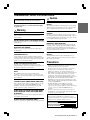
Playing MP3/WMA Data
You can search for tracks (files).
This product can playback CDs containing both CD and MP3/WMA
data. However, in some situations (some enhanced CDs), playback
may be difficult. For these special cases, you can select playback of
CD data only. When a disc contains both CD or the MP3/WMA data,
playback starts from the CD data portion of the disc.
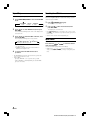
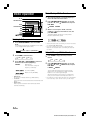
Press and hold
track (file number).
or
to select the desired
The selected track is played back immediately.
• Holding down
or
causes the files to change
continuously and removing your finger starts playing that track.
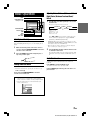
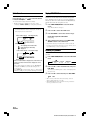
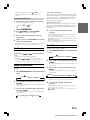
1
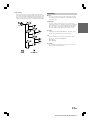
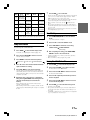
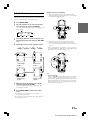
Press FUNCTION/SETUP to select the SETUP
mode*.
* See “About SETUP” on Page 6.
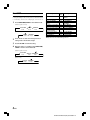
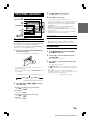
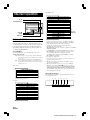
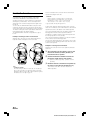
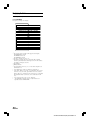
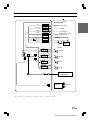
MP3/WMA Play Display
The folder number, file number, sampling rate, and bit rate
will be displayed as described below.
Folder number display
2
3
Press / or - to select the CD-DA mode.
Press -/J / ENT. to set the disc selection range.
File number display
CD-DA ONLY
01
01
4
Sampling rate display
The sampling rate and the bit rate
(frame display) are alternately
displayed.
Folder number display
01
File number display
01
After completing the setting, press FUNCTION/
SETUP to return to the normal mode.
• Perform this setting before inserting a disc. If a disc has already
been inserted, perform the setting after you remove the disc. (If you
use an MP3 changer, you have to change discs.)
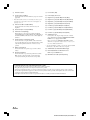
Scanning Programmes
The first 10 seconds of each track (file) will be played back in
succession.
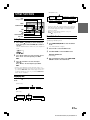
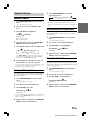
1
Bit rate display*
Press FUNCTION/SETUP to select the FUNCTION
mode.
As the root folder number is displayed as 1, when there is no
file in the root folder, the first folder is displayed as 2 and
played back.
* The recording sampling rate and bit rate of the MP3/WMA file
are displayed. A WMA file of variable bit rate displays the
average bit rate.
• Press TITLE to switch the display. Please see “Displaying the
Title/Text” (on Page 16) for information about display switching.
CD-DA & MP3/WMA
(Initial setting)
FUNCTION
mode
2
SETUP
mode
NORMAL
mode
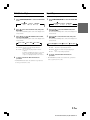
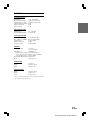
Press / or - to select the SCAN mode, then press
-/J / ENT..
The mode that is blinking at the centre of the display is the
selected mode.
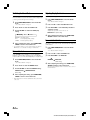
3
Press / or - to select ON, then press -/J / ENT..
ON
OFF
• When you have found a desired track for listening, switch the
function OFF with the above procedure.
• The FUNCTION mode will be cancelled when an operation has
not been performed in 10 seconds.
10-EN
ALPINE CDA-W925E (EN) 68-05946Z41-A