1
Chapter 5
Debugging a Multi-Agent System
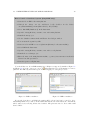
The Goal runtime provides various options for debugging. While running a mas, Goal provides
a range of options for debugging which include the following:
1. options for viewing and controlling debug output produced while running a mas,
2. setting general and specific breakpoints to pause an agent on,
3. agent introspectors for inspecting the mental state of an agent, and percepts and messages
received at runtime,
4. a message sniffer for tracing messages that are exchanged between agents (currently, only
when running the JADE middleware).
[TODO: Goal facilitates debugging of a multi-agent system in various ways. It provides
various forms of feedback in the feedback area at the bottom of the runtime in debug mode, i.e.
when a multi-agent system is running. In addition, for each agent, an introspector can be opened
to inspect the contents of the mental state of an agent. Finally, it is possible to set breakpoints
to pause an agent when it hits such a breakpoint.]
5.1
Introspecting Agents
A useful tool to trace what your agents are up to is the introspector. An introspector allows you
to inspect the mental state of an agent.
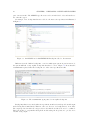
How to open an Introspector:
• Open an introspector by double clicking on an agent process in the Process panel, or,
• Alternatively, select the agent process and the Open Introspector item in the Debug
menu.
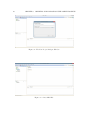
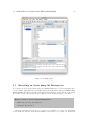
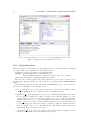
Introspectors are located in the content area of the debug mode. Figure 5.1 shows an introspector for the stackbuilder agent that is part of the bw2agents.mas2g project.
An agent introspector consists of various tabs that allow you to access the current contents of
the agent’s beliefs, goals, mails, percepts, and knowledge. In the area showing the contents, you
can select text and copy it to somewhere else.
21