1
Unit at a Glance
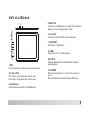
1
2 3
5.USB OTG
Connect to a USB device or a computer to transfer
data (e.g. music, videos,photos, files).
6. microSD
Load external microSD memory cards here.
4
5
6
7
8
9
7.USB HOST
Connect to a USB device
8. HDMI
Connect to a TV or other displays.
10
1.ESC
Press this button to return to a previous screen.
2/3. VOL+/VOLPress VOL+ to increase the volume level.
Press VOL- to decrease the volume level.
9.DC IN 5V
Change and power the tablet with the included
power adapter.
10. POWER
Press to turn the unit on, or to turn the screen on
or off.
Press and hold to access the Power Off menu.
4. Headphone
Audio output connection for headphones.
3