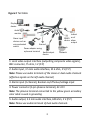
1
z
z
The flash program is programmed in the first start, prolonging the self‐test duration. Please wait patiently. When you restart the device, the self‐test will be quick.
When the working environment temperature is lower than zero Celsius degrees, the device will be automatically pre‐heated. When the temperature rises above zero Celsius degrees, the device will start the self‐test again. It takes a rather long time (at most 30 minutes) for the device to finish the pre‐heating process. Please wait patiently. 5 Setting the Camera over the LAN To view and configure the camera via LAN (Local Area Network), you need to connect the network camera in the same subnet with that of your PC. Then, install the EZStation software to search and change the IP address of network camera. 21