1
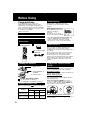
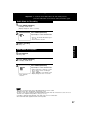
JPEG Zoom
(During JPEG Playback.)
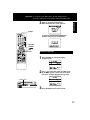
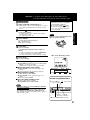
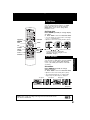
You can enlarge specific portions of a JPEG
picture and select the zoom ratio using the
ZOOM button on the remote during JPEG
Playback screen.
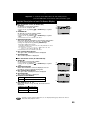
Set Zoom size.
Press ZOOM repeatedly to change display
as follows.
➡ Press STOP to return the MP3/JPEG MENU.
SELECT
ACTION
SET
STOP
• You can enlarge the center portion of the image
to one of 2 magnifications.
• Operation can be done during Rotation (below).
× 1.0 (ORIGINAL)
FF/
SLOW+
REW/
SLOWSTILL
ANGLE
PLAY
SKIP+
SKIPZOOM
× 1.5 (ZOOM 1)
1st press
× 2.0 (ZOOM 2)
2nd press
3rd press
■ Use the , , and
buttons to move the
position up, down, left and right.
(Position cannot be changed on ×1.0
ORIGINAL images.)
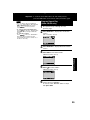
JPEG Rotation
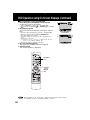
Set rotation.
Press ANGLE repeatedly to change
display as below.
DVD Operation
(During JPEG Playback.)
You can rotate a JPEG picture using the ANGLE
button on the remote during JPEG Playback
screen. (The JPEG picture will be rotated 90°
clockwise.)
➡ Press STOP to return the MP3/JPEG MENU.
• Operation can be done during Zoom (above).
• The vertical/horizontal ratio of rotated JPEG
images may vary when they are displayed.
1st press
2nd press
3rd press
4th press
MPEG Layer-3 audio decoding technology licensed from Fraunhofer IIS
and Thomson multimedia.
51