1
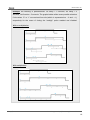
MAXinBOX 16 expires. The cyclical monitoring can be disabled by simply setting a 0 under this filed. The following example illustrates the above behaviour: Example: Suppose that a cyclical monitoring period of 3 minutes is configured. The trigger value is “1” and the reaction of the actuator when the alarm is activated consists in moving the shutter all the way up, while when the alarm is deactivated, the shutter will be lowered. Assuming that the shutter has been lowered, when the alarm becomes active the actuator will start raising the shutter. While the alarm stays active, any action over the shutter channel will be ignored by the actuator. After some time (t2), one “0” arrives through the alarm object, which makes the alarm turn off and the shutter be raised. Before the parameterised cyclical monitoring period (3 minutes) ends, a new alarm deactivation order arrives, so the time count starts again. After 3 minutes without receiving further values through the alarm object, the alarm will be automatically activated, making the shutter move up again. As before, any action over the shutter will be ignored until the alarm is deactivated. See the following figure “[CX] Alarm”=1 Automatic Alarm Activation “[CX] Alarm”=0 “[CX] Alarm”=0 Output status t1 t2 3 minutes 3 minutes Response: sets the response order to be sent to the shutter when the alarm is triggered: • Stop. • Up. • Down. • Specific position. http://www.zennio.com Technical Support: http://zennioenglish.zendesk.com 31