1
User’s Manual
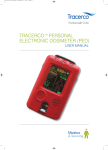
Electronic Personal Dosimeter
(For Gamma(X)-ray)
NRF30
Direct Scientific www.drct.com
tel 310 589 0601
email: [email protected]
Fuji Electric Co., Ltd.
TN514629i 1/31
Introduction
Thank you for purchasing the Electronic Personal Dosimeter NRF30 (Hereinafter described as “the
Dosimeter”) by FUJI ELECTRIC CO., LTD. The User’s Manual is organized to provide descriptions of
parts, functions and operational instructions for optimal use. Please make sure that you read this manual
carefully before operation.
In the event of product malfunction, contact your Fuji Electric authorized customer service representative.
In order to ensure prompt service, please provide precise details of the problem and its evolution, along
with the model and serial number. A photo or drawing would enhance understanding and would be greatly
appreciated.
Do not repair or attempt to repair the Dosimeter through any unauthorized service providers. Such actions
may void the warranty by Fuji Electric Co., Ltd.
TN514629i 2/31
HANDLING PRECAUTIONS
Please read the following handling precautions to ensure that you use the Product safely and avoid injury/
damages. Please read this User’s Manual carefully to understand all the precautions before using the
Product.
Measures of Precaution
Attention
・ The Dosimeter is a precision instrument; do not drop it or subject it to
impact.
・ Keep the Dosimeter in a plastic bag for protection when used in an
environment where chemical fumes, splashes /steam, full of dust and
wastes are present.
・ Handle the Dosimeter with clean, dry hands. If becomes tainted, clean it
with dry cloth.
・ Do not place the Dosimeter and metal objects in the same pocket. It may
cause the dosimeter breaking.
・ Avoid use where with high frequency noise. Pay attention when use near
the following devices:
1. Mobile phone
2. Premises/local wireless phone such as <PHS>
3. High power transceiver, or like kind
4. Microwave oven
5. Radar
6. Welding machine
7. Any other spark discharging or high intensity radio wave emitting
devices
Especially keep the Dosimeter at least 5cm away from any mobile/
wireless phones
・ When the battery level is critically low, read the displayed value within 10
minutes.
・ Use CR123A battery only. During replacement, align the battery polarities
correctly.
・ Prior to disposal of the used battery, protect exposed terminals with
insulating tape to prevent shorting that may cause possible heating,
rupture, or burning. Otherwise, injury or fire may result.
・ Do not throw the Dosimeter or battery into a fire. Do not disassemble
them.
・ Keep distance between the buzzer and ears to avoid the injury.
(Buzzer makes the sound over 85dB)
・ Do not use the Dosimeter as a survey meter.
・ If a hard impact operating on the dosimeter, it may have a crack to the
dosimeter. In this case, it may deteriorate the capabilities in a
waterproof and a resistance of radio wave.
・ Do not excessively open or pull the clip to avoid breakage.
TN514629i 3/31
Contents
1.
Overview ............................................................................................................................................. 5
2.
Product Overview................................................................................................................................ 6
3.
4.
5.
6.
7.
8.
2.1
Product package .......................................................................................................................... 6
2.2
Product type code ........................................................................................................................ 6
Precautions ......................................................................................................................................... 7
3.1
Operational conditions ................................................................................................................. 7
3.2
Other requirements ...................................................................................................................... 7
Descriptions of Parts and Functions ................................................................................................... 8
4.1
Part names................................................................................................................................... 8
4.2
Display function.......................................................................................................................... 10
4.3
Buzzer function ...........................................................................................................................11
4.3.1
Audible signal ......................................................................................................................11
4.3.2
Audible alarms.................................................................................................................... 12
Battery Replacement......................................................................................................................... 17
5.1
Battery replacement................................................................................................................... 17
5.2
Attaching and removing a clip.................................................................................................... 18
Operational Instructions .................................................................................................................... 19
6.1
When start to use....................................................................................................................... 19
6.2
During use.................................................................................................................................. 21
6.3
After use..................................................................................................................................... 24
Care and Maintenance...................................................................................................................... 25
7.1
Check procedures...................................................................................................................... 25
7.2
Consumable supplies ................................................................................................................ 25
Specification ...................................................................................................................................... 26
8.1
General specification ................................................................................................................. 26
8.2
Photon energy response............................................................................................................ 27
8.3
Dose equivalent rate dependence............................................................................................. 27
8.4
Angular of incidence .................................................................................................................. 28
8.4.1
For 137Cs on phantom......................................................................................................... 28
8.4.2
For 241Am (X-ray 56.2keV) on phantom ............................................................................. 28
8.4.3
Angle of incidence for 137Cs in Free air .............................................................................. 29
8.5
9.
Ambient temperature ................................................................................................................. 29
Appendix ........................................................................................................................................... 30
9.1
Troubleshooting Table................................................................................................................ 30
9.2
Disposal ..................................................................................................................................... 31
TN514629i 4/31
1.
Overview
The Electronic Personal Dosimeter NRF30 (hereinafter referred to as NRF30) is designed to
provide measurement of personal dose equivalent of external exposure to radiations (hereinafter
referred to as dose).
The Dosimeter NRF30 measures gamma dose, and indicates each preset dose threshold (alarm
threshold) will be audibly alarmed if reached.
Using the Dosimeter Setting Device and a PC, you can write PC-edited values to / read
measurement data trend from the Dosimeter NRF30 via communication with the device.
If worn tight to the body, energy characteristic of the NRF30 series enables direct reading of dose
equivalent at the depth of 1cm (unit: Sv or rem, 1Sv is equivalent to 100 rem).
You can switch Sv and rem units through the Dosimeter Setting Device. Default setting of
NRF30021-□□1YY and NRF30021-□□2YY are Sv and rem, respectively.
TN514629i 5/31
2.
Product Overview
2.1 Product package
(1) The Dosimeter NRF30
1 (Clip included)
(2) Option
Battery (CR-123A)
1
Plug-pin
1
2.2 Product type code
1
2
3
4
N
R
F
3
5
6
7
8
1
9
10
11
-
12
13
Y
Y
14
-
Radiation measured
0
Gamma(X)-ray
Transmission
0
Infrared
Battery
2
Primary cell
Modification number
Normal version
1
Indication plate
1
2
Japanese
English
Measurement
2
Accumulated dose + Dose rate
(realtime)
Accumulated dose + Dose rate
(time constant)
3
Unit
Sv
rem
1
2
Non-Standard specification
Blank,S
A
Standard
Other specifications
TN514629i 6/31
3.
Precautions
Attention
3.1 Operational conditions
Item
Condition
Temperature range
-20 ℃ to +50 ℃
Relative humidity
90 % or less (No condensation)
Storage temperature
-20 ℃ to +50 ℃
Reset of accumulated
dose
Reset through the Dosimeter Setting Device
Alarm volume
Approximately 85 dB @20 cm
Continuously 2880 hours
Battery life
(Using a new battery under normal temperature
and no alarm activity)
Impact resistance
Impact from 150cm drop onto a hard wood surface
Dose thresholds by default
Dose rate thresholds by
default
Overload indication
Alarm
0.5 mSv (50 mrem)
Pre-Alarm
0.25 mSv (25 mrem)
Alarm
700 mSv/h
Pre-Alarm
(70000 mrem/h)
70 mSv/h (7000 mrem/h)
‘OVER’ is indicated
3.2 Other requirements
(1) See User’s Manual “Dosimeter Setting Device” for information on parameter writing and data
reading via the device and a PC.
(2) If multiple dosimeters are used, dosimeter rack (*Option) is recommended. See Outline
Drawing “Dosimeter Rack” for information on the rack for storage dosimeters.
(3) Try to turn OFF & ON the dosimeter if you encounter technical problems. See the
“Troubleshooting Table” if not recovered.
(4) The dosimeter NRF30 cannot be reset by inserting the plug pin (*Option) if the reset-mode
setting of dosimeter is “OFF”. In this case, please reset the Dosimeter through the Dosimeter
Setting Device.
TN514629i 7/31
4.
Descriptions of Parts and Functions
4.1 Part names
1. Buzzer
2. LED (RED)
3. LCD
Top view
4. Battery cap
5. Mode switch
6. Point of
Calibration
Front view
Rear view
Side view
7. Clip
11. Label
9. Communication port
8. Power ON/OFF Jack
Bottom view
10. Plug pin
TN514629i 8/31
Functions
1. Buzzer: Sounds the alarm, buzzer sound check, low battery level.
2. LED: Red type Light Emitting Diode.
3.
LCD: Liquid Crystal Display Indicator. Displays the dose, set dose value, operating time, etc.
and can read directly as 1cm dose (unit: Sv or rem)
4.
Battery Cap: Seals the battery compartment.
5. Mode Switch: Select desired display mode with this switch-- Accumulated Dose (mSv or mrem)
or Dose Rate (mSv/h or mrem/h)
6. Point of Calibration: Shows location of calibration point. (Sensor position)
7. Clip: To fix the dosimeter on the pocket or on the band.
8. Power ON/OFF: Switches power ON and OFF.
After 2 seconds from inserting a dosimeter to the dosimeter rack, power turns OFF. By pulling
out, it turns ON.
9. Communication Port (IR): The communication port with the setting device of an exclusive use.
10. Plug pin: For power on or off of the dosimeter. If multiple dosimeters are used, dosimeter rack
is recommended for storage.
11. Label: Type number, Serial number and the date of Manufacture are mentioned.
12. Maximum dose rate during use is transmitted to a dosimeter reader or a dosimeter setting
device.
13. Stores maximum 600 records of trend data and maximum 500 records of access data.
TN514629i 9/31
4.2 Display function
LCD Indications
Normal mode
Dose Type
Accumulation time mode: Operating Time
Decreasing time mode: Remaining Time
Unit of Accumulated Dose
Or Dose Rate
Accumulated Dose or Dose Rate
Alarm mode
Dose Type
Alarm Indicators
Unit of accumulated Dose
or Dose Rate
Accumulated Dose or Dose Rate
Accumulation time mode: Operating Time
Decreasing time mode: Remaining Time
TN514629i 10/31
4.3 Buzzer function
4.3.1 Audible signal
Audible signals sound under the following circumstances:
Signal beep
ON/OFF
Starts when:
Beep pattern
The dosimeter is turned on.
Beep
30 msec
The dosimeter is turned off.
No sound
Contact to external
The dosimeter is set at the setting device or
No sound
device
a rack.
Data transmission
Successful completion of data transmission
Setting value In the dosimeter are changed
No sound
Beep
Beep
Using a setting device.
0.5 sec
Data transmission failed
Buzzer test
0.5 sec
No sound
Beep
Buzzer test
(See Sec.6.2 During use)
5 sec
TN514629i 11/31
4.3.2 Audible alarms
Alarm activations and beep patterns are as follows:
Alarm activation
Preset
accumulated
dose threshold is
Alarm cause
Beep pattern
Accumulated dose has reached Alarm sound generates 50-ms beeps at intervals
the preset dose threshold.
of 150 ms for 3 times in one second.*1
This repeats until exit operation by communicating
(Pre-ALarm)
with external devices or turning the power off. *2
Alarm Type (blink)
Dose type
reached
50ms
50ms
50ms
Accumulated dose
or dose rate
Operating time
(blink)
Or remaining time
150ms
150ms
550ms
1sec
Accumulated dose has reached
the preset dose threshold.
(ALarm)
Note: In case of pre-alarm, LED does not light
on/blink.
Alarm Type (blink)
Dose type
●
LED (blink)
Accumulated dose
or dose rate
(blink)
Operating time
Or remaining time
TN514629i 12/31
Preset dose rate
threshold is
reached
Dose rate has reached the
preset dose threshold.
Alarm sound generates 150-ms beeps at intervals
(Pre-ALarm)
This repeats until decreasing to 50 % of preset
of 50 ms for 3 times in one second.*1
dose rate, exit operation by communicating with
Alarm Type (blink)
Dose type
external devices or turning the power off. *2
150ms
150ms
150ms
Accumulated dose
or dose rate
Operating time
(blink)
Or remaining time
50ms
50ms
450ms
Dose rate has reached the
preset dose threshold.
1sec
Note: In case of pre-alarm, LED does not light
(ALarm)
on/blink.
Alarm Type (blink)
Dose type
●
LED (blink)
Accumulated dose
or dose rate
(blink)
Operating time
Or remaining time
*1 If the preset dose and dose rate thresholds are simultaneously reached, the alarm sound
pattern is switched and repeated at intervals of one second.
*2
If the mode-switch is pressed in 3 seconds during preset alarm duration, the buzzer and LED
are inactivated. (This Alarm-Stop-Function can switch ON and OFF using a setting device.
Default setting is ON.)
Attention
If you press and hold the button until the audible/LCD alarm stops, any other
alarm is not available except for dose rate alarm.
As for accumulated dose alarm in this case, audible alarm does not activate
and only “AL” and “OVER” are blinking.
* One-second interval alarm sound does not activate in this case.
TN514629i 13/31
Alarm activation
Low battery level
Alarm cause
When the battery voltage
became lower than 2.2 V.
Alarm Type (blink)
Dose type
Beep pattern
If this alarm and one of the above-mentioned
alarms activate simultaneously, the alarm sound
for low battery voltage activates first. The low
battery voltage alarm sounds 3 times with 2
seconds interval.
2sec
2sec
2sec
Accumulated dose
or dose rate
Operating time
(blink)
Or remaining time
2sec
2sec
LED is NOT activated.
Exceed the
Accumulated time
The alarm begins with a 1 min-long beep, followed
Operating time
When the operating time
by a 1 sec mute. After that, a 1 sec beep and a 1
reaches the preset time
sec mute are repeated. All beeps go on for preset
(In case of the setting is 9:30 ) alarm duration.
*2
Alarm Type(blink)
LED(blink)
●
Accumulated dose
or dose rate
Operating time (blink)
Preset alarm duration
Decrease time
When the remaining-time
LED is activated in 1 sec. interval.
reaches to zero.
Alarm Type(blink)
LED(blink)
●
Accumulated dose
or dose rate
Remaining time (blink)
TN514629i 14/31
Detector function
error
E :06” will start blinking if an
The alarm begins with a 1 min-long beep, followed
error occurred with detection
by a 1 sec mute. After that, a 1 sec beep and a 1
circuit (e.g. an open circuit or
sec mute are repeated. All beeps go on for preset
short –circuit with condensing). alarm duration.
●
*2
LED(blink)
Alarm Type (blink)
Preset alarm duration
LED is activated in 1 sec. interval.
*2 If the mode-switch is pressed in 3 seconds during preset alarm duration, the buzzer and LED
are inactivated. (This Alarm-Stop-Function can switch ON and OFF using a setting device.
Default setting is ON.)
Attention
If you press and hold the button until the audible/LCD alarm stops, Operating
time alarm activates without audible alarm.
* One-second interval alarm sound does not activate in this case.
TN514629i 15/31
Alarm cause
Alarm activation
Overflow
Beep pattern
Accumulate dose reaches
a 10 Sv or
Dose rate reaches a 10 Sv/h.
Alarm Type (blink)
●
LED(blink)
・Accumulate dose and dose rate (common)
The alarm begins with a 1 min-long beep, followed
by a 1 sec mute. After that, a 1 sec beep and a 1
sec mute are repeated. All beeps go on for preset
alarm duration. *3
Alarm Type (blink)
Preset alarm duration
LED is activated in 1 sec. interval.
*3
If the mode-switch is pressed in 3 seconds during preset alarm duration, the buzzer and LED
are inactivated. (This Alarm-Stop-Function can switch ON and OFF using a setting device.
Default setting is ON.)
Attention
If you press and hold the button until the audible/LCD alarm stops and then
dose rate alarm occurs, audible/LCD alarm for dose rate activates only when
the dose rate exceeds 10 Sv/h.
As for accumulated dose alarm in this case, audible alarm does not activate
and only “AL” and “OVER” are blinking.
* One-second interval alarm sound does not activate in this case.
TN514629i 16/31
5.
Battery Replacement
5.1 Battery replacement
Follow these steps to replace the battery :
(1) Insert the plug pin (*Option) to turn the
-
+
dosimeter off.
(2) Unscrew the battery cap using a coin.
Battery
(CR123A)
(3) Replace the battery.
Battery
cap
Insert a new battery in the compartment
correctly.
(4) Close the battery cap using a coin till the
O-ring is disappeared.
Plug pin
(Option)
An O-ring is consumables, please change the O-ring every 2 years or the when of battery
replacement (recommend). The information of the O-ring purchase, please contact our agency.
1. When replacing battery, make sure to turn off the dosimeter by inserting the
Attention
Plug pin.
2. During replacement, align the battery polarity correctly.
3. Use only CR123A battery in 3.0 V. *4
*4 The battery voltage is checked on electrodes of CR123A by using a ordinary voltmeter.
Becase of a load resistance in the dosimeter, in some cases, the measured voltage is higher
than the voltage during the operation.
TN514629i 17/31
5.2 Attaching and removing a clip
Follow these steps to replace the battery;
・Removing a clip
Pull up a clip as shown fig.2 with pushing the hook arrow pointing toward as shown fig.1
Fig.1
Fig.2
・Attaching a clip
Attach the circled area of a clip as shown below to the rear side of a dosimeter. Make sure to
insert a clip perfectly. When inserting incompletely, a clip comes away and a dosimeter might fall.
TN514629i 18/31
6.
Operational Instructions
6.1 When start to use
(1) Unscrew and remove the Plug pin (*Option). Confirm the power is ON (one beep) and LCD.
LCD
Please entry a new battery (CR123A)
into the dosimeter for the first time use.
(To see Sec. 5.1 battery replacement)
Check items
Audible signal (1 beep)
Indicated dose value
Display of operating time
Method of confirmation
Confirm one beep after removing the plug pin.
0 µSv (0.0 mrem) or 0 µSv/h (0.0 mrem/h)
Operating time or remaining time
[hour : min] or [hour.]
0 min. to 99 hr 59 min
LCD
〔Normal display〕
100 hr to 9999 hr 59 min
〔Abnormal display〕
If Hp(10) is 0 µSv (0.0mrem).
Replace the battery if battery level
Operating time is 2 min.
is low.
TN514629i 19/31
(2) Select desired display mode with this switch--Accumulated Dose (Sv or rem) or Dose
Rate (Sv/h or rem/h). Display mode may be changed at any time by using the mode
switch.
(3) Clip the dosimeter onto the chest pocket as shown below.
Human Body
Pocket
TN514629i 20/31
6.2 During use
To switch modes for LCD display:
Display
№
1
Remarks
Normal mode 1
Accumulated dose
3 sec press
short-press *5
Normal
mode 2
Mode switch
10 sec inactivity
3 sec press
Normal
mode 2
Mode switch
short-press
10 sec inactivity
3 sec press
short-press
Mode switch
Normal
mode 2
Hp(10)
Alarm threshold
(Cumulative dose)
Normal
mode 2
Hp(10)
Pre-alarm threshold
(Cumulative dose)
Normal
mode 2
Hp(10)
Alarm threshold
(dose rate)
Normal
mode 2
Hp(10)
Pre-alarm threshold
(dose rate)
Normal
mode 2
Dosimeter’s
software version
10 sec inactivity
3 sec press
short-press
Mode switch
10 sec inactivity
3 sec press
short-press
Mode switch
10 sec inactivity
short-press
User’s name
Mode switch
3 sec press
10 sec inactivity
short-press
Mode switch
3 sec press
10 sec inactivity
3 sec press
short-press
*5
*6
Mode switch
Alarm *6
(5 sec)
Alarm test
(Buzzer test)
Short-press : press in 3 seconds
LED is also activated.
TN514629i 21/31
Display
No
2
Remarks
Normal mode 2
Hp(10)
Accumulated dose
Mode switch
3 sec press
short-press
Normal
mode 1
Hp(10)
dose rate
Mode switch
3 sec press
short-press
TN514629i 22/31
Item
No
3
Operating time display
Display
Remarks
Accumulated time (In case of the setting is 9:30 )
The time alarm will
be activated when
the operating time
Time count up
reaches the preset
time value.
●
Blink
TIME, Operating Time and LED are blinking.
Remaining time display
Decrease time (In case of the setting is 9:30 )
The time alarm is
activated,
when
the remaining-time
reaches to zero.
Time count down
●
Blink
TIME, Remaining-time and LED are blinking.
4
Low battery display
[BATT] will start blinking if the battery level is low.
Blink
The low battery
alarm will beep 5
times only.
LED
is
blinking.
NOT
(LED is NOT blinking)
Note: During this alarm activation, the beep sound
of dose and dose rate alarm will stop. After
low battery voltage alarm (BATT blinking),
available for about 10 hours without alarm
and backlight.
5
Detector function error
display
In
this
case,
please replace to
a new battery as
soon as possible.
“E :06” will start blinking if an error occurred with DO NOT use the
detection circuit (e.g. an open circuit or short dosimeter
after
–circuit with condensing).
this error.
TN514629i 23/31
6.3 After use
Insert the dosimeter in the rack, or insert and screw the plug pin to turn off.
(2 seconds is needed to turn off the dosimeter)
Off
Attention
Plug pin (*Option)
Do not insert the plug pin again to dosimeter in 5 seconds
after pulling out the plug pin.
TN514629i 24/31
7.
Care and Maintenance
Check the Dosimeter as specified below to ensure quality performance.
7.1 Check procedures
№
1
Check items
Procedures
Check point
Joint line of the battery Visually check the joint line.
The cases should be
cap.
tightened
and
fixed
When to check: Before use and after battery together.
No sign of
replacement.
gap should be found.
Check purpose: To avoid contamination of the
Dosimeter by moisture or dust.
2
Crack to the dosimeter.
Visually check the joint line.
No sign of crack should
be found.
When to check: Before use and after battery
replacement.
3
The surface is clean
Check purpose: To avoid contamination of the
Dosimeter by moisture or dust. To avoid
deteriorations of the capabilities in a waterproof
and a resistance of radio wave.
Wipe the dosimeter surface with dry cloth or soft The dosimeter surface
brush. Also wipe the communication port.
should be clean.
When to check: After use in environment where If dirt cannot be removed,
please contact us.
dust, chemical fumes and etc. are present.
4
5
Battery cap (With O-ring)
Check purpose: To prevent operation mistake.
Recommend a replacement periodically
Battery cap has
When to replace: Every 2 years or when replaces a elasticity.
battery.
Indication error /
Replacement purpose: To keep waterproofing.
To confirm the indication error within 10% to the If indication error is over
reference dose equivalent using Cs-137.
10%, please contact us for
calibration.
calibration
When to check: 1 year or less
Check purpose: To optimize the dose equivalent
management and to avoid exposure accidents.
7.2 Consumable supplies
Please contact our agency.
1. Battery CR123A
: Order from 1 unit.
2. Battery cap with O-ring
: Order from 1 unit.
TN514629i 25/31
8.
Specification
8.1 General specification
Type
NRF30021-□□1YY , NRF30021-□□2YY
Radiation type
Gamma (X)-ray
Detector
Silicon semi-conductor
Dose display range
0 µSv to 9.999 Sv
(35 keV to 6.0 MeV)
0 µSv/h to 9.999 Sv/h
Display
LCD
Calibration
±10 %
Energy response
50 keV to 1.5 MeV
< ±20 % (Ref. 137Cs)
1.5 MeV to 6 MeV
< ±30 % (Ref. 137Cs)
137
Cs, 1 mSv (10 mSv/h)
Dose accuracy
±10 %
( 0.1 mSv to 9.999 Sv) (137Cs)
Dose rate accuracy
±20 %
( 2 mSv/h to 9.999 Sv/h)
Linearity
±10 %
( 0.1 mSv/h to 9.999 Sv/h) (137Cs)
Angular of incidence
±20 %
( 0 deg. - 60 deg.)(137Cs, Ref. 0 deg.)
±50 %
( 0 deg. - 60 deg.)
(241Am or equivalent of 60 keV X-ray, Ref. 0 deg.)
Ambient temperature
±20 %
(-10 ℃ to +40 ℃) (Ref. 20 ℃)
Response time
5 s or less
( 5 mSv/h to 9.999 Sv/h)
Battery
Li-ion battery
x1 (CR123A)
Battery life
2880 hours
(new battery, normal temperature, no alarms)
Operating temperature
-20 ℃ to +50 ℃ (90 % or less, no condensation)
Dimensions
Approx. 60 mm x 78 mm x 33 mm (including clip)
Weight
Approx. 100 g
(including clip, rubber cover and battery)
Tests on the dosimeter comply with the IEC Standard IEC 61525 (1998), and IEC 61526 (1998)、
and JIS Standard JIS Z 4312 (2002). Indications on the dosimeter may be interfered by certain
factors such as mobile phones, vibrations, and impacts.
If a hard impact operating on the dosimeter, it may have a crack to the dosimeter. In this case,
it may deteriorate the capabilities in a waterproof and a resistance of radio wave.
TN514629i 26/31
Relative response (Ref.
137
Cs)
8.2 Photon energy response
Energy [keV]
Indication par 6 min. [mSv]
8.3 Dose equivalent rate dependence
Irradiation dose rate [mSv/h]
Open square is experimental data, black circle is simulated data using electric pulses.
TN514629i 27/31
8.4 Angular of incidence
8.4.1 For 137Cs on phantom
8.4.2 For 241Am (X-ray 56.2 keV) on phantom
TN514629i 28/31
8.4.3 Angle of incidence for 137Cs in Free air
8.5 Ambient temperature
TN514629i 29/31
9.
Appendix
9.1 Troubleshooting Table
Error No.
E04
POSSIBLE CAUSE
(1) Communication distance is too
Communication error
far
SUGGESTED SOLUTION
(1) Set the distance between
Communication port of the Dosimeter and
(2) Communication port is dirty.
the Setting Device within 5 cm. Also note
(3) IC circuit parts malfunction
that these windows are face to face.
(2) Clean IR communication window with
soft cloth.
(3) Contact our agency.
E06
(1) IC malfunction
(1) Contact our agency.
E81
(1) RF Module malfunction
(1) Contact our agency.
E82
(2) Additional Device malfunction
(2) Contact our agency.
E83
(3)Communication Error
(3) Set the distance between
Detector function error
E89
Communication port of the Dosimeter and
etc.error
the Setting Device within 5 cm. Also note
that these windows are face to face.
Clean IR communication window with soft
cloth.
When contact our agency, please provide precise details of the problem.
Note: This Troubleshooting Table is to help you locate only the Dosimeter’s malfunctions
that occurred during use.
SYMPTOM
No Indications on LCD
POSSIBLE CAUSE
(1) Defective battery connection
(2) Power switch malfunction or IC
malfunction
SUGGESTED SOLUTION
(1) Check the proper contacts in the battery
compartment and there is no exogenous
material in the battery case.
(2) Contact our agency.
Characters on LCD is
(1) Defective battery connection
(1) Check the proper contacts in the battery
garbled
(2) Power switch malfunction or IC
compartment and there is no exogenous
malfunction
material in the battery case.
(2) Contact our agency.
Backlight does not light
(1) Power switch malfunction or IC
when pushing the mode
malfunction
(1) Contact our agency.
switch
TN514629i 30/31
Dose error
(1) LCD malfunction
(1) and (2) Contact our agency.
・Dose accumulation
(2) IC malfunction
(3) Confirm calibration constant. Please ask us
doesn’t work
(3) Calibration constant trouble
how to check the calibration constant.
・Displayed dose is high
・Displayed dose is low
Audible signal doesn’t work
(Assuming the indication display is
normal)
(1) Clean up the mesh with soft brush. Do not
use alcohol for cleaning. If trouble
(1) Waterproof mesh is dirty
continues after this procedure, contact our
(2) Frequency setting trouble
agency.
(3) Buzzer lead wire is broken
(2) (3) and (4), Contact our agency.
(4) Buzzer unit IC malfunction
Time indication does not
(1) Near the end of the battery’s life. (1) Replace with a new battery. (See 5.1)
reach an intended value.
(2) Increase the current
consumption
Low battery indicator
(3) The change of the voltage
appears prematurely.
decline detection level by IC
malfunction.
IR communication is unable. (1) Communication distance is too
far
(2) Check the proper contacts in the battery
compartment and there is no exogenous
material in the battery case. If trouble
continues, Contact our agency.
(3) Contact our agency.
(1) Set the distance between Communication
port of the Dosimeter and the Setting
(2) Communication port is dirty.
device within 5cm. Also note that these
(3) IC circuit parts malfunction
windows are face to face.
(2) Clean IR communication window with soft
cloth.
(3) Contact our agency.
Crack to the dosimeter
(1) A hard impact operating on the
(1) Contact our agency.
dosimeter by dropped or crushed.
9.2 Disposal
Regarding disposal of this product, please follow the rule of your country.
TN514629i 31/31
Direct Scientific www.drct.com
tel 310 589 0601
email: [email protected]