1
the Move mode, and drag the item to any Home screen as you prefer.
Reposition
Touch and hold the item to be repositioned to activate the Move mode,
drag the item to the desired position and then release. You can move
items both on the Home screen and the Favorite tray. Hold the icon on
the left or right edge of the screen to drag the item to another Home
screen.
Remove
Touch and hold the item to be removed to activate the Move mode, drag
the item up to the top of Remove, and release after the item turns red.
Create folders
To improve the organization of items (shortcuts or applications) on the
Home screen, you can add them to a folder by stacking one item on top
of another.
Wallpaper customization
Touch and long press the blank area in Home screen, then touch
Wallpaper to customize wallpaper.
1.3.6 Volume adjustment
Using volume key
Press Volume key to adjust the volume. To activate the Silent mode,
press the Volume down key until the tablet silent.
Using Settings menu
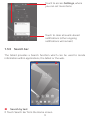
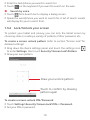
Drag down the quick setting panel and touch the settings icon
to enter Settings, then touch Sound & notification, you can set the
volume of media, notification, system and etc. to your preference.
12