1
Rako Controls Ltd
Installing a Wall Plate onto the Wired System
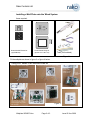
Items required:
Button Module Electronics
(eg WCM-070)
Cover Plate & Fixing Kit
(eg WVF-070 or WLF-070)
Tools (not included)
Figure 2
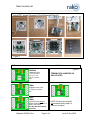
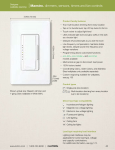
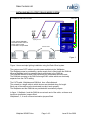
Fit the wallplate as shown in figure 3 or figure 4 below:
Using WVF series Flush Mounted Plate kit
Backbox minimum 35mm deep
Strip outer insulation from CAT5 cable
Follow the
colour coding
written on the
circuit board
SET THE
TERMINATION
JUMPERS
Punch down
cables using
correct
colours
Use cable ties to hold CAT5
cable to the plastic housing.
Prevents cables being ripped
from connector.
Wallplate WCM070.doc
Figure 3
Page 2 of 3
Issue B. Nov 2009