1
USER MANUAL
DIGITAL PIANO
STP-710
Using the Instruction Manual
Thank you for purchasing this Digital Piano. The use of high technology and the most advanced
sampling technique brings you high quality sound and enjoyment. The combination of digital piano
and electronic keyboard features let you perform perfectly. We hope this skilfully built digital piano
will able to explore your creativity, and brings you unlimited happiness and music enjoyment.
Before you use the piano, we recommend you to read through this manual. Please keep this
instruction manual for future reference.
Precautions
Please read the following carefully before use:
Do not expose the piano to high temperature, direct sunlight and excessively dusty places.
Do not place the piano too close to other electrical appliances such as television and radio or
it may cause interference.
Do not place the piano to excessive humidity area. Avoid putting container with liquid on top of
the piano, this will prevent the damage of the internal parts of the piano by flowing liquid.
Always unplug cables by gripping the plug firmly, but not pulling on the cable.
Do not apply excessive force to the switches and buttons.
When the piano is not in use or during a thunderstorm, disconnect the power supply.
Avoid adjusting the volume level to the maximum or to the levels that you feel uncomfortable, we
recommend you to limit the volume level to two-third of the max to prevent the damage of
audiory sense
Unplug the power cable before cleaning the piano, never connect or disconnect the power cable
with a wet hand.
Check and clean the power plug periodically.
To avoid damage to the piano and other devices to which it is connected, turn the power
switches of all related device off prior to connecting or disconnecting cables.
Clean the piano with a dry soft cloth, a slightly damp cloth may be used to remove dirt.
Never use cleaners such as thinner or alcohol. To prevent damage the surface of the LED display,
please use lens cleaning tissue to clean the display.
If the piano cable is damaged, do not use the piano, otherwise it may a fire or electrical hazard.
The piano may cause malfunction due to improper handling, if this occurs, switch off the piano
and switch on again after 30 seconds.
Do not attempted to disassemble or repair the piano by yourself, and do not modify the internal
parts. If the piano is not working properly, please contact approved repairer.
1
Contents
Digital Piano Set-up Guide
General Guide
The Connectors
- Using the AC power jack
- Using Headphones
- Using the AUX.OUT jack
- Using the Foot Pedals
- Using the MIDI IN/OUT ports
Operation
1. Power Switch & Volume
2. Voice/Dual Voice
3. Metronome
4. DSP (Digital Signal Processor)
5. Transpose
6. Tempo
7. Touch Response
8. Record & Playback
9. Demo Song
10. Foot Pedals
MIDI
- What is MIDI?
- What you can do with MIDI?
Specifications
Voice List
Demo Song List
3-5
6-7
8-9
8
8
8
9
9
10-14
10
10
10
11
11
11
12
12-13
13-14
14
15
15
15
16
17
17
2
Digital Piano Set-up Guide
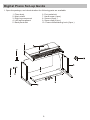
1. Open the package, and check whether the following parts are available:
1. Piano body
2. Music stand
3. Right leg component
4. Left leg component
5. Back panel skirt
6. Foot pedal unit
7. Hand screw (4 pcs.)
8. Screws (8 pcs.)
9. Screw caps (8 pcs.)
10. Power cable stabling hook (2 pcs.)
3
Digital Piano Set-up Guide................Continued
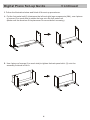
2. Follow the illustration below and finish off the set-up procedures.
A. Put the foot pedal unit(6) in between the left and right legs components (3&4), use 4 pieces
of screws (2 on each side) to stable the legs onto the foot pedal unit.
(Make sure the direction of the placement is correct before screwing)
B. Use 4 pieces of screws (2 on each side) to tighten the back panel skirt (5) onto the
assembly finished in Part A.
4
Digital Piano Set-up Guide................Continued
C. Put the piano body(1) on the top of the assembly finished in part B, use 4 pieces of hand
screws to stable afterward.
D. After the initial set-up, stick the cable stabling hook(10) on the internal side of the leg
component (see the below illustration for reference).
Cable stabling hook
5
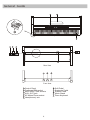
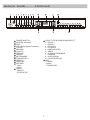
General Guide
Top View
Rear View
Front View
1
2
3
4
5
6
Control Panel
Footboard DIN socket
MIDI IN/OUT DIN sockets
AUX. OUT jack
AC Mains Power socket
Headphones j ack
6
7
8
9
10
11
Soft Pedal
Sostenuto Pedal
Sustain Pedal
Music Stand
Piano Keyboard
General Guide............Continued
POWER SWITCH
MASTER VOLUME
DUAL
DSP (Digital Signal Processor)
TOUCH
RECORD
TRACK A
TRACK B
REPEAT
METRONOME
TRANSPOSE +/TEMPO +/DEMO ALL
RECORD
- PLAY
- STOP
15 DEMO
- SELECT
- START/STOP
1
2
3
4
5
6
7
8
9
10
11
12
13
14
VOICE TYPE & DEMO SONG SELECT
0 - PIANO 1
1 - PIANO 2
2 - E.PIANO 1
3 - E.PIANO 2
4 - HARPSICHORD
5 - VIBES
6 - STRINGS ENSEMBLE
7 - CHORUS
8 - JAZZ ORGAN
9 - CHURCH ORGAN
17 LED
- TEMPO
- SONG
- TRANSPOSE
16
7
The Connectors
Using the AC power socket
1. Connect the power
cable to the AC mains
socket underneath the
piano body.
3. Turn the volume control
anti-clockwise to
the minimum volume
level.
2. Ensure the piano
is turned off when
connecting and
disconnecting the
power cable.
4. Plug the power cable
into a proper AC mains
power outlet
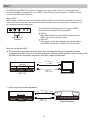
5. If you have done the above procedures
you are now safe to turn on the piano.
Caution: When the piano is not in use or during a thunderstorm, disconnect the power for
safety sake.
Using the Headphones jack
An optional set of stereo headphones can be
connected to the headphones jack located on
the lefthand side, underneath the keyboard.
When a pair of headphones is connected to
this jack, the internal speakers will switch off
automatically
Caution:
Never use the headphone with high volume, as it may damage your sense of hearing.
To prevent the damage of the speakers, ensure that the volume is set to the
minimum level before connecting the power and other device.
Using the AUX.OUT jacks
Connect the rear-panel AUX.OUT
jack to amplified speakers, amplifiers
or domestic hi-fi-units for external
amplification.
Note: Connect both left(L) and right(R) channels for the stereo result. If you only connect
either one of the channels, the connected channel will only take effect.
8
The Connectors..................Continued
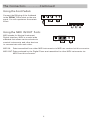
Using the Foot Pedals
Connect the DIN plug of the footboard
to the “PEDAL” DIN socket on the rear
panel. You will experience the sustain
effect.
Using the MIDI IN/OUT Ports
MIDI stands for Musical Instrument
Digital Interface. MIDI is a world wide
standard that allows various electronic
musical instruments and other devices
to communicate with each other.
MIDI IN: Data transmitted from other MIDI instruments via MIDI are received at this connector.
MIDI OUT: Data produced by the Digital Piano are transmitted to other MIDI instruments via
MIDI from this connector.
9
Operation
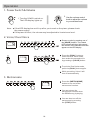
1. Power Switch & Volume
1. Turn the POWER switch on.
The LED display lights up.
Note:
2. Use the volume control
knob to adjust the volume
to your desired level
If the LED display has not lit up after you turned on the piano, please check
the power supply.
If the piano is silent, the volume may be adjusted to its minimum level.
2. Voice/ Dual Voice
Choose a voice by pressing one of
the [VOICE] buttons. The related
LED indicator will then light up and
the number of the selected voice will
appear on the LED display.
Press the [DUAL] button to
enter the Dual Voice mode,
then select the second voice
by pressing a [VOICE] button.
To quit the Dual Voice mode,
press the [DUAL] button again.
While recording, Voice 2 will
turn off automatically.
3. Metronome
Press the [METRONOME]
button to turn on/off the
metronome function.
You cannot use the
metronome function when
the DEMO song is playing.
You can also turn off the
metronome by pressing
the [STOP] button.
10
Operation............Continued
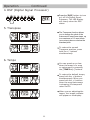
4. DSP (Digital Signal Processor)
Press the [DSP] button to turn
on/ off the Digital Signal
Processor. The LED display
will clearly show the DSP
status.
5. Transpose
The Transpose function allows
you to change the pitch of the
instrument in semi-tone steps, up
to a maximum of 12 semi-tones
(one octave) above or below the
standard pitch.
To restore the normal
Transpose position, press
both the +/- buttons
simultaneously.
6. Tempo
You can speed up or slow
down the tempo of a song
or metronome by pressing
the [TEMPO +/-] buttons.
To restore the default tempo,
press both the +/-buttons
simultaneously. When you
press both the +/- buttons
when the song/metronome
is stopping, the tempo will
return to 120.
When you are adjusting the
tempo, the tempo indicator
will appear on the display.
11
Operation............Continued
7. T ouch Response
The digital piano features a touchsensitive keyboard. This function is
a default setting when you turn on
the piano.
Pressing the [TOUCH] button
repeatedly adjusts the touch
response level from 1 to 3, where 2
is the default level.
To cancel the touch response effect,
press the [TOUCH] button until the
LED display shows “OFF”.
8. Record & Playback
Record
Press the [RECORD] button. The
indicator lights up. Then, press
[TRACK A] or [TRACK B] to
select a track to record.
Play a key on the keyboard to
start recording.
Press the [STOP] button to
stop the recording.
Playback
Press the [PLAY] button to start the
playback.
Recorded Track A or B can be
deactivated to play Track B or A
only
Press the [RECORD - STOP]
button to stop the playback.
12
Operation............Continued
Repeat the playback
During the playback, press the
[REPEAT] button once to set
the starting point of the
repeated part you want to
listen.“r-A” appears on the
display. Then, press the
[REPEAT] button again to set the
ending point of the playback.
"r-B" appears on the display and
the recorded song is then played
back repeatedly from point “r-A” to
“r-B”.
9. Demo Song
Select a Demo song
Use the
Voice button
twice to select
a Demo song.
Press the Demo [SELECT]
button. The display shows the
number of the current Demo song.
To choose a new Demo song, hold
down the Demo [SELECT] button
while entering a 2-digit number
(00-19) with the Voice Select
buttons (0-9). For example, to select
Demo Song n°8, press first “0”
(piano) then “8” (harpsichord).
Play the Demo songs in sequence
Press the [DEMO ALL] button
to make the Demo songs play
one after the other. To stop
playing the Demo songs, press
once the [DEMO ALL] or
[START/ STOP] button.
Selecting a track of the demo song
While the Demo song is
playing, you can deactivate
the corresponding track by
pressing the [TRACK A] or
[TRACK B] button.
13
Operation............Continued
Repeat the demo song
To play a Demo song in loop, press the
[REPEAT] button once to set the starting
point of the repeated part you want to
listen.“r-A” appears on the display. Then,
press the [REPEAT] button again to set the
ending point of the playback part."r-B"
appears on the display and the recorded
song is then played back repeatedly from
point “r-A” to “r-B”.
Adjusting the tempo of the Demo song
While a Demo song is playing, you can
adjust its tempo by pressing the [TEMPO
+/-] buttons.
10. Foot pedals
The piano has a footboard w/ 3 pedals,
from left to right: Soft, Sostenuto and
Sustain pedal.
Sustain
Pedal
Soft
Pedal
Sostenuto
Pedal
14
MIDI
The MIDI IN and MIDI OUT sockets, located on the rear panel of the unit, offer broadened
musical possibilities through the use of MIDI. The following is the description of MIDI and how
you can use MIDI with the piano.
What is MIDI?
MIDI stands for Musical Instrument Digital Interface. MIDI is a world wide standard that allows
various electronic musical instruments and other devices, such as sequencers, computers, etc
to "communicate with each other".
The keyboard is equipped with two types of MIDI
tsockets, both located on the rear panel.
MIDI IN
Data transmitted from other MIDI instruments via
MIDI, are received at this socket.
MIDI OUT
Data produced by the keyboard, are transmitted to
other MIDI instruments via MIDI from this socket.
MIDI IN/OUT
Sockets
What can you do with MIDI?
Record performance data using the piano Auto Accompaniment on an external computer
(equipped w/ a MIDI card) or an external sequencer (featuring MIDI facilities). After recording, edit
the data with the computer/ sequencer, then play it again on the piano.
MIDI transmit
MIDI OUT
MIDI IN
MIDI IN
MIDI OUT
MIDI receive
STP-710
Computer w/ MIDI
Play music from another keyboard .
MIDI transmit
MIDI OUT
MIDI IN
MIDI OUT
MIDI IN
MIDI receive
STP-710
Digital Keyboard
15
Specifications
Keyboard
Voice
Demo Song
Display
Switch and Buttons
Transpose
Pedals
Touch Response
Connectors
Speaker
Dimensions (W*D*H)
Weight
88 hammer action keys
10 Voices
20 Demo Songs
LED
POWER SWITCH, VOLUME SWITCH, DUAL, DSP,
TOUCH, RECORD, TRACK A, TRACK B, REPEAT,
METRONOME, TRANSPOSE +/-, TEMPO +/-,
DEMO ALL, RECORD - PLAY/STOP, DEMO - SELECT/
START/STOP, VOICE SELECT 0-9
12 semi tones above or below standard pitch
Soft, Sostenuto, Sustain
Hard, Medium, Soft, Off
DC POWER, HEADPHONES, AUX.OUT, MIDI IN/OUT,
PEDALS
8ohm 25w x 2
1380*520*830 mm / 54.3*20.5*32.7 in
62kg / 136.7 lb
16
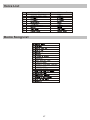
Voice List
No
Name of Voice
Demo Song List
17
Name of Voice on Panel
V.040510
STAGGMUSIC.COM