1
Technical Note on PKCS#11, Version 2.0
Page 15 of 17
July 7, 2015
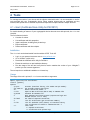
--moz-cert, -z <arg>
--verbose, -v
Test Mozilla-like keypair gen and cert req, <arg>=certfile
Verbose operation. Use several times to enable debug output.
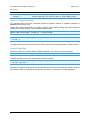
Import a Trusted Certificate
You generally want to store the certificates needed for signature creation or validation purposes as
trusted in the PKCS#11 store.
Starting with a basic certificate file, you need to convert it into the DER encoding, and have it marked as
trusted, prior to using the pkcs11-tool’s certificate import feature:
openssl x509 –trustout < certificate.cer > trusted.cer
openssl x509 –outform DER < trusted.cer > certificate.DER
pkcs11-tool --module libopencryptoki.so –y cert –w certificate.DER –label NAME
--id <ID> -l
Tip: always specify a label and the correct ID. This will permit you to selectively delete or update an entry.
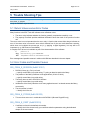
Import Private Key
Unless the private key is already stored in DER formatted file, you need to convert it accordingly:
openssl rsa –outform DER –out private-key.DER < private-key.pem
The DER encoded private key is imported into the store as follows:
pkcs11-tool --module libopencryptoki.so –y privkey –w private-key.DER --label NAME
--id <ID> --pin PIN –l
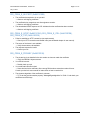
Note that it is important to specify the ID value identical to the ID of the corresponding certificate, as this is
the relevant criterion for matching the two objects in the store for the purpose of creating signatures.
© PDF Tools AG – Premium PDF Technology