1
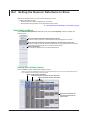
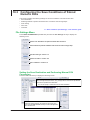
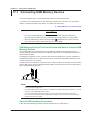
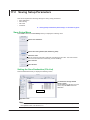
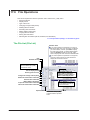
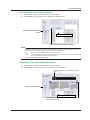
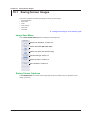
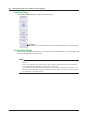
WT1800
Precision Power Analyzer
IM WT1801-02EN
2nd Edition
Thank you for purchasing the WT1800 Precision Power Analyzer. This User’s Manual explains how
to use the WT1800. To ensure correct use, please read this manual thoroughly before beginning
operation.
Keep this manual in a safe place for quick reference in the event a question arises. The following
manuals, including this one, are provided as manuals for the WT1800. Please read all the manuals.
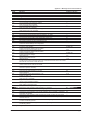
Manual Title
WT1800 Precision Power Analyzer
Features Guide
Manual No.
IM WT1801-01EN
WT1800 Precision Power Analyzer
User’s Manual
IM WT1801-02EN
WT1800 Precision Power Analyzer
Getting Started Guide
WT1800 Precision Power Analyzer
Communication Interface
User’s Manual
IM WT1801-03EN
IM WT1801-17EN
Description
The supplied CD contains the PDF file of this
manual. This manual explains all the WT1800
features other than the communication interface
features.
This manual. The supplied CD contains the PDF
file of this manual. The manual explains how to
operate the WT1800.
This guide explains the handling precautions and
basic operations of the WT1800.
The supplied CD contains the PDF file of this
manual. This manual explains the WT1800
communication interface features and how to use
them.
Notes
• The contents of this manual are subject to change without prior notice as a result of continuing
improvements to the instrument’s performance and functionality. The figures given in this manual
may differ from those that actually appear on your screen.
• Every effort has been made in the preparation of this manual to ensure the accuracy of its
contents. However, should you have any questions or find any errors, please contact your nearest
YOKOGAWA dealer.
• Copying or reproducing all or any part of the contents of this manual without the permission of
YOKOGAWA is strictly prohibited.
• The TCP/IP software of this product and the documents concerning it have been developed/created
by YOKOGAWA based on the BSD Networking Software, Release 1 that has been licensed from
the Regents of the University of California.
Trademarks
• Microsoft and Windows are either registered trademarks or trademarks of Microsoft Corporation in
the United States and/or other countries.
• Adobe and Acrobat are either registered trademarks or trademarks of Adobe Systems Incorporated.
• In this manual, the ® and TM symbols do not accompany their respective registered trademark or
trademark names.
• Other company and product names are registered trademarks or trademarks of their respective
holders.
Revisions
• 1st Edition: February 2011
• 2nd Edition: August 2011
2nd Edition: August 2011(YMI)
All Rights Reserved, Copyright © 2011 Yokogawa Meters & Instruments Corporation
IM WT1801-02EN
Conventions Used in This Manual
Notes and Cautions
The notes and cautions in this manual are categorized using the following symbols.
Improper handling or use can lead to injury to the user or damage to the
instrument. This symbol appears on the instrument to indicate that the user must
refer to the user’s manual for special instructions. The same symbol appears
in the corresponding place in the user’s manual to identify those instructions.
In the manual, the symbol is used in conjunction with the word “WARNING” or
“CAUTION.”
WARNING
Calls attention to actions or conditions that could cause serious or fatal injury to
the user, and precautions that can be taken to prevent such occurrences.
CAUTION
Calls attention to actions or conditions that could cause light injury to the user
or cause damage to the instrument or user’s data, and precautions that can be
taken to prevent such occurrences.
Note Calls attention to information that is important for proper operation of the
instrument.
Units
k
K
ii
Denotes 1000. Example: 100 kS/s (sample rate)
Denotes 1024. Example: 720 KB (file size)
IM WT1801-02EN
Key Operation and Functions
Key Operation
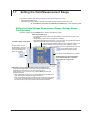
How to Use Setup Menus That Appear When Keys Are Pressed
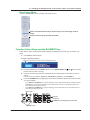
The operation after you press a key varies depending on the key that you press.
Numeric (4) Menu
Measure Menu
Line Filter Menu
A
Numeric Form Menu
F
H
D
B
E
C
G
A:Press the soft key to use the cursor keys to configure this setting. Use the cursor keys to set the
value or select an item.
B:A related setup menu appears when you press the soft key.
C:The selected setting switches each time you press the soft key.
D:A dialog box or the keyboard appears when you press the soft key.
Use the cursor keys and the SET key to configure the settings.
E:Press the soft key to display a selection menu.
Press the soft key that corresponds to the appropriate setting.
F:Press the soft key to use the cursor keys to configure this setting. After you configure the setting,
the status of the selected setting switches each time you press the soft key.
G:Press the soft key to execute the specified feature.
H:Press the soft key to apply the value assigned to the key.
How to Display the Setup Menus That Are Written in Purple below the Keys
In the explanations in this manual, “SHIFT+key name (written in purple)” is used to indicate the
following operation.
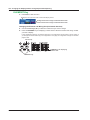
1. Press SHIFT. The SHIFT key lights to indicate that the keys are shifted.
Now you can select the setup menus written in purple below the keys.
2. Press the key that you want to display the setup menu of.
ESC Key Operation
If you press ESC when a setup menu or available options are displayed, the screen returns to the
menu level above the current one. If you press ESC when the highest level menu is displayed, the
setup menu disappears.
IM WT1801-02EN
iii
Key Operation and Functions
RESET Key Operation
If you press RESET when you are using the cursor keys to set a value or select an item, the setting
is reset to its default value (depending on the operating state of the WT1800, the setting may not be
reset).
SET Key Operations
The operation varies as indicated below depending on what you are setting.
• For a soft key menu that has two values that you use the cursor keys to adjust
Press SET to switch the value that the cursor keys adjust.
• For a menu that has the cursor keys + SET mark ( + SET ) displayed on it
Press SET to confirm the selected item.
Cursor Keys Operations
The operation varies as indicated below depending on what you are setting.
• When setting a value
Up and down cursor keys: Increases and decreases the value
Left and right cursor keys: Changes which digit to set
• When selecting the item to set
Up and down cursor keys: Moves the cursor between settings
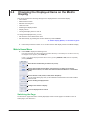
How to Enter Values in Setup Dialog Boxes
1. Use the keys to display the appropriate setup dialog box.
2. Use the cursor keys to move the cursor to the item that you want to set.
3. Press SET. The operation varies as indicated below depending on what you are setting.
•
•
•
•
A selection menu appears.
A check box is selected or cleared.
An item is selected.
A table of settings is selected.
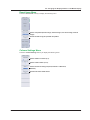
Displaying a Selection Menu and Selecting an Item
Displays the selection
menu
Select OFF or ON.
After selecting an item
with the cursor keys,
press SET to confirm it.
Setting Items in a Table
After moving the cursor to the table, press SET
to select the setting that you want to change.
Use the cursor keys and the SET key to
select a table entry.
How to Clear Setup Dialog Boxes
Press ESC to clear the setup dialog box from the screen.
iv
IM WT1801-02EN
Entering Values and Strings
Entering Values
Using the Cursor Keys to Enter Values
Select the appropriate item using the soft keys, and change the value using the cursor keys and the
SET key. This manual sometimes describes this operation simply as “using the cursor keys.”
Note
Some items that you can set using the cursor keys are reset to their default values when you press the
RESET key.
Entering Character Strings
Use the keyboard that appears on the screen to enter character strings such as file names and
comments. Use the cursor keys and the SET key to operate the keyboard and enter a character string.
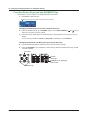
How to Operate the Keyboard
1. After bringing up the keyboard, use the cursor keys to move the cursor to the character that
you want to enter.
2. Press SET to enter the character.
• If a character string has already been entered, use the arrow soft keys (< and >) to move the cursor to
the position you want to insert characters into.
• To switch between uppercase and lowercase letters, move the cursor to CAPS on the keyboard, and
then press SET.
• To delete the previous character, press the Back Space soft key.
• To delete all the characters, press the All Clear soft key.
3. Repeat steps 1 and 2 to enter all the characters in the string.
• Select
on the keyboard or press the History soft key to display a list of character strings that you
have entered previously. Use the cursor keys to select a character string, and press SET to enter the
selected character string.
• Select
on the keyboard to display a list of preset character strings. The following operands and
equations, which are used with user-defined functions, are included as preset character strings.
ABS(
SQR(
SQRT(
LOG(
LOG10(
EXP(
NEG(
PPK(
MPK(
CF
TI(
THD(
THF(
TIF(
HVF(
HCF(
KFACT(
EAU(
EAI(
PLLFRQ(
RMS(
MN(
RMN(
DC(
AC(
PC(
Use the cursor keys to select a character string, and press SET to enter the selected character string.
4. Press the ENTER soft key, or move the cursor to ENTER on the keyboard, and press SET to
confirm the character string and clear the keyboard.
IM WT1801-02EN
Entering Values and Strings
Character insertion position
Enter a character string from the history.
Enter a preset character string.
Moves the character insertion
position
Deletes the previous character
Deletes all characters
Confirms the characters that
you have entered
Enter a character string from
the history.
Input History: A List of Previously Entered Character Strings
After selecting an item with the cursor
keys, press SET to confirm it.
Note
• @ cannot be entered consecutively.
• File names are not case-sensitive. Comments are case-sensitive. The following file names cannot be
used due to MS-DOS limitations:
AUX, CON, PRN, NUL, CLOCK, COM1 to COM9, and LPT1 to LPT9
• For details on file name limitations, see the features guide, IM WT1801-01EN.
vi
IM WT1801-02EN
Contents
Conventions Used in This Manual..................................................................................................... ii
Key Operation and Functions........................................................................................................... iii
Entering Values and Strings...............................................................................................................v
Chapter 1 Basic Measurement Conditions
1.1
1.2
1.3
1.4
1.5
1.6
1.7
1.8
1.9
1.10
1.11
1.12
1.13
1.14
1.15
1.16
1.17
Configuring the Wiring System Settings............................................................................ 1-1
Setting the Voltage and Current Ranges........................................................................... 1-2
Setting the External Current Sensor Range (Option)........................................................ 1-4
Setting the External Current Sensor Conversion Ratio (Option)....................................... 1-5
Setting the Display Format of the External Current Sensor Range (Option)..................... 1-6
Setting the Scaling Feature When Using a VT or CT........................................................ 1-7
Setting the Valid Measurement Range.............................................................................. 1-9
Setting the Efficiency Equation........................................................................................ 1-12
Turning the Independent Input Element Configuration On and Off................................. 1-13
Setting Delta Computation (Option)................................................................................ 1-14
Setting the Crest Factor.................................................................................................. 1-15
Setting Measurement Periods......................................................................................... 1-16
Setting Line Filters........................................................................................................... 1-17
Setting Frequency Filters................................................................................................ 1-18
Setting the Data Update Interval..................................................................................... 1-19
Setting Averaging............................................................................................................ 1-20
Displaying the Setup Parameter List............................................................................... 1-21
Chapter 2 Harmonic Measurement Conditions (Option)
2.1
Setting Harmonic Measurement Conditions...................................................................... 2-1
Chapter 3 Motor Evaluation Conditions (Option)
3.1
Setting Motor Evaluation Conditions................................................................................. 3-1
Chapter 4 Auxiliary Input Conditions (Option)
4.1
Setting Auxiliary Input Conditions...................................................................................... 4-1
Chapter 5 Holding Measured Values and Performing Single Measurements
5.1
5.2
Holding Measured Values................................................................................................. 5-1
Performing Single Measurements..................................................................................... 5-2
Chapter 6 Power Measurement (Numeric Data Display)
6.1
6.2
6.3
6.4
6.5
6.6
6.7
IM WT1801-02EN
Setting the Display Format................................................................................................ 6-1
Switching the Displayed Page........................................................................................... 6-2
Changing the Displayed Items on the 4 Items, 8 Items, and 16 Items Displays............... 6-4
Changing the Displayed Items on the Matrix Display........................................................ 6-6
Changing the All Items Display.......................................................................................... 6-9
Changing the Harmonics List Display (Option)............................................................... 6-10
Setting the Custom Display............................................................................................. 6-12
vii
Contents
Chapter 7 Computations
7.1
7.2
7.3
7.4
7.5
7.6
7.7
Setting User-Defined Functions........................................................................................ 7-1
Setting User-Defined Events............................................................................................. 7-2
Setting Apparent Power, Reactive Power, and Corrected Power Equations..................... 7-3
Setting the Sampling Frequency....................................................................................... 7-4
Setting the Phase Difference Display Format................................................................... 7-5
Setting Master and Slave Synchronized Measurement.................................................... 7-6
Setting the Voltages or Currents Whose Frequencies Will Be Measured......................... 7-7
Chapter 8 Integrated Power (Watt hour)
8.1
8.2
8.3
Setting Independent Integration........................................................................................ 8-1
Setting Integration Conditions........................................................................................... 8-2
Starting, Stopping, and Resetting Integration.................................................................... 8-5
Chapter 9 Waveform Display
9.1
9.2
Setting the Display Format................................................................................................ 9-1
Turning the Display of Waveforms On and Off and Setting the Vertical Zoom Factors
and Vertical Positions........................................................................................................ 9-3
Chapter 10 Trend Display
10.1
10.2
Setting the Display Format.............................................................................................. 10-1
Turning the Trend Display On and Off and Setting the Measurement Functions
to Display and the Vertical Scales................................................................................... 10-3
Chapter 11 Bar Graph Display (Option)
11.1
11.2
Setting the Display Format...............................................................................................11-1
Setting the Measurement Function to Display and the Vertical Scale..............................11-2
Chapter 12 Vector Display (Option)
12.1
12.2
Setting the Display Format.............................................................................................. 12-1
Setting the Element and Wiring Unit to Display and the Zoom Factor............................ 12-2
Chapter 13 Split Display
13.1
Configuring the Split Display........................................................................................... 13-1
Chapter 14 Cursor Measurements
14.1
14.2
14.3
Performing Cursor Measurements on Waveforms.......................................................... 14-1
Performing Cursor Measurements on Trends................................................................. 14-2
Performing Cursor Measurements on Bar Graphs.......................................................... 14-3
Chapter 15 High Speed Data Capturing (Option)
15.1
15.2
15.3
15.4
Setting the Number of Data Captures and Configuring the Capture Control Settings.... 15-1
Configuring the Save Conditions of Captured Numeric Data.......................................... 15-4
Changing the Displayed Items for High Speed Data Capturing...................................... 15-6
Starting and Stopping High Speed Data Capturing......................................................... 15-9
Chapter 16 Storing Data
16.1
16.2
16.3
16.4
viii
Configuring Storage Control............................................................................................ 16-1
Setting the Numeric Data Items to Store......................................................................... 16-4
Configuring the Save Conditions of Stored Numeric Data.............................................. 16-5
Starting, Stopping, and Resetting Storage...................................................................... 16-6
IM WT1801-02EN
Contents
Chapter 17 Saving and Loading Data
17.1
17.2
17.3
17.4
17.5
17.6
Connecting USB Memory Devices.................................................................................. 17-1
Saving Setup Parameters............................................................................................... 17-2
Saving Waveform Display Data....................................................................................... 17-4
Saving Numeric Data...................................................................................................... 17-5
Loading Setup Parameters.............................................................................................. 17-7
File Operations................................................................................................................ 17-8
Chapter 18 Saving Screen Images
18.1
Saving Screen Images.................................................................................................... 18-1
Chapter 19 Printing Screen Images and Numeric Data (Option)
19.1
19.2
Loading Roll Paper into the Built-In Printer (Option)....................................................... 19-1
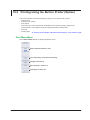
Printing Using the Built-in Printer (Option)...................................................................... 19-5
Chapter 20 Ethernet Communication
20.1
20.2
20.3
20.4
20.5
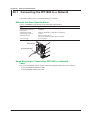
Connecting the WT1800 to a Network............................................................................ 20-1
Configuring TCP/IP Settings............................................................................................ 20-3
Accessing the WT1800 from a PC (FTP Server)............................................................ 20-4
Connecting to a Network Drive........................................................................................ 20-5
Using SNTP to Set the Date and Time............................................................................ 20-6
Chapter 21 Other Features
21.1
21.2
21.3
21.4
21.5
21.6
21.7
21.8
21.9
21.10
Appendix
Viewing System Information (Overview)......................................................................... 21-1
Initializing Settings........................................................................................................... 21-2
Setting the Message, Menu, and USB Keyboard Languages......................................... 21-3
Setting the Screen Brightness and Configuring the Display Color Settings.................... 21-4
Configuring the Environment Settings............................................................................. 21-5
Configuring D/A Output Items (Option)............................................................................ 21-6
Carrying Out Self-Tests (Selftest).................................................................................... 21-7
Performing Zero-Level Compensation............................................................................ 21-9
Using the NULL Feature................................................................................................ 21-10
Locking the Keys............................................................................................................21-11
Appendix 1 Messages and Corrective Actions......................................................................... App-1
Index
IM WT1801-02EN
ix
Chapter 1
Basic Measurement Conditions
1.1
Configuring the Wiring System Settings
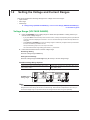
This section explains the following settings for wiring systems:
• Wiring system
• Wiring unit
• Wiring pattern
► “Wiring System (Wiring)” in the features guide
Wiring Settings (Wiring Settings)
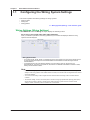
Press WIRING and then the Wiring soft key to display the following screen.
Set the wiring system (1P2W, 1P3W, 3P3W, 3P4W, 3P3W(3V3A)).
When you select an input element, the wiring systems that you can select are displayed. Select the wiring
system from those displayed.
Wiring System Pattern
• If you select 1P3W, 3P3W, 3P4W, or 3P3W(3V3A) for the wiring system, the wiring unit is set with the two
or three input elements adjacent to the selected element whose element numbers are larger than the
selected element.
• On models that have six input elements installed, up to three wiring units (ΣA, ΣB, and ΣC) are
automatically set. The wiring unit symbols ΣA, ΣB, and ΣC are attached to the element numbers in order,
starting with the smallest number.
Note
• Because the wiring system with the largest element number is automatically determined according to the
settings of the wiring systems with smaller element numbers, the element with the largest element number
cannot be selected.
• You cannot set the wiring units for larger element numbers before the wiring units for smaller element
numbers.
• To measure voltage, current, and active power Σ functions using high speed data capturing (/HS option),
set the wiring system to 3P4W or 3P3W (3V3A). When the wiring system is set to 1P3W or 3P3W,
voltage, current, and active power Σ functions are not measured.
IM WT1801-02EN
1-1
1.2
Setting the Voltage and Current Ranges
This section explains the following settings for the voltage and current ranges:
• Input element
• Auto range
• Fixed range
► “Voltage Range (RANGE UP/DOWN (V))” and “Current Range (RANGE UP/DOWN (A))”
in the features guide
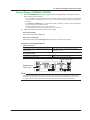
Voltage Range (VOLTAGE RANGE)
1. Press the ELEMENT key for setting ranges to select the input element or wiring unit that you
want to set the voltage range of.
• If you press ESC to clear the setup menu from the screen, soft keys corresponding to the input elements
or wiring units will be displayed on the menu. You can use these soft keys to select the input element or
wiring unit.
• Press SHIFT+the ELEMENT (ALL) key for setting ranges to collectively configure all the input elements
for which the following conditions are met.
The input element type (for 5 A or for 50 A) is the same.
The valid measurement range setting (see section 1.7) is the same.
2. Follow the instructions below to set the voltage range.
Auto Range Setting
Press the voltage range’s AUTO key.
Setting the Fixed Range
Press the voltage range’s fixed range keys (▲ and ▼) to set the voltage range.
Available Voltage Range Options
When the crest factor is set to 3
1.5 V, 3 V, 6 V, 10 V, 15 V, 30 V, 60 V, 100 V, 150 V,
300 V, 600 V, 1000 V
When the crest factor is set to 6
0.75 V, 1.5 V, 3 V, 5 V, 7.5 V, 15 V, 30 V, 50 V, 75 V,
150 V, 300 V, 500 V
Voltage range display
ELEMENT key for
setting ranges
Note
When Element Independent (see section 1.9) is set to OFF, the voltage ranges of input elements that are
assigned to the same wiring unit are set to the same range. When Element Independent is set to ON, you
can set the voltage range of input elements that are assigned to the same wiring unit separately.
1-2
IM WT1801-02EN
1.2 Setting the Voltage and Current Ranges
Current Range (CURRENT RANGE)
1. Press the ELEMENT key for setting ranges to select the input element or wiring unit that you
want to set the current range of.
• If you press ESC to clear the setup menu from the screen, soft keys corresponding to the input elements
or wiring units will be displayed on the menu. You can use these soft keys to select the input element or
wiring unit.
• Press SHIFT+the ELEMENT (ALL) key for setting ranges to collectively configure all the input elements
for which the following conditions are met.
The input element type (for 5 A or for 50 A) is the same.
The valid measurement range setting (see section 1.7) is the same.
2. Follow the instructions below to set the current range.
Auto Range Setting
Press the current range’s AUTO key.
Setting the Fixed Range
Press the current range’s fixed range keys (▲ and ▼) to set the current range.
Available Current Range Options
• 5 A Input Element
When the crest factor is set to 3
10 mA, 20 mA, 50 mA, 100 mA, 200 mA, 500 mA,
1 A, 2 A, 5 A
When the crest factor is set to 6
5 mA, 10 mA, 25 mA, 50 mA, 100 mA, 250 mA,
500 mA, 1 A, 2.5 A
• 50 A Input Element
When the crest factor is set to 3
1 A, 2 A, 5 A, 10 A, 20 A, 50 A
When the crest factor is set to 6
500 mA, 1 A, 2.5 A, 5 A, 10 A, 25 A
Current range display
ELEMENT key for
setting ranges
Note
When Element Independent (see section 1.9) is set to OFF, the current ranges of input elements that are
assigned to the same wiring unit are set to the same range. When Element Independent is set to ON, you
can set the current range of input elements that are assigned to the same wiring unit separately.
IM WT1801-02EN
1-3
1.3
Setting the External Current Sensor Range
(Option)
This section explains the following settings for external current sensor ranges (current ranges that are
used when external current sensors are being used). This feature is available on models with the /EX1
to /EX6 option.
• Input element
• External current sensor
• Auto range
• Fixed range
► “External Current Sensor Range (EXT SENSOR; option)” in the features guide
1. Press the ELEMENT key for setting ranges to select the input element or wiring unit that you
want to set the external current sensor range of.
• If you press ESC to clear the setup menu from the screen, soft keys corresponding to the input elements
or wiring units will be displayed on the menu. You can use these soft keys to select the input element or
wiring unit.
• Press SHIFT+the ELEMENT (ALL) key for setting ranges to collectively configure all the input elements
for which the following conditions are met.
The input element type (for 5 A or for 50 A) is the same.
The valid measurement range setting (see section 1.7) is the same.
2. Press EXT SENSOR to illuminate the EXT SENSOR key.
Press EXT SENSOR again to turn the EXT SENSOR key off. In this state, you can set the current range
that is used when current is applied directly to the WT1800 (see section 1.2).
3. Follow the instructions below to set the external current sensor range.
Auto Range Setting
Press the current range’s AUTO key.
Setting the Fixed Range
Press the current range’s fixed range keys (▲ and ▼) to set the external current sensor range.
Available External Current Sensor Range Options
When the display format of the external current sensor range is set to DIRECT, you can select
the range from the available options shown in the following table (the unit is mV or V). When the
display format is set to MEAS, the setup range is set to the value from the following table divided
by the external current sensor conversion ratio (the unit is A). For instructions on how to set the
display format of the external current sensor range, see section 1.5.
When the crest factor is set to 3
50 mV, 100 mV, 200 mV, 500 mV, 1 V, 2 V, 5 V, 10 V
When the crest factor is set to 6
25 mV, 50 mV, 100 mV, 250 mV, 500 mV, 1 V, 2.5 V,
5V
External current sensor range display
ELEMENT key for
setting ranges
Note
When Element Independent (see section 1.9) is set to OFF, the external current sensor ranges of input
elements that are assigned to the same wiring unit are set to the same range. When Element Independent
is set to ON, you can set the external current sensor range of input elements that are assigned to the same
wiring unit separately.
1-4
IM WT1801-02EN
1.4
Setting the External Current Sensor
Conversion Ratio (Option)
This section explains the following settings for the external current sensor conversion ratio. This
feature is available on models with the /EX1 to /EX6 option.
• Conversion ratio
• Copying the conversion ratio
► “External Current Sensor Conversion Ratio (SENSOR RATIO; option)” in the features guide
Sensor Ratio Menu
Press SHIFT+EXT SENSOR (SENSOR RATIO) to display the following menu.
Cursor (use the ◄► cursor keys to move it)
Set the conversion ratio (0.0001 to 99999.9999).
Copies the conversion ratio
The conversion ratio of the input element that is indicated by the cursor is copied to all
the input elements in that element’s wiring unit.
Note
External Current Sensor Range and Conversion Ratio Configuration Example
When measuring a current with a maximum value of 100 A using a current sensor that produces 10 mV when
1 A of current is flowing, the maximum voltage that the current sensor produces is 10 mV/A × 100 A = 1 V.
Therefore, configure the settings as indicated below.
• External current sensor range: 1V
• External current sensor conversion ratio: 10 mV/A
IM WT1801-02EN
1-5
1.5
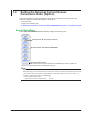
Setting the Display Format of the External
Current Sensor Range (Option)
This section explains the following setting for the external current sensor range. This feature is
available on models with the /EX1 to /EX6 option.
• Display format
► “External Current Sensor Range Display Format (DIRECT/MEASURE; option)”
in the features guide
1. Press the ELEMENT key for setting ranges to select the input element or wiring unit that you
want to set the external current sensor range of.
• If you press ESC to clear the setup menu from the screen, soft keys corresponding to the input elements
or wiring units will be displayed on the menu. You can use these soft keys to select the input element or
wiring unit.
• Press SHIFT+the ELEMENT (ALL) key for setting ranges to collectively configure all the input elements
for which the following conditions are met.
The input element type (for 5 A or for 50 A) is the same.
The valid measurement range setting (see section 1.7) is the same.
2. Press EXT SENSOR to illuminate the EXT SENSOR key.
Press EXT SENSOR again to turn the EXT SENSOR key off.
3. Press SHIFT+the current range’s CONFIG (DIRECT/MEASURE) key. The DIRECT indicator
or MEAS indicator, which indicates the display format, illuminates. The external current sensor
range is displayed in the indicated display format.
Press SHIFT+the current range’s CONFIG (DIRECT/MEASURE) key again to switch the display format.
The indicators illuminate and turn off appropriately.
External current sensor range display
(Display example of when the display format
is set to MEASURE.)
ELEMENT key for
setting ranges
Display format indicators
(DIRECT, MEASURE)
1-6
IM WT1801-02EN
1.6
Setting the Scaling Feature When Using a VT
or CT
This section explains the following settings for measuring voltage through an external VT (voltage
transformer) and current that through an external CT (current transformer):
• Turning the scaling feature on and off
• VT ratio
• CT ratio
• Power coefficient
► “Scaling (SCALING)” in the features guide
Scaling Menu
Press SCALING to display the following menu.
Turns the scaling feature on and off*
* When you want to multiply the external current sensor output by the
conversion ratio and read the current of the circuit under
measurement directly, turn the VT/CT scaling feature off. If it is
Set the VT ratio.
turned on, the value will be further multiplied by the CT ratio.
Set the CT ratio.
Set the power coefficient.
Setting the VT Ratio (VT Scaling)
Press the VT Scaling soft key to display the following menu.
Cursor (use the ◄► cursor keys to move it)
Set the VT ratio (0.0001 to 99999.9999).
Copies the VT ratio
The VT ratio of the input element that is indicated by the cursor is copied to all the input
elements in that element’s wiring unit.
IM WT1801-02EN
1-7
1.6 Setting the Scaling Feature When Using a VT or CT
Setting the CT Ratio (CT Scaling)
Press the CT Scaling soft key to display the following menu.
Cursor (use the ◄► cursor keys to move it)
Set the CT ratio.
Copies the CT ratio
The CT ratio of the input element that is indicated by the cursor is copied to all the input
elements in that element’s wiring unit.
Setting the Power Coefficient (SF Scaling)
Press the SF Scaling soft key to display the following menu.
Cursor (use the ◄► cursor keys to move it)
Set the power coefficient.
Copies the power coefficient
The power coefficient of the input element that is indicated by the cursor is copied to all the
input elements in that element’s wiring unit.
1-8
IM WT1801-02EN
1.7
Setting the Valid Measurement Range
This section explains the following settings for the valid measurement range:
• Valid measurement range
• Measurement ranges that the WT1800 can switch to when a peak over-range occurs
► “Valid Measurement Range (CONFIG (V)/CONFIG (A))” in the features guide
Setting the Valid Voltage Measurement Range (Voltage Range
Configuration)
Press the voltage range’s CONFIG key to display the following screen.
Available voltage range options
For each range, you can
set whether the range is a
valid measurement range
for all input elements (All
ON) or not (All OFF).
Valid measurement range
• The measurement range switches (in order) between the ranges whose check boxes
are selected.
• Ranges whose check boxes are not selected are skipped.
• When Element Independent (see section 1.9) is set to OFF, the input elements that are
assigned to the same wiring unit are set to the same status.
If the measurement range to switch to when a peak over-range occurs
has been selected, the range background is displayed in yellow.
For each input element or wiring unit,
you can set all ranges as valid
measurement ranges (All ON).
Slot in which an input element is not installed
Available options for the measurement
ranges that the WT1800 can switch to
when a peak over-range occurs
Measurement range to switch to when a peak over-range occurs
• When Element Independent is set to OFF, the input elements that are
assigned to the same wiring unit are set to the same range.
• If auto range is on (you can turn it on by pressing AUTO), the WT1800
operates as follows:
• When a peak over-range occurs, the measurement range increases to the
range specified here, skipping the ranges in between.
• When the measurement range to switch to when a peak over-range occurs
is set to OFF, the measurement range increases in the order specified by
the measurement ranges whose check boxes have been selected.
IM WT1801-02EN
1-9
1.7 Setting the Valid Measurement Range
Setting the Valid Current Measurement Range (Current Range
Configuration)
Press the current range’s CONFIG key to display the following menu.
Set the valid measurement ranges of the 50 A input element.
Direct input range
Set the valid measurement ranges of the 5 A input element.
Set the valid measurement ranges of the external current sensor.
Setting the Valid Measurement Range of 50 A Input Elements (50A
Input Element)—Direct Input Range
Available current range options
For each range, you can
set whether the range is a
valid measurement range
for all input elements (All
ON) or not (All OFF).
Valid measurement range
• The measurement range switches (in order) between the ranges whose check boxes
are selected.
• Ranges whose check boxes are not selected are skipped.
• When Element Independent (see section 1.9) is set to OFF, the input elements that are
assigned to the same wiring unit are set to the same status.
If the measurement range to switch to when a peak over-range occurs
has been selected, the range background is displayed in yellow.
For each input element or wiring unit,
you can set all ranges as valid
measurement ranges (All ON).
Slot in which a 50 A input element is not
installed
Available options for the measurement
ranges that the WT1800 can switch to
when a peak over-range occurs
Measurement range to switch to when a peak over-range occurs
• When Element Independent is set to OFF, the input elements that are
assigned to the same wiring unit are set to the same range.
• If auto range is on (you can turn it on by pressing AUTO), the WT1800
operates as follows:
• When a peak over-range occurs, the measurement range increases to the
range specified here, skipping the ranges in between.
• When the measurement range to switch to when a peak over-range occurs
is set to OFF, the measurement range increases in the order specified by
the measurement ranges whose check boxes have been selected.
1-10
IM WT1801-02EN
1.7 Setting the Valid Measurement Range
Setting the Valid Measurement Range of 5 A Input Elements (5A
Input Element)—Direct Input Range
Available current range options
For each range, you can
set whether the range is a
valid measurement range
for all input elements (All
ON) or not (All OFF).
Valid measurement range
• The measurement range switches (in order) between the ranges whose check boxes
are selected.
• Ranges whose check boxes are not selected are skipped.
• When Element Independent (see section 1.9) is set to OFF, the input elements that are
assigned to the same wiring unit are set to the same status.
If the measurement range to switch to when a peak over-range occurs
has been selected, the range background is displayed in yellow.
For each input element or wiring unit,
you can set all ranges as valid
measurement ranges (All ON).
Slot in which a 5 A input element is not
installed
Available options for the measurement
ranges that the WT1800 can switch to
when a peak over-range occurs
Measurement range to switch to when a peak over-range occurs
• When Element Independent is set to OFF, the input elements that are
assigned to the same wiring unit are set to the same range.
• If auto range is on (you can turn it on by pressing AUTO), the WT1800
operates as follows:
• When a peak over-range occurs, the measurement range increases to the
range specified here, skipping the ranges in between.
• When the measurement range to switch to when a peak over-range occurs
is set to OFF, the measurement range increases in the order specified by
the measurement ranges whose check boxes have been selected.
Setting the Valid Measurement Range of External Current Sensors
(Ext Sensor Input Element)
Valid measurement range
• The measurement range switches (in order) between the ranges whose check boxes
are selected.
• Ranges whose check boxes are not selected are skipped.
Available external current • When Element Independent (see section 1.9) is set to OFF, the input elements that are
assigned to the same wiring unit are set to the same status.
sensor range options
For each range, you can
set whether the range is a
valid measurement range
for all input elements (All
ON) or not (All OFF).
If the measurement range to switch to when a peak over-range occurs
has been selected, the range background is displayed in yellow.
For each input element or wiring unit,
you can set all ranges as valid
measurement ranges (All ON).
Slot in which an input element is not installed
Available options for the measurement
ranges that the WT1800 can switch to
when a peak over-range occurs
Measurement range to switch to when a peak over-range occurs
• When Element Independent is set to OFF, the input elements that are
assigned to the same wiring unit are set to the same range.
• If auto range is on (you can turn it on by pressing AUTO), the WT1800
operates as follows:
• When a peak over-range occurs, the measurement range increases to the
range specified here, skipping the ranges in between.
• When the measurement range to switch to when a peak over-range occurs
is set to OFF, the measurement range increases in the order specified by
the measurement ranges whose check boxes have been selected.
IM WT1801-02EN
1-11
1.8
Setting the Efficiency Equation
This section explains the following settings for the efficiency equation:
• Efficiency equation
• Summation of the active power and motor output3
► “Efficiency Equation (η Formula)” in the features guide
Setting the Efficiency Equation (ηFormula)
Press WIRING and then the η Formula soft key to display the following screen.
Installed input elements
The set wiring systems
Set the denominator and numerator of
the efficiency equation to the active
power and motor power measurement
functions.
(P1 to P6,1 PΣA to PΣC,2 Pm,3 Udef1,
Udef2).
You can set up to four equations: η1 to η4.
Define Udef1 and Udef2
(P1 to P6,1 PΣA to PΣC,2 Pm3).
To add active powers and motor output and use them in η1 to η4, use Udef1 and Udef2.
1 Can be set within the range of the installed input elements.
2 Can be set within the range of the wiring unit that is automatically determined by the installed input
elements.
3 Can be set on models with the /MTR option.
1-12
IM WT1801-02EN
1.9
Turning the Independent Input Element
Configuration On and Off
This section explains how to turn the independent input element configuration on and off.
► “Independent Input Element Configuration (Element Independent)” in the features guide
Wiring Menu
Press WIRING to display the following menu.
IM WT1801-02EN
Turns independent input element configuration on and off
1-13
1.10 Setting Delta Computation (Option)
This section explains the following settings for the delta computation. This feature is available on
models with the /DT option.
• Delta computation type
• Delta computation mode
► “Delta Computation (Δ Measure; option)” in the features guide
Delta Computation Settings (Δ Measure)
Press WIRING and then the Δ Measure soft key to display the following screen.
Installed input elements
The set wiring systems
Set the delta computation type.
The available options vary depending on
the set wiring systems.
Set the delta computation mode (rms, mean, dc, r-mean, ac).
1-14
Wiring System
1P3W
3P3W
3P4W
3P3W(3V3A)
Delta Computation Type
Difference, 3P3W > 3V3A
Difference, 3P3W > 3V3A
Star > Delta
Delta > Star
IM WT1801-02EN
1.11 Setting the Crest Factor
This section explains how to set the crest factor.
► “Crest Factor (Crest Factor)” in the features guide
System Config Menu
Press UTILITY and then the System Config soft key to display the following menu.
Set the crest factor (CF3, CF6).
IM WT1801-02EN
1-15
1.12 Setting Measurement Periods
This section explains how to set the synchronization sources that determine the measurement period.
► “Measurement Period (SYNC SOURCE)” in the features guide
Sync Src Menu
Press SYNC SOURCE to display the following menu.
1-16
Set the synchronization source
(U1, I1, U2, I2, U3, I3, U4, I4, U5, I5, U6, I6, Ext Clk, None).
IM WT1801-02EN
1.13 Setting Line Filters
This section explains the following settings for line filters:
• Turning line filters on and off
• Cutoff frequency
► “Line Filter (LINE FILTER)” in the features guide
Line Filter Menu
Press LINE FILTER to display the following menu.
Cursor (use the ◄► cursor keys to move it)
Configure the line filter settings:
• Turn the line filter on or off.
• Set the cutoff frequency (0.1kHz to 100.0kHz in steps of 0.1 kHz, 300kHz, 1MHz).
Copies the line filter setting
The line filter setting of the input element that is indicated by the cursor is copied to all the
input elements in that element’s wiring unit.
IM WT1801-02EN
1-17
1.14 Setting Frequency Filters
This section explains how to set the frequency filter.
► “Frequency Filter (FREQ FILTER)” in the features guide
Freq Filter Menu
Press SHIFT+LINE FILTER (FREQ FILTER) to display the following menu.
1-18
Set the frequency filter (OFF, 100Hz, 1kHz).
IM WT1801-02EN
1.15 Setting the Data Update Interval
This section explains how to set the data update interval.
► “Data Update Interval (UPDATE RATE)” in the features guide
Update Rate Menu
Press UPDATE RATE to display the following menu.
Increases the data update interval
Set the data update interval (50ms, 100ms, 200ms, 500ms, 1s, 2s, 5s, 10s, 20s).
Decreases the data update interval
The current data update interval
IM WT1801-02EN
1-19
1.16 Setting Averaging
This section explains the following settings for averaging:
• Turning averaging on and off
• Averaging type
• Attenuation constant
• Average count
► “Averaging (AVG)” in the features guide
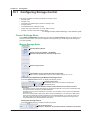
Averaging Menu
Press AVG to display the following menu.
Turns averaging on and off
Set the averaging type (Exp, Lin).
1-20
Set the attenuation constant or average count.
• When Type is set to Exp: Set the attenuation constant (2 to 64).
• When Type is set to Lin: Set the average count (8 to 64).
IM WT1801-02EN
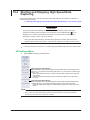
1.17 Displaying the Setup Parameter List
This section explains how to display a list of setup parameters.
► “Displaying the Setup Parameter List (INPUT INFO)” in the features guide
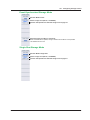
Info Form Menu
1. Press INPUT INFO. The INPUT INFO key illuminates and the split display appears.
The top half of the screen displays the setup parameter list. Press INPUT INFO again to clear the setup
parameter list and display the previous screen.
2. Hold down FORM until the Info Form menu appears.
Input element or measurement range settings are displayed.
Input Element Settings List
Select Power Element
Settings.
Measurement Range Settings List
Select Range Settings.
IM WT1801-02EN
1-21
1.17 Displaying the Setup Parameter List
Info Items Menu
3. Press ITEM to display the Info Items menu.
Turns the display frame on and off
1-22
IM WT1801-02EN
Chapter 2
2.1
Harmonic Measurement Conditions (Option)
Setting Harmonic Measurement Conditions
This section explains the following settings for harmonic measurement conditions. This feature is
available on models with the /G5 or /G6 option.
• Input element group
• PLL source
• Measured harmonic order
• Distortion factor equation
► “Harmonic Measurement Conditions (Option)” in the features guide
Harmonics Menu
Press HRM SET to display the following menu.
Menu on a Model with the /G6 Option
(Dual harmonic measurement)
Menu on a
Model with the
/G5 Option
Configure the input element groups.
Group Hrm1
Set the PLL source (U1, I1, U2, I2, U3, I3, U4, I4, U5, I5, U6, I6,
Ext Clk).
Set the minimum value of the measured harmonic order (0, 1).
Set the maximum value of the measured harmonic order (1 to 500).
Set the distortion factor equation (1/Total, 1/Fundamental).
Group Hrm2
Set the PLL source (U1, I1, U2, I2, U3, I3, U4, I4, U5, I5, U6, I6,
Ext Clk).
Set the minimum value of the measured harmonic order (0, 1).
Set the maximum value of the measured harmonic order (1 to 500).
Set the distortion factor equation (1/Total, 1/Fundamental).
Setting the Input Element Group (Element Settings)
Press the Element Settings soft key to display the following menu.
IM WT1801-02EN
Set the group of the input element (Hrm1, Hrm2).
Input elements that are assigned to the same wiring unit are set to the
same group.
2-1
Chapter 3
3.1
Motor Evaluation Conditions (Option)
Setting Motor Evaluation Conditions
This section explains the following settings for motor evaluation conditions. This feature is available on
models with the /MTR option.
• Scaling factor
• Unit
• Input signal type
• Analog input range
• Analog input linear scale
• Line filter
• Synchronization source
• Pulse input range
• Torque signal pulse rating
• Number of pulses per revolution of the revolution signal
• Motor’s number of poles for computing the synchronous speed
• Voltage or current whose frequency is measured to compute the synchronous speed
• Electrical angle measurement
• Motor efficiency and total efficiency computations
► “Motor Evaluation Conditions (Option)” in the features guide
Setting Motor Evaluation Conditions (MOTOR Settings)
Press SHIFT+SCALING (MOTOR/AUX SET) to display the following screen.
On models with the /AUX option, the auxiliary input conditions setup screen is displayed. See section 4.1.
Set the scaling factor (0.0001 to 99999.9999).
Set the scaling factor that is used to convert the signal from the revolution sensor or torque meter to
speed (rotating speed), torque, and Pm (motor output).
Set the unit (up to 8 characters).
Set the speed, torque, and Pm units.
Set the input signal type (Analog, Pulse).
Set the type of revolution sensor for Speed and the type of the torque meter for Torque.
When Sense Type is set to Analog:
• Turns the auto range on and off
• Set the fixed range (20V, 10V, 5V, 2V, 1V).
• Set the linear scale (A: 1.000 m to 1.000 M; B: −1.000 M to
1.000M).
Set A (the slope) and B (the offset).
• Computes A and B
• Set the line filter (OFF, 100Hz, 1kHz).
• Set the synchronization source (U1, I1, U2, I2, U3, I3, U4, I4,
U5, I5, U6, I6, Ext Clk, None).
Even if Sense Type is set to Pulse, correctly setting the
synchronization source improves measurement accuracy.
When Sense Type is set to Pulse:
• Set the upper and lower limits.
Revolution signal: 0.0000 to 99999.9999 [rpm]
Torque signal: −10000.0000 to 10000.0000 [N•m]
• Set the positive and negative rated torque signal pulse
frequencies (1 to 100000000 [Hz]).
• Set the positive and negative rated torque signal values
(−10000.0000 to 10000.0000 [N•m]).
Turns electrical angle
measurement on and off
Configure the electrical angle correction.
You can configure the electrical angle correction
when Electrical Angle Measurement is set to ON.
IM WT1801-02EN
Set the number of pulses per revolution of the revolution
signal (1 to 9999).
Set the voltage or current whose frequency will be measured
to compute the synchronous speed (U1, I1, U2, I2, U3, I3, U4,
I4, U5, I5, U6, I6).
Set the number of motor poles that will be used to compute
the synchronous speed (1 to 99).
3-1
3.1 Setting Motor Evaluation Conditions
Computing A and B (Calculation)
Compute A (the slope) and B (the offset) from two points on the characteristics graph of a revolution
sensor or torque meter.
Rotating Speed’s A and B
On the motor evaluation conditions setup screen, select Calculation under Speed to display the
following screen.
Set the first X-axis value [V] and Y-axis value [rpm]
(−1.000 T to 1.000 T).
Set the second X-axis value [V] and Y-axis value [rpm]
(−1.000 T to 1.000 T).
Computes A and B
Cancels the computation
Torque’s A and B
On the motor evaluation conditions setup screen, select Calculation under Torque to display the
following screen.
Set the first X-axis value [V] and Y-axis value [Nm]
(−1.000 T to 1.000 T).
Set the second X-axis value [V] and Y-axis value [Nm]
(−1.000 T to 1.000 T).
Computes A and B
Cancels the computation
Setting the Electrical Angle Correction Value (Electrical Angle
Correction)
On the motor evaluation conditions setup screen, select Electrical Angle Correction to display the
following screen.
Set the correction value (−180.00 to 180.00).
Clears the correction value
Automatically computes the correction value
Correction Value is set to the computed value.
Set the voltage or current to automatically compute the
correction value of (U1, I1, U2, I2, U3, I3, U4, I4, U5, I5, U6, I6).
Computing the Motor Efficiency and Total Efficiency
The WT1800 can compute the motor efficiency (the ratio of motor output to the power consumed by
the motor) and total efficiency from the measured active power and motor output. For information on
how to set expressions, see section 1.8.
3-2
IM WT1801-02EN
Chapter 4
4.1
Auxiliary Input Conditions (Option)
Setting Auxiliary Input Conditions
This section explains the following settings for auxiliary input conditions. This feature is available on
models with the /AUX option.
• Input signal name
• Scaling factor
• Unit
• Input signal range
• Input signal linear scale
• Line filter
► “Auxiliary Input Conditions (Option)” in the features guide
Setting Auxiliary Input Conditions (Aux Settings)
Press SHIFT+SCALING (MOTOR/AUX SET) to display the following screen.
On models with the /MTR option, the motor evaluation conditions setup screen is displayed. See section 3.1.
You can configure up to two input signals.
Set the input signal name (up to 8 characters).
Set the scaling factor (0.0001 to 99999.9999).
Set the unit (up to 8 characters).
Turns the auto range on and off
Set the fixed range (20V, 10V, 5V, 2V, 1V, 500mV, 200mV,
100mV, 50mV).
Set the linear scale (A: 1.000 m to 1.000 M; B: −1.000 M to
1.000M).
Set A (the slope) and B (the offset).
Computes A and B
Set the line filter (OFF, 100Hz, 1kHz).
Computing A and B (Calculation)
Compute A (the slope) and B (the offset) from two points on the characteristics graph of the input
signal.
On the auxiliary input conditions setup screen, select Calculation to display the following screen.
Set the first X-axis value [V] and Y-axis value [Unit]
(−1.000 T to 1.000 T).
Set the second X-axis value [V] and Y-axis value [Unit]
(−1.000 T to 1.000 T).
Computes A and B
Cancels the computation
IM WT1801-02EN
4-1
Chapter 5
5.1
Holding Measured Values and Performing Single Measurements
Holding Measured Values
This section explains how to hold measured values.
► “Holding Measured Values (HOLD)” in the features guide
Press HOLD. The HOLD key illuminates, and the displayed measured value is held.
• Values such as D/A output, the list of numeric data that is being printed on the built-in printer, and
communication output are also held.
• Press HOLD again to turn the HOLD key off. This releases the hold feature. The measured data is then
updated at the specified data update rate (see section 1.15).
If you hold the measured value, the data update count in the lower
left of the screen stops increasing.
Data update interval
Data update count
IM WT1801-02EN
5-1
5.2
Performing Single Measurements
This section explains how to perform single measurements.
► “Single Measurement (SINGLE)” in the features guide
1. Press HOLD. The HOLD key illuminates, and the displayed measured value is held.
2. Press SINGLE. A single measurement is performed at the specified data update rate, and the
WT1800 then holds the measured value.
Note
If, while the HOLD key is illuminated, you press HOLD again, the HOLD key will turn off, and the hold feature
will be released.If you press SINGLE while the hold feature is released, the measured value is updated (remeasured) when the time specified by the data update rate elapses after you press the key.
5-2
IM WT1801-02EN
Chapter 6
6.1
Power Measurement (Numeric Data Display)
Setting the Display Format
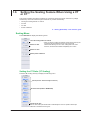
This section explains how to set the numeric data display format. To set the display format, you can:
• Select it from the Numeric Form menu.
• Set it directly by pressing NUMERIC.
► “Numeric Data Display Format” in the features guide
Numeric Form Menu
Press NUMERIC and then FORM to display the following menu.
If the setup parameter list is being displayed (the INPUT INFO key is illuminated), the Info Form menu may
be displayed. If this happens, press FORM again.
Select the 4 Items display.
Select the 8 Items display.
Select the 16 Items display.
Select the matrix display.
You can select four or six columns (see section 6.4).
Select the All Items display.
Select the harmonics list display (/G5 or /G6 option).
The WT1800 switches between the single and dual list displays each time you press this soft key.
Select the custom display.
You can load the background and customize the numeric data display (see section 6.7).
NUMERIC Key
Each time that you press NUMERIC, the display format switches, in order, between 4 Items, 8 Items,
16 Items, Matrix, All Items, Hrm List Single, Hrm List Dual, and Custom.
IM WT1801-02EN
6-1
6.2
Switching the Displayed Page
This section explains how to switch the displayed numeric data page.
► “Switching the Displayed Page (PAGE UP/PAGE DOWN)” in the features guide
1. Follow the procedure in section 6.1 to select the numeric data display format.
4 Items, 8 Items, 16 Items, Matrix, All Items, and Custom Displays
2. Press PAGE▲ to display the previous page.
Press PAGE▼ to display the next page.
Press SHIFT+PAGE▲ ( ) to jump to the first page.
Press SHIFT+PAGE▼ ( ) to jump to the last page.
• You can switch the displayed page separately for the 4 Items, 8 Items, 16 Items, Matrix, All Items, and
Custom displays.
• For the All Items display, the first page is always displayed in the top half of the screen, and the currently
selected page from pages 2 to 12 is displayed in the bottom half of the screen. On the split display, you
can switch between pages 1 to 12.
• For the Custom display, you can switch between pages when the display is set so that the total number
of displayed items is more than the number of items that can be displayed on one page (see section 6.7).
Example of the 4 Items Display
When these characters are displayed in black, you can switch the page.
PAGE
To the previous page
Currently displayed page
To the next page
PAGE
6-2
IM WT1801-02EN
6.2 Switching the Displayed Page
Hrm List Single and Hrm List Dual Displays (/G5 or /G6 options)
2. Press ESC to clear the menu.
3. Press the cursor keys (◄►) to select either the measurement function side (the left side of the
screen) or the harmonic order data side (the right side of the screen).
4. Press PAGE▲ to display the previous page.
Press PAGE▼ to display the next page.
Press SHIFT+PAGE▲ ( ) to jump to the first page.
Press SHIFT+PAGE▼ ( ) to jump to the last page.
Measurement function side
Harmonic order data side
To the previous page
PAGE
The arrows that can be used to switch
the page are displayed in black.
PAGE
To the previous page
To the next page
PAGE
Currently displayed page
PAGE
To the next page
Note
If you do not perform step 2 to clear the menu, you cannot switch between the measurement function and the
harmonic order data sides.
IM WT1801-02EN
6-3
6.3
Changing the Displayed Items on the 4 Items, 8
Items, and 16 Items Displays
This section explains the following settings for the displayed items on the 4 Items, 8 Items, and 16
Items displays:
• Item number
• Measurement function
• Element and wiring unit
• Harmonic order
• Resetting the displayed items
• Turning the display frame on and off
To change the displayed items, you can:
• Set the items on the Numeric (4), Numeric (8), or Numeric (16) menu.
• Set items directly by pressing the function select keys and ELEMENT.
► “4-, 8-, and 16-Value Displays (4 Items/8 Items/16 Items)” in the features guide
1. Follow the procedure in section 6.1 to set the numeric data display format to the 4 Items, 8
Items, or 16 Items display.
Numeric (4), Numeric (8), and Numeric (16) Menus
2. Press ITEM to display the following menu.
If the setup parameter list is being displayed (the INPUT INFO key is illuminated), the Info Items menu may
be displayed. If this happens, press ITEM again.
In step 1, you can also display the Numeric (4), Numeric (8), or Numeric (16) menu by pressing NUMERIC,
ITEM, and then repeatedly pressing NUMERIC.
Example of the Numeric (4) Menu
4 Items display: 1 to 48
Select the item number that you want to set. 8 Items display: 1 to 96
16 Items display: 1 to 192
Set the measurement function (None, other functions—for details on the various
measurement functions, see “Items That This Instrument Can Measure” in the features
guide).
Set the element and wiring unit (Element 1 to Element 6, ΣA to ΣC).
Set the harmonic order (Total, 0 to 500; /G5 or /G6 option).
You can set this setting only when you have selected a measurement function that includes a
harmonic order.
Set the resetting of displayed items.
Turns the display frame on and off
Switching the Page
To set items on pages that aren’t currently displayed, switch to these pages. For details on how to
switch pages, see section 6.2.
6-4
IM WT1801-02EN
6.3 Changing the Displayed Items on the 4 Items, 8 Items, and 16 Items Displays
Reset Items Menu
Press the Reset Items soft key to display the following menu.
Set the reset pattern (Element Origin, Function Origin, Clear Current Page, Clear All
Pages).
Resets the items using the specified reset pattern
Function Select Keys and the ELEMENT Key
Follow steps 1 and 2 on the previous page to display the Numeric (4), Numeric (8), or Numeric (16)
menu.
3. Press ESC to clear the menu.
Example of the 8 Items Display
Displayed in the upper left of the numeric data display screen
4. Press the cursor keys, the PAGE▲▼ keys, or the SHIFT+PAGE▲▼ ( and ) keys to select
the item that you want to change.
5. Press the function select key that corresponds to the measurement function that you want to
display.
Function select keys: U
/I/P key, S/Q/λ/Φ key, WP/q/TIME key, FU/FI/η key, and U/I MODE key
6. Press the ELEMENT key for displaying numeric data to select the element and wiring unit that
you want to display.
• Press SHIFT+the ELEMENT (ALL) key for displaying numeric data to illuminate the indicator below the
ELEMENT key and change all elements of the measurement functions on the displayed page to the
same element and wiring unit at once.
• Press SHIFT+the ELEMENT (ALL) key for displaying numeric data again to turn the indicator off and
stop setting all elements at once.
Cursor keys
Function
select keys
ELEMENT key for displaying numeric data
PAGE▲▼ keys
IM WT1801-02EN
6-5
6.4
Changing the Displayed Items on the Matrix
Display
This section explains the following settings for the displayed items on the Matrix display:
• Item number
• Measurement function
• Element and wiring unit
• Harmonic order
• Resetting the displayed items
• Display column
• Turning the display frame on and off
To change the displayed items, you can:
• Set the items on the Matrix Items menu.
• Set items directly by pressing the function select keys and ELEMENT.
► “Matrix Display (Matrix)” in the features guide
1. Follow the procedure in section 6.1 to set the numeric data display format to the Matrix display.
Matrix Items Menu
2. Press ITEM to display the following menu.
If the setup parameter list is being displayed (the INPUT INFO key is illuminated), the Info Items menu may
be displayed. If this happens, press ITEM again.
In step 1, you can also display the Matrix Items menu by pressing NUMERIC, ITEM, and then repeatedly
pressing NUMERIC.
Select the item number that you want to set (1 to 81).
Set the measurement function (None, other functions—for details on the various
measurement functions, see “Items That This Instrument Can Measure” in the features
guide).
Set the harmonic order (Total, 0 to 500; /G5 or /G6 option).
You can set this setting only when you have selected a measurement function that includes a
harmonic order.
Set the resetting of displayed items.
Configure the columns to display.
Turns the display frame on and off
Switching the Page
To set items on pages that aren’t currently displayed, switch to these pages. For details on how to
switch pages, see section 6.2.
6-6
IM WT1801-02EN
6.4 Changing the Displayed Items on the Matrix Display
Reset Items Menu
Press the Reset Items soft key to display the following menu.
Set the reset pattern (Element Origin, Function Origin, Clear Current Page, Clear All
Pages).
Resets the items using the specified reset pattern
Column Settings Menu
Press the Column Settings soft key to display the following menu.
Set the number of columns (4, 6).
Set the column number (1 to 6).
Set the element and wiring unit (None, Element 1 to Element 6,
ΣA to ΣC).
IM WT1801-02EN
Resets items to the default values
6-7
6.4 Changing the Displayed Items on the Matrix Display
Function Select Keys and the ELEMENT Key
Follow steps 1 and 2 on page 6-6 to display the Matrix Items menu.
3. Press ESC to clear the menu.
Displayed in the upper left of the numeric data display screen
Changing the Measurement Function (Vertical direction)
4. Press the cursor keys (▲▼), the PAGE▲▼ keys, or the SHIFT+PAGE▲▼ ( and ) keys to
select the row that you want to change.
5. Press the function select key that corresponds to the measurement function that you want to
display.
Function select keys: U
/I/P key, S/Q/λ/Φ key, WP/q/TIME key, FU/FI/η key, and U/I MODE key
Changing the Element and Wiring Unit (Horizontal direction)
4. Use the cursor keys (◄►) to select the column that you want to change.
5. Press the ELEMENT key for displaying numeric data to select the element and wiring unit that
you want to display.
Cursor keys
Function
select keys
ELEMENT key for displaying
numeric data
PAGE▲▼ keys
6-8
IM WT1801-02EN
6.5
Changing the All Items Display
This section explains the following All Items display settings:
• Harmonic order
• Turning the display of all element and all wiring unit data on and off
• Turning the display frame on and off
► “All Display (All Items)” in the features guide
1. Follow the procedure in section 6.1 to set the numeric data display format to the All Items
display.
Numeric (All) Menu
2. Press ITEM to display the following menu.
If the setup parameter list is being displayed (the INPUT INFO key is illuminated), the Info Items menu may
be displayed. If this happens, press ITEM again.
In step 1, you can also display the Numeric (All) menu by pressing NUMERIC, ITEM, and then repeatedly
pressing NUMERIC.
Set the harmonic order (Total, 0 to 500; /G5 or /G6 option).
You can set this setting only when you have selected the page of a measurement function
includes a harmonic order. For details on how to switch pages, see section 6.2.
Turns the display of numeric data of all elements or all wiring units on and off
If the total number of elements or wiring units is 7 or more, set this to ON when you want to
display the numeric data of all elements or all wiring units.
Turns the display frame on and off
Note
On the All Items display, you cannot select individual display items and change their measurement function,
element, or wiring unit. If you switch to the Matrix display, you can change the measurement functions,
elements, and wiring units using the displayed table (see section 6.4).
IM WT1801-02EN
6-9
6.6
Changing the Harmonics List Display (Option)
This section explains the following settings for the harmonics list display (Hrm List). This feature is
available on models with the /G5 or /G6 option.
• List number
• Measurement function
• Element and wiring unit
• Turning the display frame on and off
To change the displayed items, you can:
• Set the items on the List Items menu.
• Set items directly by pressing the function select keys and ELEMENT.
► “Single Harmonics and Dual Harmonics Lists (Hrm List Single/Dual; option)”
in the features guide
1. Follow the procedure in section 6.1 to set the numeric data display format to the harmonics list
display (Hrm List).
List Items Menu
2. Press ITEM to display the following menu.
If the setup parameter list is being displayed (the INPUT INFO key is illuminated), the Info Items menu may
be displayed. If this happens, press ITEM again.
In step 1, you can also display the List Items menu by pressing NUMERIC, ITEM, and then repeatedly
pressing NUMERIC. There is a List Items menu for the single harmonics list and the dual harmonics list.
When you repeatedly press NUMERIC, the menu for the single harmonics list is displayed after the All
Items display, and the menu for the dual harmonics list is displayed after the menu for the single harmonics
list.
Select the list number that you want to set (1, 2).
Function, element, and wiring unit settings that you make for list number 2 are also reflected in
the right column of the harmonic order data of the dual harmonics list.
Set the measurement function (U, I, P, S, Q, λ, Φ, ΦU, ΦI, Z, Rs, Xs, Rp, Xp).
Set the element and wiring unit (Element 1 to Element 6, ΣA to ΣC).
Turns the display frame on and off
Note
On the harmonics list displays, you can change the measurement function, element, and wiring unit for the
selected list, but you cannot change these settings for each individual display item.
6-10
IM WT1801-02EN
6.6 Changing the Harmonics List Display (Option)
Function Select Keys and the ELEMENT Key
Follow steps 1 and 2 on page 6-10 to display the List Items menu.
3. Press ESC to clear the menu.
4. Use the cursor keys (◄►) to select the harmonic order data side (the right side of the screen).
If you are displaying the dual harmonics list, you can set the left or right column of the harmonic order data,
whichever you have selected.
Example of the Single Harmonics List
Displayed in the upper left of the numeric data display screen
5. Press the function select key that corresponds to the measurement function that you want to
display.
Function select keys: U
/I/P key and S/Q/λ/Φ key
(The WP/q/TIME key, FU/FI/η key, and U/I MODE key are disabled.)
6. Press the ELEMENT key for displaying numeric data to select the element and wiring unit that
you want to display.
• If you are displaying the dual harmonics list, press SHIFT+the ELEMENT (ALL) key for displaying
numeric data to illuminate the indicator below the ELEMENT key and change all elements of the left and
right columns of the harmonic order data to the same element and wiring unit at once.
• Press SHIFT+the ELEMENT (ALL) key for displaying numeric data again to turn the indicator off and
stop setting all elements at once.
Cursor keys (◄►)
Function
select keys
ELEMENT key for
displaying numeric data
Indicator
IM WT1801-02EN
6-11
6.7
Setting the Custom Display
This section explains the following Custom display settings:
• Loading of display configuration files
• Loading of background files
• Display configuration
Total items, items per page, custom items (item number, measurement function, element and wiring
unit, harmonic order, display position, font size, font color), saving custom display configuration files
• Turning the display frame on and off
► “Custom Display (Custom)” in the features guide
1. Follow the procedure in section 6.1 to set the numeric data display format to Custom.
Custom Items Menu
2. Press ITEM to display the following menu.
If the setup parameter list is being displayed (the INPUT INFO key is illuminated), the Info Items menu may
be displayed. If this happens, press ITEM again.
Loads a display configuration file
Loads a background file
Loads display configuration and
background files at the same time
► page 6-14
You can load files for the custom display.
Display configuration files: .txt files
Background files:
.bmp files
• You can use the “Edit Items” menu described
below to change the display configuration that
you have loaded.
• To load both a display configuration file and
background file at the same time, load the
display configuration file.
Configure the display configuration.
Turns the display frame on and off
6-12
IM WT1801-02EN
6.7 Setting the Custom Display
Setting the Display Configuration (Edit Items)
Press the Edit Items soft key to display the following menu.
Set the total number of items (1 to 192).
Set the number of items per page (1 to 192).
• Any changes made to Total Items will change the Items Per Page setting, and vice-versa.
• For details on how to switch pages, see section 6.2.
Customize display items.
Saves the display configuration file
Customizing Display Items (Custom Items)
Press the Custom Items soft key to display the following screen.
(X, Y)
Numeric data box
Select the item number that you want
to set (1 to the Total Items setting).
Set the measurement function (None,
other functions—for details on the
various measurement functions, see
“Items That This Instrument Can
Measure” in the features guide).
Set the element and wiring unit
(Element 1 to Element 6, ΣA to ΣC).
When Function is set to None:
Set the character string (up to 15
characters).
When the measurement function
includes a harmonic order:
Set the harmonic order (Total, 0 to
500; /G5 or /G6 option).
Set the display position.
• X Pos: 0 (left edge of the screen) to
800 (right edge of the screen)
• Y Pos: 0 (top of the screen) to 671
(bottom of the screen)
Set the font size (14, 16, 20, 24, 32, 48,
Set the font color 64, 96, 128).
(Yellow, Green, Magenta, Cyan, Red, Orange, Light Blue, Purple,
Blue, Pink, Light Green, Dark Blue, Blue Green, Salmon Pink,
Mid Green, Gray, White, Dark Gray, Blue Gray, Black).
IM WT1801-02EN
6-13
6.7 Setting the Custom Display
Saving Display Configuration Files (Save Custom Items)
Press the Save Custom Items soft key to display the following menu.
Set the save destination. ► section 17.2
Set auto naming. ► section 17.2
Set the file name. ► section 17.2
Saves the display configuration
Note that if a file with the same name exists in the destination folder, it will be overwritten
without warning.
File names are not case-sensitive.
Loading Display Configuration and Background Files at the Same
Time (Load Items & Bmp)
Follow the procedure on page 6-12 to display the Custom Items menu, and then press the Load Items
& Bmp soft key to display the following screen.
Select the file that you want to load.
Select a custom display file.
Display configuration files: .txt files
Background files:
.bmp files
Loads the file
To load both a display configuration file and
background file at the same time, load the display
configuration file.
However, an error will occur if a background file
that has the same name as the display
configuration file is not present in the save
destination folder of the display configuration file.
For the operating procedure, see section 17.6.
6-14
IM WT1801-02EN
6.7 Setting the Custom Display
Example of Loading a File for the Custom Display
Note
After you properly load a display configuration file and a background file, if you restart the WT1800 and the
same background file is not in the same location, the background will return to its default.
IM WT1801-02EN
6-15
Chapter 7
7.1
Computations
Setting User-Defined Functions
This section explains the following settings for user-defined functions:
• Turning computations on and off
• Computation name
• Unit
• Expressions
• Turning max hold on and off
► “User-Defined Functions (User Defined Function)” in the features guide
Setting User-Defined Functions (User Defined Function)
Press MEASURE and then the User Defined Function soft key to display the following screen.
Set the expression.
Turns the computation
on and off
Set the computation
name
(up to 8 characters).
Set the unit
(up to 8 characters).
Displays the setup screen for
user-defined functions F1 to F5
Displays the setup screen for
user-defined functions F6 to F10
Displays the setup screen for
user-defined functions F11 to F15
Displays the setup screen for
user-defined functions F16 to F20
Turns max hold on and off
IM WT1801-02EN
7-1
7.2
Setting User-Defined Events
This section explains the following settings for user-defined events:
• Event number
• Turning events on and off
• Event name
• Character string displayed when events occur or do not occur
• Judgment condition setup method
• Using numeric data to perform judgment
Measurement function, element and wiring unit, harmonic order, comparison condition,
comparison reference
• Using logical AND and OR of events to perform judgment
Inversion of judgment conditions
► “User-Defined Events (User Defined Event)” in the features guide
Setting User-Defined Events (User Defined Event)
Press MEASURE and then the User Defined Event soft key to display the following screen.
Set the event number (1 to 8).
Turns the event
on and off
Set the character string that is displayed when events
Set the event name occur or do not occur
(up to 8 characters). (up to 6 characters).
Select the judgment condition setup
method (Range, Condition).
The settings are displayed.
When you turn an event on, the corresponding check
box is selected.
7-2
Using numeric data to perform
judgment (Range)
• Set the measurement function (for
details on the various measurement
functions, see “Items That This
Instrument Can Measure” in the
features guide).
• Set the element and wiring unit
(Element 1 to Element 6, ΣA to ΣC).
• Set the harmonic order (Total, 0 to
500; /G5 or /G6 option).
You can set this setting when the
measurement function includes a
harmonic order.
• Set the comparison condition (OFF,
<, <=, =, >, >=, !=).
• Set the comparison reference
(−9.999T to 9.999T).
Using logical AND and OR of events to
perform judgment (Condition)
• Set the judgment condition
inversion.
• Set AND, OR, or END.
• Set the events.
You can select events whose event
numbers are smaller than the number
specified by Event No. for the current
event.
IM WT1801-02EN
7.3
Setting Apparent Power, Reactive Power, and
Corrected Power Equations
This section explains the following settings for the apparent power, reactive power, and corrected
power equations:
• Apparent power equation
• Apparent power and reactive power equation types
• Corrected power equation
Applicable standard and coefficients
► “Apparent Power, Reactive Power, and Corrected Power Equations (Formula)”
in the features guide
Formula Menu
Press MEASURE and then the Formula soft key to display the following menu.
Set the apparent power equation (Urms*Irms, Umean*Imean, Udc*Idc, Umean*Irms,
Urmean*Irmean).
Set the apparent power and reactive power equation types (Type 1, Type 2, Type 3).
Set the corrected power equation.
Setting the Corrected Power Equation (Pc Formula)
Press the Pc Formula soft key to display the following screen.
Set the applicable standard (IEC76-1(1976), IEC76-1(1993)).
Set the coefficients (0.0001 to 9.9999).
When Select standard is IEC76-1(1976), set coefficients P1 and P2.
IM WT1801-02EN
7-3
7.4
Setting the Sampling Frequency
This section explains how to set the sampling frequency.
► “Sampling Frequency (Sampling Frequency)” in the features guide
Measure Menu
Press MEASURE to display the following menu.
Set the sampling frequency (Auto, Clock A, Clock B, Clock C).
7-4
IM WT1801-02EN
7.5
Setting the Phase Difference Display Format
This section explains how to set the phase difference display format.
► “Phase Difference Display Format (Phase)” in the features guide
Measure Menu
Press MEASURE to display the following menu.
Set the phase difference display format (180 degrees, 360 degrees).
IM WT1801-02EN
7-5
7.6
Setting Master and Slave Synchronized
Measurement
This section explains the following setting for master and slave synchronized measurement.
• Master and slave
► “Master/Slave Synchronized Measurement (Sync Measure)” in the features guide
Measure Menu
Press MEASURE to display the following menu.
Select whether this is the master unit or a slave unit (Master, Slave).
7-6
IM WT1801-02EN
7.7
Setting the Voltages or Currents Whose
Frequencies Will Be Measured
This section explains how to select the voltages or currents of the installed input elements whose
frequencies will be measured. Set this setting on models without the /FQ option. On models with the
/FQ option, the frequencies of the voltages or currents of all elements can be measured, so this setup
menu is not displayed.
► “Voltages or Currents Whose Frequencies Will Be Measured (FREQ MEASURE)”
in the features guide
Freq Items Menu
Press SHIFT+MEASURE (FREQ MEASURE) to display the following menu.
Set the voltages or currents whose frequencies will be
measured (U1, I1, U2, I2, U3, I3, U4, I4, U5, I5, U6, I6).
You can set up to three voltages or currents.
IM WT1801-02EN
7-7
Chapter 8
Integrated Power (Watt hour)
8.1
Setting Independent Integration
This section explains the following settings for independent integration. If you turn independent
integration on, you can start, stop, and reset integration for each input element separately.
• Turning independent integration on and off
• Element that independent integration will be performed on
► “Enabling or Disabling Independent Integration (Independent Control)” in the features guide
Integ Menu
Press INTEG to display the following menu.
Turns independent integration on and off
Select the elements that independent integration will be performed on.*
This soft key is displayed when Independent Control is set to ON.
The input elements that independent integration will be performed on are displayed.
* Even if you select input elements that independent integration will be performed on,
independent integration may not be performed due to the wiring system setting or the
independent input element configuration (see the features guide).
Selecting the Element That Independent Integration Will Be
Performed On (Element Object)
Press the Element Object soft key to display the following screen.
Select the check boxes for the input
elements that you want independent
integration to be performed on.
Clears all selected input elements
Selects all input elements
IM WT1801-02EN
8-1
8.2
Setting Integration Conditions
This section explains the following settings for integration conditions:
• Integration mode
• Integration timer
• Scheduled times for real-time integration
• Turning integration auto calibration on and off
• Watt-hour integration method for each polarity
• Current mode for current integration
• Rated time of integrated D/A output (/DA option)
► “Integration Conditions (Integ Set)” in the features guide
Integ Menu
Press INTEG and then the Integ Set soft key to display the following menu.
Set the integration mode (Normal, Continuous, R-Normal, R-Continuous).
Set the integration timer.
Set the scheduled times for real-time integration.
This soft key is displayed when Mode is set to R-Normal or R-Continuous.
Turns integration auto calibration on and off
Set the watt-hour integration methods for each polarity.
Set the current modes for current integration.
Set the rated time of integrated D/A output (/DA option).
Setting the Integration Timer (Integ Timer)
Press the Integ Timer soft key to display the following screen.
When Independent
Integration Is Off
Set the integration timer (00000 hours : 00 minutes : 00 seconds to
10000 hours : 00 minutes : 00 seconds).*
When Independent
Integration Is On
Select the integration timer’s setup method (Each, All).
When you select Each, you can set the integration timer for each input
element.
* When Mode is set to Normal and the integration timer is 00000 : 00 : 00,
the WT1800 is in manual integration mode.
8-2
IM WT1801-02EN
8.2 Setting Integration Conditions
Setting Scheduled Times for Real-Time Integration (Real-time
Control)
Press the Real-time Control soft key to display the following screen.
The Real-time Control soft key is displayed when Mode is set to R-Normal or R-Continuous.
When Independent Integration Is Off
Set the scheduled start and stop times
(Year/month/day, 00 hours : 00
minutes : 00 seconds to 23 hours : 59
minutes : 59 seconds).
Scheduled integration stop time
Scheduled integration start time
Sets the scheduled integration start time to
the current time
Copies the scheduled integration start time to the
scheduled integration stop time
When Independent Integration Is On
Select the schedule setup method
(Each, All).
When you select Each, you can set the
schedule for each input element.
Setting the Watt-Hour Integration Method for Each Polarity (WP±
Type)
Press the WP± Type soft key to display the following screen.
Select the integration method setup method (Each, All).
When you select Each, you can set the integration method for
each input element.
IM WT1801-02EN
Set the integration method (Charge/Discharge, Sold/Bought).
8-3
8.2 Setting Integration Conditions
Setting the Current Mode for Current Integration (q Mode)
Press the q Mode soft key to display the following screen.
Select the current mode setup method (Each, All).
When you select Each, you can set the current mode for each
input element.
Set the current mode (rms, mean, dc, r-mean, ac).
Setting the Rated Time of Integrated D/A Output (D/A Output
Rated Time, /DA option)
Press the D/A Output Rated Time soft key to display the following screen.
8-4
Set the rated time of integrated D/A output
(00000 hours : 00 minutes : 00 seconds to 10000 hours :
00 minutes : 00 seconds).
IM WT1801-02EN
8.3
Starting, Stopping, and Resetting Integration
This section explains how to start, stop, and reset integration.
► “Starting, Stopping, and Resetting Integration (Start/Stop/Reset)” in the features guide
Integ Menu
Press INTEG to display the following menu.
Starts integration
The WT1800 starts integration using the integration mode that you have specified (see section
8.2).
• The START indicator to the right of the INTEG key illuminates.
Integration has started; “Integ: Start” is displayed.*
• The START indicator to the right of the INTEG key blinks.
The integration operation is ready; “Integ: Ready” is displayed.*
Stops integration
The WT1800 automatically stops integration according to the integration mode that you have
specified. To force integration to stop, press this soft key. The integration time and integrated
value are held.
• The STOP indicator to the right of the INTEG key blinks.
Integration has stopped; “Integ: Stop” is displayed.*
If you press the Start soft key when “Stop” is displayed in yellow, you can resume integration
from the point where you stopped integration.
• The STOP indicator to the right of the INTEG key illuminates.
Integration has stopped automatically because the integration timer has expired; “Integ:
TimeUp” is displayed.*
Integration has stopped automatically because of real-time control; “Integ: Stop” is
displayed.* “Stop” is displayed in orange.
Resets the integration time and integrated value.
All integration data is deleted, and the no-data display, “-------,” appears.
The STOP indicator to the right of the INTEG key turns off.
* Character strings are displayed in the upper-right section of the screen.
Note
If you do not reset integration, you will not be able to start it again.
IM WT1801-02EN
8-5
Chapter 9
Waveform Display
9.1
Setting the Display Format
This section explains the following settings for the waveform display format:
• Number of divisions of the waveform screen
• Time axis
• Trigger
• Advanced waveform display settings
• Waveform mapping
► “Display Format (FORM)—Waveform” in the features guide
Wave Form Menu
Press WAVE and then FORM to display the following menu.
If the setup parameter list is being displayed (the INPUT INFO key is illuminated), the Info Form menu may
be displayed. If this happens, press FORM again.
Set the number of divisions of the waveform screen (Single, Dual, Triad, Quad, Hexa).1
Set the time axis (0.05 ms to
the specified data update interval
).2
10
Configure trigger settings.
Configure the advanced waveform display settings.
Set waveform mapping.
1 In addition to using this Format soft key, you can repeatedly press WAVE to change the
order and the number of divisions.
2 For information on how to set the data update interval, see section 1.15.
Configuring Trigger Settings (Trigger Settings)
Press the Trigger Settings soft key to display the following menu.
Set the trigger mode (Auto, Normal, OFF).
Set the trigger source (U1, I1, U2, I2, U3, I3, U4, I4, U5, I5, U6, I6, Ext Clk).
Set the trigger slope (
,
,
).
Set the trigger level (0.0% to ±100.0%).
IM WT1801-02EN
9-1
9.1 Setting the Display Format
Configuring Advanced Waveform Display Settings (Display
Settings)
Press the Display Settings soft key to display the following menu.
Set the display interpolation (
Set the grid (
,
,
,
).
).
Turns the display of scale values on and off
Turns the display of waveform labels on and off
Note
Changes that you make to the waveform display settings on the Display Settings menu are also reflected in
the advanced trend display settings (see section 10.1).
Setting Waveform Mapping (Wave Mapping)
Press the Wave Mapping soft key to display the following screen.
Select the waveform mapping mode (Auto, Fixed, User).
9-2
Set the mapping destination (the divided screen number: 0 to 5).
Map each waveform (U1, I1, etc.) to the part of the divided screen that you want it
to appear on.
• These settings are displayed when Mode is set to User.
• Spd/Aux1 and Trq/Aux2 can be set on models with the /MTR or /AUX options.
IM WT1801-02EN
9.2
Turning the Display of Waveforms On and Off
and Setting the Vertical Zoom Factors and
Vertical Positions
This section explains the following waveform display settings:
• Turning the display of waveforms on and off
• Vertical zoom factor
• Vertical position
► “Display Items (ITEM)—Waveform” in the features guide
Configuring the Waveform Display
Press WAVE and then ITEM to display the following menu.
If the setup parameter list is being displayed (the INPUT INFO key is illuminated), the Info Form menu may
be displayed. If this happens, press ITEM again.
Select the waveforms that you want to display.
Set the vertical zoom factor
(× 0.1, × 0.2, × 0.25, × 0.4, × 0.5, × 0.75, × 0.8, × 1, × 1.14, × 1.25, × 1.33, × 1.41,
× 1.5, × 1.6, × 1.77, × 2, × 2.28, × 2.66, × 2.83, × 3.2, × 3.54, × 4, × 5, × 8, × 10,
× 12.5, × 16, × 20, × 25, × 40, × 50, × 100).
Set the vertical position (0.000% to ±130.000%).
Turns the display of all waveforms on
Turns the display of all waveforms off
Speed and Torque are displayed on
models with the /MTR option.
Aux1 and Aux2 are displayed on
models with the /AUX option.
IM WT1801-02EN
9-3
Chapter 10 Trend Display
10.1 Setting the Display Format
This section explains the following settings for the trend display format:
• Number of divisions of the trend screen
• Time axis
• Restarting trends
• Advanced trend display settings
► “Display Format (FORM)—Trend” in the features guide
Others Menu
Press OTHERS to display the following menu.
Select Trend.
Even if you select one of these settings, you can still show the trend display. You can split the
screen into top and bottom halves, and show the trend display in one half and another
display in the other half. ► chapter 13
Trend Form Menu
Press FORM to display the following menu.
If the setup parameter list is being displayed (the INPUT INFO key is illuminated), the Info Form menu may
be displayed. If this happens, press FORM again.
Set the number of divisions on the trend screen (Single, Dual, Triad, Quad).
Set the time axis (3s, 6s, 10s, 30s, 1min, 3min, 6min, 10min, 30min, 1hour,
3hour, 6hour, 12hour, 1day).
Restarts the trend
IM WT1801-02EN
Configure the advanced trend display settings.
10-1
10.1 Setting the Display Format
Configuring Advanced Trend Display Settings (Display Settings)
Press the Display Settings soft key to display the following menu.
Set the display interpolation (
Set the grid (
,
,
,
).
).
Turns the display of scale values on and off
Turns the display of trend labels on and off
Note
Changes that you make to the trend display settings on the Display Settings menu are also reflected in the
advanced waveform display settings (see section 9.1).
10-2
IM WT1801-02EN
10.2 Turning the Trend Display On and Off and
Setting the Measurement Functions to Display
and the Vertical Scales
This section explains the following trend display settings:
• Turning the trend display on and off
• Measurement function
• Element and wiring unit
• Harmonic order
• Vertical scale
Vertical scale mode and upper and lower limits of vertical scales
► “Display Items (ITEM)—Trend” in the features guide
1. Follow the procedure in section 10.1 to select Trend on the Others menu.
Configuring the Trend Display
2. Press ITEM to display the following screen.
If the setup parameter list is being displayed (the INPUT INFO key is illuminated), the Info Form menu may
be displayed. If this happens, press ITEM again.
Select the trends that you want to display.
If you move the cursor to Display, and then press SET, you can select all the trends (All ON) and clear all
the selections (All OFF).
Set the measurement function (for details on the various measurement functions, see “Items
That This Instrument Can Measure” in the features guide).
Set the element and wiring unit (Element 1 to Element 6, ΣA to ΣC).
Set the harmonic order (Total, 0 to 500; /G5 or /G6 option).
You can set this setting when the measurement function includes a harmonic order.
Select the vertical scale’s setup method
(Auto, Manual).
Set the upper and lower limits (–9.999 T to 9.999 T).
These settings can be set when Scaling is set to
Manual.
IM WT1801-02EN
10-3
Chapter 11 Bar Graph Display (Option)
11.1 Setting the Display Format
This section explains the following settings for the bar graph display format. This feature is available
on models with the /G5 or /G6 option.
• Number of divisions of the bar graph screen
• Bar graph display range (displayed harmonic orders)
► “Display Format (FORM)—Bar Graph” in the features guide
Others Menu
Press OTHERS to display the following menu.
Select Bar.
Even if you select one of these settings, you can still show the bar graph display. You can
split the screen into top and bottom halves, and show the bar graph display in one half and
another display in the other half. ► chapter 13
Bar Form Menu
Press FORM to display the following menu.
If the setup parameter list is being displayed (the INPUT INFO key is illuminated), the Info Form menu may
be displayed. If this happens, press FORM again.
Set the number of divisions on the bar graph screen (Single, Dual, Triad).
Set the bar graph display range.
• The display’ s start harmonic order (0 to 490)
• The display’ s end harmonic order (10 to 500)
You can set the range to any value provided that the end harmonic order is larger than the
start harmonic order by 10 or more.
IM WT1801-02EN
11-1
11.2 Setting the Measurement Function to Display
and the Vertical Scale
This section explains the following bar graph display settings. This feature is available on models with
the /G5 or /G6 option.
• Bar graph number
• Measurement function
• Element
• Vertical scale
Vertical scale mode, vertical scale type, vertical scale upper limit, and X-axis position
► “Display Items (ITEM)—Bar Graph” in the features guide
1. Follow the procedure in section 11.1 to select Bar on the Others menu.
Bar Items Menu
2. Press ITEM to display the following menu.
If the setup parameter list is being displayed (the INPUT INFO key is illuminated), the Info Form menu may
be displayed. If this happens, press ITEM again.
Select the bar graph number that you want to set (1, 2, 3).
Set the measurement function (U, I, P, S, Q, λ, Φ, ΦU, ΦI, Z, Rs, Xs, Rp, Xp).
Set the element (Element 1 to Element6).
Select the vertical scale’s setup method (Fixed, Manual).
Set the vertical scale type (Linear, Log).
This soft key is displayed when you set Scale Mode to Manual.
Set the upper limit (0 to 9.999 T).
This soft key is displayed when you set Scale Mode to Manual.
Set the X-axis position (Bottom, Center).
This soft key is displayed when you set Scale Mode to Manual and Vertical Scale to Linear.
11-2
IM WT1801-02EN
Chapter 12 Vector Display (Option)
12.1 Setting the Display Format
This section explains the following settings for the vector display format. This feature is available on
models with the /G5 or /G6 option.
• Number of divisions of the vector screen
• Turning the numeric data display on and off
► “Display Format (FORM)—Vector” in the features guide
Others Menu
Press OTHERS to display the following menu.
Select Vector.
Even if you select one of these settings, you can still show the vector display. You can split
the screen into top and bottom halves, and show the vector display in one half and another
display in the other half. ► chapter 13
Vector Form Menu
Press FORM to display the following menu.
If the setup parameter list is being displayed (the INPUT INFO key is illuminated), the Info Form menu may
be displayed. If this happens, press FORM again.
Set the number of divisions on the vector screen (Single, Dual).
Turns the numeric data display on and off
IM WT1801-02EN
12-1
12.2 Setting the Element and Wiring Unit to Display
and the Zoom Factor
This section explains the following vector display settings. This feature is available on models with the
/G5 or /G6 option.
• Vector number
• Element and wiring unit
• Zoom factor
► “Display Items (ITEM)—Vector” in the features guide
1. Follow the procedure in section 12.1 to select Vector on the Others menu.
Vector Items Menu
2. Press ITEM to display the following menu.
• If the setup parameter list is being displayed (the INPUT INFO key is illuminated), the Info Form menu
may be displayed. If this happens, press ITEM again.
• If setup parameter list is being displayed, the vector that you have set to vector number 1 is displayed in
the bottom half of the screen.
Select the vector number that you want to set (1, 2).
Set the element and wiring unit (Element 1 to Element 6, ΣA to ΣC).
12-2
Set the zoom factor (0.100 to 100,000).
• Set the zoom factor of fundamental wave U (1) or I (1). The value that indicates the size of
the vector display’s peripheral circle changes according to the zoom factor, and the size of
the vectors that indicate U (1) and I (1) change accordingly as well.
• If you press this soft key to select both U Mag and I Mag, you can link the zoom factors of
both settings and change them at the same time.
IM WT1801-02EN
Chapter 13 Split Display
13.1 Configuring the Split Display
This section explains the following split display settings:
• The two screens to display
• Switching between Form menus
• Switching between Items menus
► “Split Display” in the features guide
Others Menu
Press OTHERS to display the following menu.
The split screen that you configure last is
displayed.
Set the top half of the screen to the Numeric display,
and set the display that you want to show in the bottom half of the
screen (Wave, Trend, Bar,* Vector*).
Set the top half of the screen to the Wave display,
and set the display that you want to show in the bottom half of the
screen (Numeric, Trend, Bar,* Vector*).
Set the top half of the screen to the Trend display,
and set the display that you want to show in the bottom half of the
screen (Numeric, Wave, Bar,* Vector*).
* This feature is available on models with the /G5 or /G6 option.
Form Menu
Press FORM to switch between the Form menus of the two screens that you set on the Others menu.
Configure the settings on each menu.
Display
Numeric
Wave
Trend
Bar
Vector
For Instructions on How to Use
the Form Menu, See:
Sections 6.1 and 6.2
Section 9.1
Section 10.1
Section 11.1
Section 12.1
If the setup parameter list is being displayed (the INPUT INFO key is illuminated), the setup
parameter list is displayed in the top half of the screen and the screen that you set to display in
the top half of the split screen on the Others menu is displayed in the bottom half of the screen.
Additionally, if you repeatedly press FORM, you can switch between the Info Form menu and the
menu of the screen that is displayed in the bottom half of the screen.
IM WT1801-02EN
13-1
13.1 Configuring the Split Display
Items Menu
Press ITEM to switch between the Items menus of the two screens that you set on the Others menu.
Configure the settings on each menu.
Display
Numeric
Wave
Trend
Bar
Vector
For Instructions on How to Use
the Items Menu, See:
Sections 6.3 to 6.7
Section 9.2
Section 10.2
Section 11.2
Section 12.2
If the setup parameter list is being displayed (the INPUT INFO key is illuminated), the setup
parameter list is displayed in the top half of the screen and the screen that you set to display in
the top half of the split screen on the Others menu is displayed in the bottom half of the screen.
Additionally, if you repeatedly press ITEM, you can switch between the Info Form menu and the
menu of the screen that is displayed in the bottom half of the screen.
13-2
IM WT1801-02EN
Chapter 14 Cursor Measurements
14.1 Performing Cursor Measurements on
Waveforms
This section explains the following settings for performing cursor measurements on waveforms:
• Turning the cursor display on and off
• The waveforms to perform cursor measurements on
• Cursor movement path
• Cursor position
• Turning linked cursor movement on and off
► “Cursor Measurement” in the features guide
1. Follow the procedures in chapter 9 to display waveforms.
Wave Cursor Menu
2. Press SHIFT+FORM (CURSOR) to display the following menu.
Turns the cursor display on and off
Set the waveform to measure with cursor 1 (+) (U1, I1, U2, I2, U3, I3, U4, I4, U5, I5, U6, I6,
Speed,1 Torque,1 Aux1,2 Aux22).
Set the waveform to measure with cursor 2 (×) (U1, I1, U2, I2, U3, I3, U4, I4, U5, I5, U6, I6,
Speed,1 Torque,1 Aux1,2 Aux22).
Set the cursor movement path (Max, Min, Mid).
Set the positions of cursor 1 (+) and cursor 2 (×) (0, which is the left edge of the screen
to 800, which is the right edge of the screen)
Turns linked cursor movement on and off
1 This feature is available on models with the /MTR option.
2 This feature is available on models with the /AUX option.
IM WT1801-02EN
14-1
14.2 Performing Cursor Measurements on Trends
This section explains the following settings for performing cursor measurements on trends:
• Turning the cursor display on and off
• The trends to perform cursor measurements on
• Cursor position
• Turning linked cursor movement on and off
► “Cursor Measurement” in the features guide
1. Follow the procedures in chapter 10 to display trends.
Trend Cursor Menu
2. Press SHIFT+FORM (CURSOR) to display the following menu.
Turns the cursor display on and off
Set the trend to measure with cursor 1 (+) (T1 to T16).
Set the trend to measure with cursor 2 (×) (T1 to T16).
Set the positions of cursor 1 (+) and cursor 2 (×) (0, which is the left edge of the
screen to 1601, which is the right edge of the screen)
Turns linked cursor movement on and off
14-2
IM WT1801-02EN
14.3 Performing Cursor Measurements on Bar
Graphs
This section explains the following settings for performing cursor measurements on bar graphs:
• Turning the cursor display on and off
• Cursor position
• Turning linked cursor movement on and off
► “Cursor Measurement” in the features guide
1. Follow the procedures in chapter 11 to display bar graphs.
Bar Cursor Menu
2. Press SHIFT+FORM (CURSOR) to display the following menu.
Turns the cursor display on and off
Set the harmonic order of the bar graph to measure with cursor 1 (+) and cursor 2 (×)
(0 to 500).
Turns linked cursor movement on and off
IM WT1801-02EN
14-3
Chapter 15 High Speed Data Capturing (Option)
15.1 Setting the Number of Data Captures and
Configuring the Capture Control Settings
This section explains the following settings concerning the number of data captures for high speed
data capturing and the capture control settings. This feature is available on models with the /HS option.
• Number of data captures
• Confirming and optimizing the maximum capturing count
• Capture control settings
Voltage and current measurement modes, turning the HS filter on and off, setting the HS filter cutoff
frequency, triggering, performing synchronized measurement using an external signal
• Selecting whether to save to a file
► “Capture Count (Capture Count)” and “Capture Control Settings (Control Settings)”
in the features guide
Others Menu
Press OTHERS to display the following menu.
Select High Speed Data Capturing.
HS Settings Menu
Press FORM to display the following menu.
Set the number of data captures (Infinite, 1 to 9999).
Confirm and optimize the maximum capturing count.*
Configure capture control settings.
Select whether to save to a file*
• OFF: When high speed data capturing is performed, you can use communication
commands to output the captured data.
• ON: “File State: Ready” appears in the upper left of the screen. When high speed data
capturing is performed, the captured data is recorded (saved) under the save
conditions set in section 15.2.
Set the save conditions. ►section 15.2
Starts high speed data capturing ►section 15.4
Stops high speed data capturing ►section 15.4
* You cannot configure the settings in “Confirming and Optimizing the Maximum Capturing
Count” when Record to File is set to OFF.
IM WT1801-02EN
15-1
15.1 Setting the Number of Data Captures and Configuring the Capture Control Settings
Confirming and Optimizing the Maximum Capturing Count
(Optimize Count)
Press the Optimize Count soft key to display the following screen.
Set the number of data captures.
The capturing count is set to the maximum capturing count
displayed to the left.
Maximum capturing count (0 to the maximum number of captures)
* The maximum number of times that data can be captured depends on the number of numeric
data items that you have set to be saved and the free space at the save destination.
For instructions on how to set the save destination and the numeric data items to be saved, see
section 15.2.
Even if you have specified a USB memory device as the save destination, if you remove the USB
memory device, the save destination switches automatically to the internal RAM disk. If you close
this screen and then open it again by pressing the Optimize Count soft key,, the maximum
capturing count changes to the value determined by the internal RAM disk s free space.
Configuring Capture Control Settings (Control Settings)
Press the Control Settings soft key to display the following menu.
Configure the voltage and current measurement modes.
Set the HS Filter.
• Turn the HS filter on or off.
• Set the cutoff frequency (1 Hz to 1000 Hz in steps of 1 Hz)
Configure trigger settings.
Turn external signal synchronization on or off.
• OFF: The WT1800 captures data every 5 ms.
• ON: The WT1800 captures data in sync with an external signal.
Configuring the Voltage and Current Measurement Modes
Press the U/I Measuring Mode soft key to display the following menu.
Select the measurement mode setup method (Each,
All).
When you select Each, you can set the measurement
mode separately for the current and voltage of each input
element.
Set the measurement mode (rms, mean, dc, r-mean).
Note
If the voltage and current measurement mode settings differ for elements assigned to the same wiring unit,
the measurement data (Σ function) for the wiring unit is displayed as “-------” (no data).
15-2
IM WT1801-02EN
15.1 Setting the Number of Data Captures and Configuring the Capture Control Settings
Configuring Trigger Settings
Set the trigger mode (Auto, Normal, OFF).
Set the trigger source (U1, I1, U2, I2, U3, I3, U4, I4, U5, I5, U6, I6, Ext Clk).
Set the trigger slope (
,
,
).
Set the trigger level (0.0% to ±100.0%).
IM WT1801-02EN
15-3
15.2 Configuring the Save Conditions of Captured
Numeric Data
This section explains the following settings for the save conditions of captured numeric data. This
feature is available on models with the /HS option.
• Save destination
• Selecting whether to perform automatic CSV conversion when capturing stops
• Numeric data items to save
• Auto naming
• File name
• Comment
► “Save Conditions (File Settings)” in the features guide
1. Follow the procedure in section 15.1 to select High Speed Data Capturing on the Others menu.
File Settings Menu
2. Press FORM and then the File Settings soft key to display the following menu.
Set the save destination and perform manual CSV conversion.
Select whether to perform automatic CSV conversion when high speed
data capturing stops.
Set the numeric data items to save.
Set auto naming. ► section 17.2
Set the file name. ►section 17.2.
Set a comment. ► section 17.2
15-4
IM WT1801-02EN
15.2 Configuring the Save Conditions of Captured Numeric Data
Setting the Save Destination and Performing Manual CSV
Conversion
Press the File List soft key to display the following screen.
Set the save destination.*
When high speed data capturing starts (see section 15.4), captured data is saved
to the specified file name at the specified save destination.
* You cannot specify a network drive as the save destination.
Executes the manual CSV conversion
Select the data file (.WTS file) that was saved, and then press
the CSV Convert soft key to create a data file in ASCII format.
Setting the Numeric Data Items to Save
Press the Item Settings soft key to display the following screen.
The numeric data items in this screen whose check boxes are selected are saved.
For the individual numeric
data items U, I, and P,
you can set whether to
save the numeric data for
all installed input elements
and wiring units (All ON)
or not (All OFF).
You can set whether to
save all the numeric data
(All ON) or not (All OFF).
For each input element or wiring
unit, you can set whether to save
the numeric data for U, I, and P (All
ON) or not (All OFF). You cannot
configure this setting for slots that
do not have input elements installed
in them.
Slot in which an input element is not
installed
On models with the /MTR option, you can set whether
to save the numeric data for Speed, Torque, and Pm
(All ON) or not (All OFF).
On models with the /AUX option, you can set whether
to save the numeric data for Aux1 and Aux2 (All ON)
or not (All OFF).
Note
Even if you select the check box for wiring unit ΣA, ΣB, or ΣC, the wiring unit's numeric data will not be saved
under the following circumstances.
• When the wiring system has not been set
• When the wiring system is set to 1P3W or 3P3W
• When input elements assigned to the same wiring unit have different voltage or current measurement
mode settings
For information on how to set the wiring system, see section 1.1.
IM WT1801-02EN
15-5
15.3 Changing the Displayed Items for High Speed
Data Capturing
This section explains the following settings concerning the displayed items for high speed data
capturing. This feature is available on models with the /HS option.
• Number of columns
• Column number
• Element and wiring unit
• Resetting the displayed items
• Peak over-range information
• Turning the display frame on and off
► “Display Items (ITEM)—High Speed Data Capturing” in the features guide
1. Follow the procedure in section 15.1 to select High Speed Data Capturing on the Others menu.
HS Items Menu
2. Press ITEM to display the following menu.
Set the number of columns (4, 6).
Set the column number (1 to 6).
Set the element or wiring unit (None, Element 1 to Element 6, ΣA to ΣC).
Resets items to the default values
Peak over-range information
Turns the display frame on and off
Switching the Page
You can switch between page 1 and 2 (pages 1 to 4 on models with the /MTR or /AUX option). The
items are arranged for high speed data capturing, and the displayed measurement functions are fixed
for every page. For details on how to switch pages, see section 6.2.
Page 1 Example
15-6
IM WT1801-02EN
15.3 Changing the Displayed Items for High Speed Data Capturing
Page 2 Example
Page 3 Example
(Page 3 can only be selected on models with the /MTR or /AUX option.)
Speed, Torque, and
Pm are displayed on
models with the /MTR
option.
Aux1 and Aux2 are
displayed on models
with the /AUX option.
Page 4 Example
(Page 4 can only be selected on models with the /MTR or /AUX option.)
Speed, Torque, and
Pm are displayed on
models with the /MTR
option.
IM WT1801-02EN
Aux1 and Aux2 are
displayed on models
with the /AUX option.
15-7
15.3 Changing the Displayed Items for High Speed Data Capturing
ELEMENT Key
3. Press ESC to clear the menu.
Displayed in the upper left of the numeric data display screen
Voltage measurement range and measurement mode
Current measurement range and measurement mode
Changing the Element and Wiring Unit (Horizontal direction)
4. Use the cursor keys (◄►) to select the column that you want to change.
5. Press the ELEMENT key for displaying numeric data to select the element and wiring unit that
you want to display.
In high speed data capturing, the elements and wiring unit configurations are the same on all four pages. If
you change the element and wiring unit configuration on one page, the configuration changes on the other
pages as well.
Cursor keys
ELEMENT key for displaying
numeric data
PAGE▲▼ keys
15-8
IM WT1801-02EN
15.4 Starting and Stopping High Speed Data
Capturing
This section explains how to start and stop high speed data capturing. This feature is available on
models with the /HS option.
► “Starting and Stopping High Speed Data Capturing (Start/Stop)” in the features guide
CAUTION
During high speed data capturing and when captured data is being saved, the storage
medium is constantly being accessed, even though the icon that indicates this ( ) is not
displayed. Do not remove the USB memory device or turn the power off. Doing so may
damage the storage medium and corrupt its data.
During high speed data capturing, “HS State: Start” appears in the upper right of the screen.
While the captured data is being saved, “File State: Rec” appears in the upper left of the screen.
1. Follow the procedure in section 15.1 to select High Speed Data Capturing on the Others menu.
HS Settings Menu
2. Press FORM to display the following menu.
Starts high speed data capturing
High speed data capturing starts according to the specified number of data captures (see
section 15.1), the capture control settings (see section 15.1), and the save conditions (see
section 15.2).
• When high speed data capturing is started, “HS State: Start” appears in the upper right
of the screen.
• When the captured data is being saved, “File State: Rec” appears in the upper left of
the screen.
Stops high speed data capturing
After the specified number of data captures have been made, high speed data capturing
automatically stops. To force high speed data capturing to stop, press this soft key.
When high speed data is stopped, “HS State: Ready” appears in the upper right of the
screen.
Note
• You cannot restart high speed data capturing without first stopping high speed data capturing.
• After you stop high speed data capturing and then change the settings or restart high speed data
capturing, the data captured up to that point is deleted.
IM WT1801-02EN
15-9
Chapter 16 Storing Data
16.1 Configuring Storage Control
This section explains the following settings for storage control:
• Storage mode
• Storage count
• Confirming and optimizing the maximum storage count
• Storage interval
• Scheduled times for real-time storage
• Trigger event (synchronization to a user-defined event)
• Storage of numeric data when storage starts
► “Storage Control (Control Settings)” in the features guide
Control Settings Menu
Press SHIFT+STORE START (STORE SET) and then the Control Settings soft key to display one of
the menus shown below. The menu that appears varies depending on the storage mode setting that
you have specified.
Manual Storage Mode
Set Store Mode to Manual.
Set the storage count (Infinite, 1 to 9999999).
Confirms and optimizes the maximum storage count
Set the storage interval.
Select whether to store numeric data when storage starts.
This soft key is displayed when Interval is set to a value other than 00 : 00 : 00.
Confirming and Optimizing the Maximum Storage Count
Press the Optimize Count soft key to display the following screen.
Sets the storage count
The storage count is set to the maximum storage count
displayed to the left.
Maximum storage count (0 to the maximum number of times that data can be stored to the save
destination)*
* The maximum number of times that storage can be performed depends on the number of stored items that
you have set and the free space at the save destination.
For details on how to set the stored items, see section 16.2. For details on how to set the save destination,
see section 16.3.
Even if you have specified a USB memory device as the save destination, if you remove the USB memory
device, the save destination switches automatically to the internal RAM disk. If you close this screen and
then open it again by pressing the Optimize, Count soft key, the maximum storage count changes to the
value determined by the internal RAM disk s free space.
Setting the Storage Interval
Press the Interval soft key to display the following screen.
IM WT1801-02EN
Set the storage interval
(00 hours : 00 minutes : 00 seconds to 99 hours : 59 minutes : 59 seconds).
16-1
16.1 Configuring Storage Control
Scheduled Times for Real-Time Storage Mode
Set Store Mode to Real Time.
Set the storage count (Infinite, 1 to 9999999).
Confirms and optimizes the maximum storage count ► previous page
Set the storage interval. ► previous page
Set the scheduled times for real-time storage.
Select whether to store numeric data when storage starts.
This soft key is displayed when Interval is set to a value other than 00 : 00 : 00.
Setting Scheduled Times for Real-Time Storage
Press the Real-time Control soft key to display the following screen.
Scheduled storage stop time
Set the scheduled start and stop times
(Year/month/day, 00 hours : 00 minutes : 00
seconds to 23 hours : 59 minutes : 59 seconds).
Scheduled storage start time
Sets the scheduled storage start time to the
current time
Copies the scheduled storage start time to the scheduled
storage stop time
Integration-Synchronized Storage Mode
Set Store Mode to Integ Sync.
Set the storage count (Infinite, 1 to 9999999).
Confirms and optimizes the maximum storage count ► previous page
Set the storage interval. ► previous page
Select whether to store numeric data when storage starts.
16-2
IM WT1801-02EN
16.1 Configuring Storage Control
Event-Synchronized Storage Mode
Set Store Mode to Event.
Set the storage count (Infinite, 1 to 9999999).
Confirms and optimizes the maximum storage count ► page 16-1
Select the trigger event (Event 1 to Event 8).
When measured data is updated, storage is started if the conditions of the specified
user-defined event are met.
Single-Shot Storage Mode
Set Store Mode to Single Shot.
Set the storage count (Infinite, 1 to 9999999).
Confirms and optimizes the maximum storage count ► page16-1
IM WT1801-02EN
16-3
16.2 Setting the Numeric Data Items to Store
This section explains how to set the numeric data items to store.
• Numeric data items to store
• Numeric data items that are displayed on the screen
• Numeric data items specified on the stored item setup screen
► “Stored Items (Item Settings)” in the features guide
Item Settings Menu
Press SHIFT+STORE START (STORE SET) and then the Item Settings soft key to display the
following menu.
Stores the numeric data that is displayed on the screen
Press this soft key to store the numeric data items that are displayed on the screen.
Stores the numeric data that you have specified on the Store Items setup screen
Press this soft key to store the numeric data items that you have specified on the Store Items
setup screen that is displayed when you press the Items soft key.
Set the stored items.
This soft key is displayed when you select Selected Items.
Setting Stored Items (Items)
Press the Items soft key to display the following screen.
When you press the Selected Items soft key on the Item Settings menu, the numeric data items that you
have specified on the following screen are stored.
Selects all the numeric data items
Clears the selection of all the numeric data items
Selects the preset numeric data items
Select the check boxes for
the numeric items that you
want to store.
16-4
IM WT1801-02EN
16.3 Configuring the Save Conditions of Stored
Numeric Data
This section explains the following settings for the save conditions of stored numeric data:
• Save destination
• Selecting whether to perform automatic CSV conversion when storage stops
• Auto naming
• File name
• Comment
► “Save Conditions (File Settings)” in the features guide
File Settings Menu
Press SHIFT+STORE START (STORE SET) and then the File Settings soft key to display the
following menu.
Set the save destination and perform manual CSV conversion.
Select whether to perform automatic CSV conversion when storage stops.
Set auto naming. ► section 17.2
Set the file name. ► section 17.2
Set a comment. ► section 17.2
Setting the Save Destination and Performing Manual CSV
Conversion
Press the File List soft key to display the following screen.
Set the save destination.*
When storage starts (see section 16.4), storage data is saved to the specified file
name at the specified save destination.
* You cannot specify a network drive as the save destination.
Executes the manual CSV conversion
Select the storage data file (.WTS file) that was saved, and
then press the CSV Convert soft key to create a storage data
file in ASCII format.
IM WT1801-02EN
16-5
16.4 Starting, Stopping, and Resetting Storage
This section explains how to start, stop, and reset storage.
► “Starting, Stopping, and Resetting Storage (STORE START, STORE STOP, and STORE RESET)”
in the features guide
CAUTION
During storage, the storage medium is constantly being accessed, even though the icon that
indicates this ( ) is not displayed. Do not remove the USB memory device or turn the power
off. Doing so may damage the storage medium or corrupt its data.
Storage is in progress when the STORE START key is illuminated or blinking or when the
STORE STOP key is blinking.
Starting the Storage Operation
Press STORE START. The WT1800 starts storage using the storage mode that you have specified (see
section 16.1).
•
•
The STORE START key is illuminated.
Storage has started; “Store: Start” is displayed.*
The STORE START key is blinking.
The storage operation is ready; “Store: Ready” is displayed.*
* Character strings are displayed in the upper left of the screen.
Stopping the Storage Operation
The WT1800 automatically stops storage according to the storage mode that you have specified. To
pause storage, press STORE STOP.
• The STORE STOP key is blinking.
Storage has been paused; “Store: Stop” is displayed.*
If you press STORE START when “Stop” is displayed in yellow, you can resume the storage
operation from the point where you stopped the storage operation.
• The STORE STOP key is illuminated.
Storage has been automatically stopped; “Store: Close” is displayed, and then “Store:Cmpl” is
displayed.*
* Character strings are displayed in the upper left of the screen.
Resetting the Storage Operation
Press SHIFT+STORE STOP (STORE RESET). The STORE STOP key turns off.
•
•
If the storage operation has been paused
The WT1800 finishes writing stored data to a file and closes the file.
If the storage operation has automatically stopped
When the storage operation stops automatically, the WT1800 finishes writing stored data to a file
and closes the file. Therefore, the reset operation performs no file operations.
Note
If you do not reset storage, you will not be able to start it again.
16-6
IM WT1801-02EN
Chapter 17 Saving and Loading Data
17.1 Connecting USB Memory Devices
This section explains how to connect USB memory devices to save and load data.
If you want to use a storage device on your network (a network drive), you have to use an Ethernet
cable to connect the WT1800 to the network. For details, see section 20.4.
► “Storage Media” in the features guide
CAUTION
• Do not remove the USB memory device or turn off the power when the USB memory
device is being accessed. Doing so may damage the storage medium or corrupt its data.
• When the USB memory device is being accessed,
is displayed in the center of the top
part of the screen and the USB memory device indicator blinks.
USB Memory Devices That Can Be Used and How to Connect USB
Memory Devices
Use portable USB memory devices that are compatible with USB Mass Storage Class version 1.1.
Connect USB memory devices directly to the USB ports (type A) for connecting peripheral devices on
the WT1800 front panel.
Hot-plugging is supported: you can connect or disconnect the USB device at any time, regardless of
whether the WT1800 is on or off. When the power is on, the WT1800 automatically detects the USB
memory device after it is connected.
The WT1800 has two USB ports: USB-0 and USB-1. The port numbers are not fixed. The port at which
the first USB memory device is detected becomes USB-0. The port at which the second USB memory
device is detected becomes USB-1.
USB memory device
Note
• Connect USB memory devices directly to the USB ports (type A) for connecting peripheral devices. Do
not connect them through a hub.
• Use portable USB memory devices that are compatible with USB Mass Storage Class version 1.1. Do not
connect an incompatible USB memory device.
• You cannot use protected USB memory devices (such as those that contain encrypted content).
• Do not connect and disconnect the two USB devices repetitively. Provide at least a 10-second interval
between removal and connection.
General USB Handling Precautions
Follow the general handling precautions that are included with your USB memory.
IM WT1801-02EN
17-1
17.2 Saving Setup Parameters
This section explains the following settings for saving setup parameters:
• Save destination
• Auto naming
• File name
• Comment
► “Saving Setup Parameters (Save Setup)” in the features guide
Save Setup Menu
Press FILE and then the Save Setup soft key to display the following menu.
Set the save destination.
Set the auto naming method (OFF, Numbering, Date).
Set the file name.
You can set the file name that is used when Auto Naming is set to OFF. This is also used as
the common file name when Auto Naming is set to Numbering.
Set a comment.
Saves the data
Setting the Save Destination (File List)
Press the File List soft key to display the following screen.
The destination storage medium
(drive) or folder
Use the cursor keys (▲▼) to move the
cursor, and press SET to select the
destination.
File list
Operation menu
Note
For details on how to move between the operation menu and the file list and how to operate
the operation menu, see section 17.6.
17-2
IM WT1801-02EN
17.2 Saving Setup Parameters
Setting Auto Naming (Auto Naming)
OFF:The auto naming feature is not used. The name that you specified for the File Name
setting is used. If there is a file with the same name in the save destination folder, you
cannot save the data.
Numbering:The WT1800 automatically adds a four-digit number from 0000 to 0999 after the
common name that you specified for the File Name setting and saves the file.
Date:The file name is the date and time (down to seconds) when the file is saved. The file
name that you specified for the File Name setting is ignored.
20100930_121530_0
Y M D H Min S
(2010/09/30 12:15:30)
The sequence number (0-9, A-Z) that is appended
if a file name with the exact same date and time
(down to seconds) exists.
The sequence number that comes after the date and time is appended if a file name
with the exact same date and time (down to seconds) exists. The sequence number is
incremented by one (0 to 9 and then A to Z) each time a file is added.
Setting the File Name (File Name)
You can set the file name that is used when Auto Naming is set to OFF. This is also used as the
common file name when Auto Naming is set to Numbering. The maximum number of characters that
you can use for file names and folder names is 32 characters. However, there are limitations on the
type of characters and the character strings that you can use.
Setting the Comment (Comment)
You can add a comment that consists of up to 30 characters when saving files. You do not have to
enter a comment. All characters, including spaces, can be used in comments.
IM WT1801-02EN
17-3
17.3 Saving Waveform Display Data
This section explains the following settings for saving waveform display data:
• Save destination
• Auto naming
• File name
• Comment
► “Saving Waveform Display Data (Save Wave)” in the features guide
Save Wave Menu
Press FILE and then the Save Wave soft key to display the following menu.
Set the save destination. ► section 17.2
Set auto naming. ► section 17.2
Set the file name. ► section 17.2
Set a comment. ► section 17.2
Saves the data
17-4
IM WT1801-02EN
17.4 Saving Numeric Data
This section explains the following settings for saving numeric data:
• Save destination
• Numeric data items to save
• Auto naming
• File name
• Comment
► “Saving Numeric Data (Save Numeric)” in the features guide
Save Numeric Menu
Press FILE and then the Save Numeric soft key to display the following menu.
Set the save destination. ► section 17.2
Set the numeric data items to save.
Set auto naming. ► section 17.2
Set the file name. ► section 17.2
Set a comment. ► section 17.2
Saves the data
Setting the Numeric Data Items to Save (Item Settings)
Press the Item Settings soft key to display the following menu.
Saves the numeric data that is displayed on the screen
Press this soft key to save the numeric data items that are displayed on the screen.
Saves the numeric data that you have specified on the File Items setup screen
Press this soft key to save the numeric data items that you have specified on the File Items
setup screen that is displayed when you press the Items soft key.
Set the items to save.
This soft key is displayed when you select Selected Items.
IM WT1801-02EN
17-5
17.4 Saving Numeric Data
Setting Items to Save (Items)
Press the Items soft key to display the following screen.
When you press the Selected Items soft key on the menu on the previous page, the numeric data items
that you have specified on the following screen are saved.
Selects all the numeric data items
Clears the selection of all the numeric data items
Selects the preset numeric data items
Select the check boxes for
the numeric items to save.
17-6
IM WT1801-02EN
17.5 Loading Setup Parameters
This section explains how to load setup parameters.
► “Loading Setup Parameters (Load Setup)” in the features guide
Load Setup Menu
Press FILE and then the Load Setup soft key to display the following screen.
Select the .SET file that you want to load.
Loads the file
Note
• The WT1800 cannot load setup parameters that have been saved by a product with an incompatible
firmware version.
• The WT1800 cannot load setup parameters that were saved by an instrument with a different element
configuration or with different options.
IM WT1801-02EN
17-7
17.6 File Operations
This section explains the file list’s operation menu and the FILE_Utility menu.
• Sorting the file list
• Display format
• Type of file to list
• Changing storage media (drives)
• Deleting files and folders
• Renaming files and folders
• Making folders (directories)
• Copying files and folders
• Moving files and folders
• Selecting files and folders (All Set, All Reset, and Set/Reset)
► “File Operations (Utility)” in the features guide
The File List (File List)
Selection mark
If you want to perform an operation on a group of
files at the same time, move the cursor to a file that
you want to select, and then press SET to display
this mark next to the file. To select multiple folders,
press the Set/Reset soft key on the FILE_Utility
menu to display this mark next to the selected folder.
Path
Available memory
If you want to perform an operation on a single file,
move the cursor to the file you want to select to
display this mark next to the file.
Operation menu cursor
Use the cursor keys (▲▼)
to move the cursor.
Sorts the file list
Set the display format.
Set the type of file to list.
Changes the storage medium (drive)
Deletes the selected files and folders
Total number of files and
folders that are contained
within the storage medium or
folder indicated by the path
Renames files and folders
Makes folders (directories)
Copies the selected files and folders
Moves the selected files and folders
Operation menu
17-8
File list cursor
Use the cursor keys (▲▼)
to move the cursor.
Use the cursor keys (◄►)
to switch between operation
areas.
File list
IM WT1801-02EN
17.6 File Operations
Sorting the File List (Sort To)
Select Sort To on the operation menu to display the following screen.
Sorts by file name in ascending order
Sorts by file name in descending order
Sorts by file size in ascending order
Sorts by file size in descending order
Sorts by date and time in ascending order
Sorts by date and time in descending
order
Setting the Display Format ( , )
Select
or
on the operation menu to display the following screen.
List Display ( )
Set the display format.
Thumbnail Display ( )
Set the display format.
IM WT1801-02EN
17-9
17.6 File Operations
Setting the Type of Files to List (Filter)
Select Filter on the operation menu to display the following screen.
Set the type of file to list.
File Type
*.*
*.SET
*.CSV
*.WTS
*.HDS
*.BMP
*.PNG
*.JPG
*.TXT
All files
Setup parameter files
Numeric data files (ASCII format),
storage data files (ASCII format), and
waveform display data files (ASCII format)
Storage data files (binary format)
Storage header files (binary format)
Screen image data files (BMP format) and custom display background files
Screen image data files (PNG format)
Screen image data files (JPEG format)
Custom display configuration files
Changing the Storage Medium or Drive (Change Drive)
Select Change Drive on the operation menu to display the following screen.
Changes the storage medium
(drive)
Storage Medium (Drive) Type
RAM-0
WT1800 internal RAM disk
USB-0
USB memory device that was detected first
USB-1
USB memory device that was detected second
Network
Network drive
Note
You can also change the storage medium by highlighting the storage medium (drive) you want to change to
in the file list and pressing SET.
17-10
IM WT1801-02EN
17.6 File Operations
Deleting Files and Folders (Delete)
1. Select the file or folder in the file list that you want to delete.
2. Select Delete on the operation menu to display the following screen.
Deletes the selected files and
folders
File that you want to delete
Confirms the deletion of files and folders
Note
• To delete multiple files or folders that are in the file list at the same time, move the cursor to the file or
folder that you want to delete, and then carry out the following operations.
Files:
Press SET or the Set/Reset soft key on the Utility menu.
Folders:Press the Set/Reset soft key on the Utility menu. If you press SET, all the files and folders that
you have selected up to that point will be cleared.
• You cannot delete folders on network drives.
Renaming Files and Folders (Rename)
1. Select the file or folder in the file list that you want to rename.
2. Select Rename on the operation menu to display the following screen.
Use the keyboard to input the new file or folder
name.
Renames files and folders
File that you want to rename.
Press ENTER on the keyboard or the ENTER soft key to
confirm the entered name.
IM WT1801-02EN
17-11
17.6 File Operations
Making Folders (Directories; Make Dir)
1. Select the drive or folder in the file list that you want to make the new folder in.
2. Select Make Dir on the operation menu to display the following screen.
Use the keyboard to enter the new folder name.
Makes folders (directories)
Press ENTER on the keyboard or the ENTER soft key to confirm
the entered name.
Copying Files and Folders (Copy)
1. Select the file or folder in the file list that you want to copy.
2. Select Copy on the operation menu to display the following screen.
File list that you are copying from
File list that you are copying to
Copies the selected files and
folders
(Copy)
Folder that you are copying to
Executes the copy operation on
the selected files and folders
(Copy Exec)
3. Select the drive or folder in the file list that you are copying to.
4. Select Copy Exec on the operation menu to display the following screen.
Confirms the copying of files
and folders
Note
• The procedure for selecting multiple files or folders at the same time to copy them is the same as the
procedure for selecting multiple files or folders at the same time to delete them. For more details, see the
note on page 17-11.
• You cannot copy folders on a network drive.
• You can perform file operations on the file list that you are copying to as well.
17-12
IM WT1801-02EN
17.6 File Operations
Moving Files and Folders (Move)
1. Select the file or folder in the file list that you want to move.
2. Select Move on the operation menu to display the following screen.
File list that you are moving data from
File list that you are moving data to
Folder that you are moving data to
Moves the selected files and
folders
(Move)
Executes the move operation on
the selected files and folders
(Move Exec)
3. Select the drive or folder in the file list that you are moving to.
4. Select Move Exec on the operation menu to display the following screen.
Confirms the moving of files and
folders
Note
• The procedure for selecting multiple files or folders at the same time to move them is the same as the
procedure for selecting multiple files or folders at the same time to delete them. For more details, see the
note on page 17-11.
• You cannot move folders on a network drive.
• You can perform file operations on the file list that you are moving data to as well.
IM WT1801-02EN
17-13
17.6 File Operations
FILE Utility Menu
Press FILE and then the Utility soft key to display the following menu.
Set the file operation (Delete,
Rename, Make Dir, Copy, Move).
Selects files and folders or clears
the selection
Additional File Operations Setup Menu
Selects all files and folders or
clears all the selections
Sorts the file list (By Name, By
Size, By Date)
Jumps to the specified file or folder
Set the display format (
Displays the additional file
operations setup menu
Set the type of file to list (*.*,
*.SET, *.CSV, *.WTS, *.HDS,
*.BMP, *.PNG, *.JPG, *.TXT).
Executes the specified file
operation
,
).
Changes the storage medium
(drive)
(RAM, USB-0, USB-1, Network)
Setting the File Operation (Operation, More)
You can perform the same file operations as those that you can perform from the operation menu
described on pages 17-8 to 17-13.
Select/Clear (Set/Reset)
This soft key selects the file or folder in the file list that is highlighted or clears the selection. The
selection marks (see page 17-8) are displayed to the left of the selected files.
Select All and Clear All (All Set and All Reset)
All Set:In the file list, when a drive is highlighted or a file or folder in a drive or folder is highlighted,
pressing this soft key selects all the files and folders in the corresponding drive or folder.
The selection marks (see page 17-8) are displayed to the left of the selected files and
folders.
All Reset:Pressing this soft key clears all the selected files and folders.
Jump to the Specified File or Folder (Jump To)
Press this soft key to move the cursor to the file or folder in the file list that you specify by its position
number. The top-most position in the file list is number 0.
Range:0-999. However, if you specify a position whose number is larger than the total number of
files and folders in the file list, the cursor will move to the bottom-most file or folder in the
file list.
17-14
IM WT1801-02EN
Chapter 18 Saving Screen Images
18.1 Saving Screen Images
This section explains the following settings for saving screen images:
• Save destination
• File format
• Color
• Auto naming
• File name
• Comment
► “Saving Screen Images” in the features guide
Image Save Menu
Press SHIFT+IMAGE SAVE (MENU) to display the following menu.
Set the save destination. ► section 17.2
Set the data format (BMP, PNG, JPEG).
Set the color (OFF, Color, Reverse, Gray).
Set auto naming. ► section 17.2
Set the file name. ► section 17.2
Set a comment. ► section 17.2
Saving Screen Captures
Press IMAGE SAVE to save the screen image with the save conditions that you specified on the
Image Save menu.
IM WT1801-02EN
18-1
Chapter 19 Printing Screen Images and Numeric Data (Option)
19.1 Loading Roll Paper into the Built-In Printer
(Option)
This section explains how to load roll paper into the optional built-in printer.
Printer Roll Paper
Only use roll paper specifically made for use with the WT1800. When you first use the printer, use
the included roll paper. When you need a new supply of roll paper, contact your nearest YOKOGAWA
dealer.
Part Number:
B9316FX
Heat sensitive paper, 10 m
Specifications:
Minimum Quantity: 10 rolls
Handling Roll Paper
The roll paper is made of heat sensitive paper that changes color thermochemically. Please read the
following information carefully.
Storage Precautions
When in use, the heat-sensitive paper changes color gradually at temperatures of approximately 70°
C or higher. The paper can be affected by heat, humidity, light, and chemicals, whether something has
been recorded on it or not. As such, please follow the guidelines listed below.
• Store the paper in a cool, dry, and dark place.
• Use the paper as quickly as possible after you break its protective seal.
• If you attach a plastic film that contains plasticizing material, such as vinyl chloride film or
cellophane tape, to the paper for a long time, the recorded sections will fade due to the effect of the
plasticizing material. Use a holder made of polypropylene to store the roll paper.
• When pasting the record paper to another material, do not use paste that contains organic solvents
such as alcohol or ether. Doing so will change the paper’s color.
• We recommend that you make copies of the recordings if you intend to store them for a long period
of time. Because of the nature of heat-sensitive paper, the recorded sections may fade.
Handling Precautions
• Use genuine, YOKOGAWA-supplied roll paper.
• If you touch the roll paper with sweaty hands, there is a chance that you will leave fingerprints on
the paper, thereby blurring the recorded sections.
• If you rub something against the surface of the roll paper, the paper may change color due to
frictional heat.
• If the roll paper comes into contact with products such as chemicals or oil, there is a chance that the
paper will change color or that the recorded sections will disappear.
IM WT1801-02EN
19-1
19.1 Loading Roll Paper into the Built-In Printer (Option)
Loading the Roll Paper
WARNING
A roll paper cutter is present inside the printer unit cover. Be careful of the cutter so as to
avoid injuring your fingers or hands.
• Do not insert your fingers into the opening on the printer unit (the roll paper ejection hole).
• When you have opened the printer unit cover to place roll paper in the holder, avoid
touching the cutter with your fingers and hands.
Do not touch the print head and print motor with your fingers and hands. Doing so when these
parts are extremely hot may lead to burns.
1. Slide the lever to the right to make the printer unit
protrude from the WT1800.
2. Insert your finger into the groove on the right side
of the printer unit.
Groove
Printer unit
Lever
3. Hold the top, bottom, and right side of the printer
unit, and then pull it toward you until it stops (pull
the unit approximately 5 cm).
4. Hold the left and right sides of the printer unit’s
tray with your hands, and push the right and left
sides of the front of the cover with your thumbs to
raise it.
Cover
Hold the cover as indicated in the
figure, and push the cover up.
Hold the top, bottom, and
right side of the printer unit.
Tray
5. Pull approximately 10 cm of the roll paper out, and load the roll paper in the holder so that the thermal side of the
paper is facing up. Load the paper so that it passes through the guides.
Roll paper
Holder
Load the roll paper into the holder so that
the thermal side of the paper is facing up.
Guide
19-2
IM WT1801-02EN
19.1 Loading Roll Paper into the Built-In Printer (Option)
6. Lower the cover while you push the stopper to the left to release the latch. Hold the tray from underneath with
both hands, and close the cover until you hear a click.
Stopper
Cover
Push the stopper to the
left to release the latch.
Close the cover until you
hear a click.
Cover
Tray
7. Push the printer unit (push the area to the left of the lever on the front panel) back into the WT1800 until you
hear a click.
Push the printer unit until you
hear a click.
This completes the procedure for loading the roll paper.
Lever
IM WT1801-02EN
19-3
19.1 Loading Roll Paper into the Built-In Printer (Option)
Feeding Paper
Press SHIFT+PRINT (MENU) to display the following menu.
Feeds paper
Each time that you press this soft key, the WT1800 feeds approximately 3 cm of the roll paper.
Cutting Roll Paper
After you load roll paper and close the cover or after you print measured data, to cut the roll paper, pull
the paper up against the top of the cover.
Note
• If you open the printer cover immediately after you cut the roll paper, repeat steps 5 to 7 on pages 19-2
and 19-3.
• After you load roll paper and close the cover, check whether the paper feeds correctly. If the roll paper
does not feed straight, repeat steps 1 to 7 on pages 19-2 and 19-3.
• If you load the roll paper backwards, the paper may not feed properly or data may not be printed. This is
because the print head doesn’t come into contact with the thermal side of the paper. Load the roll paper
into the holder in the proper orientation.
19-4
IM WT1801-02EN
19.2 Printing Using the Built-in Printer (Option)
This section explains the following settings for printing on the optional built-in printer:
• Output format
• Executing auto printing
• Auto printing
Print mode, print count, print interval, scheduled times for real-time printing, trigger event
(synchronized to a user-defined event), and printing data when printing starts
• Comment
• Feeding paper
► “Printing Screen Images and Numeric Data (Option)” in the features guide
Print Menu Menu
Press SHIFT+PRINT (MENU) to display the following menu.
Set the output format (Screen, List).
Turns auto printing on (executes auto printing)
Configure auto printing.
Set a comment. ► section 17.2
Feeds paper ► section 19.1
IM WT1801-02EN
19-5
19.2 Printing Using the Built-in Printer (Option)
Configuring Auto Printing
Press the Auto Print Settings soft key to display one of the menus shown below. The menu that
appears varies depending on the Print Mode setting that you have specified.
Interval Print Mode
Set Print Mode to Interval.
Set the print count (Infinite, 1 to 9999).
Set the print interval.
Select whether to print the data at print start
Setting the Print Interval
Press the Print Interval soft key to display the following screen.
Set the print interval
(00 hours : 00 minutes : 10 seconds to 99 hours : 59 minutes : 59 seconds).
Scheduled Times for Real-Time Print Mode
Set Print Mode to Real Time.
Set the print count (Infinite, 1 to 9999).
Set the print interval ► “Interval Print Mode” above
Set the scheduled times for real-time printing.
Select whether to print the data at print start
19-6
IM WT1801-02EN
19.2 Printing Using the Built-in Printer (Option)
Setting Scheduled Times for Real-Time Printing
Press the Real-time Control soft key to display the following screen.
Scheduled print stop time
Scheduled print start time
Set the scheduled start and stop times
(Year/month/day, 00 hours : 00 minutes : 00
seconds to 23 hours : 59 minutes : 59
seconds).
Sets the scheduled print start time to the
current time
Copies the scheduled print start time to the scheduled print stop time
Integration-Synchronized Print Mode
Set Print Mode to Integ Sync.
Set the print interval ► “Interval Print Mode” on the previous page
Select whether to print the data at print start
Event-Synchronized Print Mode
Set Print Mode to Event.
Set the print count (Infinite, 1 to 9999).
Set the trigger event (Event 1 to Event 8).
When measured data is updated, data is printed each time the conditions of the specified
user-defined event are met.
IM WT1801-02EN
19-7
19.2 Printing Using the Built-in Printer (Option)
Printing
Press Print to print data according to the conditions specified in the Print Menu menu.
19-8
IM WT1801-02EN
Chapter 20 Ethernet Communication
20.1 Connecting the WT1800 to a Network
This section explains how to connect the WT1800 to a network.
Ethernet Interface Specifications
There is a 1000BASE-T port located on the rear panel of the WT1800.
Item
Ports
Electrical and mechanical
specifications
Transmission system
Communication protocol
Supported services
Connector type
Specifications
1
IEEE802.3
Ethernet (1000BASE-T, 100BASE-TX, 10BASE-T)
TCP/IP
Server: FTP and VXI-11
Client: FTP (Net Drive), SNTP, DHCP, and DNS
RJ-45 connector
Ethernet port
RJ-45 modular jack
Items Required to Connect the WT1800 to a Network
Cable
Use one of the following types of network cables that supports the data rate of your network.
• A UTP (Unshielded Twisted-Pair) cable
• An STP (Shielded Twisted-Pair) cable
IM WT1801-02EN
20-1
20.1 Connecting the WT1800 to a Network
Connection Procedure
To Connect to a PC over a Network
1. Turn off the WT1800.
2. Connect one end of a UTP (or STP) cable to the ETHERNET 1000BASE-T port on the rear
panel.
3. Connect the other end of the UTP (or STP) cable to a hub or router.
4. Turn on the WT1800.
Hub or router that supports 1000BASE-T
PC
WT1800
UTP or STP cable
(straight cable)
To Connect to a PC through a Hub or Router
1. Turn off the WT1800 and the PC.
2. Connect one end of a UTP (or STP) cable to the ETHERNET 1000BASE-T port on the rear
panel.
3. Connect the other end of the UTP (or STP) cable to a hub or router.
4. Connect the PC to the hub or router in the same way.
5. Turn on the WT1800.
Hub or router that supports 1000BASE-T
PC
WT1800
UTP or STP cable
(straight cable)
Note
• Use a hub or router that supports the data rate of your network.
• When you connect a PC to the WT1800 through a hub or router, the PC must be equipped with an auto
switching 1000BASE-T/100BASE-TX/10BASE-T network card.
• Do not connect the WT1800 to a PC directly. Direct communication without a hub or router is not
guaranteed to work.
20-2
IM WT1801-02EN
20.2 Configuring TCP/IP Settings
This section explains the following TCP/IP settings for connecting the WT1800 to a network:
• DHCP
IP address, subnet mask, and default gateway
• DNS
Domain name, DNS server IP address, and domain suffix
► “TCP/IP (TCP/IP)” in the features guide
Configuring TCP/IP Settings (TCP/IP)
Press UTILITY, the Network soft key, and then the TCP/IP soft key to display the following screen.
Set the DHCP (OFF, ON).
Set these when DHCP is set to OFF.
• IP address
• Subnet mask
• Default gateway
These are displayed when DNS is set to ON or Auto.
• Domain name
• DNS server IP address
(1: primary, 2: secondary)
• Domain suffix
(1: primary, 2: secondary)
Applies the settings
Set the DNS (OFF, ON, Auto).
• OFF: The DNS is disabled.
• ON:
The DNS is enabled. Set the domain name, and the DNS server’s primary and
secondary IP addresses and domain suffixes.
• Auto: The DNS is enabled. Set the domain suffixes. The domain name and the DNS server
IP addresses are set automatically. The Auto option is only displayed when DHCP is
set to ON.
IM WT1801-02EN
20-3
20.3 Accessing the WT1800 from a PC (FTP Server)
This section explains the following settings for accessing the WT1800 from a PC on a network:
• User name
• Password
• Timeout
• FTP client software
► “FTP Server (FTP Server)” in the features guide
Configuring FTP Server Settings (FTP Server)
Press UTILITY, the Network soft key, and then the FTP Server soft key to display the following menu.
Set the user name (up to 32 characters).
Set the password (up to 32 characters).
Set the timeout value (1 to 3600 s).
Applies the settings
FTP Client Software
Start an FTP client on a PC.
Enter the user name and password that you entered on the screen shown above to connect to the
WT1800.
Note
If you set the user name to “anonymous,” you can access the WT1800 without entering a password.
20-4
IM WT1801-02EN
20.4 Connecting to a Network Drive
This section explains the following settings for saving and loading various WT1800 data from a
network drive (FTP server):
• FTP server (file server)
• Login name
• Password
• Turning FTP passive mode on and off
• Timeout
• Connecting to and disconnecting from a network drive
► “Network Drive (Net Drive)” in the features guide
Configuring Network Drive (Net Drive) Settings and Connecting
to It
Press UTILITY, the Network soft key, and then the Net Drive soft key to display the following menu.
Set the FTP server’s host name.
Set the login name (up to 32 characters).
Set the password (up to 32 characters).
Turns FTP passive mode on and off
Set the timeout value (1 to 3600 s).
Disconnects the WT1800 from the network drive
(FTP server)
Connects the WT1800 to the network drive (FTP
server)
IM WT1801-02EN
20-5
20.5 Using SNTP to Set the Date and Time
This section explains how to use SNTP to set the date and time of the WT1800.
• SNTP server
• Timeout
• Turning automatic adjustment on and off
• Time difference from Greenwich Mean Time (setting shared with the date and time on the System
Config menu)
• Time adjustment
► “SNTP (SNTP)” in the features guide
Configuring SNTP Settings (SNTP)
Press UTILITY, the Network soft key, and then the SNTP soft key to display the following menu.
Configure the SNTP server settings
(IP address; host name and domain name can be set
when DNS is enabled).
Set the timeout value (1 to 60 s).
Turns automatic adjustment on and off
Set the time difference from Greenwich Mean Time
(–12 hours and 0 minutes to 13 hours and 0 minutes).
Executes time adjustment
20-6
IM WT1801-02EN
Chapter 21 Other Features
21.1 Viewing System Information (Overview)
This section explains how to view the WT1800 system information.
► “Overview (System Overview)” in the features guide
System Information List (System Overview)
Press UTILITY and then the System Overview soft key to display the following screen.
Displayed Contents
Model
Suffix
No.
Version
Element Configuration
Options
Link Date
Product ID
IM WT1801-02EN
Model
Suffix code
Instrument number
Firmware version
Input element types
Options
Date and time that the firmware was created
Unique number assigned to each instrument (necessary for the purchase of
additional options)
21-1
21.2 Initializing Settings
This section explains how to initialize the WT1800 settings to their factory default values.
► “Initializing Settings (Initialize Settings)” in the features guide
Utility Menu
Press UTILITY to display the following menu.
Confirmation to Initialize Settings
Initializes the
settings
Note
Only initialize the WT1800 if you are sure that it is okay for all of the settings to be returned to their initial
values. You cannot undo an initialization. We recommend that you save the setup parameters before you
initialize the WT1800.
21-2
IM WT1801-02EN
21.3 Setting the Message, Menu, and USB Keyboard
Languages
This section explains the settings that you can use to change the message, menu, and USB keyboard
languages.
► “Language (Language)” and “USB Keyboard Language (USB Keyboard)”
in the features guide
System Config Menu
Press UTILITY and then the System Config soft key to display the following menu.
Set the date and time ► section 3.4 in the getting started guide,
IM WT1801-03EN
Configure the language settings.
Set the USB keyboard language (Japanese, English).
Configuring the Language Settings
Press the Language soft key to display the following menu.
Set the menu language (Japanese, English, Chinese, German).
Set the message language (Japanese, English, Chinese, German).
IM WT1801-02EN
21-3
21.4 Setting the Screen Brightness and Configuring
the Display Color Settings
This section explains how to set the screen brightness and configure the display color settings.
► “Adjusting the LCD (LCD)” in the features guide
LCD Menu
Press UTILITY, the System Config soft key, and then the LCD soft key to display the following menu.
Turns off the LCD backlight (you can turn on the backlight by
pressing any key)
Select whether to automatically turn off the LCD backlight.
Set the amount of time before the backlight is automatically turned off
(1min to 60min).
Set the LCD backlight brightness (1 to 10).
Configure the display color settings.
Configuring the Display Color Settings
Press the Color Settings soft key to display the following menu.
Sets the graph colors to the default values
Sets the graph colors to the classic values
Set the graph colors for CH1 to CH16.
Set the grid intensity (1 to 8).
Set the menu and setup screen background color
(Blue, Gray).
21-4
IM WT1801-02EN
21.5 Configuring the Environment Settings
This section explains the following environment settings:
• Number of digits of numeric data to display
• Frequency display value when the measured frequency is less than the lower limit
• Motor display value (/MTR option) when the measured pulse frequency is less than the lower limit
• Decimal point and separator to use when data is saved in ASCII format (.CSV)
• Menu font size
► “Environment Settings (Preference)” in the features guide
Preference Menu
Press UTILITY, the System Config soft key, and then the Preference soft key to display the following
menu.
Set the number of digits of numeric data to display (4digits, 5digits).
Set the frequency display value when the measured frequency is less than the lower
limit (0, Error).
On models with the /MTR option, set the motor display value when the measured pulse
frequency is less than the lower limit (0, Error).
Set the decimal point and separator to use when data is saved in ASCII format as a .CSV
file (Period, Comma).
Set the menu font size (Small, Large).
IM WT1801-02EN
21-5
21.6 Configuring D/A Output Items (Option)
This section explains the following settings for D/A output. This feature is available on models with the
/DA option.
• Measurement function
• Element and wiring unit
• Harmonic order
• D/A output range
Range mode, range maximum, and range minimum
► “D/A Output (D/A Output Items; option)” in the features guide
Configuring D/A Output Items
Press UTILITY and then the D/A Output Items soft key to display the following screen.
D/A output signal name
For details on the connector pinout and the D/A output signal assignment, see section 4.6 in the
getting started guide, IM WT1801-03EN.
Output item
This display changes according to the Function, Element/Σ, and Order settings.
Set the measurement function
(None, other functions—for details on the various measurement functions, see
“Items That This Instrument Can Measure” in the features guide).
Set the element and wiring unit (Element 1 to Element 6, ΣA to ΣC).
Set the harmonic order (Total, 0 to 500; /G5 or /G6 option).
You can set this setting when the measurement function includes a
harmonic order.
Select the mode of the D/A
output range (Fix, Manual).
21-6
Set the maximum and minimum
values of the range
(–9.999 T to 9.999 T).
These settings can be set when
Range Mode is set to Manual.
IM WT1801-02EN
21.7 Carrying Out Self-Tests (Selftest)
This section explains the following settings for testing whether the WT1800’s memory and keys are
functioning properly:
• Test item
• Memory test
• Key test
Operation keys, indicators, and keyboard
► “Self-Test (Selftest)” in the features guide
Selftest Menu
Press UTILITY and then the Selftest soft key to display the following menu.
Set the item to test (Memory, Key Board).
Executing the Memory Test
Set the item to test to Memory.
Executes the test
IM WT1801-02EN
21-7
21.7 Carrying Out Self-Tests (Selftest)
Executing the Key Test
Set the item to test to Key Board.
Executing the Keyboard Test
Displays the
keyboard
Executes the key test
This self-test tests the panel keys and indicators.
21-8
IM WT1801-02EN
21.8 Performing Zero-Level Compensation
This section explains how to perform zero-level compensation.
► “Zero-Level Compensation (CAL)” in the features guide
Press SHIFT+SINGLE (CAL) to execute zero-level compensation.
Note
• The WT1800 automatically performs zero-level compensation after you change the measurement range
or input filter.
• To make accurate measurements, we recommend that you execute zero-level compensation after
warming up the instrument for at least 30 minutes.
• If the measurement range and input filter remain the same for a long period of time, the zero level may
change due to the changes in the WT1800’s environment. If this happens, we recommend that you
execute zero-level compensation.
• The integration feature includes an auto calibration feature that automatically performs zero-level
compensation.
IM WT1801-02EN
21-9
21.9 Using the NULL Feature
This section explains the following settings for the NULL feature:
• NULL feature setup method
All the signals of a given signal type or the selected signals
• Enabling and disabling the NULL feature
► “NULL Feature (NULL SET)” in the features guide
Configuring NULL Feature Settings
Press SHIFT+NULL (NULL SET) to display the following screen.
Select the setup method of the NULL feature (All, Select).
If you select All, the NULL feature is turned on for all the input signals that you can use
this screen to set.
Set the state of the NULL
feature for all the signals of
a given signal type
(ON, Hold, OFF).
• For the voltage signals of
the installed input
elements
• For the current signals of
the installed input
elements
• For motor evaluation
The motor evaluation
input signals
input signal setup
• For external signals
screen is displayed on
models with the /MTR
option.
Set the state of the NULL feature
for each signal
(ON, Hold, OFF).
The external signal
setup screen is
displayed on models
with the /AUX option.
Enabling and Disabling the NULL Feature
Press NULL to illuminate the NULL key and enable the NULL feature.
• The NULL value for each signal is used for those signals that have been configured to use the NULL
feature.
• Press NULL again to turn the NULL key off and disable the NULL feature.
21-10
IM WT1801-02EN
21.10Locking the Keys
This section explains how to lock the panel keys, which prevents you from unintentionally changing the
current state of the WT1800.
► “Key Lock (KEY LOCK)” in the features guide
Key Lock (KEY LOCK)
Press SHIFT+LOCAL (KEY LOCK). “LOCK” is displayed in the upper right of the screen, and the
operation keys are locked.
• The key lock disables all WT1800 keys except for the power switch, SHIFT key, and LOCAL key.
• Press SHIFT+LOCAL (KEY LOCK) again to release the key lock.
Note
When the keys are locked, you cannot use a USB mouse or keyboard to operate the WT1800 either.
IM WT1801-02EN
21-11
Appendix
Appendix 1 Messages and Corrective Actions
Messages
Error messages may appear on the screen while you are using the WT1800. This section describes
the error messages and how to respond to them. You can display the messages in the language that
you specify through the operations explained in section 21.3. If servicing is necessary to solve the
problem indicated by a message, contact your nearest YOKOGAWA dealer.
In addition to the following error messages, there are also communication error messages. These
messages are explained in the communication interface user’s manual, IM WT1801-17EN.
Warning Messages (1 to 99)
Code
3
Message
Turned on pressing the RESET key.
The system has been initialized.
11
Cannot measure PLL frequency.
Check input level.
12
File access slow. Too many files in directory or medium read/write speed slow.
64
File access is aborted.
80
System Configuration was changed.
The system has been initialized.
84
Key lock is enabled.
To release the lock, press the KEY LOCK (SHIFT+LOCAL) key.
85
In remote control mode, all keys are locked except LOCAL key.
Please hit LOCAL key to exit the remote control mode.
86
In Local Lockout mode, all keys are locked.
Please cancel the local lockout.
87
Firmware was changed.
The system has been initialized.
90
This model has no external current sensor.
Check the specifications to see whether or not the optional external current sensor is
provided.
91
This model has no built-in printer.
Check the specifications to see whether or not the optional built-in printer is provided.
92
This model has no harmonics measurement.
Check the specifications to see whether or not the optional harmonics measurement is
provided.
93
This model has neither motor evaluation function or auxiliary input.
Check the specifications to see whether or not the optional motor evaluation function
and the optional auxiliary input are provided.
94
This model has no High Speed Data Capturing Option.
Check the specifications to see whether or not the optional High Speed Data Capturing
is provided.
97
There are measure conditions which make sigma functions unmeasurable.
All or part of sigma funtions will not be measured.
98
External Sync interval has gone out of range.
Check External Sync (MEAS START) input.
1 Getting started guide, IM WT1801-03EN
2 Communication interface user’s manual, IM WT1801-17EN
IM WT1801-02EN
Chapter or Section
3.61
2.1
17.6
—
—
21.10
Chapters 1 to 32
Chapters 1 to 32
—
21.1
21.1
21.1
21.1
21.1
1.1 and 15.1
4.4*1
App-1
Appendix 1 Messages and Corrective Actions
Setup Error Messages (500 to 899)
Code
600
601
602, 603
604
605
606
607
608, 609
610
611, 612
613
614
615
616 to 620,
622 to 641
621
643 to 653
657
658
662
663
665
666
675
676
677
679
680
681
682
683
685
686
690
691
App-2
Message
File access failure.
Invalid file name.
Check the file name.
No USB device or no storage media inserted.
Check the USB device connection, and the existance of a storage medium in the drive.
Media failure.
Check the storage medium.
File not found.
Check the filename and the storage medium.
Media is protected.
Set the disk’s(medium’s) write protect switch to OFF.
Media was removed while accessing.
Check the storage medium.
File already exists.
Contains invalid characters.
Media full.
Delete unnecessary file(s) or use another disk.
Cannot delete a directory if there are files in the directory.
File is protected.
Physical format error.
Reformat the medium. If the same error occurs, the instrument is probably unable to
execute a format on this medium.
File system failure.
Check using another disk. If the same message still appears, maintenance service is
required.
File is damaged.
Check the file.
Media failure.
Check the medium.
File operation is interrupted.
File unknown format.
Check the file format.
Cannot load this bitmap file.
Use file of 16bit Color or 24bit Color Mode with less or equal size 800x672.
Cannot load this text file.
Confirm the contents of file.
Cannot load this file format.
File was stored on other models or other versions.
File is now being accessed.
Execute after access is made.
Cannot load this file.
Model/options do not conform.
Writing prohibited in this file.
An error occurred while network access.
Confirm network conditions.
Printer error.
Maintenance service is required.
Close the printer cover.
Paper empty.
Load a roll chart.
The printer head temperature is abnormality.
Printing will be aborted.
Printing will not be possible until the printe head temperature comes normal.
Printer over heat.
Power off immediately.
Printer time out.
Maintenance service is required.
Printer error.
Cannot execute for the directory depth is 10 or more.
Cannot execute because of source and destination are overrapped.
Chapter or Section
—
17.2
17.1
17.1
—
—
17.1
—
17.2
17.6
17.6
—
—
—
—
—
—
17.5 and 17.6
6.7
6.7
—
—
—
—
Chapter 20
—
19.1
19.1
—
—
—
—
—
—
IM WT1801-02EN
Appendix 1 Messages and Corrective Actions
Code
692
693
694
695
696
697
705
Message
Cannot execute for the media itself.
Cannot store at Network Drive.
Trigger Event is Off.
File version is new. Update firmware.
The file may be damaged or an unsuccessful file close could have occured.
Abnormal data file. Unsuccessful finish of file save is detected.
Can not operate while accessing medium.
Wait until access has completed.
706
Can not operate during hard copy.
Wait until output has completed.
711
File operation not allowed during hard copy.
Wait until the hard copy completes.
713
Cannot execute for All or Custom display mode.
720
Over Run had occured.
721
Can not set or execute because store is processing. Try Again.
722
No target Element for integration execution.
723
Can not set or execute when Integ Independent Control is on.
724
Can not set or execute because recording is processing. Try again.
725
File creation stopped. File size exceeded 2G bytes.
750, 751
Unable to connect to the server.
Check the network settings and configuration.
752
This ftp function in not supported.
753
FTP Error: Client Handle
Confirm the network settings and connection.
758
Failed to acquire time from SNTP server.
Confirm the network settings and connection.
759
Failed to initialize network.
Confirm the network settings.
800
Illegal date-time.
Set the correct date and time.
801
Illegal file name.
The file name contains characters which are not allowed or the file name is not a valid
MS-DOS file name. Enter another file name.
802
Cannot be set or executed in the Normal measurement mode.
Usable measurement mode are as follows.
811
Cannot be set to this display mode.
Harmonics option is necessary.
812
Cannot be set or executed while storing data.
813
Cannot be set while integration is running.
Reset Integration.
814
Cannot be set or executed when NULL is on.
Please turn NULL off.
823
Cannot change during CAL.
Wait until CAL is completed.
827
Illegal math expression.
Input a correct computing equation.
831
Processing now.
Retry setting or execution again.
841
Attempted to start integration after integration time has reached its preset value.
842
Attempted to start integration while integration is in progress.
843
Measurement stopped due to overflow during integration or due to a power failure.
844
Attempted to stop integration even though integration was not in progress.
845
Attempted to reset integration even though integration was in progress or integration
mode was not selected.
846
Attempted to start integration while measurement of peak overflow was in progress.
847
Attempted to start integration in continuous integration mode when integration preset
time was set to “0”.
848
Attempted made to start integration in real time counting integration mode when the
end time had already passed.
849
Attempted made to start storing in real time counting storing mode when the end time
had already passed.
* Getting started guide, IM WT1801-03EN
IM WT1801-02EN
Chapter or Section
—
16.3
7.2
—
—
—
—
—
—
—
—
—
8.1
8.1
—
—
Chapter 20
—
Chapter 20
20.5
Chapter 20
3.5*
17.2
—
—
—
8.3
21.9
21.8
8.1
—
8.3
8.3
8.3
8.3
8.3
—
8.2
8.2
16.1
App-3
Appendix 1 Messages and Corrective Actions
Code
850
Message
Cannot be set or executed at current store state.
To set or execute, reset store.
852
Stored file is illegal.
Initialize memory before storing.
854
Waveform display data not found.
855
Data destination memory is full.
Saving has been stopped.
856
An error has occured while storing.
Storing has been stopped.
857
Cannot be set while Master/Slave Synchronized
Measurement is set to Slave.
858
Store process is in progress now.
Execute or set setting again.
859
Cannot convert selected file.
Select a file with an extension of WTS or HDS.
862
Numeric data not found.
863
Cannot be set or executed when different types of elements are installed.
864
This wiring cannot be set as the first selected element.
865
Cannot be set while integration is running.
Stop or reset Integration.
866
Cannot be set or executed while Auto Print is operating.
Turn off Auto Print from the [PRINT MENU] (SHIFT+PRINT) menu.
867
Auto Print is not in operation.
Start Auto Print from the [PRINT MENU] (SHIFT+PRINT).
868
Print out destination must be set to Built-in Printer in order to start Auto Print.
Set [Print to] to Built-in from the [PRINT MENU] (SHIFT+PRINT) menu.
869
Auto Print funciton is not supported in the current measurement mode or settings.
870
Auto Print [Interval] setting is invalid.
Set [Interval] time to an appropriate amount from the [PRINT MENU](SHIFT+PRINT)
->[Auto Print Settings] menu.
871
Attempted made to start Auto Print when the end time had already passed.
Set [End Time] to a future date & time from the [PRINT MENU](SHIFT+PRINT)
->[Auto Print Settings] menu.
872
Auto print’s print-out has been canceled.
The printer or file system is in action.
874
Sync source, PLL source or trigger source cannot be set to Ext Clk, while Master/Slave
Synchronization Measurement is set to Slave.
875
Master/Slave Synchronization Measurement cannot be set to Slave, while sync
source, PLL source or trigger source is set to Ext Clk.
876
Can not calculate from present point value.
877
Can not set 0 to count.
879
Can not set or execute while recording high speed data.
Stop measurement and wait for file status "Ready".
880
Cannot be set or executed while initialization.
Wait until status changes to "Ready".
881
Cannot be set or executed while measurement is in progress.
To set or execute, "Stop" measurement.
882
Stopped measurement. Detection error of measuring interval signal.
Check External Sync (MEAS START) input.
883
Cannot be set or executed in High Speed Data Capturing Mode.
884
Can not set wiring to 1P3W/3P3W in High Speed Data Capturing Mode.
Select a different wiring.
885
Cannot be set or executed in High Speed Data Capturing Mode.
Set or execute in Normal Measurement Mode.
* Getting started guide, IM WT1801-03EN
App-4
Chapter or Section
16.4
16.4
—
—
—
7.6
—
16.3
—
—
1.1
8.3
19.2
19.2
19.2
19.2
19.2
19.2
19.2
7.6
7.6
3.1 or 4.1
15.1 or 16.1
15.4
15.4
15.4
4.4*
—
1.1
Appendix 10*
IM WT1801-02EN
Appendix 1 Messages and Corrective Actions
System Error Messages (900 to 999)
Code
901
902
903
905
906
907
909
915
919
920
921
922
923
926
927
928
929
931
932
IM WT1801-02EN
Message
Failed to backup setup data.
The system has been initialized.
Maintenance service is required.
System RAM failure.
Maintenance service is required.
System ROM failure.
Maintenance service is required.
System failure.
Install the input modules and the options correctly.
Fan stopped.
Power off immediately.
Maintenance service is required.
Backup battery is flat.
Maintenance service is required to replace the back-up battery.
Illegal SUM value.
Maintenance service is required.
EEPROM SUM error.
EEPROM may be damaged.
Maintenance service is required.
Module installation condition and setup parameters do not match.
The system has been initialized.
Maintenance service is required.
SUM error of NULL value.
The Null value is reset to 0.
System Failed to Draw Display.
Maintenance service is required.
Failed in communication with devices.
Maintenance service is required.
Transmit data abnormality from devices.
Maintenance service is required.
The USB device’s power consumption exceeded the capacity of the USB hub.
Disconnected USB device port 1, because overcurrent was detected.
Disconnected USB device port 2, because overcurrent was detected.
A USB mass storage device that is greater than 137 GB in capacity has been
connected.
Be careful in using this device.
If an area exceeding 137 GB is accessed, the storage device may break.
Hardware configuration error occurred. Restart this machine.
If it occurred again, maintenance service is required.
Error occurred while ImageFile process.
Chapter or Section
—
—
—
—
—
—
—
—
—
—
—
—
—
—
—
—
—
—
—
App-5
Index
Symbols
Page
1000BASE-T port.................................................................. 20-1
4, 8, and 16 Items displays...................................................... 6-4
A
Page
A and B computation, auxiliary input....................................... 4-1
A and B computation, motor evaluation................................... 3-2
All Items display...................................................................... 6-9
analog input, motor evaluation................................................ 3-1
AND......................................................................................... 7-2
apparent power equation......................................................... 7-3
applicable standards, corrected power.................................... 7-3
auto calibration........................................................................ 8-2
AUTO key, current range......................................................... 1-3
AUTO key, voltage range........................................................ 1-2
automatic CSV conversion, /HS option................................. 15-4
automatic CSV conversion, storage...................................... 16-5
auto naming........................................................................... 17-3
auto off................................................................................... 21-4
auto print............................................................................... 19-6
auxiliary input.......................................................................... 4-1
averaging............................................................................... 1-20
AVG key................................................................................. 1-20
B
Page
background............................................................................ 6-12
background color, screen...................................................... 21-4
backlight................................................................................ 21-4
bar graph display....................................................................11-1
built-in printer......................................................................... 19-1
C
Page
cable, network....................................................................... 20-1
capture control....................................................................... 15-1
capturing count...................................................................... 15-1
character strings, entering...........................................................v
color, screen.......................................................................... 21-4
color, screen image............................................................... 18-1
column, /HS option................................................................ 15-6
column, matrix display............................................................. 6-6
comment................................................................................ 17-3
common name, files.............................................................. 17-3
compensation, zero-level...................................................... 21-9
CONFIG (DIRECT/MEASURE) key........................................ 1-6
CONFIG key, current range................................................... 1-10
CONFIG key, voltage range.................................................... 1-9
connection procedure, network............................................. 20-2
conventions used in this manual................................................. ii
corrected power....................................................................... 7-3
crest factor............................................................................. 1-15
CT ratio.................................................................................... 1-8
current, measurement mode of /HS option........................... 15-1
current integration................................................................... 8-4
current mode, current integration............................................ 8-4
current range........................................................................... 1-3
cursor keys, operating................................................................ iv
cursor measurement, bar graph............................................ 14-3
cursor measurement, trend................................................... 14-2
cursor measurement, waveform............................................ 14-1
custom display....................................................................... 6-12
customizing........................................................................... 6-12
IM WT1801-02EN
cutoff frequency, /HS option.................................................. 15-1
cutoff frequency, normal measurement................................. 1-17
D
Page
D/A output.............................................................................. 21-6
D/A output, rated time.............................................................. 8-4
data, storing........................................................................... 16-1
data update count.................................................................... 5-1
data update interval............................................................... 1-19
decimal point......................................................................... 21-5
delete, files...........................................................................17-11
delta computation.................................................................. 1-14
DHCP.................................................................................... 20-3
display, changing /HS option displays................................... 15-6
display, changing the 4, 8, and 16 Items displays................... 6-4
display, changing the All Items display.................................... 6-9
display, changing the matrix display........................................ 6-6
display, harmonics list............................................................ 6-10
display brightness.................................................................. 21-4
display color, screen.............................................................. 21-4
display configuration.............................................................. 6-12
displayed harmonic orders.....................................................11-1
displayed page, switching....................................................... 6-2
display format, bar graph........................................................11-1
display format, external current sensor range......................... 1-6
display format, files................................................................ 17-9
display format, numeric data................................................... 6-1
display format, phase difference.............................................. 7-5
display format, trend.............................................................. 10-1
display format, vector............................................................ 12-1
display format, waveform........................................................ 9-1
display frame...........................................6-4, 6-6, 6-9, 6-10, 15-6
display interpolation........................................................ 9-2, 10-2
display position...................................................................... 6-12
distortion factor equation......................................................... 2-1
divisions, bar graph screen....................................................11-1
divisions, trend screen........................................................... 10-1
divisions, vector screen......................................................... 12-1
divisions, waveform screen..................................................... 9-1
DNS....................................................................................... 20-3
E
Page
efficiency equation................................................................. 1-12
electrical angle........................................................................ 3-1
electrical angle correction........................................................ 3-2
ELEMENT (ALL) key, numeric data................................ 6-5, 6-11
ELEMENT (ALL) key, range...............................1-2, 1-3, 1-4, 1-6
ELEMENT key, numeric data......................... 6-5, 6-8, 6-11, 15-8
ELEMENT key, range.........................................1-2, 1-3, 1-4, 1-6
environment settings............................................................. 21-5
error message..................................................................... App-2
ESC key, operating..................................................................... iii
ethernet communication........................................................ 20-1
event........................................................................................ 7-2
event-synchronized printing.................................................. 19-7
event-synchronized storage.................................................. 16-3
expression........................................................................ 7-1, 7-3
extension............................................................................. 17-10
external current sensor conversion ratio................................. 1-5
external current sensor range................................................. 1-4
external VT/CT........................................................................ 1-7
EXT SENSOR (SENSOR RATIO) key.................................... 1-5
EXT SENSOR key............................................................ 1-4, 1-6
Index-1
Index
F
Page
feeding paper........................................................................ 19-4
file format, screen image....................................................... 18-1
FILE key..........................................17-2, 17-4, 17-5, 17-7, 17-14
file list.................................................................................... 17-8
file name................................................................................ 17-3
file operation............................................................... 17-8, 17-14
files, copying........................................................................ 17-12
files, deleting........................................................................17-11
files, moving........................................................................ 17-13
files, renaming......................................................................17-11
file type................................................................................ 17-10
folders, making.................................................................... 17-12
font color................................................................................ 6-12
font size................................................................................. 6-12
font size, menu...................................................................... 21-5
FORM (CURSOR) key........................................ 14-1, 14-2, 14-3
FORM key....... 1-21, 6-1, 9-1, 10-1, 11-1, 12-1, 13-1, 15-1, 15-4,
15-9
frequency display value when measured frequency is less than
lower limit............................................................................ 21-5
frequency filter....................................................................... 1-18
frequency measurement.......................................................... 7-7
FTP server, network.............................................................. 20-5
FTP server, WT1800 feature................................................. 20-4
FU/FI/!et! key.................................................................... 6-5, 6-8
function select keys................................................. 6-5, 6-8, 6-11
G
Page
graph color............................................................................ 21-4
Greenwich Mean Time, time difference................................. 20-6
grid................................................................................. 9-2, 10-2
grid brightness....................................................................... 21-4
H
Page
harmonic measurement........................................................... 2-1
harmonics list........................................................................ 6-10
hold, measured value.............................................................. 5-1
HOLD key......................................................................... 5-1, 5-2
HRM SET key.......................................................................... 2-1
HS filter.................................................................................. 15-1
I
Page
IMAGE SAVE (MENU) key.................................................... 18-1
IMAGE SAVE key.................................................................. 18-1
independent input element configuration.............................. 1-13
independent integration........................................................... 8-1
initialization to factory default settings................................... 21-2
INPUT INFO key.................................................................... 1-21
INTEG key................................................................. 8-1, 8-2, 8-5
integrated D/A output, rated time............................................. 8-4
integration, auto calibration of................................................. 8-2
integration, scheduled times for.............................................. 8-3
integration-synchronized printing.......................................... 19-7
integration-synchronized storage.......................................... 16-2
integration; starting, stopping, resetting.................................. 8-5
integration condition................................................................ 8-2
integration mode...................................................................... 8-2
integration timer....................................................................... 8-2
interval printing...................................................................... 19-6
ITEM key....1-22, 6-4, 6-6, 6-9, 6-10, 6-12, 9-3, 10-3, 11-2, 12-2,
13-2, 15-6
J
Page
K
Page
k and K........................................................................................ ii
keyboard, operating.....................................................................v
key lock................................................................................21-11
keys, operating........................................................................... iii
key test.................................................................................. 21-8
L
Page
language................................................................................ 21-3
linear scale, auxiliary input...................................................... 4-1
linear scale, motor evaluation.................................................. 3-1
line filter................................................................................. 1-17
LINE FILTER (FREQ FILTER) key........................................ 1-18
line filter, auxiliary input........................................................... 4-1
line filter, motor evaluation....................................................... 3-1
LINE FILTER key................................................................... 1-17
list number............................................................................. 6-10
LOCAL (KEY LOCK) key......................................................21-11
lock.......................................................................................21-11
M
Page
manual..........................................................................................i
master and slave synchronization........................................... 7-6
matrix display.......................................................................... 6-6
max hold.................................................................................. 7-1
MEASURE (FREQ MEASURE) key........................................ 7-7
measured harmonic order....................................................... 2-1
MEASURE key.................................... 7-1, 7-2, 7-3, 7-4, 7-5, 7-6
measurement mode, /HS option............................................ 15-1
measurement period............................................................. 1-16
memory access icon.............................................................. 17-1
memory test........................................................................... 21-7
menu language...................................................................... 21-3
message.............................................................................. App-1
message language................................................................ 21-3
motor display value when measured pulse frequency is less
than lower limit.................................................................... 21-5
motor efficiency....................................................................... 3-2
motor evaluation...................................................................... 3-1
movement path...................................................................... 14-1
N
Page
network connection............................................................... 20-1
network drive......................................................................... 20-5
notes and cautions...................................................................... ii
NULL (NULL SET) key........................................................ 21-10
NULL feature....................................................................... 21-10
NULL key............................................................................. 21-10
number of digits to display..................................................... 21-5
numeric data, display of /HS option....................................... 15-6
numeric data, display of normal measurement....................... 6-1
numeric data, saving............................................................. 17-5
numeric data, saving of /HS option....................................... 15-4
numeric data, storage............................................................ 16-4
NUMERIC key......................................................................... 6-1
O
Page
optimization, /HS option........................................................ 15-1
optimization, storage............................................................. 16-1
OR........................................................................................... 7-2
OTHERS key.....................................10-1, 11-1, 12-1, 13-1, 15-1
output items, D/A output........................................................ 21-6
overview................................................................................ 21-1
judgment condition.................................................................. 7-2
Index-2
IM WT1801-02EN
Index
P
Page
page, switching........................................................................ 6-2
PAGE▲ key...................................................................... 6-2, 6-3
PAGE▼ key...................................................................... 6-2, 6-3
phase difference...................................................................... 7-5
PLL source.............................................................................. 2-1
poles, number of...................................................................... 3-1
position.................................................................................... 9-3
power coefficient...................................................................... 1-8
power measurement................................................................ 6-1
PRINT (MENU) key...................................................... 19-4, 19-5
print count.............................................................................. 19-6
printer roll paper.................................................................... 19-1
printing................................................................................... 19-5
printing, scheduled times for................................................. 19-6
print interval........................................................................... 19-6
Print key................................................................................ 19-8
pulse input, motor evaluation.................................................. 3-1
R
Page
range, auxiliary input............................................................... 4-1
range, D/A output.................................................................. 21-6
rated time................................................................................ 8-4
reactive power equation type.................................................. 7-3
renaming, files......................................................................17-11
reset, matrix display................................................................ 6-6
reset; /HS option display....................................................... 15-6
reset; 4, 8, and 16 Items displays............................................ 6-4
RESET key, operating................................................................ iv
restart, storage...................................................................... 16-6
revisions.......................................................................................i
revolution signal...................................................................... 3-1
roll paper............................................................................... 19-1
roll paper, cutting................................................................... 19-4
roll paper, loading.................................................................. 19-2
S
Page
S/Q/!lm!/Φ key......................................................... 6-5, 6-8, 6-11
sampling frequency................................................................. 7-4
save conditions, /HS option................................................... 15-4
save conditions, storage........................................................ 16-5
save conditions of captured data, /HS option........................ 15-4
save conditions of storage data............................................. 16-5
save destination.................................................................... 17-2
scale value..................................................................... 9-2, 10-2
SCALING (MOTOR/AUX SET) key.................................. 3-1, 4-1
scaling factor, auxiliary input................................................... 4-1
scaling factor, motor evaluation............................................... 3-1
scaling feature......................................................................... 1-7
SCALING key.......................................................................... 1-7
schedule, integration............................................................... 8-3
schedule, printing.................................................................. 19-7
schedule, storage.................................................................. 16-2
screen image, saving............................................................ 18-1
self-tests................................................................................ 21-7
separator............................................................................... 21-5
sequence number, files......................................................... 17-3
SET key, operating..................................................................... iv
setup dialog box values, entering............................................... iv
setup menus, operating.............................................................. iii
setup parameter list, displaying............................................. 1-21
setup parameters, loading..................................................... 17-7
setup parameters, saving...................................................... 17-2
SINGLE (CAL) key................................................................ 21-9
single-shot storage................................................................ 16-3
SINGLE key............................................................................. 5-2
single measurement................................................................ 5-2
IM WT1801-02EN
SNTP..................................................................................... 20-6
sort, files................................................................................ 17-9
split display............................................................................ 13-1
standard, corrected power....................................................... 7-3
storage, numeric data............................................................ 16-4
storage, scheduled times for................................................. 16-2
storage; starting, stopping, resetting..................................... 16-6
storage count......................................................................... 16-1
storage interval...................................................................... 16-1
storage media (drive), files.................................................. 17-10
storage mode........................................................................ 16-1
STORE START (STORE SET) key..................... 16-1, 16-4, 16-5
STORE START key............................................................... 16-6
STORE STOP (STORE RESET) key.................................... 16-6
STORE STOP key................................................................. 16-6
synchronization source, motor evaluation............................... 3-1
synchronized measurement, /HS option............................... 15-1
synchronized measurement, master and slave....................... 7-6
synchronous speed................................................................. 3-1
SYNC SOURCE key............................................................. 1-16
system information................................................................ 21-1
T
Page
TCP/IP................................................................................... 20-3
test......................................................................................... 21-7
time axis, trend...................................................................... 10-1
time axis, waveform................................................................. 9-1
time difference....................................................................... 20-6
torque signal............................................................................ 3-1
total efficiency.......................................................................... 3-2
trademarks...................................................................................i
trend display.......................................................................... 10-1
trend label.............................................................................. 10-2
trigger............................................................................. 9-1, 15-1
type A..................................................................................... 17-1
U
Page
U/I/P key.................................................................. 6-5, 6-8, 6-11
U/I MODE key................................................................... 6-5, 6-8
UPDATE RATE key............................................................... 1-19
USB keyboard language....................................................... 21-3
USB memory device, connecting.......................................... 17-1
USB port................................................................................ 17-1
user-defined event................................................................... 7-2
user-defined function............................................................... 7-1
UTILITY key1-15, 20-3, 20-4, 20-5, 20-6, 21-1, 21-2, 21-3, 21-4,
21-5, 21-6, 21-7
V
Page
valid measurement range........................................................ 1-9
values, entering...........................................................................v
vector display........................................................................ 12-1
vertical position........................................................................ 9-3
vertical scale, bar graph.........................................................11-2
vertical scale, trend............................................................... 10-3
vertical zoom factor................................................................. 9-3
voltage, measurement mode of /HS option........................... 15-1
voltage range........................................................................... 1-2
VT ratio.................................................................................... 1-7
W
Page
watt hours................................................................................ 8-1
watt hours for each polarity..................................................... 8-3
waveform display..................................................................... 9-1
waveform display data, saving.............................................. 17-4
waveform label........................................................................ 9-2
waveform mapping.................................................................. 9-2
Index-3
Index
WAVE key......................................................................... 9-1, 9-3
WIRING key..................................................1-1, 1-12, 1-13, 1-14
wiring pattern........................................................................... 1-1
wiring system........................................................................... 1-1
wiring unit................................................................................ 1-1
WP/q/TIME key................................................................. 6-5, 6-8
WT1800, accessing from a PC.............................................. 20-4
Z
Page
zero-level compensation....................................................... 21-9
zoom factor, vector................................................................ 12-2
zoom factor, waveform............................................................ 9-3
Index-4
IM WT1801-02EN