1
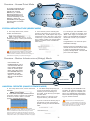
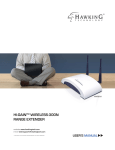
Overview : Universal Repeater (Range Extender) Mode
wired or wireless router
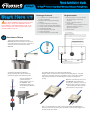
In this mode, the HOD45B
will repeat the wireless
signal of an existing
wireless router/access
point. It will act as a
wireless relay and create a
larger, seamless wireless
network for your devices to
connect to.
wired connection
w
wireless
cconnection
Placing your HOD45B in an Optimal Location in Universal Repeater Mode
DO NOT place the HOD45B outside the range of your wireless source.
Place the HOD45B within the range of your wireless source.
Home Router or AP
Access Point
or Router
6
Home Router or AP
HOD45B
Home Router or AP
Home Router or AP
Wireless Device
(Laptop)
Access Point
or Router
HOD45B
Wireless Device
(Laptop)
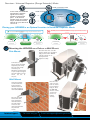
Mounting the HOD45B on a Pole or a Wall
ll Mount
Place the nuts and secure
ecure the
bolts as shown. Do not tighten
fully yet. Place the HOD45B
into the sockets on the
back panel and
tighten securely.
Pole Mount
To mount
unt on a pole,
please
e use the included
adjustable
able pole clamp.
Place the pole clamp
aroud the pole.
Match the mount bracket
to polee clamp and tighen
the pole
ole clamp to secure
the mount
ount bracket onto
the pole.
Wall Mount
Place the
e nuts
and secure
ure the
bolts as shown.
Do not tighten
ighten
fully yet. Place
the HOD45B
D45B
into the sockets
on the back
ack
panel and
d
tighten
securely.
Using the available
screws and mounting bracket, first
drill two holes into
the wall you wish to
mount the HOD45B.
Place the provided
wall anchors into
holes. Match the
mount bracket to
the wall anchors
and secure the
mount bracket with
the provided
screws.
Technical Support
Tel: 1.888.202.3344
E-mail: [email protected]
HOD45B- QIG 01152013
© 2013 Hawking Technologies, Inc. All rights reserved. All trademarks herin are the property of their respective owners. Apple, Mac, iPad, and iPhone are registered trademarks of Apple Computer, Inc. No Affiliation implied or expressed.