1
www.bestcircuit.ca
6.0
6.1
Software installation
USB driver installation
1. Download and unzip in the specific USB driver in a separate folder
2. Login as Administrator
3. Close all applications
4. Using the USB extension cable connect the Evaluation keypad to your PC
5. The red LED will indicate the keypad is ON
6. When prompted with the message "Found new hardware" follow the installation instructions on the screen and install the
driver.
7. Go to “Control panel" and click on "System" icon to find the serial port number the driver installed.
6.2
Windows Application (WA) installation
WA is a Microsoft .NET Windows application to help the design engineer setup keypad’s parameters and learn about many
features our touch technology has. If your PC does not have already, download for free the Microsoft .NET Framework version
2.0 from http://www.microsoft.com/downloads/details.aspx?FamilyID=0856eacb-4362-4b0d-8eddaab15c5e04f5&displaylang=en
Package will installs the .NET Framework runtime and associated files required to run applications developed to target
the .NET Framework v2.0.
Installation:
1
Download the WA zip package in a separate folder
2
Unzip the package (two files)
3
Launch the WA executable
4
Click on [Serial port] and select the serial port number from 6.1 step 7
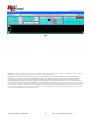
If your newly installed serial port is COM5 your screen should look like Fig 3:
Fig3
Technical Support 647-388-2976
-6-
email [email protected]