1
Full Descriptions
SeqEd 8-17
LOCAL DATA FILES
The files described below supply auxiliary data to this program. The program automatically
reads them from a public data directory unless you either; 1) have a data file with exactly the
same name in your current working directory; or 2) name a file on the command line with an
expression like -DATa1=myfile.dat. For more information see the Chapter 4, Using Local
Data Files in the User’s Guide.
Customizing Your Keyboard With SetKeys
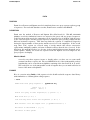
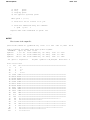
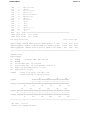
You can use the program SetKeys to create a set.keys file that tells the editors SeqEd,
GelEnter, LineUp, and GelAssemble how to interpret the letters you type at the terminal.
When entering gel readings, it is useful to have the symbols for G, A, T, and C under the
fingers of one hand in the same positions as the lanes in your gel. SeqEd, GelEnter,
LineUp, and GelAssemble automatically read the file set.keys if it is present in your local
directory. If set.keys is absent, or if the sequence type is set to Protein (in SeqEd and
LineUp, only) the terminal keys retain their conventional meanings.
If you have a set.keys file in your directory, SeqEd, GelEnter, LineUp,and GelAssemble
only respond to the sequence characters that it redefines. You can edit the file set.keys
with a text editor if some of the keys you want to use are not in it. Any keys not
mentioned in set.keys appear to be dead.
Several keys are vital for the control of SeqEd, LineUp, GelEnter, and GelAssemble; this
means you are not allowed to redefine the keys for /, [, ], {, }, (, ), :, ,, 1, 2, 3,
4, 5, 6, 7, 8, 9, 0, <Ctrl>R, <Ctrl>D, <Ctrl>H, <Return>, and <Ctrl>E.
OPTIONAL PARAMETERS
The parameters and switches listed below can be set from the command line. Optional
parameters available to all programs are described in the "Using Program Parameters" section of
Chapter 3, Using Programs of the User’s Guide.
-SINGlecommand
sets SeqEd to return automatically to Screen Mode after every command in Command
Mode.
-PERFect
makes pattern searches use perfect symbol matches. Normally if you type /GARC in
Screen Mode, the patterns GAAC or GAGC could be found. If you have -PERFect on the
command line, /GARC would only find the pattern GARC. This also makes SeqEd treat
sequences as linear and not find patterns that start at the end and continue into the
beginning of the sequence.
-PROtein
sets the sequence type to be protein, and makes pattern searches use perfect symbol
matches. SeqEd treats protein sequences as linear and will not find patterns that start at
the end and continue into the beginning of the sequence. Furthermore, -PROtein causes
SeqEd to ignore any set.keys file in your local directory.