1
Maintenance and Modifications, cont’d
3.
Disconnect any cables from the rear of the AAP(s) that are
being replaced.
4.
If an AAP cable is no longer required in your system, on
the underside of the clamshell, cut the tie wraps that route
the AAP cables out of the way.
5.
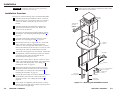
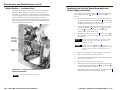
If an AAP cable is no longer required in your system,
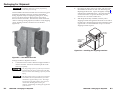
on the underside of the table, remove the two bolts
(shown at right) that secure the clamshell to the surface
mount enclosure and remove the clamshell.
6.
If an AAP cable is no longer required in your system,
from the underside of the enclosure, reach into the
cable access holes (figure 3-1 on page 3-2, item 3 ), and
cut the tie wraps ( 5 ) that route the AAP cables and
network (CAT 6) cables inside the enclosure.
7.
If an AAP cable is no longer required in your system,
carefully pull the cable through and out the bottom of the
surface mount enclosure and the clamshell.
8.
Remove the AAP(s) that you no longer want from the
AAP/RJ-45 panel by unscrewing the nuts on the rear of
the AAP/RJ-45 panel that secure the AAPs in place.
9.
10.
Cable the rear of the AAP(s) to be installed before
attaching the AAP(s) to the enclosure. Route the cables
through the hole in the underside of the surface mount
enclosure and connect them to the rear of the AAP(s). If
applicable, refer to the cabling information in the
documentation for the AAP.
11.
Replace the AAP/RJ-45 panel in the surface mount
enclosure and secure them in place with the screws
removed in step 2. If you lose an AAP/RJ-45 panel screw,
four spare screws are stored in the underside of the
enclosure (figure 3-1 on page 3-2, item 6 ).
12.
If you replaced an AAP cable, to prevent wear and tear
caused by cable movement, secure the AAP cables
underneath the table. See “Routing the AAP Cables and
Installing the Clamshell” on page 2-9.
Replacing the Bezels
The HSA 822M ships with RJ-45 connector bezel plug-ins in a
variety of colors and a black, blank bezel. Replace a bezel as
follows:
1.
The center screws on each side of the AAP/RJ-45 panel
do not fasten the AAP/RJ-45 panel in place. They secure
the AC power outlet.
Ensure that the edges of the AAP/RJ-45 panels do not
scratch the finished surface of the top panel flange when
removing the panels.
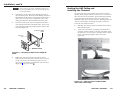
2.
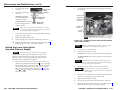
With a Tweeker, push down on and
gently twist on the front of each RJ-45
connector detent to disconnect the
connector from the rear of the AAP/RJ-45
panel plug-in.
3.
Pinch the top and bottom bezel detents
together and push the bezel through the
AAP/RJ-45 panel.
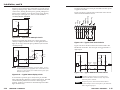
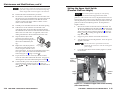
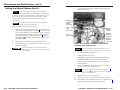
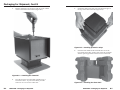
Insert each AAP’s screws through the holes in the AAP
opening of the AAP/RJ-45 panel. Secure each AAP to the
panel with the provided captive washers and #4-40 nuts
(figure 3-3).
#4-40 Nut w/ Captive
Washer
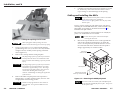
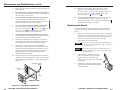
Remove and retain the top and bottom screws on the right
and left sides of the AAP/RJ-45 panel (figure 3-2). Lift the
panel away from the enclosure as far as the connected
cables allow and then allow the panel to dangle,
supported by its connected cables.
AAP/RJ-45
Panel
Cable
IN
SE PUT
LE
CT
CO
AU
MP
UTE DIO
R
HS
A8
22M
RGB 580xi SI AAP
Figure 3-3 — Mounting an AAP device
3-4
HSA 822M • Maintenance and Modifications
HSA 822M • Maintenance and Modifications
3-5