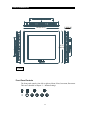
1
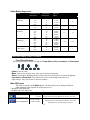
Video Modes Supported
Mode
Horizontal Sync
Rate (KHz)
Vertical Sync
Rate (KHz)
Dot Freq.
(MHz)
Expansion Factor
Vertical
VESA VGA
(640x480)
31.5
37.9
37.5
43.3
31.5
37.9
35.1
37.9
48.1
46.9
53.7
48.4
56.5
57.5
60.0
68.7
35.5
64.0
78.1
80.0
IBM (720x400)
VESA SVGA
(800x600)
VESA XGA
(1024x768)
VESA SXGA
(1280x1024)
60
72
75
85
70
85
56
60
72
75
85
60
70
72
75
85
87
60
72
75
25.175
31.500
31.500
36.000
28.322
35.500
36.000
40.000
50.000
49.500
56.250
65.000
75.000
75.000
78.780
94.500
44.900
108.000
135.000
135.000
Horizontal
2
2
1.7
1.7
1.5
1.5
1.25
1.25
1
1
Onscreen Display (OSD) Functions
Front Panel Controls
The front panel controls, from left to right are Power, Menu, Select, Increment, and Decrement.
Power: Power on LED.
Menu: Turns on the onscreen menu. Also steps to the next menu group.
Select: These buttons highlight and select menu items. They also increase or decrease brightness.
Increment and Decrement: These buttons are used to scroll through menu items or to
adjust settings. They also increase or decrease contrast.
Main OSD menu
This menu is opened with the Menu button. The following icons are displayed with their
labels appearing in the top blue bar of the menu screen.
* Displayed in PC Mode only.
**Displayed in Video Mode only.
Menu Item
Brightness/Contrast
Description
Brightness
Contrast
Color Temperature
9500K / 8000K /
6500K / 5000K
Increase/decrease panel brightness level, total: 100 steps
Increase/decrease panel brightness level, total: 100 steps
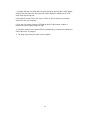
Adjust the warmness of the image displayed. The higher
temperature the coolest image looks like. The lower
temperature the warmest image looks like.
3-2