1
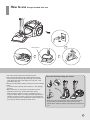
How to use Vacuum cleaning, steam cleaning, simultaneous vacuum and steam cleaning
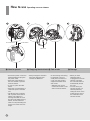
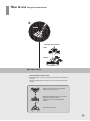
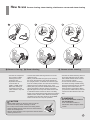
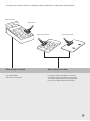
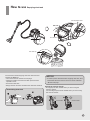
➌ Vacuum cleaning
• Connect the carpet and
floor nozzle or steam
cleaning tool to the
extension pipe.
• Operate the function
control button to
“MAX” or “MIN” mode.
When the cleaning is
completed, press the
“OFF” button to stop the
operation.
CAUTION
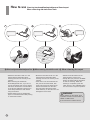
➍ Steam cleaning
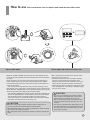
➎ Vacuum steam cleaning
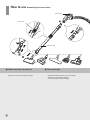
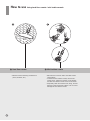
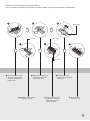
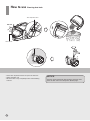
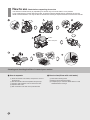
• Connect the steam cleaning vacuum tool to the
extension pipe.
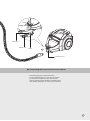
• When you lift the extension pipe up as shown by
the arrow, the extension pipe will be locked into
the upright position, to release the extension pipe
from the vertical position and start steam cleaning,
depress the foot pedal as shown in fig. 4 & 5.
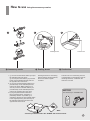
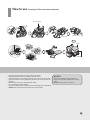
•S
hortly after you press the “STEAM” button the steam
will be generated to start the cleaning, and a blue
light will appear on the top of the steam vacuum tool
to indicate the steam function is active. The safety
trigger on the handle must be held pressed so that the
steam function remains active. When the cleaning is
completed, press the “OFF” button or the “STEAM”
button one more time to stop the operation.
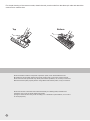
• Water slightly leaking on the floor when you tilt the
vacuum tool during steam cleaning is normal.
• Do not flip over the steam vacuum tool during steam
cleaning. Water and hot steam will come off the bottom,
which can be dangerous.
• Vacuum steam cleaning can only be done with the steam
cleaning vacuum tool.
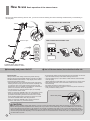
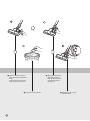
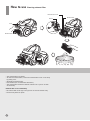
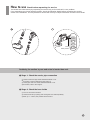
• Connect the steam cleaning vacuum
tool to the extension pipe. A "Click"
will indicate that the steam vacuum
tool is securely in place.
• To use both the vacuum cleaning
and steam cleaning simultaneously,
press the function button for vacuum
cleaning and function button for
steam cleaning respectively. When
you press the “OFF” button, both the
vacuum and the steam function will
stop.
WARNING
• Do not use the steam nozzle on
the wooden floor.
It can cause discoloration or
deformation when using the steam
nozzle.
15