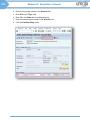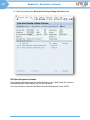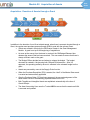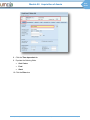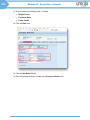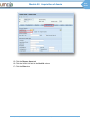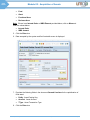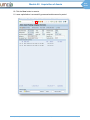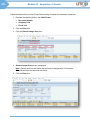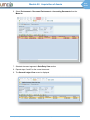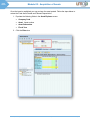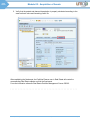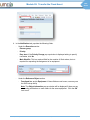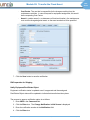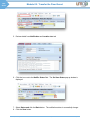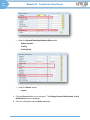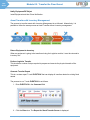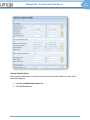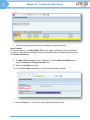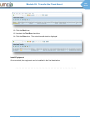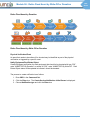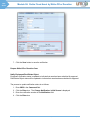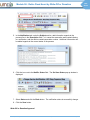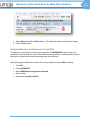
1
User Guide Asset Accounting Process User Guide Asset Accounting Process Table of Contents Module 1: Asset Accounting Process Overview ................................... 1 End-to-End High Level Process .............................................................................................. 1 Enterprise Roles & Responsibilities ........................................................................................ 2 Asset Master Data Overview .................................................................................................. 3 Module 2: Acquisition of Assets ........................................................... 12 Acquisition: Assets though Purchase .....................................................................................13 Acquisition: New Construction or Improvement .....................................................................17 Acquisition: Donation of Non-Grant Related Assets ..............................................................18 Acquisition: Donation of Assets through a Grant ...................................................................25 Acquisition: Finance Lease/Donated Right to use .................................................................26 Module 3: Depreciation of Assets......................................................... 41 Depreciation of Assets: Process ............................................................................................41 Module 4: Impairment of Fixed Asset ................................................... 42 Notify Equipment ...................................................................................................................43 Receive Notification on Impairment, T-code IW59 .................................................................49 Post Impairment Value, T-code ABAA ...................................................................................52 Revise Useful Life, T-code AS02 ...........................................................................................56 Module 5: Transfer the Fixed Asset ....................................................... 58 Asset Transfer without Inventory Management ......................................................................58 Asset Transfer with Inventory Management ...........................................................................70 Module 6: Retire Fixed Asset by Write-Off or Donation ...................... 74 Review Notification on Retirement, T-code IW59...................................................................81 Asset Write-Off/Donation .......................................................................................................85 Module 7: Retire Fixed Asset by Sale ................................................... 90 Review Notification on Retirement, T-code IW59...................................................................95 Post Retirement by Sale, T-Code ABAON .............................................................................98 Module 8: Run the Asset Accounting Reports .................................. 102 Appendix and Reference Information ................................................. 110 Key Transactions .................................................................................................................110 Key Terminology .................................................................................................................111 Asset Accounting Process Depreciation Transactions ...................................................................................................112 User Guide User Guide Module 01: Asset Accounting Process Overview Module 1: Asset Accounting Process Overview This User Guide can be used as a reference when performing Asset Accounting processes using the Umoja Asset Accounting process. End-to-End High Level Process Umoja Asset Accounting deals with the accounting of fixed assets, which is a subset of noncurrent assets. Umoja Asset Accounting encompasses the entire lifetime of a fixed asset. The end-to-end Asset Accounting process is as follows: Asset Master Date Maintenance Impairment of Assets UN Umoja Training Acquisition of Assets Depreciation of Assets Transfer of Assets User Guide: Asset Accounting Process Revision of Useful Life Retirement of Assets Page 1 User Guide Module 01: Asset Accounting Process Overview Enterprise Roles & Responsibilities The following roles are involved in the Umoja Asset Accounting process: Enterprise Roles System Activities Financial Accounting Asset Accounting User Creates, updates and maintains the fixed Asset Master Data, posts manual acquisitions and/or verifies certain acquisition transactions Financial Accounting Asset Accounting Senior User Is responsible for asset retirements, transfers and impairments Performs settlement to assets under construction and final assets Is responsible for the Year-End Closing process to close the financial year at the Company Code level Runs the fixed asset depreciation and financial accounting revaluation (IPSAS requirement) Is responsible for the reclassification of receivables and payables and balances the carry-forward processes on an annual basis Manages the Special Period documents Runs the revaluation of Purchase Orders (POs) and earmarked funds, as well as other closing processes in Funds Management Financial Accounting Closing User UN Umoja Training Non System Activities User Guide: Asset Accounting Process Page 2 UN Athens Training User Manual: <User Manual Name> User Guide 3/124 Module 01: Asset Accounting Process Overview Asset Master Data Overview Asset Master Data: T-Codes The T-codes to create, change and display an asset master record are: T-Code Description AS01 Create Asset Master Record AS02 Change Asset Master Record AS03 Display Asset Master Record Asset Master Data: Fields The following fields appear at the top of the Asset Master Data screen: Asset Number and Sub Number: A unique number that identifies the asset in the Fixed Assets sub-ledger. Sub assets are created for the component parts that could have independent useful lives and depreciation parameters Class: Identifies the asset class that the asset belongs to Asset Master Data: Tabs The asset Master Data is organized into the following tabs: General: This tab includes the description and other basic information for the asset Time-Dependent: This tab includes data that can change over time, such as assigned Cost Centre. This tab stores both current and historical values, while the other tabs only store the current value Allocations: This tab includes fields for report sorting, investment and integration with Plant Maintenance (to be implemented in later parts of Umoja Foundation) Origin: This tab includes information regarding the origin of the asset Net Worth Tax: This tab includes the net worth and real estate information Insurance: This tab includes information on insurance for the asset, if applicable Leasing: This tab includes the lease information, if applicable UN Umoja Training User Guide: Asset Accounting Process Page 3 User Guide Module 01: Asset Accounting Process Overview Deprec. Area: This tab includes information on the valuation of a fixed asset for a particular purpose Asset Master Data: General The General tab (tab A) contains the following Master Data fields: Description: A text that describes the asset Additional Description: This field is being populated for real estate assets with the site where the asset is located Acct Determination: It is defined at the asset class level. It determines the reconciliation accounts in the G/L, as well as their offsetting accounts, that are to be posted to when certain business transactions are carried out for the asset Inventory number: It contains the unique identifier of the asset in the legacy system Quantity and Unit of Measurement (UOM): For UN, all assets have quantity “1” and units “each” as assets are individually maintained and not grouped Historical Indicator: This is used to ensure the inclusion of an asset in the history report for assets Inventory Indicator: This is used to ensure the inclusion of an asset in the inventory listing Capitalized on: This is defaulted to the day of the first acquisition posting to the asset. This is the starting date for calculating the depreciation Deactivation on: This date is automatically populated when an asset is retired UN Umoja Training User Guide: Asset Accounting Process Page 4 UN Athens Training User Manual: <User Manual Name> User Guide 5/124 Module 01: Asset Accounting Process Overview Asset Master Data: Time-Dependent The Time-Dependent tab (tab B) contains the following Master Data fields: Business Area: Business Area in which the asset is reported on the balance sheet Cost Centre: Area responsible for the asset’s depreciation cost Fund: Fund in which the asset is reported on the balance sheet Budget Period: Budget period in which the asset was acquired Functional Area: Used to classify revenues and expenditures of an organization by function. It is used to derive the Segment under which the asset is going to be reported on the balance sheet Grant: Grant in which the asset is reported on the balance sheet Funds Centre: The organizational level at which the budgets are stored. It indicates the budget source for the acquisition of the asset Asset Shutdown: Used to stop the depreciation of an asset UN Umoja Training User Guide: Asset Accounting Process Page 5 User Guide Module 01: Asset Accounting Process Overview Asset Master Data: Allocations The Allocations tab (tab C) contains the following Master Data fields: Asset Super Number: Identifies the IPSAS class that the asset belongs to. It is defaulted from the Umoja asset class UN Umoja Training User Guide: Asset Accounting Process Page 6 UN Athens Training User Manual: <User Manual Name> User Guide 7/124 Module 01: Asset Accounting Process Overview Asset Master Data: Origin The Origin tab (tab D) contains the following Master Data fields: Vendor: Identifies the name of the vendor from whom the asset was acquired Original Asset: Identifies the asset number prior to the asset transfer, if the asset was acquired through a transfer Asset Master Data: Net Worth Tax The Net Worth Tax tab (tab E) contains the following Master Data field: Property Indicator: Used to indicate the ownership situation of the asset, for example, purchased, constructed, donated, finance lease, controlled UN Umoja Training User Guide: Asset Accounting Process Page 7 User Guide Module 01: Asset Accounting Process Overview Asset Master Data: Depreciation Areas The Depreciation Areas tab (tab H) contains the following Master Data fields: Depreciation Key: Default depreciation parameter given to the asset based on the pre-configured depreciation settings for each asset class. The depreciation key contains various depreciation parameters such as depreciation method, period controls (when to start/stop the depreciation) and acceleration parameters. Enter ZSLA for straight-line depreciation Note: For assets that are not depreciated, this field is automatically populated with Z000. No other fields need to be entered. UN Umoja Training User Guide: Asset Accounting Process Page 8 UN Athens Training User Manual: <User Manual Name> User Guide 9/124 Module 01: Asset Accounting Process Overview The Depreciation Areas tab (tab H) contains the following Master Data fields: 1. Useful Life: Default number of years and months that will be given to the asset based on the pre-configured values for each asset class. This is a very important element for the calculation of depreciation as the cost of the asset is depreciated over the useful life Note: Assets (e.g. infrastructure) with variable useful life will have a default value of “999”. This needs to be updated when creating the asset master record to the specific useful life for that asset. 2. Scrap Value: Value of the asset that can be recovered at the end of its useful life. In the UN it is “0” (to find this information, double-click the UseLife field) UN Umoja Training User Guide: Asset Accounting Process Page 9 User Guide Module 01: Asset Accounting Process Overview Asset Explorer Once the user creates an asset master record, the Asset Values button is available at the top of the Asset Value screen. The user can click this button or use the T-code AW01N to access the Asset Explorer. For an asset, the Asset Explorer Planned values tab displays planned changes in value and all Transactions carried out for this asset. UN Umoja Training User Guide: Asset Accounting Process Page 10 UN Athens Training User Manual: <User Manual Name> User Guide 11/124 Module 01: Asset Accounting Process Overview The Posted values tab displays posted changes in value and Depreciation that is posted or planned for each period. For an asset, the Asset Explorer screen displays information for Objects related to asset, example related PO numbers, G/L accounts, etc. * * * * * * * * * * * * * * * * * * * * * * * * * * * * * * * * * * * * * * * * * * * * UN Umoja Training User Guide: Asset Accounting Process Page 11 User Guide Module 02: Acquisition of Assets Module 2: Acquisition of Assets This module includes the following key points: Fixed Assets can be acquired in the following three ways: o Purchase: Assets can be procured through the SRM portal. Users in the Supply Chain Function initiate a procurement request in the form of a Shopping Cart. o Self-Construction: Assets can be self-constructed, internally developed intangible assets and other capital projects. These Assets are considered Assets under Construction o Donation: Assets can be donated in kind with or without a grant Assets can be a Finance Lease/Donated Right to Use This module includes the Asset capitalization process for standalone assets, assets under construction and donated assets: UN Umoja Training User Guide: Asset Accounting Process Page 12 UN Athens Training User Manual: <User Manual Name> Module 02: Acquisition of Assets User Guide 13/124 Acquisition: Assets though Purchase Assets are procured by users in the Supply Chain function. There are two ways to procure standalone assets: Through the Material Master: This is used for tangible assets such as equipment and real estate. Through the Service Master: This is used for all intangible assets. When the Purchase Requisition (PR) is created, the “shell” of the Master Data record is created and automatically populated. At this point, the asset number is generated by the system. When the Purchase Requisition (PR) is created, the “shell” of the Master Data record is created and automatically populated. The shell is only created automatically if the material is type is “ZAST”. This material type consist of materials that are expected to meet the $20,000 capitalisation threshold and an additional five categories of assets that have a lower threshold of $5,000. At this point, the asset number is generated by the system. After the Purchase Order (PO) has been approved, the account assignment of the asset master record is automatically populated based on the PO. The selection of items to be purchased generates the identification of the asset class and G/L account to be used for recording the asset (both tangible and intangible). For entities with a capitalisation threshold lower than $20,000 or a non “ZAST” material type, asset account assignment and asset class have to be selected manually by the user in order for the asset shell to be created. The diagram below shows the process: UN Umoja Training User Guide: Asset Accounting Process Page 13 User Guide Module 02: Acquisition of Assets For acquisition of assets through purchase, a requisition would log into the SRM portal and create a shopping cart. For more detailed instruction of the requisitioning process please refer to the Requisitioning User Guide. For materials with type ZAST the Account Assignment category will automatcally populate with asset in the field. However for material type that is not ZAST, asset must be manually picked in the Account Assignment Category (shown below) otherwise the item procured will not be an asset. Select the appropriate Asset Master Class UN Umoja Training User Guide: Asset Accounting Process Page 14 UN Athens Training User Manual: <User Manual Name> Module 02: Acquisition of Assets User Guide 15/124 Enter a description for Asset, click “Create Asset Master. Asset Number is auto-created. Capitalization of Assets through Purchase Both Tangible and Intangible Assets are capitalized automatically at the time of Goods Receipt The trigger for capitalization is the point when the goods or services are received: When Goods Receipts are created by users in the Supply Chain function, the system automatically post the accounting entries to debit the Asset G/L account that has been referred to in the PO When Service Entry Sheets (for service receipts) are created, the system automatically posts the accounting entries to debit the Asset G/L account that has been referred to in the PO UN Umoja Training User Guide: Asset Accounting Process Page 15 User Guide Module 02: Acquisition of Assets The corresponding accounting entries appears as follows: Debit (+) Credit (-) Asset GR/IR The Asset Accounting User uses the T-code AS02 to ensure that the asset useful life is accurate and updated. If the asset useful life cannot be defaulted based on the asset class, the useful life will be 999 and it must be updated manually UN Umoja Training User Guide: Asset Accounting Process Page 16 UN Athens Training User Manual: <User Manual Name> Module 02: Acquisition of Assets User Guide 17/124 Acquisition: New Construction or Improvement The Assets under Construction (AuC) process accounts for self-constructed assets, internally developed intangible assets and other capital projects. As long as Galileo is still in use, the process differs between Peacekeeping and NonPeacekeeping: • • • In Peacekeeping and Special Political Missions, an Internal Order (IO) is used to identify individual AuCs for reconciliation purposes only. At fiscal year end, or at the completion of a project, the value of the AuC will be entered directly into the Umoja General Ledger using the internal order. In Non-Peacekeeping entities, a project or internal order is created to collect costs related to the AuC. Goods and services are tracked against the project’s Work Breakdown Structure Elements (WBSE’s) or internal order. Costs are settled monthly to the AuC. When the project is completed, the AuC is settled into the Final Asset. Service Orders may be used as cost collectors or as part of projects for AuCs. Service Orders will be discussed later in the course. Note: Please see the Asset under Construction User Guide for step by step and more detailed instruction for the AuC process. UN Umoja Training User Guide: Asset Accounting Process Page 17 User Guide Module 02: Acquisition of Assets Acquisition: Donation of Non-Grant Related Assets In some cases, a mission may receive an in-kind donation of an asset that is not budgeted. Since there asset was not procured through SRM, there is not an automatic generation of the asset record in Umoja. Therefore, the asset will have to be created and capitalized manually. The process for donation of Non-Grant Related Assets is shown above. The Asset Accountant user manually creates the asset through transaction code AS01. Insert necessary data entries for Time-dependent, Net Worth Tax, Deprec. Areas tabs. A manual entry also is used to debit the asset and credit revenue without consuming budget or cash. No Grant will be used for this solution. Follow the steps below to create Fixed Asset Master record: 1. Enter T-Code AS01 2. Click the Time-dependent tab 3. Populate the following fields: Cost centre Fund Grant 4. Click the Enter icon UN Umoja Training User Guide: Asset Accounting Process Page 18 UN Athens Training User Manual: <User Manual Name> Module 02: Acquisition of Assets User Guide 19/124 5. Click the Net Worth Tax tab 6. Enter the property indicator number in the Property Indicator field 7. Click the Deprec. Areas tab 8. Click the Useful Life field in the UseLife column 9. Click the Enter icon UN Umoja Training User Guide: Asset Accounting Process Page 19 User Guide Module 02: Acquisition of Assets UN Umoja Training User Guide: Asset Accounting Process Page 20 UN Athens Training User Manual: <User Manual Name> Module 02: Acquisition of Assets User Guide 21/124 After capitalizing the fixed asset, the Facilities Planner user in Real Estate will create the corresponding Real Estate objects and link the fixed asset. For more information reference Real Estate Portfolio Management Course CS325. Capitalization: Donation of Non-Grant Related Assets Enter T-code F-90 to begin the process to capitalized the asset manually. Follow the steps below to capitalize the asset. This process involves the Asset Accounting User. 1. Populate the required information in the following fields: Document Date Posting Date Document type: AA Currency/Rate: USD Reference Doc.Header Text UN Umoja Training User Guide: Asset Accounting Process Page 21 User Guide Module 02: Acquisition of Assets 2. Enter the final asset number in the Account field 3. Enter Z10 in the TType field 4. Enter 70 in the Pstky field to credit posting key 5. Enter the credit account number in the Account field 6. Click the Fast Data Entry button UN Umoja Training User Guide: Asset Accounting Process Page 22 UN Athens Training User Manual: <User Manual Name> Module 02: Acquisition of Assets User Guide 23/124 7. Populate the following fields in the Enter Asset Posting: Add Asset item screen: Amount Quantity: It should always be 1 8. Click the More button 9. Enter 50 in the PstKy field to credit the AuC accounts 10. Click the Fast Data Entry button UN Umoja Training User Guide: Asset Accounting Process Page 23 User Guide Module 02: Acquisition of Assets 11. Check the posting on the Enter Asset Posting: Display Overview screen RE Object/Equipment Creation After capitalizing the fixed asset, the Facilities Planner user in Real Estate will create the corresponding Real Estate objects and link the fixed asset. For more information reference Real Estate Portfolio Management Course CS325. UN Umoja Training User Guide: Asset Accounting Process Page 24 UN Athens Training User Manual: <User Manual Name> Module 02: Acquisition of Assets User Guide 25/124 Acquisition: Donation of Assets through a Grant In addition to the donation of non-Grant related assets, when there is an asset donated through a Grant, the regular asset purchase process through SRM is used with the relevant Grant. Grants are created in Umoja by the GM Grants Creator in the Grant Management Module. A grant is set up at the beginning of negotiations As soon as the money from the donor is received, the GM Budget Release User releases the amount that has been received. The user needs to ensure that there is always sufficient cash on the grant The Budget Officer decides how and where to release the budget. The budget document is created in Umoja using both GM and FM dimensions. After it is approved, the spending authority amount is reflected in the released budget on the grant Assets are procured by users in the Supply Chain function When the Purchase Requisition (PR) is created, the “shell” of the Master Data record is created and automatically populated After the Purchase Order (PO) has been approved, the account assignment of the asset master record is automatically populated based on the PO Both Tangible and Intangible Assets are capitalized automatically at the time of Goods Receipt The Asset Accounting User uses the T-code AS03 to ensure that the asset useful life is accurate and updated UN Umoja Training User Guide: Asset Accounting Process Page 25 User Guide Module 02: Acquisition of Assets Acquisition: Finance Lease/Donated Right to use Donated right-to-use arrangements refer to situations where a donor gives the United Nations the right of use and occupancy of an asset (either for some period of time or indefinitely) without transfer of ownership and requires zero or a nominal payment (very small payment) in return. An example of a donated right to use arrangement classified as a finance lease: A government agency donates to the United Nations a right-to-use a 2,000 square meter office building for a 40 year period. Because the Asset is not created automatically, it must be manually created by the Asset Accounting User. Asset Master Creation, T-code AS01 The Asset Accounting user manually creates the asset through transaction code AS01. Insert necessary data entries for General, Time-dependent, Net Worth Tax, Deprec. Areas tabs. Follow the steps below to create Fixed Asset Master record: 1. Enter AS01 in the Command field 2. Click the Enter icon. The Create Asset: Master Data screen displays 3. Populate the following fields in the Initial Screen: Company Code Asset Class: 120 Build - Fixed Number of similar assets: 1 4. Click the Enter icon 5. Click the General tab 6. Enter asset description in the Description filed 7. Click the Enter icon UN Umoja Training User Guide: Asset Accounting Process Page 26 UN Athens Training User Manual: <User Manual Name> Module 02: Acquisition of Assets User Guide 27/124 8. Click the Time-dependent tab 9. Populate the following fields: Cost Centre Fund Grant 10. Click the Enter icon UN Umoja Training User Guide: Asset Accounting Process Page 27 User Guide Module 02: Acquisition of Assets 11. Enter or modify the following fields, if needed Budget Period Functional Area Funds Centre 12. Click the Enter icon 13. Click the Net Worth Tax tab 14. Enter the property indicator number in the Property Indicator field UN Umoja Training User Guide: Asset Accounting Process Page 28 UN Athens Training User Manual: <User Manual Name> Module 02: Acquisition of Assets User Guide 29/124 15. Click the Deprec. Areas tab 16. Click the Useful Life field in the UseLife column 17. Click the Enter icon UN Umoja Training User Guide: Asset Accounting Process Page 29 User Guide Module 02: Acquisition of Assets UN Umoja Training User Guide: Asset Accounting Process Page 30 UN Athens Training User Manual: <User Manual Name> Module 02: Acquisition of Assets User Guide 31/124 Asset Capitalization T-Code F-90 Follow the steps below to capitalize the acquired finance lease: 1. Populate the following fields in the document header: Document date Posting date Doc type Company Code Currency Reference Doc.Header 2. Populate the following fields in the document First Line Item: Document Date Posting key: Obligation Posting Key Account: Obligation Account 3. Click the Enter icon 4. Populate the following fields in the First Line Item: Amount UN Umoja Training User Guide: Asset Accounting Process Page 31 User Guide Module 02: Acquisition of Assets Fund Grant Functional Area Business Area Note: If there is an Internal Order or WBS Element provided below, click on More and enter the values below: Internal Order WBS element 5. Click the Enter icon 6. Data accepted by the system and first line detail screen is displayed 7. Populate the following fields in the document Second Line Item for the capitalization of fixed asset: PstKy: Asset Posting Key Account: Asset Account TType: Asset Transaction Type 8. Click the Enter icon UN Umoja Training User Guide: Asset Accounting Process Page 32 UN Athens Training User Manual: <User Manual Name> Module 02: Acquisition of Assets User Guide 33/124 9. Select Document > Simulate from the Menu bar to simulate the transaction UN Umoja Training User Guide: Asset Accounting Process Page 33 User Guide Module 02: Acquisition of Assets UN Umoja Training User Guide: Asset Accounting Process Page 34 UN Athens Training User Manual: <User Manual Name> Module 02: Acquisition of Assets User Guide 35/124 10. Click the Save button to execute 11. Lease capitalization is successfully processed and document is posted UN Umoja Training User Guide: Asset Accounting Process Page 35 User Guide Module 02: Acquisition of Assets Follow the steps below to review Financial Accounting document for fixed asset transaction: 1. Populate the following fields in the Initial Screen: Document Number Company Code Fiscal Year 2. Click the Enter icon 3. Click the General Ledger View icon 4. General Ledger View screen is displayed Note: Review each line and ensure that all Account Assignments, GL Accounts, Commitment Items and amounts are correct. 5. Click the Enter icon UN Umoja Training User Guide: Asset Accounting Process Page 36 UN Athens Training User Manual: <User Manual Name> Module 02: Acquisition of Assets User Guide 37/124 6. Select Environment > Document Environment > Accounting Documents from the Menu bar 7. Selected document appears in Data Entry View section 8. Repeat steps 2 and 3 for the current document 9. The General Ledger View screen is displayed UN Umoja Training User Guide: Asset Accounting Process Page 37 User Guide Module 02: Acquisition of Assets Once the lease is capitalized you may reviewn the asset posted. Follow the steps below to review the Fixed Asset Posted and Planned Depreciation: 1. Populate the following fields in the Asset Explorer screen: Company Code Asset: Asset number Asset Subnumber Fiscal Year 2. Click the Enter icon UN Umoja Training User Guide: Asset Accounting Process Page 38 UN Athens Training User Manual: <User Manual Name> Module 02: Acquisition of Assets User Guide 39/124 3. Click the Posted Values tab 4. The planned and posted depreciation for each period in the selected year is displayed on the bottom panel UN Umoja Training User Guide: Asset Accounting Process Page 39 User Guide Module 02: Acquisition of Assets 5. Verify that the posted and planned depreciation is properly calculated according to the asset net book value and remaining useful life After capitalizing the fixed asset, the Facilities Planner user in Real Estate will create the corresponding Real Estate objects and link the fixed asset. For more information reference Real Estate Portfolio Management Course CS325. * * * * * * * * * * * * * * * * * * * * * * * * * * * * * * * * * * * * * * * * * * * * UN Umoja Training User Guide: Asset Accounting Process Page 40 User Guide Module 03: Depreciation of Assets Module 3: Depreciation of Assets UN will depreciate assets on monthly basis. Both Depreciation and Impairment Loss are recorded in the General Ledger when a depreciation run is completed at the end of the month. The accounting entries that will be posted are: Depreciation of Assets: Process Completed AuCs Settled Useful Life Updated Good Receipts Completed Impairments Recorded Transfers Recorded Retirements Recorded All of these steps are preparatory steps that should be taken by each entity to ensure that their fixed asset records are up-to-date before depreciation is run. Depreciation runs are processed by a select few users for the transactional steps please refer to the appendix. UN Umoja Training User Guide: Asset Accounting Process Page 41 User Guide Module 04: Impairment of Fixed Asset Module 4: Impairment of Fixed Asset This module includes the following key points: The impairment of fixed assets is performed using the T-code ABAA When an asset has been impaired, the Asset Accounting Senior User is informed to record it in the asset master record In Umoja impairment is considered as an Unplanned Depreciation. Thus the screens in this section contain “Unplanned Depreciation” in the header Within the Unplanned Depreciation screen, Transaction Types called “Special Depreciation” indicate impairment. Thus on the Asset Explorer screen, the user will find the impairment values in the “Special Depreciation” line Transaction type 620 and 630 are used to record impairment. Transaction 620 relates to assets acquired in previous calendar year while 630 relates to asset acquired in current calendar year. For example, If an asset acquired in December 2013 is impaired in January 2014, transaction 620 will be used even though both December 2013 and January 2014 fall in the fiscal year The process to impair assets is as follows. This process involves the Asset Accounting Senior User: Impairment of Fixed Asset The Impairment Process starts with Physical Verification/Event Damage to an asset may be identified as part of the physical verification or triggered by a specific event. Analyse Possible Impairment A determination needs to be made as to whether the asset can be repaired and if so, whether the repair will bring it to the same level of service. UN Umoja Training User Guide: Asset Accounting Process Page 42 User Guide Module 04: Impairment of Fixed Asset Notify Equipment The Plant Maintenance User creates Equipment notification IW51 for each equipment that should to be impaired - notification type “PW”, coding group “UNWRTOFF”, code “UN09”. If a repair is involved, notification type “P1” will be created with a task to create a notification type “PW” if an impairment is also needed. Real Estate Object status will be updated to indicate it should be impaired. The process to create notification is as follows: 1. Enter IW51 in the Command field 2. Click the Enter icon. The Create Service Notification: Initial Screen is displayed 3. Choose Notification type and click the Enter icon 4. In the Notification tab, populate the following fields: Under the Execution section: - Planner group - Priority - Req. start: If the Priority Change pop-up window is displayed asking to specify new dates, click No - Main WorkCtr: This is a required field for the creation of Work orders, but not required for requesting the assignment of an equipment UN Umoja Training User Guide: Asset Accounting Process Page 43 User Guide Module 04: Impairment of Fixed Asset Under the Reference Object section: - Functional loc. And / or Equipment: If these fields are not known, user may use the SAP lookup facility Note: The Object Information pop-up window will be displayed if there are any outstanding notifications or work orders for the same equipment. Click the OK icon to exit. Note: For requesting the assignment of an equipment the above information are optional / not required. For requesting disposal of items held in inventory which are not equipment, the above information is not required. Under the Subject section: - Coding: To describe the type of maintenance that is needed for this notification - Description: Enter a short description of the notification in the Description field Enter the description details in the text box under the Description field UN Umoja Training User Guide: Asset Accounting Process Page 44 User Guide Module 04: Impairment of Fixed Asset 5. Click on the Location Data tab Note: If you have provided the equipment number or functional location in the Notification tap, some or all of the below information will be pre-populated based on the equipment master record and will need to be updated to reflect financial details of Funding source. 6. Populate the following fields: Under the Account Assignment section: - Company Code - Business Area: Where tasks are carried out. This is applicable only if the Business Area field is available - Cost Centre: The one that is responsible for the charges resulting from the maintenance activities. In case of request for equipment assignment, this would be the requesting Cost Centre - Asset: In certain cases (i.e. maintenance of functional location), the maintenance cost could be charged against asset, so the asset number has to be specified UN Umoja Training User Guide: Asset Accounting Process Page 45 User Guide Module 04: Impairment of Fixed Asset 7. Click the Save button to save the notification Prepare Impairment Case Process is applied to determine the impairment amount and any other information to prepare the impairment case. Notify Equipment/Real Estate Object Plant Maintenance User updates Equipment notification status IW52 to indicate that case has been submitted for approval and throughout the different status in the approval process. Real Estate Object status will be updated to indicate that case has been submitted for approval and throughout the different status in the approval process. The process to update notification status is as follows: 1. Enter IW52 in the Command field 2. Click the Enter icon. The Change Service Notification: Initial Screen is displayed 3. Enter the notification number in the Notification field 4. Click the Enter icon UN Umoja Training User Guide: Asset Accounting Process Page 46 User Guide Module 04: Impairment of Fixed Asset 5. In the Notification tab, under the Subject section, add information regards to the process flow in the Description field, i.e. in cases the reservation was created refering to a notification, add the earlier created reservation number. Additional information can be added regards to the current status of the process 6. Click the icon next to the Notific. Status filed. The Set User Status pop-up window is displayed 7. Select Status and click the Back button. The notification status is successfully change. 8. Click the Save button Impairment Approval Administrative process is followed up to the point when approval is given by the authority with Property Management Delegation. UN Umoja Training User Guide: Asset Accounting Process Page 47 User Guide Module 04: Impairment of Fixed Asset Notify Equipment/Real Estate Object Plant Maintenance User updates Equipment notification status IW52 to indicate that case has been approved (REWA Review Approved). Real Estate Object status will be updated to indicate that case has been approved. The process to update notification status is as follows: 1. Enter IW52 in the Command field 2. Click the Enter icon. The Change Notification: Initial Screen is displayed 3. Enter the notification number in the Notification field 4. Click the Enter icon 5. In the Notification tab, under the Subject section, add information regards to the process flow in the Description field, i.e. in cases the reservation was created refering to a notification, add the earlier created reservation number. Additional information can be added regards to the current status of the process 6. Click the icon next to the Notific. Status filed. The Set User Status pop-up window is displayed UN Umoja Training User Guide: Asset Accounting Process Page 48 User Guide Module 04: Impairment of Fixed Asset 7. Select HPSB HPSB Review 8. Click the OK button 9. The notification status is successfully change 10. Click the Save button Receive Notification on Impairment, T-code IW59 To search the notifications, execute transaction IW59. Using this transaction, you can also run a report and find open notifications. Identify the approved assets for impairment by running notifications report (with variant), including: o Type = PW o Coding = UNWRIOFF-UN09 o Status = REWA Review Approved o Asset number = Not Blank UN Umoja Training User Guide: Asset Accounting Process Page 49 User Guide Module 04: Impairment of Fixed Asset The impairment financial entry is the last step in the impairment notification, therefore, all notifications in the query are still pending Note: Before posting the retirement, verify if de-recognized date is NOT populated. Report is displayed showing all open notifications based on the entered selection parameters. UN Umoja Training User Guide: Asset Accounting Process Page 50 User Guide Module 04: Impairment of Fixed Asset Note: Double-click the notification number from the list to review Notification details. Note: Double-click the equipment number to verify the status of the Equipment. UN Umoja Training User Guide: Asset Accounting Process Page 51 User Guide Module 04: Impairment of Fixed Asset Post Impairment Value, T-code ABAA In Umoja, impairment is considered as an Unplanned Depreciation. Thus, the screens in this section contain “Unplanned Depreciation” in the header. Within the Unplanned Depreciation screen, Transaction Types called “Special Depreciation” indicate impairment. Thus on the Asset Explorer screen, the user will find the impairment values in the “Special Depreciation” line. Transaction type 620 and 630 are used to record impairment. Transaction 620 relates to assets acquired in previous calendar year while 630 relates to asset acquired in current calendar year. For example, if an asset acquired in December 2013 is impaired in January 2014, transaction 620 will be used even though both December 2013 and January 2014 fall in the fiscal year. To post the impairment value, enter the T-code ABAA in the commad field. On the Unplanned Depreciation initial screen, enter the following details: 1. Populate the required information in the following fields: Asset Number: Relevant asset number Asset Sub-Number: Relevant asset sub-number Document Date: Approval document date Posting Date: When the impairment will be effective from TType: Transaction Type o UN Umoja Training Assets acquired in the prior year: 620 User Guide: Asset Accounting Process Page 52 User Guide Module 04: Impairment of Fixed Asset o UN Umoja Training Assets acquired in the current year: 630 User Guide: Asset Accounting Process Page 53 User Guide Module 04: Impairment of Fixed Asset 2. Enter the impairment amount in the Amount Posted field, on the Create Asset Transaction screen 3. Click the Line Items button 4. Note the Transaction Type and Amount 5. Click the Save button to post the impairment. A document number is generated Note: There is no workflow in this T-code. UN Umoja Training User Guide: Asset Accounting Process Page 54 User Guide Module 04: Impairment of Fixed Asset Review the Impaired Value, T-code AW01N Review the Special depreciation value in the Asset Explorer using the T-code AW01N. Reverse the Posting if due to Error, T-code AB08 If the postings are not correct the Asset Accountant Senior User can reverse the posting. Follow the below steps to reverse the previous posting: UN Umoja Training User Guide: Asset Accounting Process Page 55 User Guide Module 04: Impairment of Fixed Asset Revise Useful Life, T-code AS02 The Asset Reviewer revises the estimated useful life of the asset in the asset master record using the T-code AS02 if necessary. Enter the Asset Number for the asset that has just been impaired. Click on the Deprec. Areas tab to update the UseLife field if necessary. UN Umoja Training User Guide: Asset Accounting Process Page 56 User Guide Module 04: Impairment of Fixed Asset If the useful life is adjusted, use the T-code AW01N to verify if the Ordinary depreciation Amount is adjusted, based on the change in useful life. Notify Equipment/ RE Object, T-code IW22 Equipment notification is updated to indicate that impairment has been recorded. It will not be possible to close the notification until the task for financial entry has been completed * * * * * * * * * * * * * * * * * * * * * * * * * * * * * * * * * * * * * * * * UN Umoja Training User Guide: Asset Accounting Process Page 57 User Guide Module 05: Transfer the Fixed Asset Module 5: Transfer the Fixed Asset This module includes the following key points: The Asset Transfer process involves physical movement of fixed assets, or the transfer of ownership for real estate and intangible assets. In UN, transfer of assets involves the following scenarios: • Transfer of assets between Umoja Entities/Business Areas • Transfer of assets between funds, segments, and grants The process to transfer an asset differs depending on if the asset involves inventory management or not. If the asset involves inventory management, there is an alternative process (Refer to training LE Inventory Management course). Asset Transfer without Inventory Management Notify Equipment/Real Estate Object Plant Maintenance User creates Equipment notification IW51 for each equipment that should to be transferred. The long description in the notification should indicate the coding block of the destination. The notification will have a task to ensure that the financial transfer has been entered. Notification type is “P1” and code “UNASSN-UN03” Real Estate Object status will be updated to indicate it should be transferred. The process to create notification is as follows: 1. Enter IW51 in the Command field 2. Click the Enter icon. The Create Service Notification: Initial Screen is displayed 3. Choose Notification type and click the Enter icon UN Umoja Training User Guide: Asset Accounting Process Page 58 User Guide Module 05: Transfer the Fixed Asset 4. In the Notification tab, populate the following fields: - - Under the Execution section: - Planner group - Priority - Req. start: If the Priority Change pop-up window is displayed asking to specify new dates, click No - Main WorkCtr: This is a required field for the creation of Work orders, but not required for requesting the assignment of an equipment Under the Reference Object section: - Functional loc. and/or Equipment: If these fields are not known, user may use the SAP lookup facility Note: The Object Information pop-up window will be displayed if there are any outstanding notifications or work orders for the same equipment. Click the OK icon to exit. UN Umoja Training User Guide: Asset Accounting Process Page 59 User Guide Module 05: Transfer the Fixed Asset Note: For requesting the assignment of an equipment the above information are optional / not required. For requesting disposal of items held in inventory which are not equipment, the above information is not required. - Under the Subject section: - Coding: To describe the type of maintenance that is needed for this notification - Description: Enter a short description of the notification in the Description field. Enter the description details in the text box under the Description field 5. Click on the Location Data tab Note: If you have provided the equipment number or functional location in the Notification tap, some or all of the below information will be pre-populated based on the equipment master record and will need to be updated to reflect financial details of Funding source. 6. Populate the following fields: Under the Account Assignment section: - Company Code - Business Area: Where tasks are carried out. This is applicable only if the Business Area field is available UN Umoja Training User Guide: Asset Accounting Process Page 60 User Guide Module 05: Transfer the Fixed Asset - Cost Centre: The one that is responsible for the charges resulting from the maintenance activities. In case of request for equipment assignment, this would be the requesting Cost Centre - Asset: In certain cases (i.e. maintenance of functional location), the maintenance cost could be charged against asset, so the asset number has to be specified 7. Click the Save button to save the notification PM Preparation for Shipping Notify Equipment/Real Estate Object Equipment notification status is updated once it is approved and then assigned. Real Estate Object status will be updated to indicate that transfer has taken place. The process to approve notification status is as follows: 1. Enter IW52 in the Command field 2. Click the Enter icon. The Change Notification: Initial Screen is displayed 3. Enter the notification number in the Notification field 4. Click the Enter icon UN Umoja Training User Guide: Asset Accounting Process Page 61 User Guide Module 05: Transfer the Fixed Asset 5. Review details from Notification and Location data tab 6. Click the icon next to the Notific. Status filed. The Set User Status pop-up window is displayed 7. Select Status and click the Back button. The notification status is successfully change. 8. Click the Save button UN Umoja Training User Guide: Asset Accounting Process Page 62 User Guide Module 05: Transfer the Fixed Asset Update Equipment Status Equipment status will be updated to “EQIT In Transit” when shipment occurs. Review Notifications The Senior Asset Accounting Senior User identifies the assets that are ready for transfer by running notifications report IW59 with type is “P1”, code “UNASSN-UN03”, status “ASGN Request Assigned” or beyond and asset number. The process to report for open notifications is as follows: 1. Enter IW59 in the Command field 2. Click the Enter icon. The Display Notifications: Selection of Notifications is displayed 3. Under the Notification status section, select the Outstanding and In Process checkboxes 4. Populate the following fileds: Under the Notification Selection section: - Notification type - Notification Date UN Umoja Training User Guide: Asset Accounting Process Page 63 User Guide Module 05: Transfer the Fixed Asset Under the General Data/Administrative Data section: - Status included - Coding - Coding Code Under the Others section: - Layout 5. Click the Execute button to run the report. The Display Serviece Notifications: List of Notifications screen is displayed 6. Filter the notifications with the Status parameter UN Umoja Training User Guide: Asset Accounting Process Page 64 User Guide Module 05: Transfer the Fixed Asset 7. Double click the notificaiton number 8. The Display Service Notification screen is displayed. Review the notification details 9. Double click the Equipment number on the header UN Umoja Training User Guide: Asset Accounting Process Page 65 User Guide Module 05: Transfer the Fixed Asset 10. The Display Equipment: Genearal Data screen is displayed. Verify the equipment status 11. Click the Back icon to navigate back to the notification UN Umoja Training User Guide: Asset Accounting Process Page 66 User Guide Module 05: Transfer the Fixed Asset 12. To identify the revenue from sales order, perform the following steps: In the open notification, double click the sales order number to open the document Review the net value of the sale on top of the sales order. Note the amount if necessary The notifications go through additional steps up to the actual shipment. In order to identify the equipment assets that have been shipped, another report ZAAEQASREC should be run to identify the equipment assets with status of “EQIT”. The process to verify Asset and Equipment Master Data is as follows: 13. Populate the following criteria: Company Code Report Date Asset Number Equipment Number Asset Sub-number RE Object ID Asset Class Equipment Category Fund Functional Location Funds Centre Object Type Grant Plant Functional Area Storage Location Business Area Material Group Cost Centre System Status Asset Super Number Status Change Date 14. Click the Execute icon. The Asset Equipment Reconciliation screen is displayed 15. Verify that the values in the report are according to the data stored in the asset master record and corresponding equipment master record UN Umoja Training User Guide: Asset Accounting Process Page 67 User Guide Module 05: Transfer the Fixed Asset Asset Transfer For transfer of assets, T-code ZAA_MASS_TFR can be used by uploading a text file with Assets that are to be transferred. The new asset master record can be checked using the Tcode AS03. To transfer assets with T-code ZAA_MASS_TFR: 1. The Mass Asset Transfer screen is displayed. Under the Execution Mode section, select the Execute in Foreground radio button 2. Select the Test Run check box 3. Click the File name matchcode icon to find the required file to upload UN Umoja Training User Guide: Asset Accounting Process Page 68 User Guide Module 05: Transfer the Fixed Asset 4. Click the Enter icon. The transfer data is displayed in the test mode 5. Click the Back icon 6. Unselect the Test Run check box 7. Click the Execute icon. The actual transfer data is displayed UN Umoja Training User Guide: Asset Accounting Process Page 69 User Guide Module 05: Transfer the Fixed Asset Notify Equipment/RE Object Install Equipment and then Close Notification. Asset Transfer with Inventory Management The process to transfer assets with Inventory Management is as followed. Alternatively, it is possible to follow the same process as Asset Transfer without inventory management. Return Equipment to Inventory When an equipment is going to be transferred using the Logistics module, it must be returned to inventory first. Perform Logistics Transfer This involves a number of steps required to prepare and execute the physical transfer of the equipment. Generate Transfer Report This is a custom report T-code ZLESTOCK that can display all transfers related to existing fixed assets. The process to run T-code ZLESTOCK is as follows: 1. Enter ZLESTOCK in the Command field 2. Click the Enter icon. The Report for Stock Transfer Screen is displayed. UN Umoja Training User Guide: Asset Accounting Process Page 70 User Guide Module 05: Transfer the Fixed Asset Review Transfer Report Identify asset transfers that cross balance sheet-relevant dimensions (Business Area, Fund, Grant and Segment). 1. Populate the Material Document field 2. Click the Execute icon UN Umoja Training User Guide: Asset Accounting Process Page 71 User Guide Module 05: Transfer the Fixed Asset 1. Verify that the displayed records are according to the selection criteria Asset Transfer To transfer assets, T-code ZAA_MASS_TFR can be used by uploading a text file with Asset information. Enter Z1 as the budget relevant value and Z2 as the non-budget relevant value in the Transfer Variant field. 8. The Mass Asset Transfer screen is displayed. Under the Execution Mode section, select the Execute in Foreground radio button 9. Select the Test Run check box 10. Click the File name matchcode icon to find the required file to upload 11. Click the Enter icon. The transfer data is displayed in the test mode UN Umoja Training User Guide: Asset Accounting Process Page 72 User Guide Module 05: Transfer the Fixed Asset 12. Click the Back icon 13. Unselect the Test Run check box 14. Click the Enter icon. The actual transfer data is displayed Install Equipment Once received, the equipment can be installed in the final destination. * * * * * * * * * * * * * * * * * * * * * * * * * * * * * * * * * * * * * * * * UN Umoja Training User Guide: Asset Accounting Process Page 73 User Guide Module 06: Retire Fixed Asset by Write-Off or Donation Module 6: Retire Fixed Asset by Write-Off or Donation This module includes the following key points: Asset Retirement can go through the following processes: o Donation or Write-off of an Asset o When assets are being donated or written off, the transaction is manually entered in the Fixed Asset module and the system calculates the losses and posts these entries automatically in the G/L Sale of an Asset (Content will be covered in next module) Some of the key points are as follows: o After the asset has been approved for retirement, a notification is sent to the Asset Accounting Senior User o Once notified, the Asset Accounting Senior User identifies the asset that needs to be retired in the Accounting system, the portion of the asset (if partial disposal) and the effective date of the transaction (sale, donation or written-off) The retirement of the fixed asset by scrapping or donation is performed using the Tcode ABAVN The process to impair fixed assets. This process involves the Asset Accounting User Retire Fixed Asset by Write-Off Write-Offs and Donation of Assets go through similar processes and transactions steps except after the AA Senior User Notifies Equipment/RE Object. UN Umoja Training User Guide: Asset Accounting Process Page 74 User Guide Module 06: Retire Fixed Asset by Write-Off or Donation Retire Fixed Asset by Donation Retire Fixed Asset by Write-Off or Donation Physical Verification/Event An asset that needs to be written-off or donated may be identified as part of the physical verification or triggered by a specific event. Notify Equipment/Real Estate Object Create Equipment notification for each equipment that should to be donated with type “PW”, code “UNWRTOFF-By Donation” or written off “PW”, code “UNWRTOFF-By Write-Off”. Real Estate Object status will be updated to indicate it should be donated. The process to create notification is as follows: 1. Enter IW51 in the Command field 2. Click the Enter icon. The Create Service Notification: Initial Screen is displayed 3. Choose Notification type and click the Enter icon UN Umoja Training User Guide: Asset Accounting Process Page 75 User Guide Module 06: Retire Fixed Asset by Write-Off or Donation 4. In the Notification tab, populate the following fields: a. Under the Execution section: i. Planner group - Priority - Req. start: If the Priority Change pop-up window is displayed asking to specify new dates, click No - Main WorkCtr: This is a required field for the creation of Work orders, but not required for requesting the assignment of an equipment b. Under the Reference Object section: - Functional loc. and/or Equipment: If these fields are not known, user may use the SAP lookup facility Note: The Object Information pop-up window will be displayed if there are any outstanding notifications or work orders for the same equipment. Click the OK icon to exit. UN Umoja Training User Guide: Asset Accounting Process Page 76 User Guide Module 06: Retire Fixed Asset by Write-Off or Donation Note: For requesting the assignment of an equipment the above information are optional / not required. For requesting disposal of items held in inventory which are not equipment, the above information is not required. c. Under the Subject section: - Coding: To describe the type of maintenance that is needed for this notification - Description: Enter a short description of the notification in the Description field. Enter the description details in the text box under the Description field 5. Click on the Location Data tab Note: If you have provided the equipment number or functional location in the Notification tap, some or all of the below information will be pre-populated based on the equipment master record and will need to be updated to reflect financial details of Funding source. 6. Populate the following fields: Under the Account Assignment section: a. Company Code b. Business Area: Where tasks are carried out. This is applicable only if the Business Area field is available c. Cost Centre: The one that is responsible for the charges resulting from the maintenance activities. In case of request for equipment assignment, this would be the requesting Cost Centre d. Asset: In certain cases (i.e. maintenance of functional location), the maintenance cost could be charged against asset, so the asset number has to be specified UN Umoja Training User Guide: Asset Accounting Process Page 77 User Guide Module 06: Retire Fixed Asset by Write-Off or Donation 7. Click the Save button to save the notification Prepare Write-Off or Donation Case Notify Equipment/Real Estate Object Equipment notification status is updated to indicate that case has been submitted for approval. Real Estate Object status will be updated to indicate that case has been submitted for approval. The process to update notification status is as follows: 1. Enter IW52 in the Command field 2. Click the Enter icon. The Change Notification: Initial Screen is displayed 3. Enter the notification number in the Notification field 4. Click the Enter icon UN Umoja Training User Guide: Asset Accounting Process Page 78 User Guide Module 06: Retire Fixed Asset by Write-Off or Donation 5. In the Notification tab, under the Subject section, add information regards to the process flow in the Description field, i.e. in cases the reservation was created refering to a notification, add the earlier created reservation number. Additional information can be added regards to the current status of the process 6. Click the icon next to the Notific. Status filed. The Set User Status pop-up window is displayed 7. Select Status and click the Back button. The notification status is successfully change. 8. Click the Save button Write-Off or Donation Approval UN Umoja Training User Guide: Asset Accounting Process Page 79 User Guide Module 06: Retire Fixed Asset by Write-Off or Donation Administrative process is followed up to the point when approval is given by the authority with Property Management Delegation. Notify Equipment/Real Estate Object Equipment notification status is updated to indicate that case has been approved (REWA Review Approved). Real Estate Object status will be updated to indicate that case has been approved. The process to update notification status is as follows: 1. Enter IW52 in the Command field 2. Click the Enter icon. The Change Notification: Initial Screen is displayed 3. Enter the notification number in the Notification field 4. Click the Enter icon 5. In the Notification tab, under the Subject section, add information regards to the process flow in the Description field, i.e. in cases the reservation was created refering to a notification, add the earlier created reservation number. Additional information can be added regards to the current status of the process 6. Click the icon next to the Notific. Status filed. The Set User Status pop-up window is displayed UN Umoja Training User Guide: Asset Accounting Process Page 80 User Guide Module 06: Retire Fixed Asset by Write-Off or Donation 7. Select Status and click the Back button. The notification status is successfully change. 8. Click the Save button Review Notification on Retirement, T-code IW59 To identify the ones that have not been de-recognized, a ZAAEQASREC report needs to be executed to verify whether the de-activation date has been populated. If the deactivation date is populated, it means that the asset has already been de-recognized. Identify the approved assets for donation by running notifications report IW59, including: Type PW Coding UNWRTOFF Status REWA Review Approved or beyond Asset number Sales order not equal to blank UN Umoja Training User Guide: Asset Accounting Process Page 81 User Guide Module 06: Retire Fixed Asset by Write-Off or Donation UN Umoja Training User Guide: Asset Accounting Process Page 82 User Guide Module 06: Retire Fixed Asset by Write-Off or Donation The approved notifications go through additional statuses to perform the actual donation. Therefore, some of the items identified in this report may be previously de-recognized as assets. To identify the de-recognized notification, execute the ZAAEQASREC report to verify whether the de-activation date is populated If the deactivation date is populated, it means that the asset is already de-recognized UN Umoja Training User Guide: Asset Accounting Process Page 83 User Guide Module 06: Retire Fixed Asset by Write-Off or Donation This report also indicates the method of Write-Off in the User Status of the Equipment. UN Umoja Training User Guide: Asset Accounting Process Page 84 User Guide Module 06: Retire Fixed Asset by Write-Off or Donation Asset Write-Off/Donation To retire fixed asset by scrapping or donation, use the T-code ABAVN. 1. Enter the asset number in the Asset field 2. Click the Transaction Data tab • Enter the approval date in the Document Date field • Enter the date in the Posting Date field • Enter the posting date in the Asset Value Date field • Enter relevant text in the Text field and press Enter UN Umoja Training User Guide: Asset Accounting Process Page 85 User Guide Module 06: Retire Fixed Asset by Write-Off or Donation 3. Click the Additional Details tab 4. Populate the following fields under the Additional Details tab: Document Date Posting Date 5. Click the Enter icon 6. Enter the reference number in the Reference field Note: For scrapping use 200 for prior calendar year acquisition and 250 for current calendar-year acquisition For donation use Z20 for prior calendar year acquisition and Z25 for current calendar-year acquisition 7. Click the Simulate button to run the post as a simulation 8. Click the Save button to run the transaction when it is ready to post. A document number is generated UN Umoja Training User Guide: Asset Accounting Process Page 86 User Guide Module 06: Retire Fixed Asset by Write-Off or Donation If the postings are not correct, the previous posting needs to be reversed using the T-code AB08 to find and reverse any transactions such impairment, transfer or retirement. This transaction helps to review the fixed assets posted. It can also be to review the accounting document. Use the T-code AW01N to review the asset value. Double-click a transaction to review it. UN Umoja Training User Guide: Asset Accounting Process Page 87 User Guide Module 06: Retire Fixed Asset by Write-Off or Donation Review the accounting documents. Alternatively, this screen can also be accessed using the Tcode FB03 and the document number generated. The General Ledger view displays. UN Umoja Training User Guide: Asset Accounting Process Page 88 User Guide Module 06: Retire Fixed Asset by Write-Off or Donation Notify Equipment/RE Object Use T-Code IW22 to update Equipment notification to indicate that donation or Write-Off has been recorded. It will not be possible to close the notification until the task for financial entry has been completed. Real Estate Object status will be updated to indicate the donation or Write-Off has been recorded. Asset Write-Off Retirement of Asset Write-Offs and Donation differ after Asset Accounting transactions are posted. For Asset Write-Off s Equipment and Real Estate Object are De-activated. Then, Notification is Closed. Asset Donation Retirement of Asset Write-Off s and Donation differ after Asset Accounting transactions are posted. Bring Equipment to Stock It is necessary to bring equipment back to stock to be able to issue it for the Sales Order with zero revenue. If the entity does not use Inventory Management, status updates will only be reflected on the equipment side without any Inventory Management transactions. Process Sales Order Sales Order will be processed with zero revenue and any handling costs as necessary. This is only applicable to equipment. De-activate Equipment Real Estate Object * * * * * * * * * * * * * * * * * * * * * * * * * * * * * * * * * * * * * * * * UN Umoja Training User Guide: Asset Accounting Process Page 89 User Guide Module 07: Retire Fixed Asset by Sale Module 7: Retire Fixed Asset by Sale This module includes the following key points: If the retirement is through sale to a customer (whether on a profit or loss) it is performed through the Standard Order process in the Sales and Distribution module and manually entered in the Fixed Asset module The retirement of the fixed asset by sale is performed using the T-code ABAON. This process involves the Asset Accounting Senior User Retirement Fixed Asset by Sale Physical Verification/Event An asset that needs to be sold may be identified as part of the physical verification or triggered by a specific event. Notify Equipment/Real Estate Object Create Equipment notification for each equipment that should to be sold with type “PW”, code “UNWRTOFF”. Real Estate Object status will be updated to indicate it should be sold. The process to create notification is as follows: 1. Enter IW51 in the Command field 2. Click the Enter icon. The Create Service Notification: Initial Screen is displayed 3. Choose Notification type and click the Enter icon UN Umoja Training User Guide: Asset Accounting Process Page 90 User Guide Module 07: Retire Fixed Asset by Sale 4. In the Notification tab, populate the following fields: a. Under the Execution section: - Planner group - Priority - Req. start: If the Priority Change pop-up window is displayed asking to specify new dates, click No - Main WorkCtr: This is a required field for the creation of Work orders, but not required for requesting the assignment of an equipment Under the Reference Object section: - Functional loc. and/or Equipment: If these fields are not known, user may use the SAP lookup facility Note: The Object Information pop-up window will be displayed if there are any outstanding notifications or work orders for the same equipment. Click the OK icon to exit. Under the Subject section: - Coding: To describe the type of maintenance that is needed for this notification - Description: Enter a short description of the notification in the Description field. Enter the description details in the text box under the Description field 5. Click on the Location Data tab Note: If you have provided the equipment number or functional location in the Notification tap, some or all of the below information will be pre-populated based on the equipment master record and will need to be updated to reflect financial details of Funding source. UN Umoja Training User Guide: Asset Accounting Process Page 91 User Guide Module 07: Retire Fixed Asset by Sale 6. Populate the following fields: Under the Account Assignment section: - Company Code - Business Area: Where tasks are carried out. This is applicable only if the Business Area field is available - Cost Centre: The one that is responsible for the charges resulting from the maintenance activities. In case of request for equipment assignment, this would be the requesting Cost Centre - Asset: In certain cases (i.e. maintenance of functional location), the maintenance cost could be charged against asset, so the asset number has to be specified 7. Click the Save button to save the notification Prepare Sale Case Notify Equipment/Real Estate Object Equipment notification status is updated to indicate that case has been submitted for approval. Real Estate Object status will be updated to indicate that case has been submitted for approval. The process to update notification status is as follows: 1. Enter IW52 in the Command field 2. Click the Enter icon. The Change Service Notification: Initial Screen is displayed 3. Enter the notification number in the Notification field 4. Click the Enter icon 5. In the Notification tab, under the Subject section, add information regards to the process flow in the Description field, i.e. in cases the reservation was created refering to a notification, add the earlier created reservation number. Additional information can be added regards to the current status of the process UN Umoja Training User Guide: Asset Accounting Process Page 92 User Guide Module 07: Retire Fixed Asset by Sale 6. Click the icon next to the Notific. Status filed. The Set User Status pop-up window is displayed 7. Select Status and click the Back button. The notification status is successfully change. 8. Click the Save button Sale Approval Administrative process is followed up to the point when approval is given by the authority with Property Management Delegation. Notify Equipment/Real Estate Object Equipment notification status is updated to indicate that case has been approved (REWA Review Approved). Real Estate Object status will be updated to indicate that case has been approved. The process to update notification status is as follows: 1. Enter IW52 in the Command field 2. Click the Enter icon. The Change Notification: Initial Screen is displayed 3. Enter the notification number in the Notification field 4. Click the Enter icon UN Umoja Training User Guide: Asset Accounting Process Page 93 User Guide Module 07: Retire Fixed Asset by Sale 5. In the Notification tab, under the Subject section, add information regards to the process flow in the Description field, i.e. in cases the reservation was created refering to a notification, add the earlier created reservation number. Additional information can be added regards to the current status of the process 6. Click the icon next to the Notific. Status filed. The Set User Status pop-up window is displayed 7. Select Status and click the Back button. The notification status is successfully change. 8. Click the Save button UN Umoja Training User Guide: Asset Accounting Process Page 94 User Guide Module 07: Retire Fixed Asset by Sale Bring Equipment to Stock It is necessary to bring equipment back to stock to be able to issue it for the Sales Order with revenue. If the entity does not use Inventory Management, status updates will only be reflected on the equipment side without any Inventory Management transactions. Process Sales Order Sales Order will be processed with revenue and any handling costs as necessary. If the entity does not use Inventory Management, the equipment will not be issued to the Sales Order. Instead, the equipment number will be manually referenced in the Sales Order. Review Notification on Retirement, T-code IW59 The Asset Accounting Senior User is informed to take action. Use transaction IW59 to identify the assets that have been sold by running notifications for type “PW”, status “DPCO Disp/Impairmt Completed” and asset number and sales order not equal to blank. The notification has the sales order number to obtain the revenue. To identify the assets that have not been de-recognized, an additional asset report could be executed to verify whether the de-activation date has been populated. Use t-code ZAAVALAS to run report. If the deactivation date is populated, it means that the asset has already been derecognized even though the notification has not been closed. To search the notifications, execute transaction IW59. Using this transaction, you can also run a report and find open notifications. Identify the following assets that are sold by running notifications: o Type PW o Status DPCO Disp/Impairmt Completed o Asset number Sales order is not equal to blank. The notification has the sales order number to obtain the revenue UN Umoja Training User Guide: Asset Accounting Process Page 95 User Guide Module 07: Retire Fixed Asset by Sale UN Umoja Training User Guide: Asset Accounting Process Page 96 User Guide Module 07: Retire Fixed Asset by Sale To identify the de-recognized assets, execute an additional asset report. This also helps verify whether the de-activation date is populated. If the deactivation date is populated, it means that the asset is already de-recognized even though the notification is closed. Note: Before posting the retirement, verify if de-recognized date is NOT populated. Asset Sale To retire fixed asset by sale, use the T-code ABAON. Asset sale will be recorded with respective revenue and the gain/loss will be automatically calculated and posted. If the postings are not correct, the previous posting needs to be reversed using the T-code AB08 to find and reverse any transactions such impairment, transfer, retirement. Use T-code AW01N to review the asset value. Notify Equipment/RE Object T-Code IW22 Equipment notification is updated to indicate that sale has been recorded. UN Umoja Training User Guide: Asset Accounting Process Page 97 User Guide Module 07: Retire Fixed Asset by Sale Post Retirement by Sale, T-Code ABAON To retire fixed asset by sale, use the T-code ABAON. Asset sale will be recorded with respective revenue and the gain/loss will be automatically calculated and posted. If the postings are not correct, the previous posting needs to be reversed using the T-code AB08 to find and reverse any transactions such impairment, transfer, retirement. Use T-code AW01N to review the asset value. To retire fixed asset by sale, use the T-code ABAON. 1. Click the Transaction Data tab. Enter the following details and press Enter: Enter approval date in the Document Date field Enter date in the Posting Date field Enter the revenue amount in the Manual Revenue field UN Umoja Training User Guide: Asset Accounting Process Page 98 User Guide Module 07: Retire Fixed Asset by Sale 2. Click the Simulate button to run the post as a simulation 3. Click the Save button to run the transaction when it is ready to post UN Umoja Training User Guide: Asset Accounting Process Page 99 User Guide Module 07: Retire Fixed Asset by Sale Reverse the Posting if due to Error, T-Code AB08 If the postings are not correct, the previous posting needs to be reversed using the T-code AB08 to find and reverse any transactions such impairment, transfer and retirement. UN Umoja Training User Guide: Asset Accounting Process Page 100 User Guide Module 07: Retire Fixed Asset by Sale Review Asset Accounting and G/L documents, T-Code AW01N Use the T-code AW01N to review the asset value. Double-click the transaction to review the asset accounting and G/L documents. Notify Equipment/ RE Object, T-Code IW22 Equipment notification is updated to indicate that sale has been recorded. It will not be possible to close the notification until the task for financial entry has been completed. Real Estate Object status will be updated to indicate the sale has been recorded. * * * * * * * * * * * * * * * * * * * * * * * * * * * * * * * * * * * * * * * * UN Umoja Training User Guide: Asset Accounting Process Page 101 User Guide Module 08: Run the Asset Accounting Reports Module 8: Run the Asset Accounting Reports This module includes the following key points: The following are the Asset Accounting related reports: o Asset Balances o Asset History Sheet o Ordinary Depreciation o Unplanned Depreciation o Changes to Asset Master Records o Asset Acquisitions, Retirements, Transfers, Transactions o Asset Master Validation The Asset Balances report is generted using the T-code S_ALR_87011963 The Asset History sheet is generted using the T-code S_ALR_87011990 The Ordinary Depreciation report is generted using the T-code S_ALR_87012006 The Unplanned Depreciation report is viewed using the T-code S_ALR_87012008 The Asset Master records changes are viewed using the T-code AS03 The Asset Transactions reports are viewed using the T-codes S_ALR_87012048, S_ALR_87012050, S_ALR_87012052 and S_ALR_87012054 The Asset Master Validation report is generted using the T-code ZAAVALAS UN Umoja Training User Guide: Asset Accounting Process Page 102 User Guide Module 08: Run the Asset Accounting Reports Asset Balances, T-Code S_ALR_87011963 This report displays the values of all assets in a depreciation area. The user can filter and customize this report based on how he or she would like to view assets. To generate this report, use the T-code S_ALR_87011963. UN Umoja Training User Guide: Asset Accounting Process Page 103 User Guide Module 08: Run the Asset Accounting Reports Asset History Sheet, T-Code S_ALR_87011990 This report is the most important and most comprehensive asset report for the year-end closing or for an interim financial statement. This report contains information from opening balances to the end of the year. This report contains information from opening balances to the end of the year. To generate this report, use the T-code S_ALR_87011990. UN Umoja Training User Guide: Asset Accounting Process Page 104 User Guide Module 08: Run the Asset Accounting Reports Ordinary Depreciation, T-Code S_ALR_87012006 This report displays the value of ordinary depreciation of assets for a fiscal year. To generate this report, use the T-code S_ALR_87012006. UN Umoja Training User Guide: Asset Accounting Process Page 105 User Guide Module 08: Run the Asset Accounting Reports Unplanned Depreciation, T-Code S_ALR_87012008 This report displays the value of unplanned depreciation of assets for a fiscal year. To generate this report, use the T-code S_ALR_87012008. UN Umoja Training User Guide: Asset Accounting Process Page 106 User Guide Module 08: Run the Asset Accounting Reports Changes to Asset Master Records, T-Code AS03 This report lists the changes to the Asset Master record. To find the list of users who modified an asset master record, run the T-code AS03. Click the Environnent menu, Change documents and On asset. Asset Acquisitions, Retirements, Transfers and Transactions The reports below list different transactions such as Asset Acquisitions, Retirements and Transfers. Use the following T-codes for the asset transaction reports: All Asset Transactions: S_ALR_87012048 Asset Acquisitions: S_ALR_87012050 Asset Retirements: S_ALR_87012052 Asset Transfers: S_ALR_87012054 UN Umoja Training User Guide: Asset Accounting Process Page 107 User Guide Module 08: Run the Asset Accounting Reports Asset Transaction, T-code S_ALR_87012050 In this example, we have used the T-code S_ALR_87012050 to display the Asset Acquisitions report. UN Umoja Training User Guide: Asset Accounting Process Page 108 User Guide Module 08: Run the Asset Accounting Reports Asset Master Validation, T-code ZAAVALAS This report displays all relevant asset master fields, including linkages to real estate objects for validation. To view all UN assets in the Umoja ECC system, open the Asset Master Validation Report using the T-code ZAAVALAS. This displays all relevant asset master fields, including linkages to real estate objects for validation. Note: The selection of data chosen for each report can be set in the initial screen. * * * * * * * * * * * * * * * * * * * * * * * * * * * * * * * * * * * * * * * * * * * * * * * * * UN Umoja Training User Guide: Asset Accounting Process Page 109 User Guide Appendix and Reference Information Appendix and Reference Information Key Transactions Transactions T-Code Create, Change, and View Asset AS01, AS02, AS03 Capitalize Asset F-90 Navigate to the Depreciation Posting Run screen AFAB Post impairment value ABAA Retire fixed asset ABAVN, ABAON Transfer fixed asset ZAA_MASS_TFR Run the Asset Accounting reports S_ALR_87011963, S_ALR_87011990, S_ALR_87012006, S_ALR_87012008, AS03, S_ALR_87012048, S_ALR_87012050, S_ALR_87012052 and S_ALR_87012054 and ZAAVALAS UN Umoja Training User Guide: Asset Accounting Process Page 110 User Guide Appendix and Reference Information Key Terminology Key Terms Description Amortization The deduction of capital expenses over an asset’s life. This method measures the consumption of the value of intangible assets. In Umoja, both depreciation and amortization are referred to as depreciation. Asset Class A criteria for structuring fixed assets from an accounting point of view. Every asset has to be assigned to exactly one asset class. The asset class is used to assign the assets (and their business transactions) to the correct G/L accounts. Asset Class A criteria for structuring fixed assets from an accounting point of view. Every asset has to be assigned to exactly one asset class. The asset class is used to assign the assets (and their business transactions) to the correct G/L accounts. Assets under Construction The process to account for self-constructed assets, internally developed intangible assets and other capital projects which are mainly of long duration and high dollar amount. Assets under Construction The process to account for self-constructed assets internally developed intangible assets and other capital projects which are mainly of long duration and high dollar amount. Capitalization The recording of business expenditures as assets because their occurrences produce benefits for the business for more than a financial year. Depreciation The diminution in the value of an asset due to the normal wear and tear over the life of the asset. It is calculated on a straight-line basis over the period of the life that is stored in the asset master data. This method measures the consumption of the value of tangible assets. Final Asset The point where assets are deemed available to use and depreciation starts. Fixed Asset A subset of non-current assets that can be used for more than one reporting period and is material in value. Impairment A loss in the future economic benefits or service potential of an asset, over and above depreciation. Intangible Asset An asset that is not physical in nature, for example patents, trademarks and software. Tangible Asset An asset that has a physical form, for example machinery, buildings or land. Useful Life The length of time that a depreciable asset is expected to be useable. UN Umoja Training User Guide: Asset Accounting Process Page 111 User Guide Appendix and Reference Information Depreciation Transactions Before performing a depreciation run, recalculate depreciation using transaction code AFAR. The Financial Accounting Closing User reviews and finalizes any changes to the depreciation run. Navigate to the Depreciation Posting Run screen using the T-code AFAB. Select the reason for posting run and perform depreciation as a Test Run first to verify. Depreciation will be centrally run by OPPBA to post the monthly depreciation for the entire company code. Umoja can perform four depreciation runs. Planned Posting Run will be performed at each month end, others will be performed on need basis. Planned Posting Run The UN will perform a depreciation run at the end of each month, as part of the month-end closing process. Umoja checks that a prior-month depreciation run has been posted before allowing the user to post current-month depreciation. For example, processing of the depreciation run for the month of October can only take place after all depreciation postings/runs up to September are successfully completed. Re-Run In case depreciation has to be re-run, it can only be done for the last period performed. The system will only consider changes that have taken place in the asset register since the last run. It will post depreciation amounts that were not posted in previous runs. Restart Run The restart run option will be performed when the system was stalled and the depreciation run could not be completed. Unplanned Posting Run The unplanned posting run option is generally not used. It can be used when running depreciation out of sequence. For example, executing the depreciation run for December when the last run was performed for September. UN Umoja Training User Guide: Asset Accounting Process Page 112 User Guide Appendix and Reference Information Review and Prepare for Depreciation Run Note that the depreciation run is always performed at company code level, in UNHQ only. Missions will be required to ensure that the fixed asset master record are complete, have correct data, impairment, adjustments to useful lives etc. have been recorded before the run is performed. Confirm Depreciation Mode Navigate to the Depreciation Posting Run screen using the T-code AFAB. The status of the Depreciation Posting Run displays. Step-by-Step Instructions The process to depreciate assets is as follows: 1. Enter the required year in the Fiscal Year field 2. Enter the required period in the Posting Period field 3. Select the Planned posting run option under Reason for posting run 4. Select the List assets option under Further options 5. Select the optional fields Test Run, Error Analysis under Parameters for Test Run UN Umoja Training User Guide: Asset Accounting Process Page 113 User Guide Appendix and Reference Information 6. Click the Execute button to perform a test run UN Umoja Training User Guide: Asset Accounting Process Page 114 User Guide Appendix and Reference Information Run in Test Mode and Foreground After errors are rectified, run the simulation in the background for all assets. Note that the system limits depreciation run to the first 1000 assets. Note: Normally no error will be reported, as Umoja will not allow documents to be posted which are not complete in all respects. The status of the depreciation run is then displayed. If there are any errors, click the Error List button to review them. UN Umoja Training User Guide: Asset Accounting Process Page 115 User Guide Appendix and Reference Information Note: If there are no errors, the text run will complete successfully. UN Umoja Training User Guide: Asset Accounting Process Page 116 User Guide Appendix and Reference Information Run in Test Mode and Background After errors are rectified, run the simulation in the background for all assets. Step-by-Step Instructions Follow the steps below to run the simulation in the background for all assets: 1. Click the Back button to revisit the previous screen 2. Select the Execute in Background > Program menu item to run the simulation in the background 3. Click the System menu. The Background Print Parameters pop-up window displays 4. Select LOCL > Output Device menu item 5. Click the Enter button UN Umoja Training User Guide: Asset Accounting Process Page 117 User Guide Appendix and Reference Information 6. Click the Immediate button 7. Click the Save button Verify Depreciation Amounts After the job is performed, check it by clicking the System menu and Own Jobs. Step-by-Step Instructions Follow the steps below to verify the depreciation amounts: 1. Click the Spool button 2. Review the report in the Type column 3. Click the Job Log button to view errors and description UN Umoja Training User Guide: Asset Accounting Process Page 118 User Guide Appendix and Reference Information Perform Actual Run After all checks are complete and no errors exist, click the Back button to go to the Depreciation Posting Run screen. Note that this will run as an actual posting. Step-by-Step Instructions Follow the steps below to perform the actual run: 1. Uncheck Test Run under Parameters for Test Run 2. Perform the same steps for the background run Note: The background run will run as an actual posting. UN Umoja Training User Guide: Asset Accounting Process Page 119 User Guide Appendix and Reference Information Review Postings Review depreciation postings. Monthly depreciation is shown as Ordinary Depreciation and Impairment is shown as Special Depreciation. Use the T-code SMX to search for previous depreciation runs, executed by the current user. * * * * * * * * * * * * * * * * * * * * * * * * * * * * * * * * * * * * * * * * UN Umoja Training User Guide: Asset Accounting Process Page 120