1
ODS Overheight Detection System
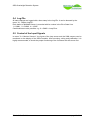
The Menu
Mainmenu
Submenu
Parameter
Description
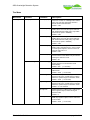
1 Settings
1 Setup Inputs
With Loop (Y/N)
Specifies whether the loop input should be
monitored. If YES, an overheight alarm will be
given only if the loop signal also detects a
vehicle at about the same time.
Default = YES
With SAM1 (Y/N)
Specifies whether the system works with 2
SAMs. When set to NO, the system will work
with limited detection ability using only SAM2
and the loops. (RUN + ERROR)
Default = YES
With SAM2 (Y/N)
Specifies whether the system works with 2
SAMs. When set to NO, the system will work
with limited detection ability using only SAM1
and the loops. (RUN + ERROR)
Default = YES
With DCF77 (Y/N)
Specifies whether the system should use the
build in radio controlled clock. In case of weak
or weak signal reception, the time can be set
manually with menu 3.2.
Default = YES
Comm Test (Y/N)
Specifies whether the system should test the
communication to the SAMs every time before
entering the detection mode.
Default = No
Menu Timeout [s]
Specifies the number of seconds after the
system will return to the detection mode
automatically.
Default = 300 (= 5 minutes)
Alarm Time
Defines the duration of the overheight alarm in
milliseconds.
Default = 2000 ( = 2 seconds)
SAM Arming Time
Defines the time (in milliseconds), the SAM
sensors must stay in normal state (no object),
before the system will go into detection mode.
Default = 2000 ( = 2 seconds)
Loop Arming Time
Defines the time (in milliseconds), the loop
sensors must stay in normal state (no vehicle),
before the system will go into detection mode.
Default = 0 = not checked
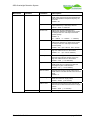
Min Obj Time
Defines the time in milliseconds a SAM output
has to signal an object, before this signal
becomes valid.
Default = 4
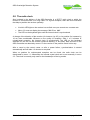
Max Obj Time
Defines the maximum time in milliseconds a
SAM may signal an object, before it will cause
an error state.
Default = 3000 ( = 3 seconds)
2 Special Settings
Schuh & Co. GmbH
page 14 of 24