1
ODS Overheight Detection System
7 SAMcom Software
SAM laser sensors have a serial interface to communicate with a PC for configuration,
service and testing. Most easily this is done via the ODS-Controller which will do the
RS485/RS232 conversion.
Alternatively, a connection via the interface converter is possible, as described in chapter 6.
SAMcom has to be installed from CD on PC first. Execute the program SETUP.EXE from the
SAMcom directory on CD. After installation, the program SAMcom.exe can be called from its
installation directory (The default directory is : C:\Programme\SAMcom\ ).
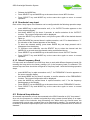
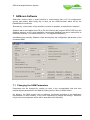
Immediately after starting, SAMcom reads and displays the configuration parameters of the
connected SAM:
7.1 Changing the SAM Parameters
Parameters can be changed by making an input in the corresponding field and then
transferring the parameters to the SAM by clicking on the "Store to SAM" button.
On delivery, the SAM sensors will be optimally configured according to the application
requirements, so that normally, it will not be necessary to change the settings. Therefore,
only the two most important values will be described in the following.
Schuh & Co. GmbH
page 20 of 24