1
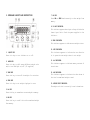
3. KEYBOARD LAYOUT AND DESCRIPTION
7. MC KEY
Press MR and ZERO simultaneously to clear weight from
memory.
8. LO BAT INDICATOR
This indicator appears when input voltage is below the
lowest input limit. Check the power supplied to the
indicator.
9. ZERO INDICATOR
This indicator appears to indicate zero weight status.
1. ON/OFF KEY
Press this key to turn indicator on or off.
10. NET INDICATOR
This indicator appears to indicate the tare function
is in operation and weight shown is net weight.
2. MODE KEY
Press this key to shift among different weight units
and/or turn backlight on/off. (If supplied)
11. M+ INDICATOR
This indicator appears to indicate memory contents of
stored data.
3. TARE KEY
Press this key to tare off the weight of a container.
12. MR INDICATOR
This indicator appears to indicate the value shown is
the total accumulated weight stored.
4. ZERO KEY
Press this key to set weight displayed to zero.
5. M+ KEY
Press this key to accumulate current weight to memory.
6. MR KEY
Press this key to recall the total accumulated weight
from memory.
13. WEIGHT UNIT INDICATOR
The weight unit that is currently in use is shown here.