1
5. Ayllu Behaviors for Pioneer Control
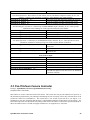
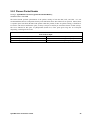
This section details the standard behaviors for control of Pioneer mobile robots. We list here the name of the behavior
class, the name of the default instance as created by ayInitPioControl (see Section 4.6), and all of their
available ports with a short description of the messages they provide or accept.
5.1 Pioneer Base Controller
Prototype: ayDefBehaviorClass(ayiBaseControllerMaker);
Standard instance name: PBC
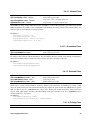
Ports Used for Input
ayIntPort(ControlMode, ayFAST);
Motor Controller mode - can be one of:
• aySMOOTH - for smoother motion
• ayFAST - for more responsive control
ayIntPort(DefaultVel, 200);
Set velocity to be used when executing distance-based
commands (see Distance port)
ayIntPort(MaxAngVel, 75);
Set maximum angular velocity to be used in execution of
AbsHeading and RelHeading commands.
Rotational Control - writing to any of these ports cancels the effect of previous writes to another.
ayIntPort(RelHeading, 0);
Change robot’s heading by specified number of degrees;
positive is counterclockwise, negative clockwise
ayIntPort(AbsHeading, 0);
Rotate robot to specified heading, in degrees
ayIntPort(ArcRadius, 0);
Maintain an arc of the specified radius (in millimeters).
As any velocity or distance commands are sent (to
Velocity and Distance ports), this arc radius is
maintained. If constant arc radius is maintained, the
robot will circle.
Positive radius indicates
counterclockwise rotation, negative indicates clockwise.
ayIntPort(AngularVel, 0);
Rotate robot at specified number of degrees per second;
positive is counterclockwise, negative clockwise
Translational Control - writing to either of these ports cancels the effect of previous writes to the other.
ayIntPort(Velocity, 0);
Set robot’s velocity to specified millimeters/second;
positive is forward, negative is backward
ayIntPort(Distance, 0);
Move the robot the specified number of millimeters;
positive is forward, negative is backward
Wheel Velocity Control - writing to these cancels both previous velocity and translation commands.
If only one of these receives a message, the old value is used for the other wheel.
ayIntPort(LeftWheelVel, 0);
Sets velocity to be traveled by left wheel, in mm/second;
positive is forward, negative is backward.
ayIntPort(RightWheelVel, 0);
Sets velocity to be traveled by right wheel.
ayIntPort(Stop, 0);
Stops all translational, rotational, and/or wheel-velocity
based motion.
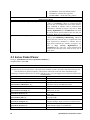
ayIntPort(Gripper, 0);
Sets the state of the Pioneer’s gripper. May be one of:
Ayllu Behaviors for Pioneer Control
39